
MLflow is an open source platform for the complete machine learning lifecycle

Project description
📣 This is the mlflow-skinny package, a lightweight MLflow package without SQL storage, server, UI, or data science dependencies.
Additional dependencies can be installed to leverage the full feature set of MLflow. For example:
- To use the
mlflow.sklearncomponent of MLflow Models, installscikit-learn,numpyandpandas. - To use SQL-based metadata storage, install
sqlalchemy,alembic, andsqlparse. - To use serving-based features, install
flaskandpandas.
Note: When using mlflow-skinny, set the tracking URI to your remote MLflow server:
export MLFLOW_TRACKING_URI="http://your-mlflow-server:5000"

The Open Source AI Engineering Platform for Agents, LLMs & Models
MLflow is the largest open source AI engineering platform for agents, LLMs, and ML models. MLflow enables teams of all sizes to debug, evaluate, monitor, and optimize production-quality AI applications while controlling costs and managing access to models and data. With over 60 million monthly downloads, thousands of organizations rely on MLflow each day to ship AI to production with confidence.
MLflow's comprehensive feature set for agents and LLM applications includes production-grade observability, evaluation, prompt management, prompt optimization and an AI Gateway for managing costs and model access. Learn more at MLflow for LLMs and Agents.






Get Started in 3 Simple Steps
From zero to full-stack LLMOps in minutes. No complex setup or major code changes required. Get Started →
1. Start MLflow Server
uvx mlflow server
2. Enable Logging
import mlflow

mlflow.set_tracking_uri("http://localhost:5000")
mlflow.openai.autolog()
3. Run Your Code
from openai import OpenAI

client = OpenAI()
client.responses.create(
    model="gpt-5.4-mini",
    input="Hello!",
)
Explore traces and metrics in the MLflow UI at http://localhost:5000.
LLMs & Agents
MLflow provides everything you need to build, debug, evaluate, and deploy production-quality LLM applications and AI agents. Supports Python, TypeScript/JavaScript, Java and any other programming language. MLflow also natively integrates with OpenTelemetry and MCP.

Observability Capture complete traces of your LLM applications and agents for deep behavioral insights. Built on OpenTelemetry, supporting any LLM provider and agent framework. Monitor production quality, costs, and safety. Getting Started → |
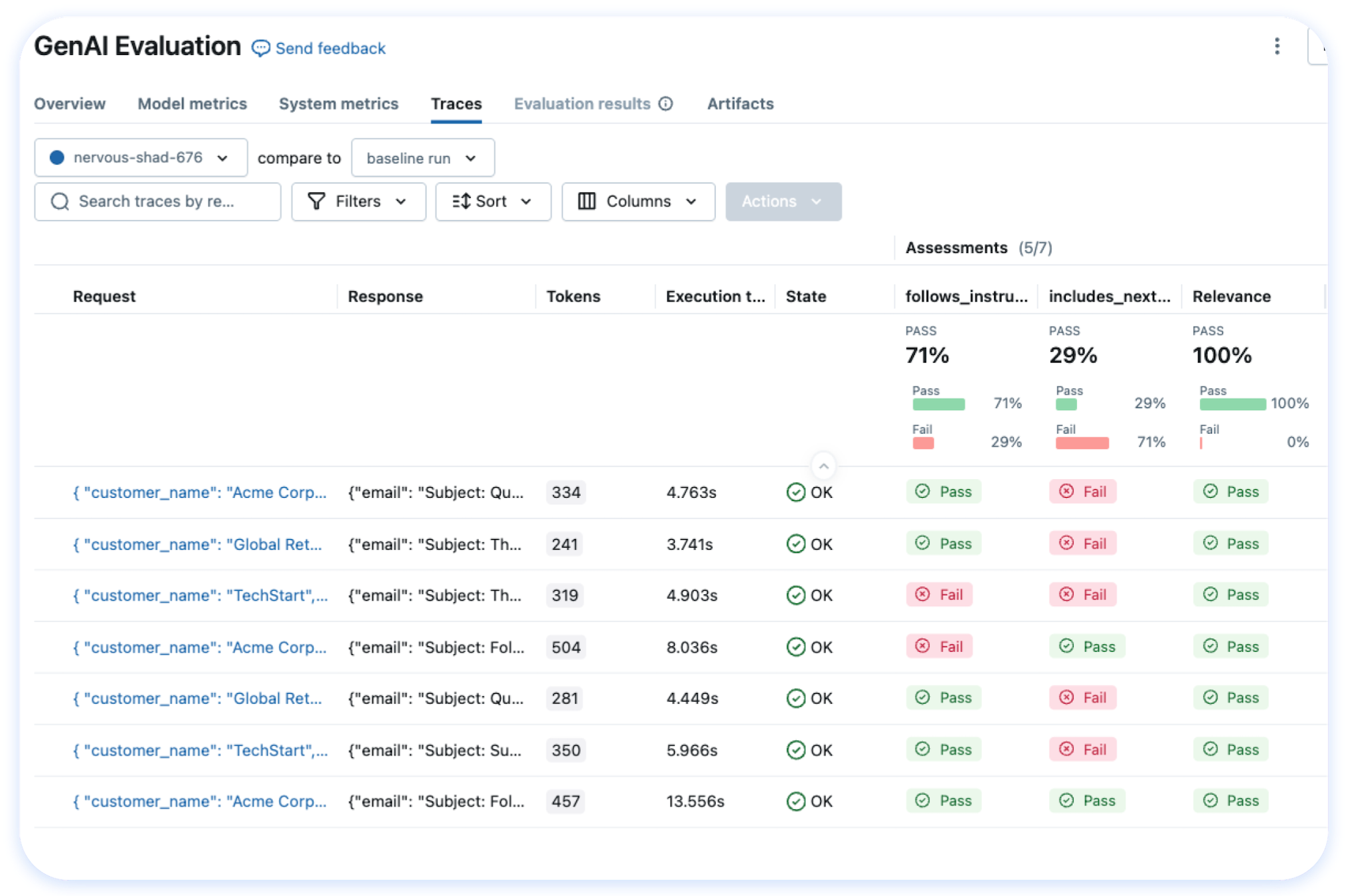
Evaluation Run systematic evaluations, track quality metrics over time, and catch regressions before they reach production. Choose from 50+ built-in metrics and LLM judges, or define your own. Getting Started → |
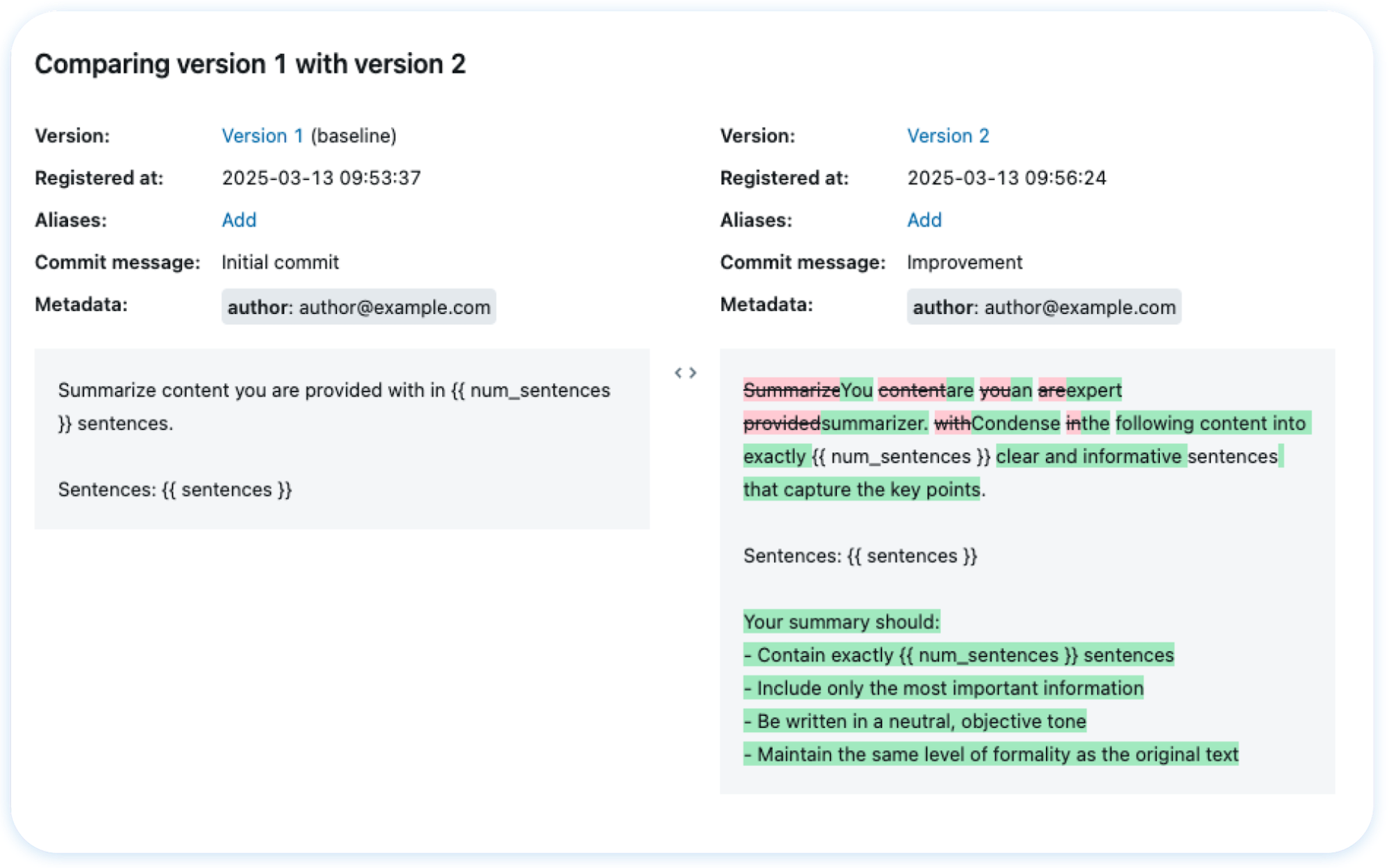
Prompts & Optimization Version, test, and deploy prompts with full lineage tracking. Automatically optimize prompts with state-of-the-art algorithms to improve performance. Getting Started → |
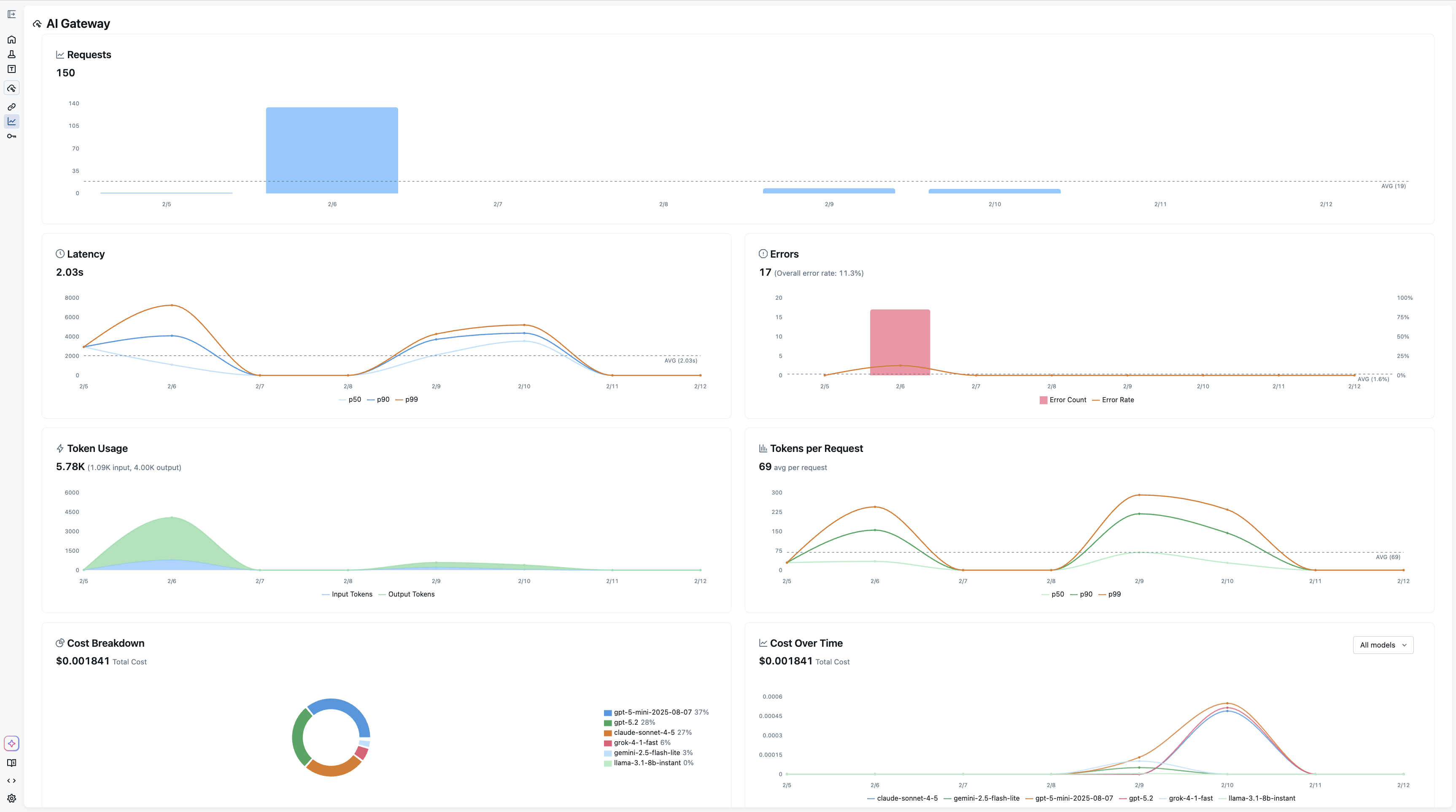
AI Gateway Unified API gateway for all LLM providers. Route requests, manage rate limits, handle fallbacks, and control costs through an OpenAI-compatible interface with built-in credential management, guardrails and traffic splitting for A/B testing. Getting Started → |
Model Training
For machine learning and deep learning model development, MLflow provides a full suite of tools to manage the ML lifecycle:
- Experiment Tracking — Track models, parameters, metrics, and evaluation results across experiments
- Model Evaluation — Automated evaluation tools integrated with experiment tracking
- Model Registry — Collaboratively manage the full lifecycle of ML models
- Deployment — Deploy models to batch and real-time scoring on Docker, Kubernetes, Azure ML, AWS SageMaker, and more
Learn more at MLflow for Model Training.
Integrations
MLflow supports all agent frameworks, LLM providers, tools, and programming languages. We offer one-line automatic tracing for more than 60 frameworks. See the full integrations list.
OpenTelemetry
 OpenTelemetry |
Agent Frameworks (Python)

















Agent Frameworks (TypeScript)
 LangChain |
 LangGraph |
 Vercel AI SDK |
 Mastra |
 VoltAgent |
Agent Frameworks (Java)
 Spring AI |
 Quarkus LangChain4j |
Model Providers
 OpenAI |
 Anthropic |
 Databricks |
 Gemini |
 Amazon Bedrock |
 LiteLLM |
 Mistral |
 xAI / Grok |
 Ollama |
 Groq |
 DeepSeek |
 Qwen |
 Moonshot AI |
 Cohere |
 BytePlus |
 Novita AI |
 FireworksAI |
 Together AI |
Gateways
Databricks |
LiteLLM Proxy |
Vercel AI Gateway |
 OpenRouter |
 Portkey |
 Helicone |
 Kong AI Gateway |
 PydanticAI Gateway |
 TrueFoundry |
Tools & No-Code
 Instructor |
 Claude Code |
 Opencode |
 Langfuse |
 Arize / Phoenix |
 Goose |
 Langflow |
Hosting MLflow
MLflow can be used in a variety of environments, including your local environment, on-premises clusters, cloud platforms, and managed services. Being an open-source platform, MLflow is vendor-neutral — whether you're building AI agents, LLM applications, or ML models, you have access to MLflow's core capabilities.
Databricks |
 Amazon SageMaker |
 Azure ML |
 Nebius |
 Self-Hosted |
💭 Support
- For help or questions about MLflow usage (e.g. "how do I do X?") visit the documentation.
- In the documentation, you can ask the question to our AI-powered chat bot. Click on the "Ask AI" button at the right bottom.
- Join the virtual events like office hours and meetups.
- To report a bug, file a documentation issue, or submit a feature request, please open a GitHub issue.
- For release announcements and other discussions, please subscribe to our mailing list (mlflow-users@googlegroups.com) or join us on Slack.
🤝 Contributing
We happily welcome contributions to MLflow!
- Submit bug reports and feature requests
- Contribute for good-first-issues and help-wanted
- Writing about MLflow and sharing your experience
Please see our contribution guide to learn more about contributing to MLflow.
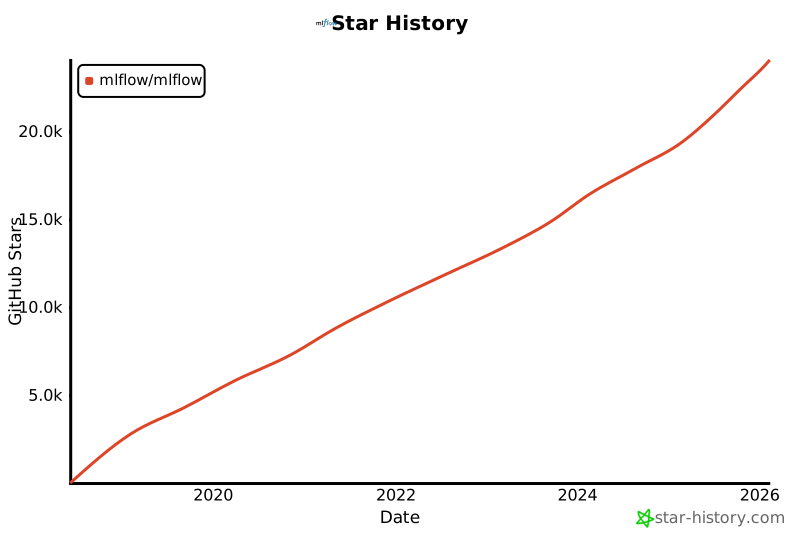
⭐️ Star History
✏️ Citation
If you use MLflow in your research, please cite it using the "Cite this repository" button at the top of the GitHub repository page, which will provide you with citation formats including APA and BibTeX.
👥 Core Members
MLflow is currently maintained by the following core members with significant contributions from hundreds of exceptionally talented community members.
Release history Release notifications | RSS feed


Download files
Download the file for your platform. If you're not sure which to choose, learn more about installing packages.
Source Distribution
Built Distribution
Filter files by name, interpreter, ABI, and platform.
If you're not sure about the file name format, learn more about wheel file names.
Copy a direct link to the current filters
File details
Details for the file mlflow_skinny-3.12.0.tar.gz.
File metadata
- Download URL: mlflow_skinny-3.12.0.tar.gz
- Upload date:
- Size: 2.7 MB
- Tags: Source
- Uploaded using Trusted Publishing? Yes
- Uploaded via: twine/6.1.0 CPython/3.13.7
File hashes
| Algorithm | Hash digest | |
|---|---|---|
| SHA256 |
74d27066bc9553d281e0c31d25f07deb39dbe99d190e4f7c257703e5c8ee6d10
|
|
| MD5 |
4e76fa5b5abdc558ed4c8420076f8a7e
|
|
| BLAKE2b-256 |
0fc09cbe24b4abcbadb3a3cdab65bfd552b6b75de64374b477abac89190d25d0
|
Provenance
The following attestation bundles were made for mlflow_skinny-3.12.0.tar.gz:
Publisher:
python.yml on mlflow/releases
-
Statement:
-
Statement type:
https://in-toto.io/Statement/v1 -
Predicate type:
https://docs.pypi.org/attestations/publish/v1 -
Subject name:
mlflow_skinny-3.12.0.tar.gz -
Subject digest:
74d27066bc9553d281e0c31d25f07deb39dbe99d190e4f7c257703e5c8ee6d10 - Sigstore transparency entry: 1439772620
- Sigstore integration time:
-
Permalink:
mlflow/releases@89d504ab17050a65eeff7f6288dd404b22a73516 -
Branch / Tag:
refs/heads/main - Owner: https://github.com/mlflow
-
Access:
private
-
Token Issuer:
https://token.actions.githubusercontent.com -
Runner Environment:
github-hosted -
Publication workflow:
python.yml@89d504ab17050a65eeff7f6288dd404b22a73516 -
Trigger Event:
workflow_dispatch
-
Statement type:
File details
Details for the file mlflow_skinny-3.12.0-py3-none-any.whl.
File metadata
- Download URL: mlflow_skinny-3.12.0-py3-none-any.whl
- Upload date:
- Size: 3.3 MB
- Tags: Python 3
- Uploaded using Trusted Publishing? Yes
- Uploaded via: twine/6.1.0 CPython/3.13.7
File hashes
| Algorithm | Hash digest | |
|---|---|---|
| SHA256 |
0498f3697abcabcc6204c432ef179840f6a7a34ce123837c98c1913064fda6dd
|
|
| MD5 |
7570a201364aa430466e97808989d87c
|
|
| BLAKE2b-256 |
95052df60fab37881c490e9364ea697a6c3a78d3b593fde2d9332a75f8cdf1f8
|
Provenance
The following attestation bundles were made for mlflow_skinny-3.12.0-py3-none-any.whl:
Publisher:
python.yml on mlflow/releases
-
Statement:
-
Statement type:
https://in-toto.io/Statement/v1 -
Predicate type:
https://docs.pypi.org/attestations/publish/v1 -
Subject name:
mlflow_skinny-3.12.0-py3-none-any.whl -
Subject digest:
0498f3697abcabcc6204c432ef179840f6a7a34ce123837c98c1913064fda6dd - Sigstore transparency entry: 1439772628
- Sigstore integration time:
-
Permalink:
mlflow/releases@89d504ab17050a65eeff7f6288dd404b22a73516 -
Branch / Tag:
refs/heads/main - Owner: https://github.com/mlflow
-
Access:
private
-
Token Issuer:
https://token.actions.githubusercontent.com -
Runner Environment:
github-hosted -
Publication workflow:
python.yml@89d504ab17050a65eeff7f6288dd404b22a73516 -
Trigger Event:
workflow_dispatch
-
Statement type:






