
A Geeky Timer for Terminal Enthusiasts

Project description
MyTimer: A Geeky Timer for Terminal Enthusiasts



Overview
MyTimer is a Python project that aims to provide a simple yet efficient timer for terminal users, particularly targeting the geek community. This project allows users to set timers directly from their command line interface, making it convenient for those who spend a significant amount of time working in the terminal!
The main objective of MyTimer is to offer a minimalistic and distraction-free timer experience. It provides a clean and straightforward interface, ensuring that users can focus solely on tracking time without any unnecessary clutter or distractions.
| PyPI Counter |  |
| Github Stars |  |
| Branch | main | dev |
| CI |  |
 |
| Code Quality |  |
 |
Installation
Source Code
- Download Version 2.5 or Latest Source
pip install .
PyPI
- Check Python Packaging User Guide
pip install mytimer==2.5
Usage
ℹ️ You can use mytimer or python -m mytimer to run this program
Version
mytimer --version
Info
mytimer --info
Basic
ℹ️ Press Ctrl + C to exit
mytimer
Time Limit
mytimer --minute=7 --second=30
mytimer --hour=2 --minute=20
Timer Mode
ℹ️ The default mode is countdown
mytimer --minute=7 --second=30 --countdown
mytimer --minute=7 --second=30 --countup
Repeat
ℹ️ The default value is 1
mytimer --repeat=3 --second=4
- Use
--repeat=-1for infinite loop
Alarm
⚠️ This mode may not be supported on all systems
mytimer --minute=7 --second=30 --alarm
Alarm Repeat
ℹ️ The default value is 1
mytimer --minute=7 --second=30 --alarm --alarm-repeat=5
Tone
ℹ️ The default tone is 1
mytimer --minute=7 --second=30 --alarm --tone=2
- Use
--tone=-1for random mode - Use
--test-tonefor test - Tones List
Face
mytimer --minute=7 --second=30 --face=3
- Use
--face=-1for random mode - Faces List
mytimer --faces-list
Vertical/Horizontal Shift
ℹ️ The vertical and horizontal shift both have default values of 0
mytimer --v-shift=20 --h-shift=30
Timer Sign
ℹ️ Valid choices: ["", "+", "-"]
mytimer --sign="+"
Keep on
In this mode, the timer will continue running after it times out
mytimer --minute=5 --keep-on
Hide Second
In this mode, the timer seconds counter will not be shown
mytimer --minute=6 --hide-second
Hide Date/Time
In this mode, the date/time will not be shown
mytimer --minute=20 --hide-datetime
Date System
ℹ️ Valid choices: [gregorian, jalali]
ℹ️ The default date system is gregorian
mytimer --minute=20 --date-system=jalali
Vertical Mode
mytimer --minute=5 --vertical
Set on
⚠️ Local time
In this mode, the timer sets on the given time. For example, here we set a timer for 15:05:
mytimer --hour=15 --minute=5 --set-on
Program
mytimer --program=black-tea
- Programs List
mytimer --programs-list
Message
mytimer --minute=7 --second=30 --message="Test message"
Color
⚠️ This mode may not be supported on all systems
ℹ️ Valid choices: [black, red, green, yellow, blue, magenta, cyan, white, lightblack, lightred, lightgreen, lightyellow, lightblue, lightmagenta, lightcyan, lightwhite]
ℹ️ The default color is white
mytimer --minute=7 --second=30 --color="red"
Background Color
⚠️ This mode may not be supported on all systems
ℹ️ Valid choices: [black, red, green, yellow, blue, magenta, cyan, white, lightblack, lightred, lightgreen, lightyellow, lightblue, lightmagenta, lightcyan, lightwhite]
ℹ️ The default background color is black
mytimer --minute=7 --second=30 --bg-color="blue"
Intensity
⚠️ This mode may not be supported on all systems
ℹ️ Valid choices: [normal, bright, dim]
ℹ️ The default intensity is normal
mytimer --minute=7 --second=30 --intensity="bright"
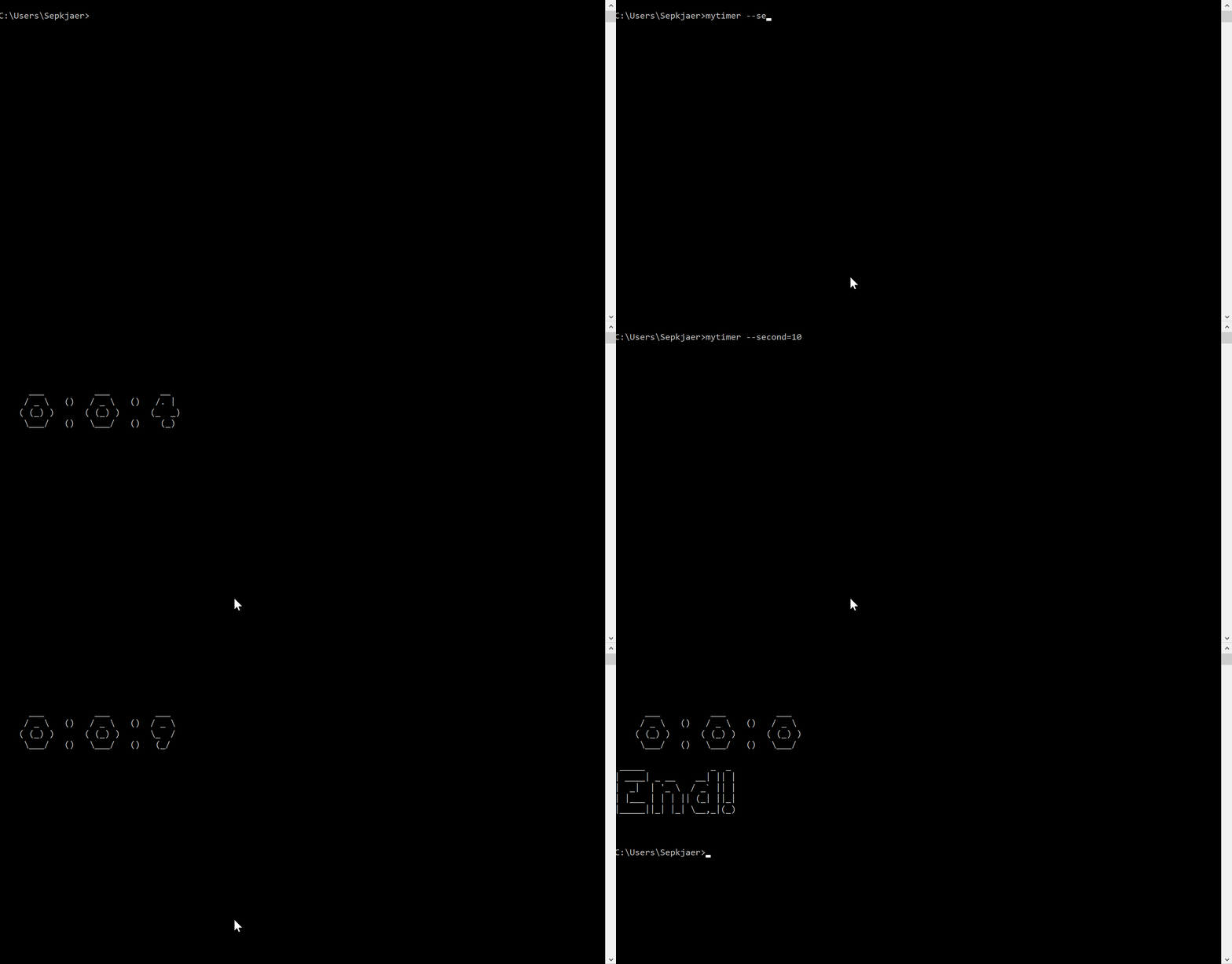
Screen Record
Issues & Bug Reports
Just fill an issue and describe it. We'll check it ASAP!
- Please complete the issue template
References
1- Mixkit Free Alarm Sound Effects
2- Online Timer
3- Media College
4- Pomodoro Technique
5- The Rule of 52 and 17: It's Random, But it Ups Your Productivity
6- Desktime’s Productivity Research: An Overview of Our Finds Throughout the Years
7- AnimeDoro Timer
8- Know Your Tea: Your Guide to Tea Steeping Time
9- How Long to Steep Tea: A Complete Guide
10- How Long to Steep French Press: Mastering the Perfect Brew
11- Freesound
12- Online Timer with Alarm and Sound
Show Your Support
Star This Repo
Give a ⭐️ if this project helped you!
Donate to Our Project
Bitcoin
1KtNLEEeUbTEK9PdN6Ya3ZAKXaqoKUuxCyEthereum
0xcD4Db18B6664A9662123D4307B074aE968535388Litecoin
Ldnz5gMcEeV8BAdsyf8FstWDC6uyYR6pgZDoge
DDUnKpFQbBqLpFVZ9DfuVysBdr249HxVDhTron
TCZxzPZLcJHr2qR3uPUB1tXB6L3FDSSAx7Ripple
rN7ZuRG7HDGHR5nof8nu5LrsbmSB61V1qqBinance Coin
bnb1zglwcf0ac3d0s2f6ck5kgwvcru4tlctt4p5qefTether
0xcD4Db18B6664A9662123D4307B074aE968535388Dash
Xd3Yn2qZJ7VE8nbKw2fS98aLxR5M6WUU3sStellar
GALPOLPISRHIYHLQER2TLJRGUSZH52RYDK6C3HIU4PSMNAV65Q36EGNLZilliqa
zil1knmz8zj88cf0exr2ry7nav9elehxfcgqu3c5e5Coffeete

Changelog
All notable changes to this project will be documented in this file.
The format is based on Keep a Changelog and this project adheres to Semantic Versioning.
Unreleased
2.5 - 2026-02-10
Added
--intensityargument- Light colors
Changed
README.mdupdated- Test system modified
- Background color bug fixed
set_colorfunction modifiedset_bg_colorfunction modifiedrun_timerfunction modified- Arguments moved to
handle_argsfunction mainfunction moved tofunctions.py--set-onflag bug fixed- Screen record updated
2.4 - 2025-12-04
Added
--colorargument--bg-colorargument
Changed
load_program_paramsfunction modifiedpomodoro_timerfunction modifiedtwo_step_timerfunction modifiedselect_timer_funcfunction renamed toselect_timer_functionmytimer_infofunction renamed toprint_mytimer_inforun_timerfunction modifiedPython 3.14added totest.ymlREADME.mdupdated- Test system modified
2.3 - 2025-07-17
Added
- 2 new programs
eye-breakpower-nap
- Start time
Changed
README.mdupdated- Python typing features added to all modules
print_date_timefunction modified- Test system modified
Python 3.6support dropped
2.2 - 2025-03-13
Added
--date-systemargument
Changed
README.mdupdated- Test system modified
countdown_timerandcountup_timerfunctions updated- String templates modified
- Input case sensitivity bug fixed
2.1 - 2025-02-28
Added
- 4 new tones
--verticalargument--test-toneargument
Changed
README.mdupdated- Test system modified
countdown_timerandcountup_timerfunctions updated
2.0 - 2025-01-30
Added
- 2 new programs
coffee-breakmeditation
- Clock and date
--hide-datetimeargument
Changed
README.mdupdated- Test system modified
countdown_timerandcountup_timerfunctions updated
1.9 - 2024-12-18
Added
- 5 new tones
--infoargument--hide-secondargument
Changed
- GitHub actions are limited to the
devandmainbranches countdown_timerandcountup_timerfunctions updatedREADME.mdupdatedTONES.mdupdated
1.8 - 2024-10-23
Added
- 5 new tones
- Face random mode
- Tone random mode
get_facefunctionget_tonefunction
Changed
show_faces_listfunction updatedREADME.mdupdated- Test system modified
Python 3.13added totest.yml
1.7 - 2024-10-09
Added
- 2 new programs
matefrench-press
- 9 new tones
Changed
README.mdupdated
1.6 - 2024-08-30
Added
- 2 new programs
puer-teapurple-tea
--set-onargument
Changed
- Default mode changed from
count-uptocountdown white-teaprogram duration changed from10minutes to3minutes
1.5 - 2024-08-12
Added
- 2 new programs
rooibos-teayellow-tea
--keep-onargument
Changed
README.mdupdated- Programs message updated
1.4 - 2024-07-15
Added
- 1 new program
mid-break
--repeatargument--signargument
Changed
long-breakprogram duration changed from15minutes to30minutesREADME.mdupdated
1.3 - 2024-05-23
Added
- 1 new program
animedoro
two_step_timerfunctionprint_messagefunctionSECURITY.md
Changed
- Test system modified
navaadded torequirements.txt- Sound playing system updated
- Python 3.5 dropped
short-breakprogram duration changed from10minutes to5minuteslong-breakprogram duration changed from30minutes to15minutespomodoroprogram updatedpomodoro_timerfunction modifiedload_paramsfunction modifiedREADME.mdupdated
Removed
animedoro_timerfunction_112_26_timerfunction_52_17_timerfunction
1.2 - 2024-02-05
Added
feature_request.ymltemplateconfig.ymlfor issue template- 2 new programs
52-17112-26
Changed
- Bug report template modified
run_timerfunction modified
1.1 - 2023-12-20
Added
- 1 new program
pomodoro
Changed
TIME_PRINT_TEMPLATEchangedKeyboardInterruptexit handling updatedADDITIONAL_INFOadded to argparser epilogPython 3.12added totest.yml
1.0 - 2023-11-08
Added
--programs-listargument--faces-listargument--v-shiftargument--h-shiftargumentDEFAULT_PARAMSparameterPROGRAMS_DEFAULTSparameterload_program_paramsfunction
Changed
japanese-green-teaprogram bug fixedREADME.mdupdated
0.9 - 2023-10-04
Added
- 4 new faces
- 4 new programs
workshort-breaklong-breaknoodle
Changed
PROGRAMS.mdupdated
0.8 - 2023-08-07
Added
- Logo
--alarm-repeatargument
Changed
- Tones length modified
README.mdupdated
0.7 - 2023-07-23
Added
--toneargumentTONES.md- 9 new tones
Changed
- Test system modified
input_checkdecorator renamed toinput_handlercountup_timerfunction inputs modifiedcountdown_timerfunction inputs modifiedPROGRAMS.mdupdatedFACES.mdupdated
0.6 - 2023-07-04
Added
--programargumentPROGRAMS.mdrun_timerfunction
Changed
- Inputs type changed to
int README.mdupdatedWRONG_INPUT_ERRORrenamed toINPUT_ERROR_MESSAGE- Alarm tone changed
0.5 - 2023-05-25
Added
- 5 new faces
--messageargument
Changed
play_soundfunction modifiedplaysoundremoved fromrequirements.txtREADME.mdupdated
0.4 - 2023-02-10
Added
- 4 new faces
- Infinite timer mode
Changed
README.mdupdated- Parameters moved to
params.py
0.3 - 2022-11-25
Added
--faceargumentFACES.md
Changed
README.mdupdated- Minimum
artlibrary version changed from1.8to2.9
0.2 - 2022-11-03
Added
--versionflag
Changed
- Test system modified
countdown_timerfunction modifiedcountup_timerfunction modified
0.1 - 2022-10-18
Added
- Countdown mode
- Count-up mode
- Alarm
Release history Release notifications | RSS feed


Download files
Download the file for your platform. If you're not sure which to choose, learn more about installing packages.
Source Distribution
Built Distribution
Filter files by name, interpreter, ABI, and platform.
If you're not sure about the file name format, learn more about wheel file names.
Copy a direct link to the current filters
File details
Details for the file mytimer-2.5.tar.gz.
File metadata
- Download URL: mytimer-2.5.tar.gz
- Upload date:
- Size: 6.5 MB
- Tags: Source
- Uploaded using Trusted Publishing? No
- Uploaded via: twine/6.2.0 CPython/3.14.2
File hashes
| Algorithm | Hash digest | |
|---|---|---|
| SHA256 |
13e92061a813458fb983e0f9a58c49aaa0c56ccfa14e6f02a812558af9bce758
|
|
| MD5 |
ce125267f88652e01dba69cd15bdbd65
|
|
| BLAKE2b-256 |
cdbd30f1a48c3fc302278f5d64cbb8ca7cd5b6eaaeb49aa948a582113b0f6f69
|
File details
Details for the file mytimer-2.5-py3-none-any.whl.
File metadata
- Download URL: mytimer-2.5-py3-none-any.whl
- Upload date:
- Size: 6.4 MB
- Tags: Python 3
- Uploaded using Trusted Publishing? No
- Uploaded via: twine/6.2.0 CPython/3.14.2
File hashes
| Algorithm | Hash digest | |
|---|---|---|
| SHA256 |
25be656da008ed8055d6a17888fd694687a59f5bf31407e70bcb8a9caa5a5bf0
|
|
| MD5 |
53ed6ca5c1abd51cacfab729766c65f7
|
|
| BLAKE2b-256 |
cb302df56a2da2dd789994b80221124018f5cd325bf7c8b951f33f9324aaea9a
|






