
Attaches a customizable Tools menu to napari

Project description
napari-tools-menu





Attaches a customizable Tools menu to napari
Usage
Just add napari-tools-menu to the dependencies of your napari-plugin. Afterwards, you can annotate your functions and dock widgets using the following syntax. The specified menu path will be used to put your tool in the right place in the tools menu. All menus and sub-menus will be listed alphabetically.
from napari_tools_menu import register_function, register_action, register_dock_widget


@register_action(menu="Utilities > Action")
def test_function(viewer):
    print("hello")


@register_function(menu="Utilities > Function")
def test_function_with_params(sigma: float = 0.5):
    print("sigma", sigma)


@register_dock_widget(menu="Utilities > Widget")
class ExampleQWidget(QWidget):
    def __init__(self, napari_viewer):
The register_function and register_dock_widget annotations are made for analysis functions and graphical user interfaces as explained in the napari-plugin tutorial.
The register_action annotation is made for functions with a single parameter: the napari viewer. This function is executed when the user clicks the menu. This might for example be useful for applying a certain operation to all currently selected layers.
Note: This implementation is based on a monkey patch of napari, tested with napari 0.4.11. Thus, it might stop working with a future version of napari, e.g. when the new plugin engine is finished. For now it is a nice workaround to ease the life of end-users.
Menu name suggestions
To keep the Tools menu clean and organized, some suggestions should be made. Create category menus that classify your tool in a way such that a broad audience knows what it's doing. Examples:
- Filtering / noise removal
- Filtering / background removal
- Filtering / edge enhancement
- Filtering / deconvolution
- Image math
- Registration
- Segmentation / binarization
- Segmentation / labeling
- Segmentation post-processing
- Measurement
- Visualization
- Utilities
Put a descriptive function name in the menu name first and the implementation behind. Examples:
- Segmentation / Binarization > Threshold (Otsu et al 1979)
- Segmentation / Binarization > Threshold (my algorithm)
- Segmentation / Labeling > Cell labeling (CellLab)
- Segmentation / Labeling > Nuclei segmentation (Nuc-Seg)
Example code:
@register_action(menu="Segmentation > Threshold (Otsu et al 1979)")
def threshold_otsu(viewer):
    pass
@register_action(menu="Segmentation > Threshold (my algorithm)")
def my_algorithm(viewer):
    pass
@register_action(menu="Segmentation > Cell labeling (CellLab)")
def celllab(viewer):
    pass
@register_action(menu="Segmentation > Nuclei segmentation (Nuc-Dect)")
def nucl_dect(viewer):
    pass
The menu would then look like this:
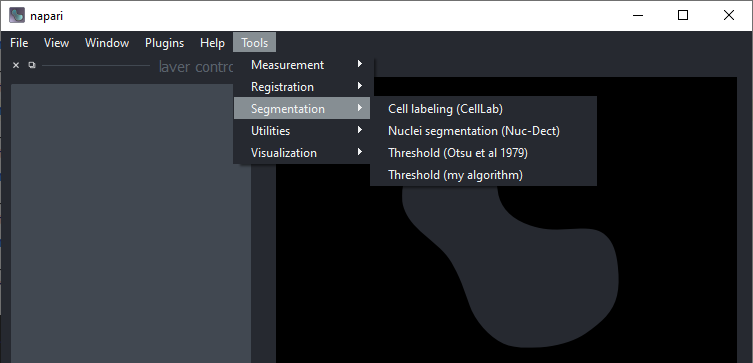
Again, there are no constraints. However, please make the life of (y)our users easy by keeping this menu well organized.
Installation
You can install napari-tools-menu via pip:
pip install napari-tools-menu
Contributing
Contributions are very welcome. Tests can be run with [pytest], please ensure the coverage at least stays the same before you submit a pull request.
License
Distributed under the terms of the BSD-3 license, "napari-tools-menu" is free and open source software
Issues
If you encounter any problems, please file an issue along with a detailed description.
Release history Release notifications | RSS feed


Download files
Download the file for your platform. If you're not sure which to choose, learn more about installing packages.
Source Distribution
Built Distribution
Filter files by name, interpreter, ABI, and platform.
If you're not sure about the file name format, learn more about wheel file names.
Copy a direct link to the current filters






