
Neptune.ai scikit-learn integration library

Project description
Neptune + scikit-learn integration
Experiment tracking for scikit-learn–trained models.
What will you get with this integration?
- Log, organize, visualize, and compare ML experiments in a single place
- Monitor model training live
- Version and query production-ready models and associated metadata (e.g., datasets)
- Collaborate with the team and across the organization
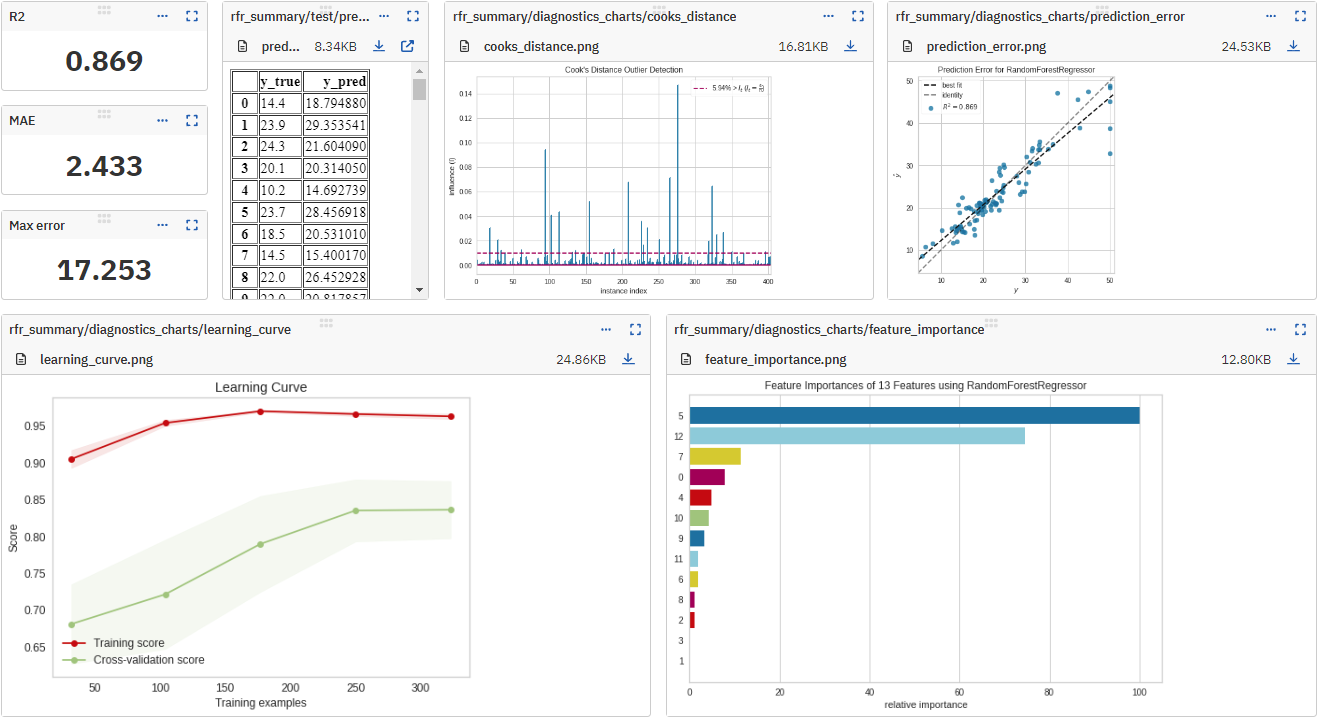
What will be logged to Neptune?
- classifier and regressor parameters,
- pickled model,
- test predictions,
- test predictions probabilities,
- test scores,
- classifier and regressor visualizations, like confusion matrix, precision-recall chart, and feature importance chart,
- KMeans cluster labels and clustering visualizations,
- metadata including git summary info,
- other metadata
Resources
Example
# On the command line:
pip install neptune-sklearn
# In Python, prepare a fitted estimator
parameters = {
    "n_estimators": 70, "max_depth": 7, "min_samples_split": 3
}

estimator = ...
estimator.fit(X_train, y_train)

# Import Neptune and start a run
import neptune

run = neptune.init_run(
    project="common/sklearn-integration",
    api_token=neptune.ANONYMOUS_API_TOKEN,
)

# Log parameters and scores
run["parameters"] = parameters

y_pred = estimator.predict(X_test)

run["scores/max_error"] = max_error(y_test, y_pred)
run["scores/mean_absolute_error"] = mean_absolute_error(y_test, y_pred)
run["scores/r2_score"] = r2_score(y_test, y_pred)

# Stop the run
run.stop()
Support
If you got stuck or simply want to talk to us, here are your options:
- Check our FAQ page
- You can submit bug reports, feature requests, or contributions directly to the repository.
- Chat! When in the Neptune application click on the blue message icon in the bottom-right corner and send a message. A real person will talk to you ASAP (typically very ASAP),
- You can just shoot us an email at support@neptune.ai
Release history Release notifications | RSS feed


Download files
Download the file for your platform. If you're not sure which to choose, learn more about installing packages.
Source Distribution
neptune_sklearn-2.1.1.tar.gz
(13.9 kB
view details)
Built Distribution
Filter files by name, interpreter, ABI, and platform.
If you're not sure about the file name format, learn more about wheel file names.
Copy a direct link to the current filters
File details
Details for the file neptune_sklearn-2.1.1.tar.gz.
File metadata
- Download URL: neptune_sklearn-2.1.1.tar.gz
- Upload date:
- Size: 13.9 kB
- Tags: Source
- Uploaded using Trusted Publishing? No
- Uploaded via: twine/4.0.2 CPython/3.9.18
File hashes
| Algorithm | Hash digest | |
|---|---|---|
| SHA256 |
ed97512cac0007e574355f04c4ecb5e5716c8baccf85c2cb3ba46720d421ab69
|
|
| MD5 |
42214c8287ca2243cbe16966e2188be2
|
|
| BLAKE2b-256 |
c063cd01d020f4e42d090359f1d2d8d47e85228359ea3b151c8feab243384e6b
|
File details
Details for the file neptune_sklearn-2.1.1-py3-none-any.whl.
File metadata
- Download URL: neptune_sklearn-2.1.1-py3-none-any.whl
- Upload date:
- Size: 14.2 kB
- Tags: Python 3
- Uploaded using Trusted Publishing? No
- Uploaded via: twine/4.0.2 CPython/3.9.18
File hashes
| Algorithm | Hash digest | |
|---|---|---|
| SHA256 |
c9c3ea6473fd52d321965c5551608059d78ec2a8741f6b59228e88b262011adf
|
|
| MD5 |
5b44cccf17e3a002e1434c42e7ba111d
|
|
| BLAKE2b-256 |
55bbf7e8755ea3cccfebb16d3ac672a3975eccf965cde30e8f1b2581ab486298
|






