
Library to read, convert and process electrical netlists and bill of materials generated in Altium Designer and KiCad.

Project description
NetBOM - Library to read, convert and process electrical netlists and Bill of Materials (BOM) generated both in Alitum Designer and KiCad.
This library provides tooling to import, process and convert BOM and schematic netlists to Python objects, and then convet them to JSON format or Python dictionaries. BOM and netlists are supported by one library because some of netlist formats may also be a source of BOM.
Imported schematic netlist may be used to automate generation of documentation, where you need to generate a table of pins and signals of a given connector. Interface control documents or user manuals are often time-consuming to prepare and are examples of such documents. Correctly drawn electrical schematics can become the only source of truth and can allow to completely automate document generation. The proposed module can be used to generate connector pin maps, and generate aesthetic documents in LaTeX.
Imported BOM file may be used as a part of custom Manufacturing Resource Planner, where you need to process electronic components required during the PCB assembly process.
Installing
As usual, you can use package installer for Python:
pip install netbomDocumentation
Get the latest documentation build: partmanager.github.io/netbom.
How does it work
Let’s assume you have to write a document describing electrical interfaces, based on schematics drawn in Altium Designer. Exemplary schematic diagram is shown below:
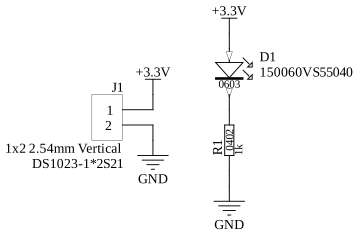
Normally you will open a Word document and start puting the signal names into the table. Then you will describe each of the signals. Doing it the first time is not a problem yet, but maintaining it later is time-consuming. Usign the Netbom library, and some markup language like LaTex or Markdown, you may generate pinout logical diagrams, physical diagrams and tables automatically using schematic netlist (i.e. RINF Netlist) exported directly from Altium Designer. The previously shown schematic diagram was loaded into the Netlist object shown below:
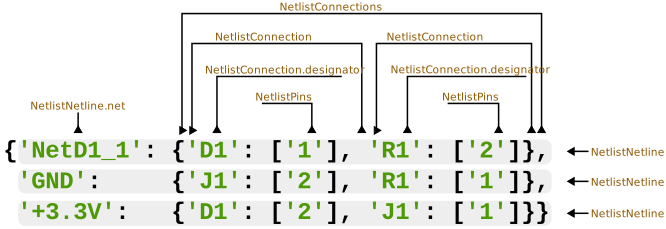
Then it can be processed and the extracted content can be automatically placed in a table or on an SVG template.


Download files
Download the file for your platform. If you're not sure which to choose, learn more about installing packages.
Source Distribution
Built Distribution
Filter files by name, interpreter, ABI, and platform.
If you're not sure about the file name format, learn more about wheel file names.
Copy a direct link to the current filters
File details
Details for the file netbom-0.0.18.tar.gz.
File metadata
- Download URL: netbom-0.0.18.tar.gz
- Upload date:
- Size: 86.9 kB
- Tags: Source
- Uploaded using Trusted Publishing? No
- Uploaded via: twine/6.0.1 CPython/3.12.8
File hashes
| Algorithm | Hash digest | |
|---|---|---|
| SHA256 |
b4082befed72bd861fed3497adb5882234f1cdae31b141fe8afc5512b16db729
|
|
| MD5 |
9c91cd63ecc27a3593726572e55da34d
|
|
| BLAKE2b-256 |
d934e6836e0b5001b959cc059b443b47c817a2c479438f0b3b13e2d0188d0adc
|
File details
Details for the file netbom-0.0.18-py3-none-any.whl.
File metadata
- Download URL: netbom-0.0.18-py3-none-any.whl
- Upload date:
- Size: 11.4 kB
- Tags: Python 3
- Uploaded using Trusted Publishing? No
- Uploaded via: twine/6.0.1 CPython/3.12.8
File hashes
| Algorithm | Hash digest | |
|---|---|---|
| SHA256 |
11228e2f53d53c49acc59a411af09146be4d7b9eae14fb22f40d02098bc1383c
|
|
| MD5 |
17179f3f1f5bab20cd7e5b6ad88a472b
|
|
| BLAKE2b-256 |
41cf19899f9d47147d7cab9049555cbe3f09ab328d0e4dfca2ef0c14627ee8c9
|






