
Easy way to efficiently run 100B+ language models without high-end GPUs


Project description
Run 100B+ language models at home, BitTorrent-style.
Fine-tuning and inference up to 10x faster than offloading


Generate text using distributed BLOOM-176B and fine-tune it for your own tasks:
from petals import DistributedBloomForCausalLM

model = DistributedBloomForCausalLM.from_pretrained("bigscience/bloom-petals", tuning_mode="ptune", pre_seq_len=16)
# Embeddings & prompts are on your device, BLOOM blocks are distributed across the Internet

inputs = tokenizer("A cat sat", return_tensors="pt")["input_ids"]
outputs = model.generate(inputs, max_new_tokens=5)
print(tokenizer.decode(outputs[0]))  # A cat sat on a mat...

# Fine-tuning (updates only prompts or adapters hosted locally)
optimizer = torch.optim.AdamW(model.parameters())
for input_ids, labels in data_loader:
    outputs = model.forward(input_ids)
    loss = cross_entropy(outputs.logits, labels)
    optimizer.zero_grad()
    loss.backward()
    optimizer.step()
🔏 Your data will be processed by other people in the public swarm. Learn more about privacy here. For sensitive data, you can set up a private swarm among people you trust.
Connect your GPU and increase Petals capacity
Run this in an Anaconda env:
conda install pytorch pytorch-cuda=11.7 -c pytorch -c nvidia
pip install -U petals
python -m petals.cli.run_server bigscience/bloom-petals
Or use our Docker image:
sudo docker run --net host --ipc host --gpus all --volume petals-cache:/cache --rm \
    learningathome/petals:main python -m petals.cli.run_server bigscience/bloom-petals
🔒 This does not allow others to run custom code on your computer. Learn more about security here.
💬 If you have any issues or feedback, let us know on our Discord server!
Check out examples, tutorials, and more
Example apps built with Petals:
- Chatbot web app (connects to Petals via an HTTP endpoint): source code
Fine-tuning the model for your own tasks:
- Training a personified chatbot: tutorial
- Fine-tuning BLOOM for text semantic classification: tutorial
Useful tools and advanced tutorials:
- Monitor for the public swarm: source code
- Launching your own swarm: tutorial
- Running a custom foundation model: tutorial
📋 If you build an app running BLOOM with Petals, make sure it follows the BLOOM's terms of use.
How does it work?
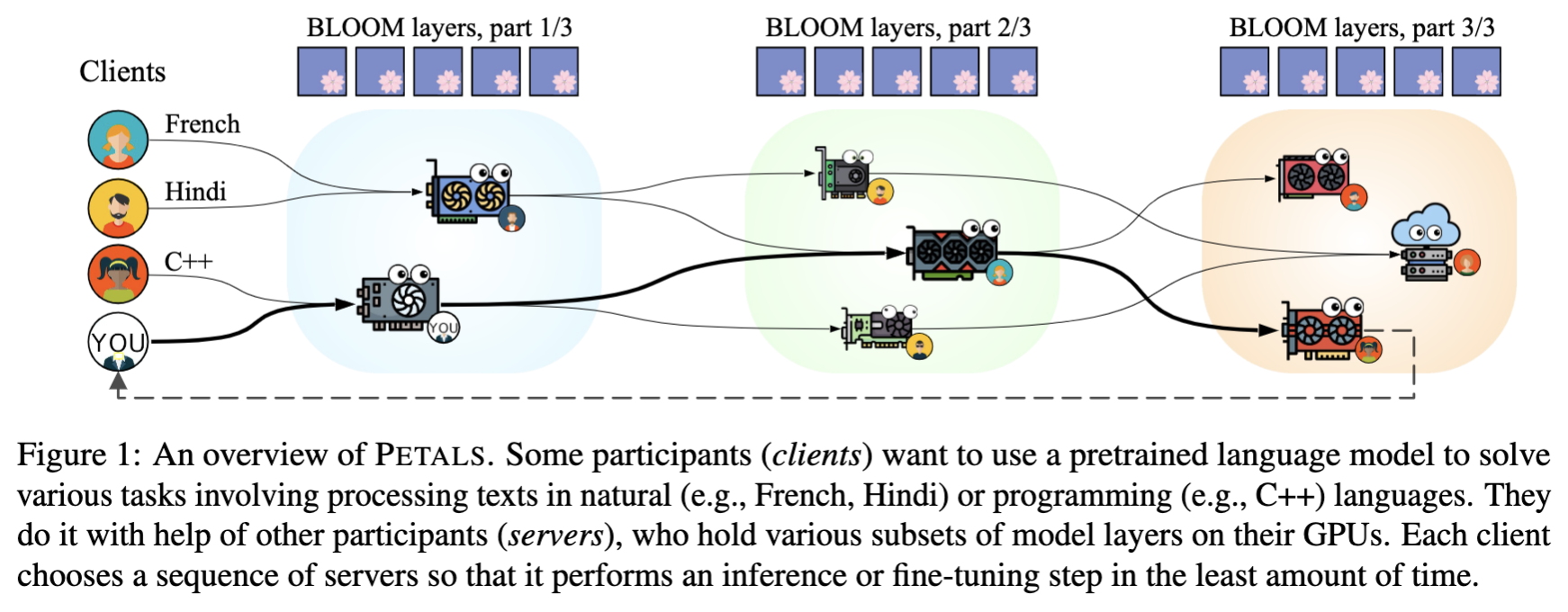
- Petals runs large language models like BLOOM-176B collaboratively — you load a small part of the model, then team up with people serving the other parts to run inference or fine-tuning.
- Inference runs at ≈ 1 sec per step (token) — 10x faster than possible with offloading, enough for chatbots and other interactive apps. Parallel inference reaches hundreds of tokens/sec.
- Beyond classic language model APIs — you can employ any fine-tuning and sampling methods by executing custom paths through the model or accessing its hidden states. You get the comforts of an API with the flexibility of PyTorch.
FAQ
-
What's the motivation for people to host model layers in the public swarm?
People who run inference and fine-tuning themselves get a certain speedup if they host a part of the model locally. Some may be also motivated to "give back" to the community helping them to run the model (similarly to how BitTorrent users help others by sharing data they have already downloaded).
Since it may be not enough for everyone, we are also working on introducing explicit incentives ("bloom points") for people donating their GPU time to the public swarm. Once this system is ready, people who earned these points will be able to spend them on inference/fine-tuning with higher priority or increased security guarantees, or (maybe) exchange them for other rewards.
-
Why is the platform named "Petals"?
"Petals" is a metaphor for people serving different parts of the model. Together, they host the entire language model — BLOOM.
While our platform focuses on BLOOM now, we aim to support more foundation models in future.
Installation
Here's how to install Petals with conda:
conda install pytorch pytorch-cuda=11.7 -c pytorch -c nvidia
pip install -U petals
This script uses Anaconda to install CUDA-enabled PyTorch. If you don't have anaconda, you can get it from here. If you don't want anaconda, you can install PyTorch any other way. If you want to run models with 8-bit weights, please install PyTorch with CUDA 11 or newer for compatility with bitsandbytes.
System requirements: Petals only supports Linux for now. If you don't have a Linux machine, consider running Petals in Docker (see our image) or, in case of Windows, in WSL2 (read more). CPU is enough to run a client, but you probably need a GPU to run a server efficiently.
🛠️ Development
Petals uses pytest with a few plugins. To install them, run:
conda install pytorch pytorch-cuda=11.7 -c pytorch -c nvidia
git clone https://github.com/bigscience-workshop/petals.git && cd petals
pip install -e .[dev]
To run minimalistic tests, you need to make a local swarm with a small model and some servers. You may find more information about how local swarms work and how to run them in this tutorial.
export MODEL_NAME=bloom-testing/test-bloomd-560m-main

python -m petals.cli.run_server $MODEL_NAME --block_indices 0:12 \
  --identity tests/test.id --host_maddrs /ip4/127.0.0.1/tcp/31337 --new_swarm  &> server1.log &
sleep 5  # wait for the first server to initialize DHT

python -m petals.cli.run_server $MODEL_NAME --block_indices 12:24 \
  --initial_peers SEE_THE_OUTPUT_OF_THE_1ST_PEER &> server2.log &

tail -f server1.log server2.log  # view logs for both servers
Then launch pytest:
export MODEL_NAME=bloom-testing/test-bloomd-560m-main REF_NAME=bigscience/bloom-560m
export INITIAL_PEERS=/ip4/127.0.0.1/tcp/31337/p2p/QmS9KwZptnVdB9FFV7uGgaTq4sEKBwcYeKZDfSpyKDUd1g
PYTHONPATH=. pytest tests --durations=0 --durations-min=1.0 -v
After you're done, you can terminate the servers and ensure that no zombie processes are left with pkill -f petals.cli.run_server && pkill -f p2p.
The automated tests use a more complex server configuration that can be found here.
Code style
We use black and isort for all pull requests.
Before committing your code, simply run black . && isort . and you will be fine.
This project is a part of the BigScience research workshop.

Release history Release notifications | RSS feed


Download files
Download the file for your platform. If you're not sure which to choose, learn more about installing packages.
Source Distribution
Built Distribution
Filter files by name, interpreter, ABI, and platform.
If you're not sure about the file name format, learn more about wheel file names.
Copy a direct link to the current filters
File details
Details for the file petals-1.1.1.tar.gz.
File metadata
- Download URL: petals-1.1.1.tar.gz
- Upload date:
- Size: 78.6 kB
- Tags: Source
- Uploaded using Trusted Publishing? No
- Uploaded via: twine/4.0.2 CPython/3.8.15
File hashes
| Algorithm | Hash digest | |
|---|---|---|
| SHA256 |
c677f0b292b5521b86c2b57d00926b683eca96381c6f5dc12da0930de2f3a724
|
|
| MD5 |
d8dad6140633a8236464174512695089
|
|
| BLAKE2b-256 |
3d4d31f183b49f12555071b50ea3dcd70d4c753b53b0d95162b3747d879fd337
|
File details
Details for the file petals-1.1.1-py3-none-any.whl.
File metadata
- Download URL: petals-1.1.1-py3-none-any.whl
- Upload date:
- Size: 91.3 kB
- Tags: Python 3
- Uploaded using Trusted Publishing? No
- Uploaded via: twine/4.0.2 CPython/3.8.15
File hashes
| Algorithm | Hash digest | |
|---|---|---|
| SHA256 |
7997b069995209b996b4646fb5276c6d53ef57d0ba478d05876b11467b43aa7b
|
|
| MD5 |
2d1c77a0cb3ba9b0fa372d518b564ded
|
|
| BLAKE2b-256 |
c46dfd31d0c6fcc1062c106ae30977b7b9b1d38f3d4f43c71bde8187b4cc308b
|






