
Utilities for integrating Phylum into CI pipelines (and beyond)

Project description
phylum-ci









Utilities for integrating Phylum into CI pipelines (and beyond)
Installation and usage
Installation
The phylum Python package is pip installable for the environment of your choice:
pip install phylum
It can also be installed in an isolated environment with the excellent pipx tool:
# Globally install the app(s) on your system in an isolated virtual environment for the package
pipx install phylum

# Use the apps from the package in an ephemeral environment
pipx run --spec phylum phylum-init <options>
pipx run --spec phylum phylum-ci <options>
These installation methods require Python 3.7+ to run. For a self contained environment, consider using the Docker image as described below.
Usage
The phylum Python package exposes its functionality with a command line interface (CLI).
To view the options available from the CLI, print the help message from one of the scripts provided as entry points:
phylum-init -h
phylum-ci -h
The functionality can also be accessed by calling the module:
python -m phylum.init -h
python -m phylum.ci -h
The functionality is also exposed in the form of a Docker image:
# Get the `latest` tagged image
docker pull phylumio/phylum-ci

# View the help
docker run --rm phylumio/phylum-ci phylum-ci --help

# Export a Phylum token (e.g., from `phylum auth token`)
export PHYLUM_API_KEY=$(phylum auth token)

# Run it from a git repo directory containing a `.phylum_project` and a lockfile
docker run -it --rm -e PHYLUM_API_KEY --mount type=bind,src=$(pwd),dst=/phylum -w /phylum phylumio/phylum-ci
The Docker image contains git and the installed phylum Python package.
It also contains an installed version of the Phylum CLI.
An advantage of using the Docker image is that the complete environment is packaged and made available with components
that are known to work together.
When using the latest tagged image, the version of the Phylum CLI is the latest available.
There are additional image tag options available to specify a specific release of the phylum-ci project and a specific
version of the Phylum CLI, in the form of <phylum-ci version>-CLIv<Phylum CLI version>. Here are image tag examples:
# Get the most current release of *both* `phylum-ci` and the Phylum CLI
docker pull phylumio/phylum-ci:latest

# Get the image with `phylum-ci` version 0.13.0 and Phylum CLI version 3.8.0
docker pull phylumio/phylum-ci:0.13.0-CLIv3.8.0
phylum-init Script Entry Point
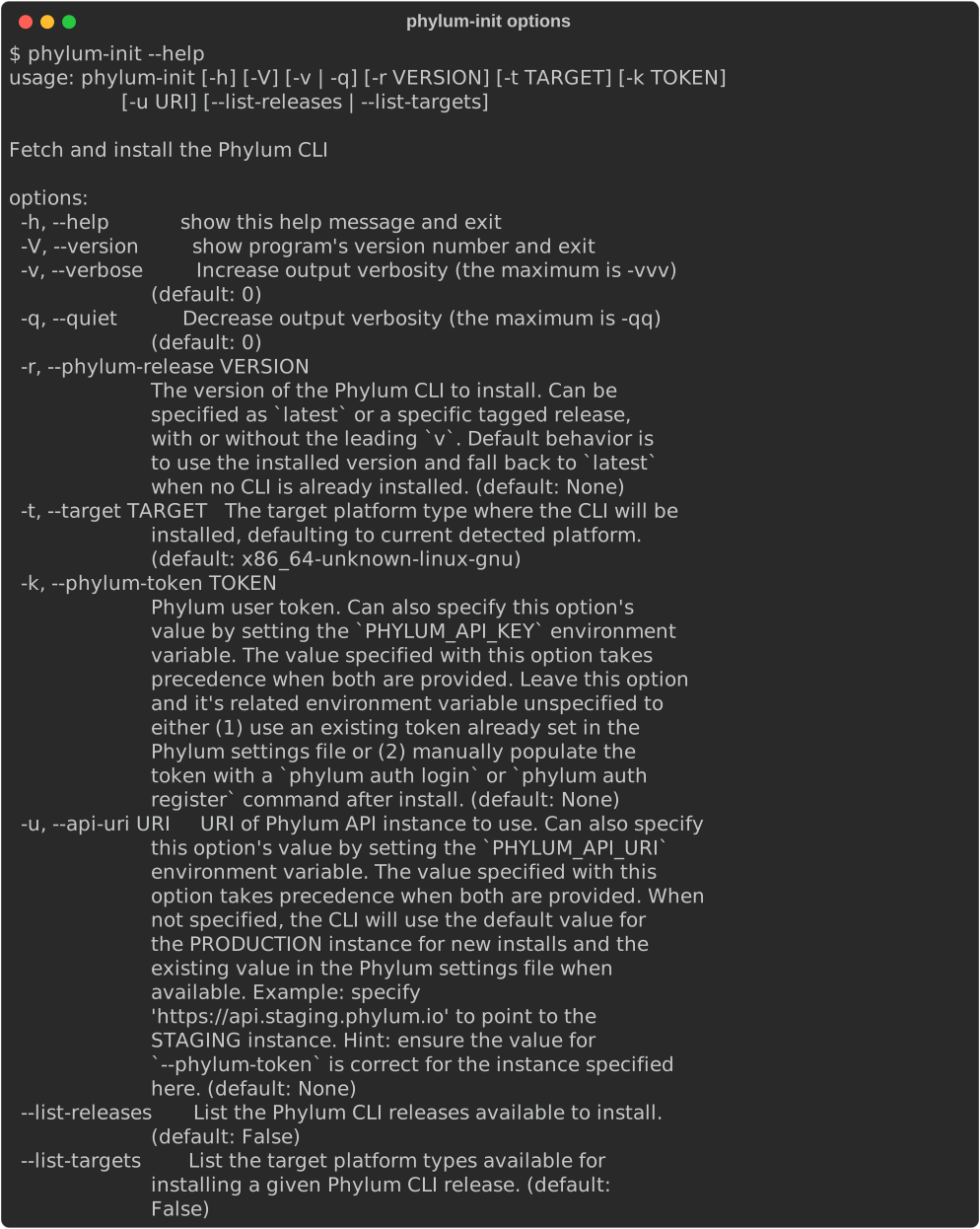
The phylum-init script can be used to fetch and install the Phylum CLI.
It will attempt to install the latest released version of the CLI but can be specified to fetch a specific version.
It will attempt to automatically determine the correct CLI release, based on the platform where the script is run, but
a specific release target can be specified.
It will accept a Phylum token from an environment variable or specified as an option, but will also function in the case
that no token is provided. This can be because there is already a token set that should continue to be used or because
no token exists and one will need to be manually created or set, after the CLI is installed.
The options for phylum-init, automatically updated to be current for the latest release:
phylum-ci Script Entry Point
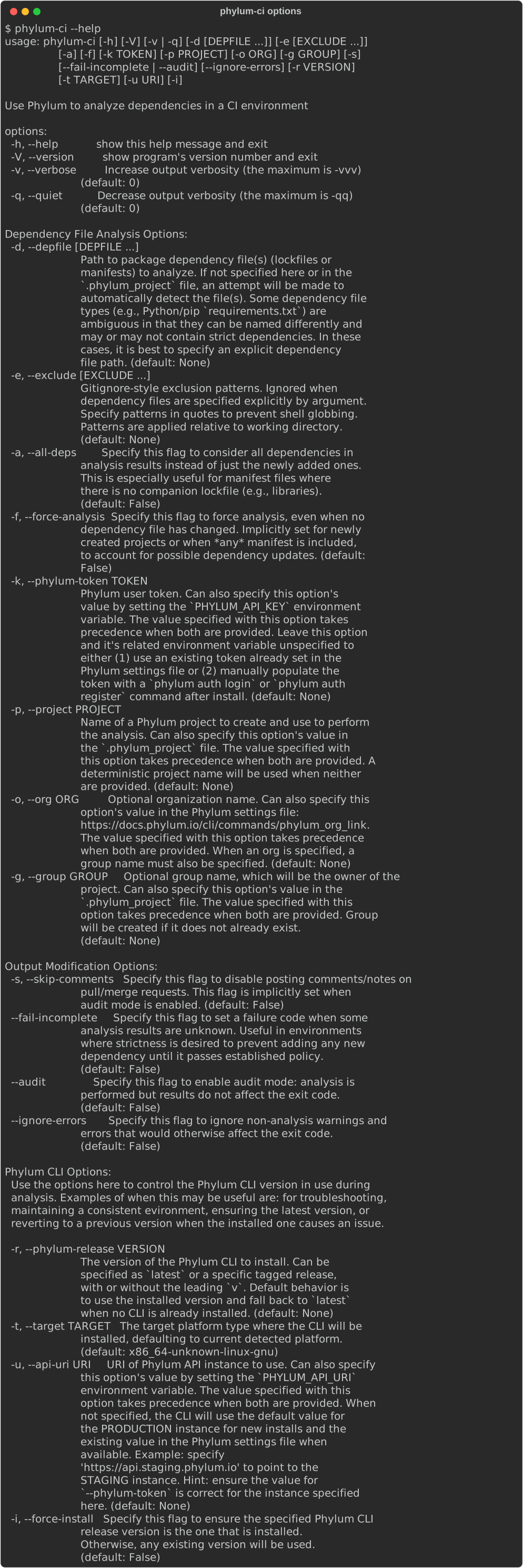
The phylum-ci script is for analyzing lockfile changes.
The script can be used locally or from within a Continuous Integration (CI) environment.
It will attempt to detect the CI platform based on the environment from which it is run and act accordingly.
The current CI platforms/environments supported are:
-
GitLab CI
- See the GitLab CI Integration documentation for more info
-
GitHub Actions
- See the GitHub Actions Integration documentation for more info
-
Git
pre-commitHooks- See the Git
pre-commitIntegration documentation for more info
- See the Git
-
None (local use)
- This is the "fall-through" case used when no other environment is detected
- Can be useful to analyze lockfiles locally, prior to or after submitting a pull/merge request (PR/MR) to a CI system
- Establishing a successful submission prior to submitting a PR/MR to a CI system
- Troubleshooting after submitting a PR/MR to a CI system and getting unexpected results
The options for phylum-ci, automatically updated to be current for the latest release:
License
MIT - with complete text available in the LICENSE file.
Contributing
Suggestions and help are welcome. Feel free to open an issue or otherwise contribute. More information is available on the contributing documentation page.
Code of Conduct
Everyone participating in the phylum-ci project, and in particular in the issue tracker and pull requests, is
expected to treat other people with respect and more generally to follow the guidelines articulated in the
Code of Conduct.
Security Disclosures
Found a security issue in this repository? See the security policy for details on coordinated disclosure.
Change log
All notable changes to this project are documented in the CHANGELOG.
The format of the change log is based on Keep a Changelog, and this project adheres to Semantic Versioning. The entries in the changelog are primarily automatically generated through the use of conventional commits and the Python Semantic Release tool. However, some entries may be manually edited, where it helps for clarity and understanding.
Release history Release notifications | RSS feed


Download files
Download the file for your platform. If you're not sure which to choose, learn more about installing packages.
Source Distribution
Built Distribution
Filter files by name, interpreter, ABI, and platform.
If you're not sure about the file name format, learn more about wheel file names.
Copy a direct link to the current filters
File details
Details for the file phylum-0.15.0.tar.gz.
File metadata
- Download URL: phylum-0.15.0.tar.gz
- Upload date:
- Size: 34.1 kB
- Tags: Source
- Uploaded using Trusted Publishing? No
- Uploaded via: twine/3.8.0 pkginfo/1.8.3 readme-renderer/37.1 requests/2.28.1 requests-toolbelt/0.9.1 urllib3/1.26.12 tqdm/4.64.1 importlib-metadata/4.12.0 keyring/23.9.1 rfc3986/2.0.0 colorama/0.4.5 CPython/3.10.6
File hashes
| Algorithm | Hash digest | |
|---|---|---|
| SHA256 |
2c7d524fea8c30a165b434ac272e8325704f201b72c2a3ffce48b80c51c75494
|
|
| MD5 |
7d7cbf109f72adc6c35989515ad528ac
|
|
| BLAKE2b-256 |
92587c5d4353c4ffc066b3209749ba7967a61a3935a451a3ae270cde039382c2
|
File details
Details for the file phylum-0.15.0-py3-none-any.whl.
File metadata
- Download URL: phylum-0.15.0-py3-none-any.whl
- Upload date:
- Size: 37.1 kB
- Tags: Python 3
- Uploaded using Trusted Publishing? No
- Uploaded via: twine/3.8.0 pkginfo/1.8.3 readme-renderer/37.1 requests/2.28.1 requests-toolbelt/0.9.1 urllib3/1.26.12 tqdm/4.64.1 importlib-metadata/4.12.0 keyring/23.9.1 rfc3986/2.0.0 colorama/0.4.5 CPython/3.10.6
File hashes
| Algorithm | Hash digest | |
|---|---|---|
| SHA256 |
e4fb8c7b95f0e50df9624c410a2fc56657ed946f4a5575a5a48fb2ef5f90d7b1
|
|
| MD5 |
96a2917ba3d470e4a7c837ec17eb0fd6
|
|
| BLAKE2b-256 |
773b0b7fdace3c8f6f3f1f456f5bfc7f8c0bcbe9e11bc5d1555e8990c13a6ff9
|






