
Python library for plan projects

Project description
pjplan: Python library for project schedule and analysis
What is it?
pjplan turns your Jupyter Notebook into project management software. This Python package gives you a simple API with following features:
- Describe Work Burn-down Structure (WBS) of your project in code or load it from external source.
- Manipulate tasks: link them as successors/predecessors, find, delete, reorder, etc. A lot of batch operations are supported via simple commands.
- Assign resources and estimates to tasks
- Define work calendars for each resource
- Calculate project schedule in several ways
- Find critical path
- Visualize WBS as Gantt or Network diagram
- Save/Load your WBS to/from csv files
- Export WBS to pandas
Why to use it?
There are several use cases for pjplan:
- Work with project plan as code with your favourite IDE, VSC, etc.
- Load tasks data from your tracker (Jira, Asure Devops, Trello, etc.) to pjplan, link/modify/reorder/delete tasks using rich pjplan API, then create schedule and Gantt for them.
- Create several schedules for same project and find optimal one.
Where to use it?
pjplan created specially for use inside Jupyter Notebook or similar software. All library objects (WBS, Task, Schedule, Calendar) have great visualisations so you can easily work with them in notebooks.
But, of course, you can use pjplan in any other python applications.
Installation
pip install pjplan
Getting started
Let's define simple project WBS:
from pjplan import WBS, Task

with WBS() as prj:
  prj // Task(1, 'Task 1', estimate=40, resource='Developer')
  prj // Task(2, 'Task 2', predecessors=[prj[1]], estimate=20, resource='Developer')
  with prj // Task(3, 'Task 3') as t3:
    t3 // Task(4, 'Task 4', predecessors=[prj[2]], estimate=100, resource='Tester')
    t3 // Task(5, 'Task 5', predecessors=[prj[2]], estimate=50, resource='Tester')
Let's define resources:
from pjplan import Resource, WeeklyCalendar

work_calendar = WeeklyCalendar(days=[0,1,2,3,4], units_per_day=8)

developer = Resource(name='Developer', calendar=work_calendar)
tester = Resource(name='Tester', calendar=work_calendar)
Now we can create schedule for our project:
from datetime import datetime
from pjplan import ForwardScheduler

schedule = ForwardScheduler(
    start=datetime.now(),
    resources=[developer, tester]
).calc(prj)
visualise it as Mermaid Gantt:
from pjplan import MermaidGantt

MermaidGantt(schedule.schedule)

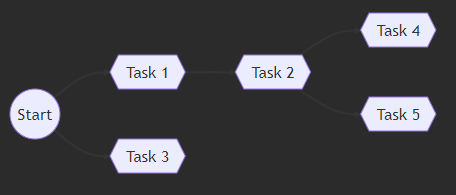
or Network:
from pjplan import MermaidNetwork

MermaidNetwork(schedule.schedule)
save schedule to csv:
from pjplan import write_csv

write_csv(schedule.schedule, "schedule.csv")
More examples
More examples you can find at examples directory.
Release history Release notifications | RSS feed


Download files
Download the file for your platform. If you're not sure which to choose, learn more about installing packages.
Source Distribution
Built Distribution
Filter files by name, interpreter, ABI, and platform.
If you're not sure about the file name format, learn more about wheel file names.
Copy a direct link to the current filters
File details
Details for the file pjplan-0.0.8.tar.gz.
File metadata
- Download URL: pjplan-0.0.8.tar.gz
- Upload date:
- Size: 183.7 kB
- Tags: Source
- Uploaded using Trusted Publishing? No
- Uploaded via: twine/4.0.2 CPython/3.10.6
File hashes
| Algorithm | Hash digest | |
|---|---|---|
| SHA256 |
0b179b69a907f659126a5c8640c6ccf48880f5a6b29b87ea4409a9ebdabe3b4f
|
|
| MD5 |
761977f4768cee071344c16d55cb5243
|
|
| BLAKE2b-256 |
c6ce7abe5a357faa2aaaa745ac074b985635726f19898ca1d7b47c747dc85b26
|
File details
Details for the file pjplan-0.0.8-py3-none-any.whl.
File metadata
- Download URL: pjplan-0.0.8-py3-none-any.whl
- Upload date:
- Size: 30.9 kB
- Tags: Python 3
- Uploaded using Trusted Publishing? No
- Uploaded via: twine/4.0.2 CPython/3.10.6
File hashes
| Algorithm | Hash digest | |
|---|---|---|
| SHA256 |
a631d43f3d460b0ce24b3f5782df594af64f2d6a4aa54b22ba8ced082a650c14
|
|
| MD5 |
c8136e92285afe3bded37c08a9139fe0
|
|
| BLAKE2b-256 |
02bf0ccee80c6d859e02d10d21725c79f93a9de90846981aefb9e38c84e9a6d3
|






