
allows images to be manually cropped using JCrop JS library


Project description

History
There has been a need for cropping for a long time and there are lots of addons around that have different ways to achieve this.
There is plip #10174 asking for adding image cropping to plone core which recently got rejected by the FWT. The cropping functionality should go into an addon first that also work for dexterity and can be pliped into core.
This package aims to be THE cropping solution for plone that just works TM.
Why do I need this?
Automatic cropping is already possible, plone.app.imaging does already handle this via the direction parameter:
<img tal:define="scales context/@@images"
     tal:replace="structure python: scales.tag('image',
                  width=1200, height=800, direction='down')"
     />
However it only crops from the center of the image, so in some ocasions this is not what you want.
plone.app.imagecropping allows you to select the cropping area manually for each available image scale using the JCrop editor
How it works
There is a view @@croppingeditor available for every content type implementing IImageCropping via an object action.
The Interface is implemented by default for ATImage and plone.app.contenttypes image.
The editor view shows at maximum three columns:
Image Fields column (only visible when more than one image field is available)
Image scales column (only visible when more than one scale is available)
Cropping editor column
The aspect ratio for the cropping area in JCrop editor is automatically set to the image scale selected by the user.
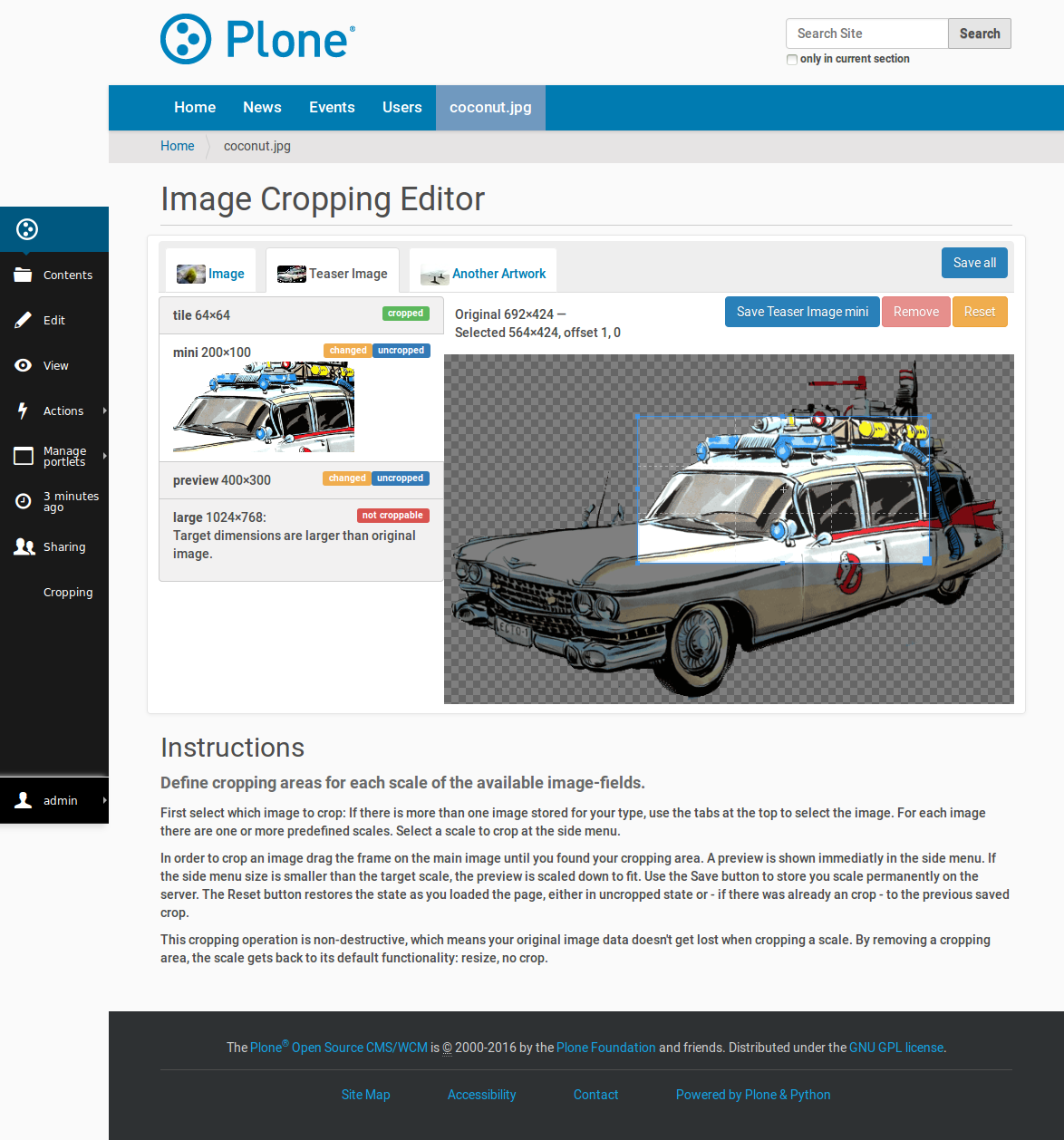
The image stored for this scale gets replaced with the cropped and scaled version. This way you can access them as you’re used to. For example:
<img tal:replace="structure context/@@images/image/mini" />
This also enables support for richtext editors such as TinyMCE to insert cropped scales into a textfield.
In TinyMCE it will be possible to access the cropping editor directly out of the image plugin right below the scale selection
Load editor as overlay
The editor can also be loaded as an overlay anywhere. Just place a link to the @@croppingeditor url of an image (<image_base_url>/@@croppingeditor) and add some javascript. For example:
(function() {
    $(function() {
        $("a[href$='@@croppingeditor']").prepOverlay({
            subtype:'ajax',
            formselector:'#coords',
            closeselector:"input[name='form.button.Cancel']"
        })

        $(document).bind("formOverlayLoadSuccess", function() {
            imagecropping.init_editor();
        })
    })
})(jQuery);
Configuration
A Configlet is registered in Plone Site Setup. There you can adjust the maximum Size of the jCrop Editor Image (large_size) and the minimum selectable size of the cropped area (min_size).
You can also set those values in the profile of your (policy)product using p.a.registry mechanism (registry.xml):
<registry>
  <records interface="plone.app.imagecropping.browser.settings.ISettings">
      <value key="large_size">500:500</value>
      <value key="min_size">10:10</value>
  </records>
</registry>
Design decisions
make this package as minimally invasive as possible
therefore we store the cropped image immediately, so plone.app.imaging traverser doesn’t need to care about cropping
users can access cropped images the same way as the access scales (so it works in richtext editors too)
support archetypes and dexterity content (XXX limitation for dexterity: this will only work for images in AttributeStorage)
a cropped image gets stored instead of the scaled image. if you want back the uncropped image scale you’ll need to remove the cropped version in the editor
Possible extensions / changes for the future
allow to mark scales as auto-croppable in the plone.app.imaging controlpanel. this enables cropped scales w/o manually defining the cropping area but would require some changes in plone.app.imaging (extend traverser, change controlpanel)
Contributors
Peter Mathis (petschki)
Joscha Krutzki (joka)
Harald Frießnegger (fRiSi)
Martijn Zweistra (themask96)
Daniel Widerin (saily)
Wolfgang Thomas (pysailor)
Credits
The basic concept of plone.app.imagcropping has already been implemented in Yiorgis’s branch of plone.app.imaging
Changelog
0.1rc1 (2013-03-11)
add support for multiple image fields
refactored javascript includes so the editor can be loaded as overlay
fixed JS error when editor is invisible (ie editor is loaded in an overlay)
fixed edit/remove actions when editor is loaded as overlay
make editor view more convenient (disable columns)
update documentation [petschki]
0.1b1 (2013-03-03)
Made cropping work in dexterity-only sites [pysailor]
Add travis integration [saily]
0.1a2 (2012-11-10)
fix tests
add test setups for Plone 4.1-4.3
Products.CMFPlone dependency. Right now we only support Plone >= 4.1
make dexterity support optional [petschki]
0.1a1 (2012-11-05)
public alpha release [petschki]
Package created using templer [fRiSi]
Release history Release notifications | RSS feed


Download files
Download the file for your platform. If you're not sure which to choose, learn more about installing packages.
Source Distribution
File details
Details for the file plone.app.imagecropping-0.1rc1.zip.
File metadata
- Download URL: plone.app.imagecropping-0.1rc1.zip
- Upload date:
- Size: 849.8 kB
- Tags: Source
- Uploaded using Trusted Publishing? No
File hashes
| Algorithm | Hash digest | |
|---|---|---|
| SHA256 |
5a0ef35a842f73d6fd2ec7114ca2b7aa83a90f9dc42bf730fb34edac1437a72a
|
|
| MD5 |
615f9b1f6ce1ce792b153b7787aa7ef5
|
|
| BLAKE2b-256 |
9716f768584a510ed4b01279da1b441ef25dfadb466fae9baf58937bedbb1b39
|






