
Prettifies Python exception output to make it legible.

Project description
pretty-errors
Prettifies Python exception output to make it legible. Install it with
python -m pip install pretty-errors
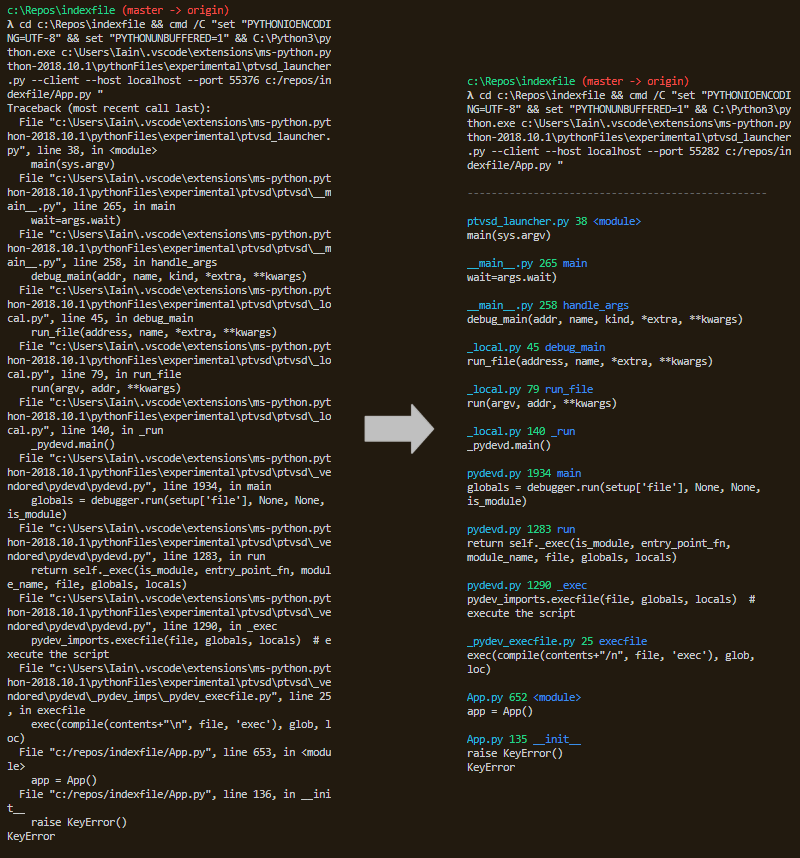
Use it simply by importing it:
import pretty_errors
Note you need to be running in a terminal capable of colour output in order to get colour output: in Windows this means powershell, cmder, etc.
If you want to configure the output then use pretty_errors.configure(). For example:
import pretty_errors
pretty_errors.configure(
    seperator_character = '—',
    line_length = 54,
    filename_display = pretty_errors.FILENAME_FULL
)
If you want to customize the output more than configure provides then you can replace the output functions
on sys.stderr after importing pretty_errors. These are:
write_header(self)
Is called at the start of a traceback.
write_location(self, path, line_number, function)
Is called with details on the exception's location.
write_body(self, body)
Is called with any other text sent to stderr (i.e. the code in question). body will never contain \n, though
it may be longer than the defined maximum line length.
You may replace as many of these functions as you wish, or for maximum control of output you may replace the main
method called with all stderr output:
write(self, *args)
You may use these helper functions to make this easier:
output_text(self, text, wants_newline = False)
Outputs text while trying to only insert 1 newline when outputing a line of maximum length.
get_location(self, text)
Extract's location of exception. If it returns None then text was not a location identifier.
is_header(self, text)
Checks if text is the start of a traceback.
For example, to change the header:
def write_header(self):
    self.output_text("\nERROR!!!!!!!!!!", wants_newline = True)

sys.stderr.write_header = write_header
Release history Release notifications | RSS feed


Download files
Download the file for your platform. If you're not sure which to choose, learn more about installing packages.
Source Distribution
Built Distribution
Filter files by name, interpreter, ABI, and platform.
If you're not sure about the file name format, learn more about wheel file names.
Copy a direct link to the current filters
File details
Details for the file pretty_errors-1.0.6.tar.gz.
File metadata
- Download URL: pretty_errors-1.0.6.tar.gz
- Upload date:
- Size: 3.4 kB
- Tags: Source
- Uploaded using Trusted Publishing? No
- Uploaded via: twine/1.12.1 pkginfo/1.4.2 requests/2.20.1 setuptools/40.6.2 requests-toolbelt/0.8.0 tqdm/4.28.1 CPython/3.7.0
File hashes
| Algorithm | Hash digest | |
|---|---|---|
| SHA256 |
ade99fb6e51963921657d2093fab392fa3b688d128608292c4e2025474ff9918
|
|
| MD5 |
3fa58f56e411b69785469f59657022f2
|
|
| BLAKE2b-256 |
2c7ded4fdc7b99ddb5221260b9c6f9b4f13829dbc68ae3c7fed5d5a0d59b2946
|
File details
Details for the file pretty_errors-1.0.6-py3-none-any.whl.
File metadata
- Download URL: pretty_errors-1.0.6-py3-none-any.whl
- Upload date:
- Size: 4.7 kB
- Tags: Python 3
- Uploaded using Trusted Publishing? No
- Uploaded via: twine/1.12.1 pkginfo/1.4.2 requests/2.20.1 setuptools/40.6.2 requests-toolbelt/0.8.0 tqdm/4.28.1 CPython/3.7.0
File hashes
| Algorithm | Hash digest | |
|---|---|---|
| SHA256 |
ab80d2752842426ccea550cec01e57dc52eb70c0d504c2dd445e74ad0acd0fd0
|
|
| MD5 |
04b450f6e6e285d2579a047b2b9ebf28
|
|
| BLAKE2b-256 |
e64746be6fd48b37f2010deb8348e7fbd60cca7c4363a17a86986a178b1ef375
|






