
Library for building powerful interactive command lines in Python

Project description


prompt_toolkit is a library for building powerful interactive command lines in Python.
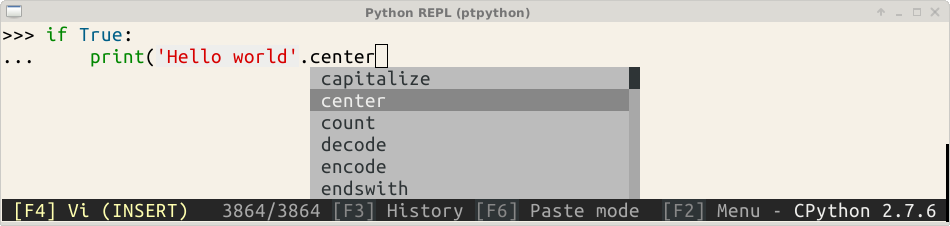
Looking for ptpython, the Python REPL?
Are you looking for ptpython, the interactive Python Shell? We moved the ptpython source code to a separate repository. This way we are sure not to pollute the prompt_toolkit library with any ptpython-specific stuff and ptpython can be developed independently. You will now have to install it through:
pip install ptpython
prompt-toolkit features
prompt_toolkit could be a replacement for GNU readline, but it can be much more than that.
Some features:
Pure Python.
Syntax highlighting of the input while typing. (For instance, with a Pygments lexer.)
Multi-line input editing.
Advanced code completion.
Both Emacs and Vi key bindings. (Similar to readline.)
Reverse and forward incremental search.
Runs on all Python versions from 2.6 up to 3.4.
Works well with Unicode double width characters. (Chinese input.)
Selecting text for copy/paste. (Both Emacs and Vi style.)
Multiple input buffers.
No global state.
Lightweight, the only dependencies are Pygments, six and wcwidth.
Code written with love.
Runs on Linux, OS X, OpenBSD and Windows systems.
Feel free to create tickets for bugs and feature requests, and create pull requests if you have nice patches that you would like to share with others.
About Windows support
prompt_toolkit is cross platform, and everything that you build on top should run fine on both Unix and Windows systems. On Windows, it uses a different event loop (WaitForMultipleObjects instead of select), and another input and output system. (Win32 APIs instead of pseudo-terminals and VT100.)
That should work fine, however the library is currently much more tested on Linux and Mac OS X systems. So, if you find any bugs in the Windows implementation, or you have an idea how to make the experience better, please create a Github issue.
It’s worth noting that the implementation is a “best effort of what is possible”. Both Unix and Windows terminals have their limitations. But in general, the Unix experience will still be a little better.
Installation
pip install prompt-toolkit
Getting started
The most simple example of the library would look like this:
from prompt_toolkit.contrib.shortcuts import get_input

if __name__ == '__main__':
    answer = get_input('Give me some input: ')
    print('You said: %s' % answer)
For more complex examples, have a look in the examples directory. All examples are chosen to demonstrate only one thing. Also, don’t be afraid to look at the source code. The implementation of the get_input function could be a good start.
Projects using prompt-toolkit
(Want your own project to be listed here? Please create a GitHub issue.)
Philosophy
The source code of prompt_toolkit should be readable, concise and efficient. We prefer short functions focussing each on one task and for which the input and output types are clearly specified. We mostly prefer composition over inheritance, because inheritance can result in too much functionality in the same object. We prefer immutable objects where possible (objects don’t change after initialisation). Reusability is important. We absolutely refrain from having a changing global state, it should be possible to have multiple independent instances of the same code in the same process. The architecture should be layered: the lower levels operate on primitive operations and data structures giving – when correctly combined – all the possible flexibility; while at the higher level, there should be a simpler API, ready-to-use and sufficient for most use cases. Thinking about algorithms and efficiency is important, but avoid premature optimization.
Special thanks to
Release history Release notifications | RSS feed


Download files
Download the file for your platform. If you're not sure which to choose, learn more about installing packages.
Source Distribution
Built Distributions
Filter files by name, interpreter, ABI, and platform.
If you're not sure about the file name format, learn more about wheel file names.
Copy a direct link to the current filters
File details
Details for the file prompt_toolkit-0.33.tar.gz.
File metadata
- Download URL: prompt_toolkit-0.33.tar.gz
- Upload date:
- Size: 109.1 kB
- Tags: Source
- Uploaded using Trusted Publishing? No
File hashes
| Algorithm | Hash digest | |
|---|---|---|
| SHA256 |
f3fa7dd284cb62a32aa76ff39f4ef9a2ab989ce24406c8a6b1b7b3c576ee203d
|
|
| MD5 |
e728e82e28472957e87ef40a87f3a54a
|
|
| BLAKE2b-256 |
d01904c986eff1749838186be5d00d9ed15221f147406534a63c34cd292d0cc6
|
File details
Details for the file prompt_toolkit-0.33-py3-none-any.whl.
File metadata
- Download URL: prompt_toolkit-0.33-py3-none-any.whl
- Upload date:
- Size: 146.6 kB
- Tags: Python 3
- Uploaded using Trusted Publishing? No
File hashes
| Algorithm | Hash digest | |
|---|---|---|
| SHA256 |
5861a3125e1aa64e43674a560e9e1b64f1f9e37856842968b6c3b0bbe0fa7988
|
|
| MD5 |
8f9820d56f5b00c8b5b4422e53fc1bd0
|
|
| BLAKE2b-256 |
50d363996f09e7a5d1f26cc7928bd1a6051e6f6040ad19918641921619799699
|
File details
Details for the file prompt_toolkit-0.33-py2-none-any.whl.
File metadata
- Download URL: prompt_toolkit-0.33-py2-none-any.whl
- Upload date:
- Size: 146.6 kB
- Tags: Python 2
- Uploaded using Trusted Publishing? No
File hashes
| Algorithm | Hash digest | |
|---|---|---|
| SHA256 |
7212041070d485d2b4d4f3d101321d2750b5edda558c560a73adda29625bf73f
|
|
| MD5 |
6b9d17f2916c5300291808ae705e2b6d
|
|
| BLAKE2b-256 |
37bef125fbb54ff6cf05fc84877012528350acec22e956c1f2336727e90cadef
|






