
Serialization library on top of dataclasses.

Project description
pyserde





Yet another serialization library on top of dataclasses.
TL;DR
Put additional @serialize and @deserialize decorator in your ordinary dataclass.
@deserialize
@serialize
@dataclass
class Foo:
    i: int
    s: str
    f: float
    b: bool
Now you can convert an object to JSON,
>>> to_json(Foo(i=10, s='foo', f=100.0, b=True))
{"i": 10, "s": "foo", "f": 100.0, "b": true}
Converted back from JSON to the object quite easily!
>>> from_json(Foo, '{"i": 10, "s": "foo", "f": 100.0, "b": true}')
Foo(i=10, s='foo', f=100.0, b=True)
pyserde supports other data formats (YAML, Toml, MsgPack) and offers many more features!
Benchmark
- macOS 10.14 Mojave
- Intel 2.3GHz 8-core Intel Core i9
- DDR4 32GB RAM
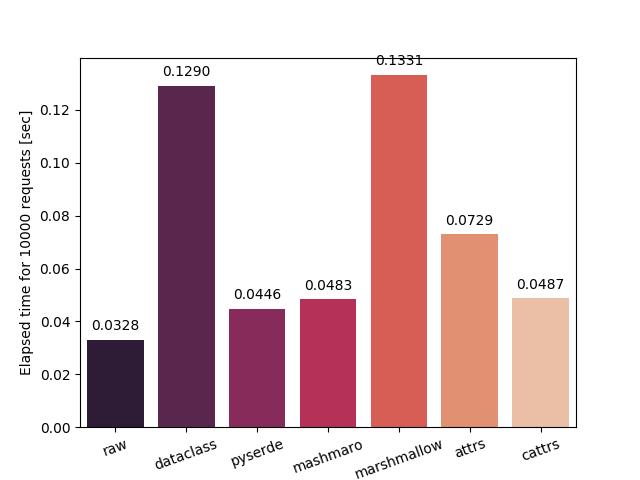
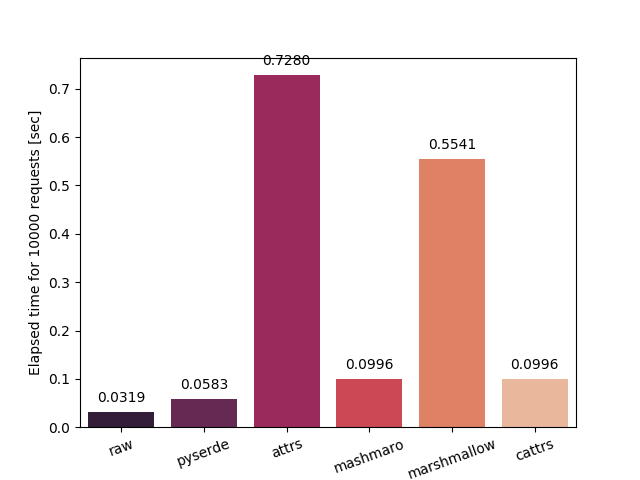
Serialize and deserialize a struct into and from json 10,000 times.
| Serialize | Deserialize |
|---|---|
 |
 |
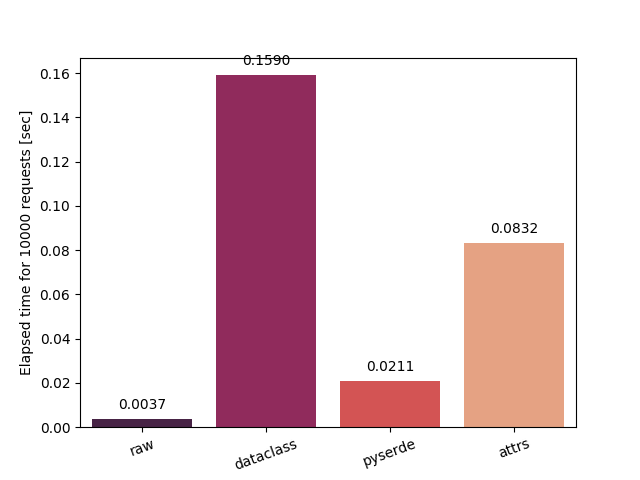
Serialize the struct into tuple and dictionary.
| astuple | asdict |
|---|---|
 |
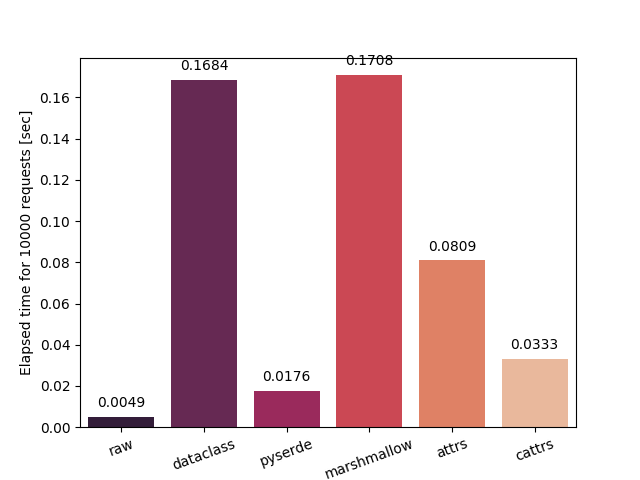 |
raw: Serialize and deserialize manually. Fastest in theory.dataclass: Serialize using dataclass's asdict.pyserde: This library.dacite: Simple creation of data classes from dictionaries.mashumaro: Fast and well tested serialization framework on top of dataclasses.marshallow: A lightweight library for converting complex objects to and from simple datatypes.attrs: Python Classes Without Boilerplate.cattrs: Complex custom class converters for attrs.
To run benchmark in your environment:
git clone git@github.com:yukinarit/pyserde.git
cd pyserde/bench
pipenv install
pipenv run python bench.py --full
You can check the benchmark code for more information.
Getting started
Install pyserde from PyPI. pyserde requires Python>=3.6.
pip install pyserde
Put additional @serialize and @deserialize decorator in your ordinary dataclass. Be careful that module name is serde, not pyserde. If you are new to dataclass, I would recommend to read dataclasses documentation first.
from serde import serialize, deserialize
from dataclasses import dataclass

@deserialize
@serialize
@dataclass
class Foo:
    i: int
    s: str
    f: float
    b: bool
pyserde generates methods necessary for serialization by @serialize and methods necessary for deserialization by @deserialize when a class is loaded into python interpreter. Generation occurs exactly only once (This is more like how decorator work, not pyserde) and there is no overhead when you actually use the generated methods. Now your class is serializable and deserializable in the data formats supported by pyserde.
Next, import pyserde helper methods. For JSON:
from serde.json import from_json, to_json
Similarly, you can use other data formats.
from serde.yaml import from_yaml, to_yaml
from serde.toml import from_toml, to_toml
from serde.msgpack import from_msgpack to_msgpack
Use to_json to serialize the object into JSON.
f = Foo(i=10, s='foo', f=100.0, b=True)
print(to_json(f))
Pass Foo class and JSON string in from_json to deserialize into Object.
s = '{"i": 10, "s": "foo", "f": 100.0, "b": true}'
print(from_json(Foo, s))
That's it! pyserde offers many more features. If you're interested, please read the rest of the documentation.
Supported types
- Primitives (int, float, str, bool)
- Containers (List, Tuple, Dict)
Optional- User defined class with
@dataclass - More types
You can write pretty complex class like this:
@deserialize
@serialize
@dataclass
class bar:
    i: int

@deserialize
@serialize
class Foo:
    i: int
    l: List[str]
    t: Tuple[int, float, str, bool]
    d: Dict[str, List[Tuple[str, int]]]
    o: Optional[str]
    nested: Bar
Supported data formats
JSON
from serde.json import from_json, to_json
print(to_json(f))
print(from_json(Foo, s))
Yaml
from serde.yaml import from_yaml, to_yaml
print(to_yaml(f))
print(from_yaml(Foo, s))
Toml
from serde.toml import from_toml, to_toml
print(to_toml(f))
print(from_toml(Foo, s))
MsgPack
from serde.msgpack import from_msgpack, to_msgpack
print(to_msgpack(f))
print(from_msgpack(Foo, s))
Case Conversion
Converting snake_case fields into supported case styles e.g. camelCase and kebab-case.
@serialize(rename_all = 'camelcase')
@dataclass
class Foo:
    int_field: int
    str_field: str

f = Foo(int_field=10, str_field='foo')
print(to_json(f))
Here, the output is all camelCase.
'{"intField": 10, "strField": "foo"}'
Rename Field
In case you want to use a keyword as field such as class, you can use serde_rename field attribute.
@serialize
@dataclass
class Foo:
    class_name: str = field(metadata={'serde_rename': 'class'})

print(to_json(Foo(class_name='Foo')))
Output json is having class instead of class_name.
{"class": "Foo"}
For complete example, please see ./examples/rename.py
Skip
You can skip serialization for a certain field, you can use serde_skip.
@serialize
@dataclass
class Resource:
    name: str
    hash: str
    metadata: Dict[str, str] = field(default_factory=dict, metadata={'serde_skip': True})

resources = [
    Resource("Stack Overflow", "hash1"),
    Resource("GitHub", "hash2", metadata={"headquarters": "San Francisco"}) ]
print(to_json(resources))
Here, metadata is not present in output json.
[{"name": "Stack Overflow", "hash": "hash1"}, {"name": "GitHub", "hash": "hash2"}]
For complete example, please see ./examples/skip.py
Conditional Skip
If you conditionally skip some fields, you can pass function or lambda in serde_skip_if.
@serialize
@dataclass
class World:
    player: str
    buddy: str = field(default='', metadata={'serde_skip_if': lambda v: v == 'Pikachu'})

world = World('satoshi', 'Pikachu')
print(to_json(world))

world = World('green', 'Charmander')
print(to_json(world))
As you can see below, field is skipped in serialization if buddy is "Pikachu".
{"player": "satoshi"}
{"player": "green", "buddy": "Charmander"}
For complete example, please see ./examples/skip.py
LICENSE
MIT
Release history Release notifications | RSS feed


Download files
Download the file for your platform. If you're not sure which to choose, learn more about installing packages.
Source Distribution
Built Distribution
Filter files by name, interpreter, ABI, and platform.
If you're not sure about the file name format, learn more about wheel file names.
Copy a direct link to the current filters
File details
Details for the file pyserde-0.1.3.tar.gz.
File metadata
- Download URL: pyserde-0.1.3.tar.gz
- Upload date:
- Size: 25.0 kB
- Tags: Source
- Uploaded using Trusted Publishing? No
- Uploaded via: twine/3.2.0 pkginfo/1.5.0.1 requests/2.23.0 setuptools/46.4.0 requests-toolbelt/0.9.1 tqdm/4.46.0 CPython/3.8.3
File hashes
| Algorithm | Hash digest | |
|---|---|---|
| SHA256 |
da471628ba6631b9806e740f5183c76f6b3fc18215c0e02d1e2e8efb9aecec7f
|
|
| MD5 |
aad98f4e8d8b94d4047994f3cd738ca4
|
|
| BLAKE2b-256 |
beb7a047838d350b8a874039a66e910d4ecc4622678c4e4da733b9142c261f7f
|
File details
Details for the file pyserde-0.1.3-py3-none-any.whl.
File metadata
- Download URL: pyserde-0.1.3-py3-none-any.whl
- Upload date:
- Size: 30.1 kB
- Tags: Python 3
- Uploaded using Trusted Publishing? No
- Uploaded via: twine/3.2.0 pkginfo/1.5.0.1 requests/2.23.0 setuptools/46.4.0 requests-toolbelt/0.9.1 tqdm/4.46.0 CPython/3.8.3
File hashes
| Algorithm | Hash digest | |
|---|---|---|
| SHA256 |
10492626fb1a64835409a6cd907fe6bb09cbb86756a06596f87cca9d25250fd6
|
|
| MD5 |
bc00c7bc59a29f39a211aaa8eb5de4f5
|
|
| BLAKE2b-256 |
e225ae86a7e8ad1e1534500c14b3cf21ab47873413ab34d1b201c5ac17d20074
|






