
An interactive web UI test runner for PyTest

Project description
PyTest Web UI

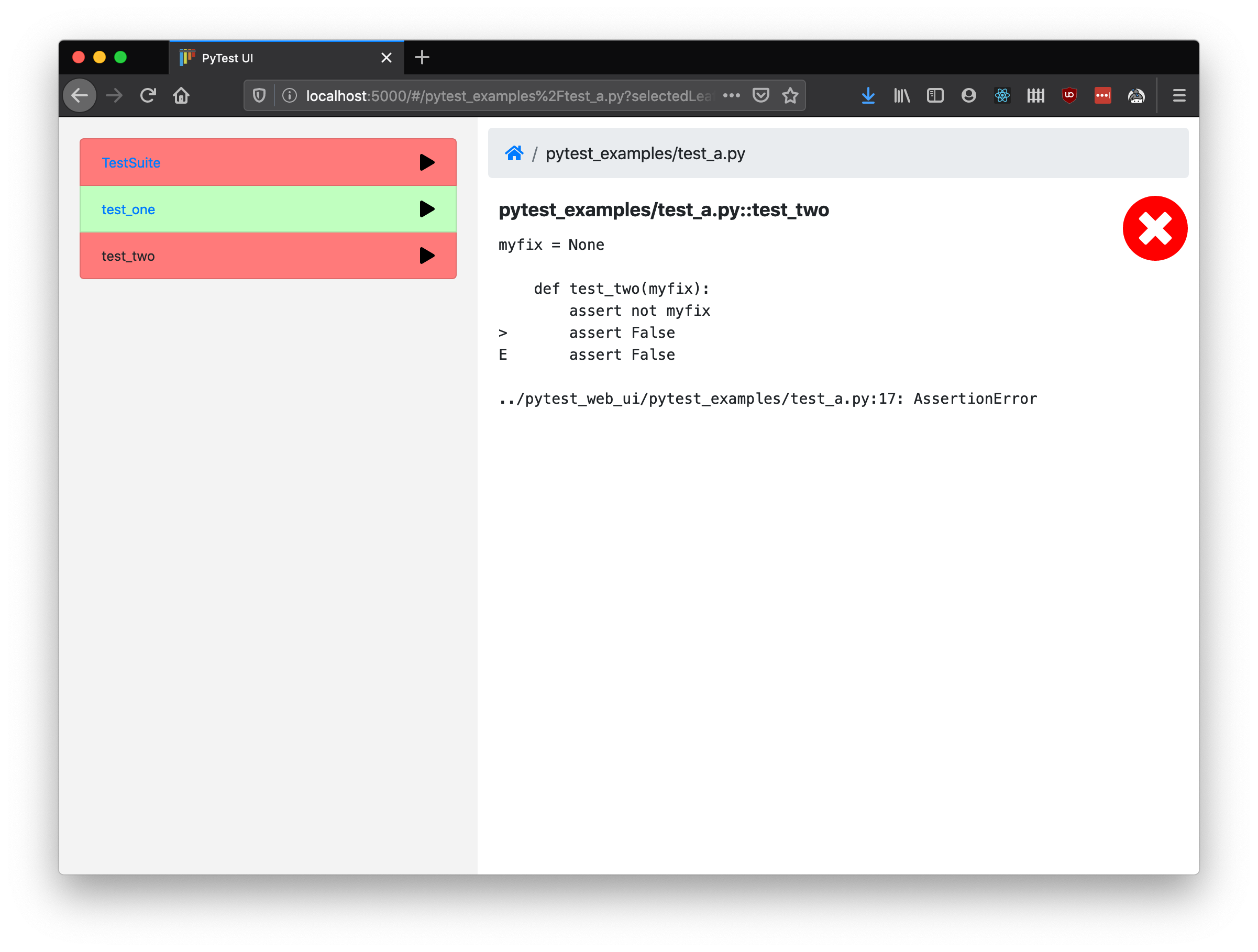
A web app for controlling PyTest interactively. With it, you can explore your test hierarchy (test packages/modules/classes/methods etc.), run tests at the click of a button and see the results presented in your web browser.
Features
- Run tests by group (module, class etc.) or individually.
- Clear pass/fail labelling so you can dig down and find what failed quickly, instead of having to scroll up through many screens of terminal output.
- Test files and dependencies are reloaded every time so you can run, tweak your code, then run again in a fast iteration cycle.
- Runs on any modern OS and browser (tested on Win10, macOS and Ubuntu with Chrome, Firefox and Safari). IE is not supported.
- Automatically start and stop docker services while running if specified in a
docker-compose.ymlfile in the root test directory. - Tests are run in separate processes and reloaded for each invocation, allowing tests to be tweaked and re-run without restarting the main process.
Prerequisites
- Requires Python3.6+ and pip.
Quickstart
Install and get started running your own PyTest tests:
pip install pytest-web-ui
pytest_web_ui /path/to/your/tests
I recommend installing into an activated virtual environment. You will want to make sure that all additional dependencies required to run your tests are installed into the same virtual environment.
When you run with default options, the web app to browse and run tests should be
opened automatically in your default browser. To view full docs for the
command-line parameters, run pytest_web_ui --help.
Build from source
Alternatively you may build from source. In addition to the prerequisites above, you must ensure you have installed pipenv and npm.
git clone https://github.com/ryanc414/pytest_web_ui.git
cd pytest_web_ui
python build.py
python test.py
You may then install the local directory into an activated virual environment, along with other dependencies installed to run your tests:
pip install .
pytest_web_ui /path/to/your/tests
Happy testing!


Download files
Download the file for your platform. If you're not sure which to choose, learn more about installing packages.
Source Distribution
Built Distribution
Filter files by name, interpreter, ABI, and platform.
If you're not sure about the file name format, learn more about wheel file names.
Copy a direct link to the current filters
File details
Details for the file pytest_web_ui-1.3.1.tar.gz.
File metadata
- Download URL: pytest_web_ui-1.3.1.tar.gz
- Upload date:
- Size: 981.2 kB
- Tags: Source
- Uploaded using Trusted Publishing? No
- Uploaded via: twine/3.1.1 pkginfo/1.5.0.1 requests/2.24.0 setuptools/46.0.0 requests-toolbelt/0.9.1 tqdm/4.46.1 CPython/3.8.2
File hashes
| Algorithm | Hash digest | |
|---|---|---|
| SHA256 |
91982259376323c97626a17b53e9088b814132d36d0f814eb8bf011ac44a5de9
|
|
| MD5 |
8feda000115c6ce80a745838ac007355
|
|
| BLAKE2b-256 |
ce53ae43226beecad1039ee8a0bf840bf3be8013a5569aa50faa320882f8fe30
|
File details
Details for the file pytest_web_ui-1.3.1-py3-none-any.whl.
File metadata
- Download URL: pytest_web_ui-1.3.1-py3-none-any.whl
- Upload date:
- Size: 4.4 MB
- Tags: Python 3
- Uploaded using Trusted Publishing? No
- Uploaded via: twine/3.1.1 pkginfo/1.5.0.1 requests/2.24.0 setuptools/46.0.0 requests-toolbelt/0.9.1 tqdm/4.46.1 CPython/3.8.2
File hashes
| Algorithm | Hash digest | |
|---|---|---|
| SHA256 |
7e57c68fd43f2b5c41a303275080d95c4ab39601da9629769782ee12ee3f63c6
|
|
| MD5 |
2b9ca172db9b7ff297e2852373099fbd
|
|
| BLAKE2b-256 |
55561b24efb3a7c7e3787458e3705d70b31ad2a2894988b28edbfe8446316b1e
|






