
Python NVD3 - Chart Library for d3.js


Project description
- Description:
Python-nvd3 is a wrapper for NVD3 graph library
- nvd3:
NVD3 http://nvd3.org/
- d3:
Data-Driven Documents http://d3js.org/
- maintainers:
- contributors:


NVD3 is an attempt to build re-usable charts and chart components for d3.js without taking away the power that d3.js offers you.
Python-NVD3 makes your life easy! You write Python and the library renders JavaScript for you! These graphs can be part of your web application:
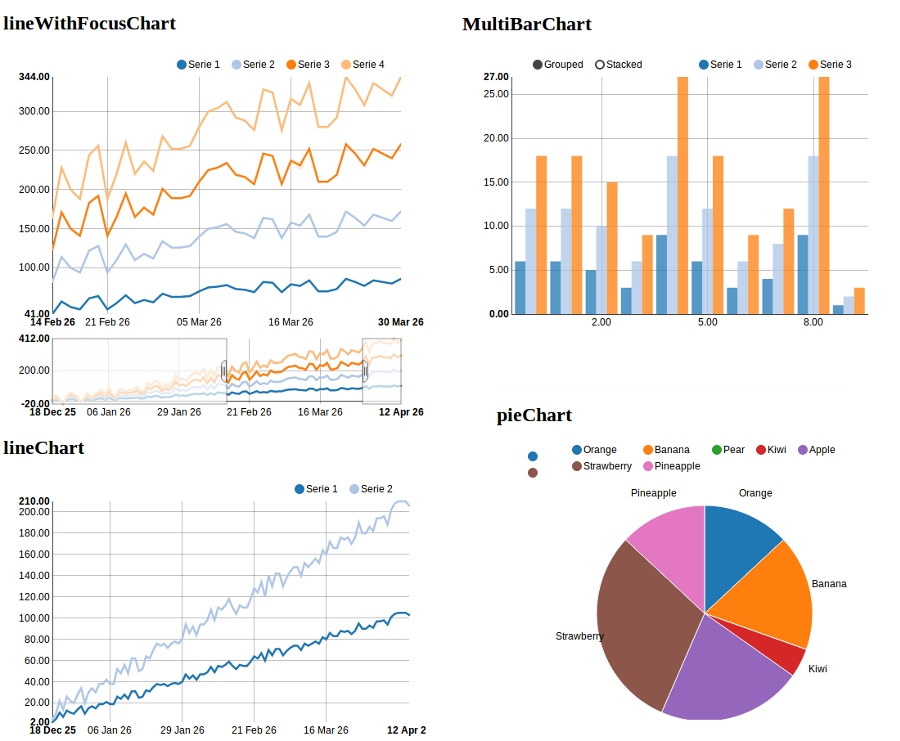
Want to try it yourself? Install python-nvd3, enter your python shell and try this quick demo:
>>> from nvd3 import pieChart
>>> type = 'pieChart'
>>> chart = pieChart(name=type, color_category='category20c', height=450, width=450)
>>> xdata = ["Orange", "Banana", "Pear", "Kiwi", "Apple", "Strawberry", "Pineapple"]
>>> ydata = [3, 4, 0, 1, 5, 7, 3]
>>> extra_serie = {"tooltip": {"y_start": "", "y_end": " cal"}}
>>> chart.add_serie(y=ydata, x=xdata, extra=extra_serie)
>>> chart.buildcontent()
>>> print chart.htmlcontent
This will output the following HTML to render a live chart. The HTML could be stored into a HTML file, used in a Web application, or even used via Ipython Notebook:
<div id="pieChart"><svg style="width:450px;height:450px;"></svg></div>
<script>
data_pieChart=[{"values": [{"value": 3, "label": "Orange"},
               {"value": 4, "label": "Banana"},
               {"value": 0, "label": "Pear"},
               {"value": 1, "label": "Kiwi"},
               {"value": 5, "label": "Apple"},
               {"value": 7, "label": "Strawberry"},
               {"value": 3, "label": "Pineapple"}], "key": "Serie 1"}];

nv.addGraph(function() {
    var chart = nv.models.pieChart();
    chart.margin({top: 30, right: 60, bottom: 20, left: 60});
    var datum = data_pieChart[0].values;
            chart.tooltipContent(function(key, y, e, graph) {
                var x = String(key);
                var y =  String(y)  + ' cal';
                tooltip_str = '<center><b>'+x+'</b></center>' + y;
                return tooltip_str;
            });
        chart.showLegend(true);
        chart.showLabels(true);
        chart.donut(false);
    chart
        .x(function(d) { return d.label })
        .y(function(d) { return d.value });
    chart.width(450);
    chart.height(450);
    d3.select('#pieChart svg')
        .datum(datum)
        .transition().duration(500)
        .attr('width', 450)
        .attr('height', 450)
        .call(chart);
});
</script>
Documentation
Check out the documentation on ‘Read the Docs’(http://python-nvd3.readthedocs.org) for some live Chart examples!
Installation
Install, upgrade and uninstall python-nvd3 with these commands:
$ pip install python-nvd3
$ pip install --upgrade python-nvd3
$ pip uninstall python-nvd3
Dependecies
D3 and NvD3 can be installed through bower (which itself can be installed through npm). See http://bower.io/ and https://npmjs.org for further information. To install bower globally execute:
$ npm install -g bower
Note : you might prefer to save your npm dependencies locally in a package.json file.
Then in the directory where you will use python-nvd3, just execute the following commands:
$ bower install d3#3.3.8
$ bower install nvd3#1.1.12-beta
This will create a directory “bower_components” where d3 & nvd3 will be saved.
Note : you might prefer to save your bower dependencies locally in a bower.json file. You can also configure the directory where your bower dependencies will be saved adding a .bowerrc file in your project root directory.
Do you like Django?
There is also a django wrapper for nvd3 available: https://github.com/areski/django-nvd3
IPython & Notebook
Python-NVD3 works nicely with Notebook (thanks to @jdavidheiser)
You can check this notebook that demonstrates ipython compatibility in the nvd3-python package: http://nbviewer.ipython.org/gist/jdavidheiser/9552624
!!! Notebook seems to be broken for the moment !!!
License
Python-nvd3 is licensed under MIT, see MIT-LICENSE.txt.
Release history Release notifications | RSS feed


Download files
Download the file for your platform. If you're not sure which to choose, learn more about installing packages.
Source Distribution
File details
Details for the file python-nvd3-0.13.3.tar.gz.
File metadata
- Download URL: python-nvd3-0.13.3.tar.gz
- Upload date:
- Size: 39.1 kB
- Tags: Source
- Uploaded using Trusted Publishing? No
File hashes
| Algorithm | Hash digest | |
|---|---|---|
| SHA256 |
96e0f4758fa683d428f7ac8cfe2b37e09b4d9c9f281157b4e010406f10d4fbce
|
|
| MD5 |
1da9dc68d7baf15af0fbec0cbae52f6a
|
|
| BLAKE2b-256 |
6a145e15c11743fd262bf210a45a266e346008c628809327ed83f76601dc38e3
|






