
Jupyter Qt console


Project description
Jupyter QtConsole





A rich Qt-based console for working with Jupyter kernels, supporting rich media output, session export, and more.
The Qtconsole is a very lightweight application that largely feels like a terminal, but provides a number of enhancements only possible in a GUI, such as inline figures, proper multiline editing with syntax highlighting, graphical calltips, and more.
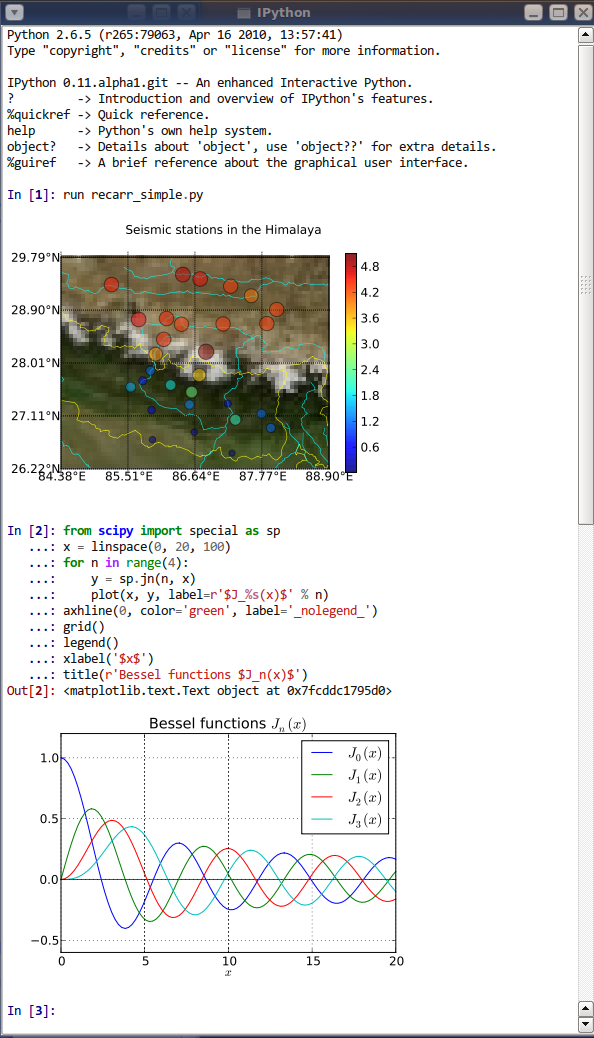
Install Qtconsole
The Qtconsole requires Python bindings for Qt, such as PyQt6, PySide6, PyQt5 or PySide2.
Although pip and conda may be used to install the Qtconsole, conda is simpler to use since it automatically installs PyQt5. Alternatively, the Qtconsole installation with pip needs additional steps since pip doesn't install the Qt requirement.
Install using conda
To install:
conda install qtconsole
Note: If the Qtconsole is installed using conda, it will automatically install the Qt requirement as well.
Install using pip
To install:
pip install qtconsole
Note: Make sure that Qt is installed. Unfortunately, Qt is not installed when using pip. The next section gives instructions on doing it.
Installing Qt (if needed)
You can install PyQt5 with pip using the following command:
pip install pyqt5
or with a system package manager on Linux. For Windows, PyQt binary packages may be used.
Note: Additional information about using a system package manager may be found in the qtconsole documentation.
More installation instructions for PyQt can be found in the PyQt5 documentation and PyQt4 documentation
Source packages for Windows/Linux/MacOS can be found here: PyQt5 and PyQt4.
Usage
To run the Qtconsole:
jupyter qtconsole
Resources
- Project Jupyter website
- Documentation for the Qtconsole
- Documentation for Project Jupyter [PDF]
- Issues
- Technical support - Jupyter Google Group
Release history Release notifications | RSS feed


Download files
Download the file for your platform. If you're not sure which to choose, learn more about installing packages.
Source Distribution
Built Distribution
Filter files by name, interpreter, ABI, and platform.
If you're not sure about the file name format, learn more about wheel file names.
Copy a direct link to the current filters
File details
Details for the file qtconsole-5.5.0.tar.gz.
File metadata
- Download URL: qtconsole-5.5.0.tar.gz
- Upload date:
- Size: 439.0 kB
- Tags: Source
- Uploaded using Trusted Publishing? No
- Uploaded via: twine/4.0.2 CPython/3.8.10
File hashes
| Algorithm | Hash digest | |
|---|---|---|
| SHA256 |
ea8b4a07d7dc915a1b1238fbfe2c9aea570640402557b64615e09a4bc60df47c
|
|
| MD5 |
b0744fec8dcecfc5260e7c0e7ba25a40
|
|
| BLAKE2b-256 |
7b18c70872d9d3ffb689ae94a09d84fbb7230d4887e2208b2a1858fc1bbb0cc9
|
File details
Details for the file qtconsole-5.5.0-py3-none-any.whl.
File metadata
- Download URL: qtconsole-5.5.0-py3-none-any.whl
- Upload date:
- Size: 123.4 kB
- Tags: Python 3
- Uploaded using Trusted Publishing? No
- Uploaded via: twine/4.0.2 CPython/3.8.10
File hashes
| Algorithm | Hash digest | |
|---|---|---|
| SHA256 |
6b6bcf8f834c6df1579a3e6623c8531b85d3e723997cee3a1156296df14716c8
|
|
| MD5 |
8943864d37a3d57bc0757e96f6db1fb5
|
|
| BLAKE2b-256 |
5e2a759ab817bbcea1c3ac188129eba897bdfcba0adbf4b7d8e64e02ca995e38
|






