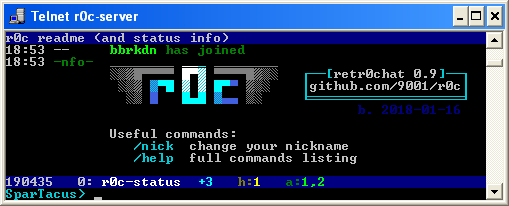
retr0chat telnet/vt100 chat server

Project description
r0c telnet server
- retr0chat, irc-like chat service for superthin clients (on PyPI)
- MIT-Licensed, 2018-01-07, ed @ irc.rizon.net
- windows telnet 360 noscope <- good video
- see installation or grab the latest release: r0c.py
summary
imagine being stuck on ancient gear, in the middle of nowhere, on a slow connection between machines that are even more archaic than the toaster you're trying to keep from falling apart
retr0chat is the lightweight, no-dependencies, runs-anywhere solution for when life gives you lemons
- tries to be irssi
- zero dependencies on python 2.6, 2.7, 3.x
- supports telnet, netcat, /dev/tcp, TLS clients
- modem-aware; comfortable at 1200 bps
- fallbacks for inhumane conditions
- linemode
- no vt100 / ansi escape codes
endorsements
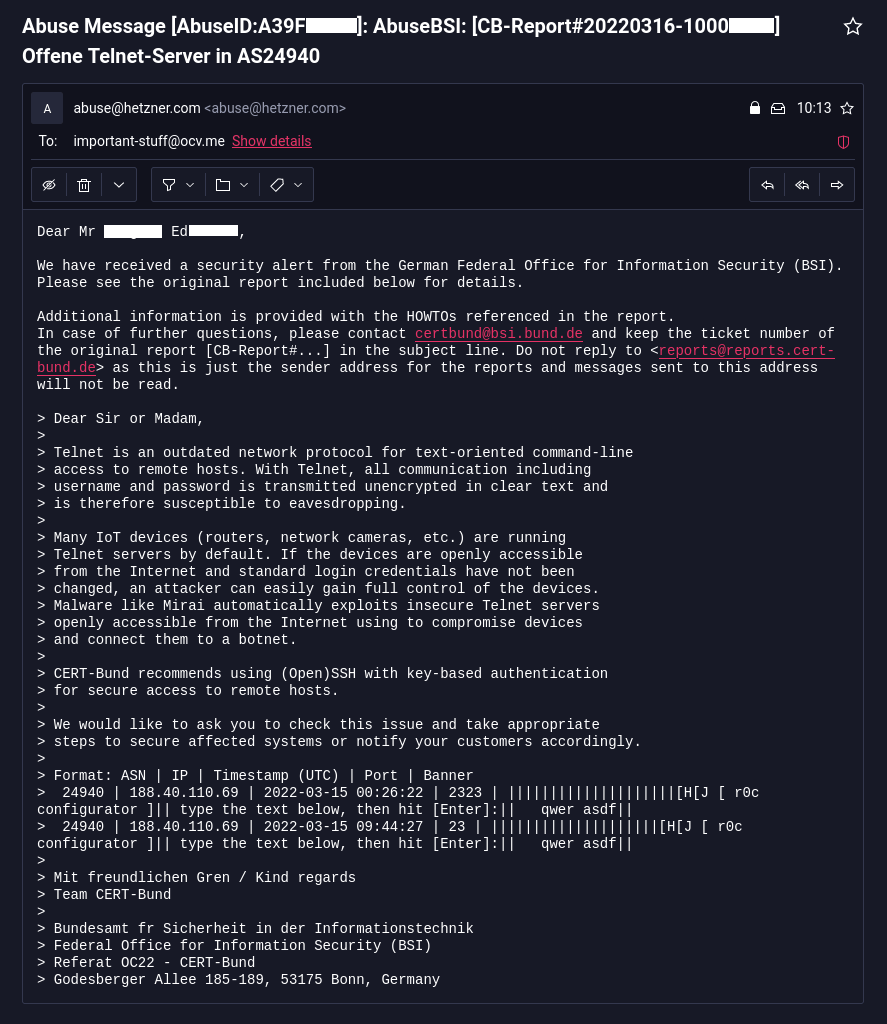
- the german federal office for information security does not approve
features
irc-like:
- public channels with persistent history (pgup/pgdn)
- private messages (
/msg acidburn hey) - nick completion with
Tab ↹ - notifications (bell/visual) on hilights and PMs
- command subset (
/nick,/join,/part,/names,/topic,/me) - inline message coloring, see
/help
technical:
- client behavior detection (echo, colors, charset, newline)
- message input with readline-like editing (arrow-left/right, home/end, backspace)
- history of sent messages (arrow-up/down)
- bandwidth-conservative (push/pop lines instead of full redraws; scroll-regions)
- fast enough; 1'000 clients @ 200 msgs/sec
windows clients
- use putty in telnet mode
- or the powershell client
- or enable
Telnet Clientin control panel->programs->programs and features->turn windows features on or off, then press WIN+R and runtelnet r0c.int
putty is the best option;
- the powershell client is OK and no longer spammy as of windows 10.0.15063 (win10 1703 / LTSC)
- windows-telnet has a bug (since win7) where non-ascii letters occasionally render but usually dont
- this is due to a buffer overflow in
telnet.exe, so r0c will apply a rate-limit to avoid it - looks like messages larger than 512 bytes end up messing with the unicode glyphs area? or something
- this is due to a buffer overflow in
linux clients
most to least recommended
| client | example |
|---|---|
| telnet | telnet r0c.int |
| socat | socat -,raw,echo=0 tcp:r0c.int:531 |
| bash | mostly internals |
| netcat | nc r0c.int 531 |
you can even exec 147<>/dev/tcp/r0c.int/531;cat<&147&while IFS= read -rn1 x;do [ -z "$x" ]&&x=$'\n';printf %s "$x">&147;done (disconnect using exec 147<&-; killall cat #sorry)
tls clients
if you enable TLS with -tpt 2424 (telnet) and/or -tpn 1515 (netcat) you can connect to r0c with TLS encryption using any of the following:
telnet-ssl -zssl -zsecure -zcacert=r0c.crt r0c.int 2424socat -,raw,echo=0 openssl:r0c.int:1515,cafile=cert.crtstty -icanon; ncat --ssl --ssl-trustfile r0c.crt -v r0c.int 1515stty -icanon; openssl s_client -CAfile ~/.r0c/cert.crt -connect r0c.int:1515
installation
just run r0c.py and that's it (usually)
- or install through pypi (python3 only):
python3 -m pip install --user -U r0c
you can run it as a service so it autostarts on boot:
- on most linux distros: systemd service (automatically does port-forwarding)
- on alpine / gentoo: openrc service
- on windows: nssm probably
firewall rules
skip this section if:
- you are using the systemd service
- or you are running as root and do not have a firewall
- or you're on windows
telnet uses port 23 by default, so on the server you'll want to port-forward 23 to 2323 (and 531 to 1531 for plaintext):
iptables -A INPUT -p tcp --dport 23 -m state --state NEW -j ACCEPT
iptables -A INPUT -p tcp --dport 531 -m state --state NEW -j ACCEPT
iptables -A INPUT -p tcp --dport 2323 -m state --state NEW -j ACCEPT
iptables -A INPUT -p tcp --dport 1531 -m state --state NEW -j ACCEPT
iptables -A INPUT -p tcp --dport 2424 -m state --state NEW -j ACCEPT  # tls telnet
iptables -A INPUT -p tcp --dport 1515 -m state --state NEW -j ACCEPT  # tls netcat
iptables -t nat -A PREROUTING -i eth0 -p tcp --dport 23 -j REDIRECT --to-port 2323
iptables -t nat -A PREROUTING -i eth0 -p tcp --dport 531 -j REDIRECT --to-port 1531
(you'll have to do this on every reboot)
documentation
not really but there is a list of commands and a list of hotkeys
Release history Release notifications | RSS feed


Download files
Download the file for your platform. If you're not sure which to choose, learn more about installing packages.
Source Distribution
Built Distribution
Filter files by name, interpreter, ABI, and platform.
If you're not sure about the file name format, learn more about wheel file names.
Copy a direct link to the current filters
File details
Details for the file r0c-1.4.2.tar.gz.
File metadata
- Download URL: r0c-1.4.2.tar.gz
- Upload date:
- Size: 65.2 kB
- Tags: Source
- Uploaded using Trusted Publishing? No
- Uploaded via: twine/4.0.2 CPython/3.11.3
File hashes
| Algorithm | Hash digest | |
|---|---|---|
| SHA256 |
c0792bde749736d25104a185dea06dfdbff9eb9c269485f31085fc8f70b8ef91
|
|
| MD5 |
90b31fc68e9eb47f226587f407da76dc
|
|
| BLAKE2b-256 |
469acccefc9c5ea1b947706d12e5941b7128d48bf006e7ac9eca4522d7426ae3
|
File details
Details for the file r0c-1.4.2-py2.py3-none-any.whl.
File metadata
- Download URL: r0c-1.4.2-py2.py3-none-any.whl
- Upload date:
- Size: 71.8 kB
- Tags: Python 2, Python 3
- Uploaded using Trusted Publishing? No
- Uploaded via: twine/4.0.2 CPython/3.11.3
File hashes
| Algorithm | Hash digest | |
|---|---|---|
| SHA256 |
05814e3484eb3d839133cd5fe032601c5e27a0061f7f39558b20c1ff787de308
|
|
| MD5 |
126bcd4a5221b9a24e9c704fe204e48e
|
|
| BLAKE2b-256 |
fadfa47d6ee0eb2ae35c1d13c55d2fe6eb3f67ef77ad3de2b10d6a91b4bcf842
|