
Interactive visualizations to assess fairness, explain models, generate counterfactual examples, analyze causal effects and analyze errors in Machine Learning models.

Project description









Responsible AI Toolbox
Responsible AI is an approach to assessing, developing, and deploying AI systems in a safe, trustworthy, and ethical manner, and take responsible decisions and actions.
Responsible AI Toolbox is a suite of tools provides a collection of model and data exploration and assessment user interfaces that enable a better understanding of AI systems. These interfaces empower developers and stakeholders of AI systems to develop and monitor AI more responsibly, and take better data-driven actions.
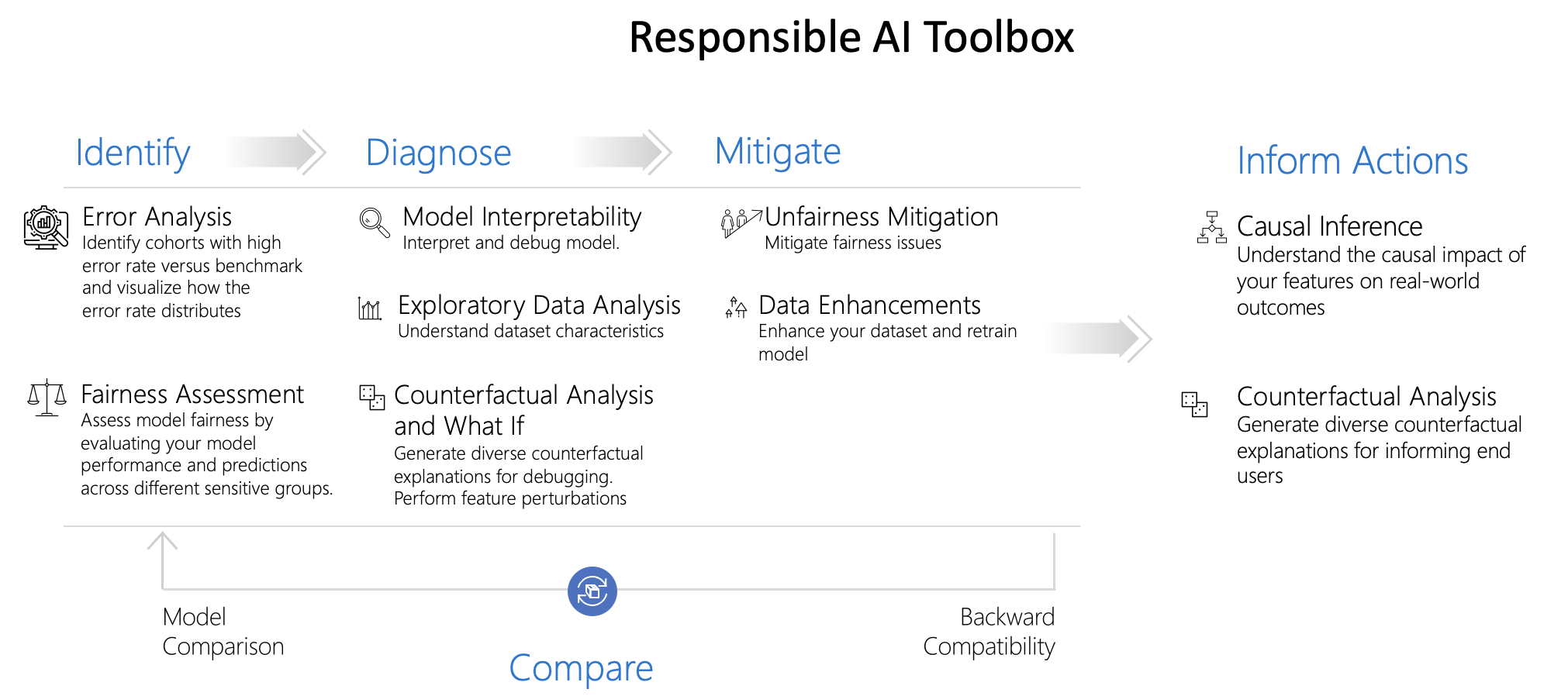
The Toolbox consists of four dashboards:
- Error Analysis dashboard, for identifying model errors and discovering cohorts of data for which the model underperforms.
- Interpretability dashboard, for understanding model predictions. This dashboard is powered by InterpretML.
- Fairness dashboard, for understanding model’s fairness issues using various group-fairness metrics across sensitive features and cohorts. This dashboard is powered by Fairlearn.
- Responsible AI dashboard, a single pane of glass bringing together several mature Responsible AI tools from the toolbox for a holistic responsible assessment and debugging of models and making informed business decisions. With this dashboard, you can identify model errors, diagnose why those errors are happening, and mitigate them. Moreover, the causal decision-making capabilities provide actionable insights to your stakeholders and customers.
Introducing Responsible AI dashboard
Responsible AI dashboard is a single pane of glass, enabling you to easily flow through different stages of model debugging and decision-making. This customizable experience can be taken in a multitude of directions, from analyzing the model or data holistically, to conducting a deep dive or comparison on cohorts of interest, to explaining and perturbing model predictions for individual instances, and to informing users on business decisions and actions.

In order to achieve these capabilities, the dashboard integrates together ideas and technologies from several open-source toolkits in the areas of
-
Error Analysis powered by Error Analysis, which identifies cohorts of data with higher error rate than the overall benchmark. These discrepancies might occur when the system or model underperforms for specific demographic groups or infrequently observed input conditions in the training data.
-
Model Interpretability powered by InterpretML, which explains blackbox models, helping users understand their model's global behavior, or the reasons behind individual predictions.
-
Counterfactual Analysis powered by DiCE, which shows feature-perturbed versions of the same datapoint who would have received a different prediction outcome, e.g., Taylor's loan has been rejected by the model. But they would have received the loan if their income was higher by $10,000.
-
Causal Analysis powered by EconML, which focuses on answering What If-style questions to apply data-driven decision-making – how would revenue be affected if a corporation pursues a new pricing strategy? Would a new medication improve a patient’s condition, all else equal?
Responsible AI dashboard is designed to achieve the following goals:
- To help further accelerate engineering processes in machine learning by enabling practitioners to design customizable workflows and tailor Responsible AI dashboards that best fit with their model assessment and data-driven decision making scenarios.
- To help model developers create end to end and fluid debugging experiences and navigate seamlessly through error identification and diagnosis by using interactive visualizations that identify errors, inspect the data, generate global and local explanations models, and potentially inspect problematic examples.
- To help business stakeholders explore causal relationships in the data and take informed decisions in the real world.
This repository contains the Jupyter notebooks with examples to showcase how to use this widget. Get started here.
Installation
Use the following pip command to install the Responsible AI Toolbox.
If running in jupyter, please make sure to restart the jupyter kernel after installing.
pip install raiwidgets
Responsible AI dashboard Customization
The Responsible AI Toolbox’s strength lies in its customizability. It empowers users to design tailored, end-to-end model debugging and decision-making workflows that address their particular needs. Need some inspiration? Here are some examples of how Toolbox components can be put together to analyze scenarios in different ways:
| Responsible AI Dashboard Flow | Use Case |
|---|---|
| Model Overview -> Error Analysis -> Data Explorer | To identify model erros and diagnose them by understanding the underlying data distribution |
| Model Overview -> Error Analysis -> Counterfactuals Analysis and What-If | To diagnose errors in individual instances with counterfactual analysis (minimum change to lead to a different model prediction) |
| Model Overview -> Data Explorer | To understand the root cause of errors and fairness issues introduced via data imbalances or lack of representation of a particular data cohort |
| Model Overview -> Interpretability | To diagnose model errors through understanding how the model has made its predictions |
| Data Explorer -> Causal Inference | To distinguish between correlations and causations in the data or decide the best treatments to apply to see a positive outcome |
| Interpretability -> Causal Inference | To learn whether the factors that model has used for decision making has any causal effect on the real-world outcome. |
| Data Explorer -> Counterfactuals Analysis and What-If | To address customer questions about what they can do next time to get a different outcome from an AI. |
Useful Links
Model Debugging Examples:
- Try the tool: model debugging of a census income prediction model (classification)
- Try the tool: model debugging of a housing price prediction model (classification)
- Try the tool: model debugging of a diabetes progression prediction model (regression)
Responsible Decision Making Examples:
- Try the tool: make decisions for house improvements
- Try the tool: provide recommendations to patients using diabetes data
Supported Models
This Responsible AI Toolbox API supports models that are trained on datasets in Python numpy.ndarray, pandas.DataFrame, iml.datatypes.DenseData, or scipy.sparse.csr_matrix format.
The explanation functions of Interpret-Community accept both models and pipelines as input as long as the model or pipeline implements a predict or predict_proba function that conforms to the Scikit convention. If not compatible, you can wrap your model's prediction function into a wrapper function that transforms the output into the format that is supported (predict or predict_proba of Scikit), and pass that wrapper function to your selected interpretability techniques.
If a pipeline script is provided, the explanation function assumes that the running pipeline script returns a prediction. The repository also supports models trained via PyTorch, TensorFlow, and Keras deep learning frameworks.
Other Use Cases
Tools within the Responsible AI Toolbox can also be used with AI models offered as APIs by providers such as Azure Cognitive Services. To see example use cases, see the folders below:
- Cognitive Services Speech to Text Fairness testing
- Cognitive Services Face Verification Fairness testing
Maintainers
Release history Release notifications | RSS feed


Download files
Download the file for your platform. If you're not sure which to choose, learn more about installing packages.
Source Distribution
Built Distribution
Filter files by name, interpreter, ABI, and platform.
If you're not sure about the file name format, learn more about wheel file names.
Copy a direct link to the current filters
File details
Details for the file raiwidgets-0.18.2.tar.gz.
File metadata
- Download URL: raiwidgets-0.18.2.tar.gz
- Upload date:
- Size: 2.2 MB
- Tags: Source
- Uploaded using Trusted Publishing? No
- Uploaded via: twine/4.0.0 CPython/3.9.13
File hashes
| Algorithm | Hash digest | |
|---|---|---|
| SHA256 |
5633ae3609188cb4877b690ede4d3f2ea540a6e91d020378937470d6c98d533b
|
|
| MD5 |
6c527574321d0de752cfe307afe3103b
|
|
| BLAKE2b-256 |
3b010c5d8c200489113f6a7e5073e4f9155f3ba786148212c9f403124a0c369b
|
File details
Details for the file raiwidgets-0.18.2-py3-none-any.whl.
File metadata
- Download URL: raiwidgets-0.18.2-py3-none-any.whl
- Upload date:
- Size: 2.2 MB
- Tags: Python 3
- Uploaded using Trusted Publishing? No
- Uploaded via: twine/4.0.0 CPython/3.9.13
File hashes
| Algorithm | Hash digest | |
|---|---|---|
| SHA256 |
02e2e176de01ae84e621411265e9b1e8e2fafe1d2b44e74a7daa8ca2eb452d7a
|
|
| MD5 |
ed2db5c130d5f0d465ae4e219ce51a75
|
|
| BLAKE2b-256 |
1fec4b7b1421d6502b2d29d431aef71d03819b31bf73baf52d48d548558e40ed
|






