
The ResourceCODE Marine Data Toolbox is a python package to facilitate the access to recent hindcast database of sea-state , along with a set of state-of-the-art methods for data analysis.

Project description
Resourcecode library
Description
The ResourceCODE Marine Data Toolbox is a python package to facilitate the access to recent hindcast database of sea-state, along with a set of state-of-the-art methods for data analysis. This toolbox provides developers with a set of standard functions for resource assessment and operations planning. The advanced statistical modelling tools provided together with the embedded high resolution wave hindcast database allow the developers with a set of standard functions for resource assessment, extreme values modelling and operations planning.
It is dedicated to users without the knowledge of manipulating numerous netCDF files or developing statistical analysis, but is also designed to fulfill expert met-ocean analysts needs. The advanced statistical modelling tools provided allow the developers of Offshore Renewable Energy (ORE) devices to conduct the necessary assessments to reduce uncertainty in expected environmental conditions,and de-risk investment in future technology design.
Installation
To install the library, you may first of all, create a dedicated virtual environment:
$ cd /your/work/directory
$ python3 -m venv env-resourcecode
then, you activate it:
$ source env-resourcecode/bin/activate
(env-resourcecode)$
In this virtual environment, you can now install the library. The library is not available on PyPI yet, therefore you have to download the archive (here for instance), and then install it:
(env-resourcecode)$ python -m pip install /your/downloads/directory/resourcecode-branch-default.zip
[…]
To test whether the install has been successful, you can run:
(env-resourcecode)$ python -c "import resourcecode ; print(resourcecode.__version__)"
0.1.0
which should print the current locally installed version of resourcecode.
Configuration
The library needs a configuration file to work properly. This file contains in particular the URL of the Cassendra API.
The library will look for the configuration at the following location (in the order) :
- in the file described by the
RESOURCECODE_CONFIG_FILEPATHenvironment variable. - in a file named
resourcecode.iniin the current directory. - in a file located in
$HOME/.config/resourcecode.ini. - in a file located in
/usr/local/etc/resourcecode/config.ini
The search stops at the first file found.
The default configuration file can be found here. You may
download it and move it to this location: $HOME/.config/resourcecode.ini.
You may need to update the Cassandra URL.
Example of use
Once the library is installed and the configuration is done, you can use the library.
The first thing to do, is a create a Client. The client will query the
cassandra database for you, and return a pandas dataframe of your selection.
See the following example:
>>> import resourcecode
>>> client = resourcecode.Client()
>>> data = client.get_dataframe_from_criteria(
"""
{
    "node": 0,
    "start": 1483228400,
    "end": 1489903600,
    "parameter": ["fp", "hs"]
}
""")
>>> data
                        fp     hs
2017-01-01 00:00:00  0.074  0.296
2017-01-01 01:00:00  0.072  0.400
2017-01-01 02:00:00  0.071  0.356
2017-01-01 03:00:00  0.071  0.350
2017-01-01 04:00:00  0.074  0.256
...                    ...    ...
2017-01-31 19:00:00  0.096  0.250
2017-01-31 20:00:00  0.096  0.332
2017-01-31 21:00:00  0.096  0.480
2017-01-31 22:00:00  0.096  0.612
2017-01-31 23:00:00  0.097  0.756

[744 rows x 2 columns]
>>> data.describe()
               fp          hs
count  744.000000  744.000000
mean     0.088046    0.537551
std      0.011400    0.192594
min      0.058000    0.160000
25%      0.081000    0.370000
50%      0.087000    0.533000
75%      0.095000    0.688500
max      0.120000    0.948000

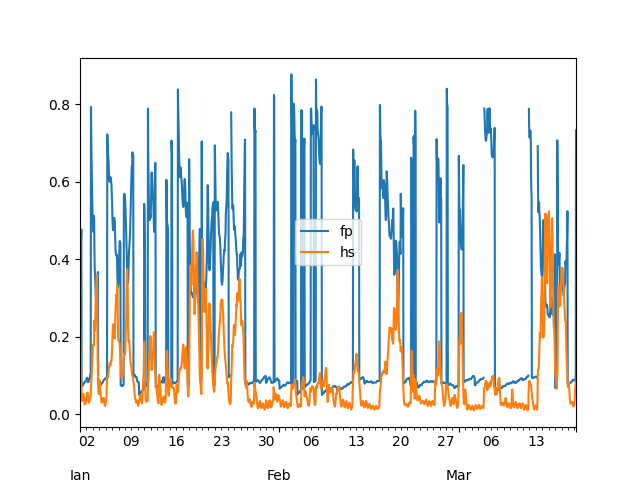
>>> # if you have malptolib installed, you can do the following
>>> ax = data.plot()
>>> ax.figure.savefig('fp_hs.png')
which will generate the following plot:
Acknowledgments
The ResourceCode Python module was developed by Logilab based on various scientific codes written by the partners of the ResourceCode Projet: EMEC, CentraleNantes, Ocean Data Lab, Smart Bay Ireland, University College Dublin, INNOSEA, Ifremer, University of Edinburgh. More information at https://resourcecode.ifremer.fr.
Release history Release notifications | RSS feed


Download files
Download the file for your platform. If you're not sure which to choose, learn more about installing packages.
Source Distribution
Built Distribution
Filter files by name, interpreter, ABI, and platform.
If you're not sure about the file name format, learn more about wheel file names.
Copy a direct link to the current filters
File details
Details for the file resourcecode-0.5.5.tar.gz.
File metadata
- Download URL: resourcecode-0.5.5.tar.gz
- Upload date:
- Size: 11.3 MB
- Tags: Source
- Uploaded using Trusted Publishing? No
- Uploaded via: twine/3.8.0 pkginfo/1.8.2 readme-renderer/32.0 requests/2.27.1 requests-toolbelt/0.9.1 urllib3/1.26.8 tqdm/4.62.3 importlib-metadata/4.11.1 keyring/23.5.0 rfc3986/2.0.0 colorama/0.4.4 CPython/3.9.10
File hashes
| Algorithm | Hash digest | |
|---|---|---|
| SHA256 |
4cf81b30411208b47c0ad934a0b04e4f2c45880a591f1b8f7cc294f93746d9f8
|
|
| MD5 |
bbb67f3de1012fd7047d08ab73d0a279
|
|
| BLAKE2b-256 |
62eb3ac1b073aa9e259907788c2b4ccaa8f623a51d2c9c06f1da2f7243882de2
|
File details
Details for the file resourcecode-0.5.5-py3-none-any.whl.
File metadata
- Download URL: resourcecode-0.5.5-py3-none-any.whl
- Upload date:
- Size: 11.3 MB
- Tags: Python 3
- Uploaded using Trusted Publishing? No
- Uploaded via: twine/3.8.0 pkginfo/1.8.2 readme-renderer/32.0 requests/2.27.1 requests-toolbelt/0.9.1 urllib3/1.26.8 tqdm/4.62.3 importlib-metadata/4.11.1 keyring/23.5.0 rfc3986/2.0.0 colorama/0.4.4 CPython/3.9.10
File hashes
| Algorithm | Hash digest | |
|---|---|---|
| SHA256 |
98a6461eb36534fea6b66f4b1edc8d2dbe0e6a83011fa9f5791fc54c46265a61
|
|
| MD5 |
779a0a72e7f1e48604e25ea3fdd5c4b4
|
|
| BLAKE2b-256 |
e323e09f092871e443da484284366b09894ec5543ae5e4c8c1594ffcd19c4472
|






