
RetinaFace: Deep Face Detection Framework in TensorFlow for Python

Project description
RetinaFace











RetinaFace is a deep learning based cutting-edge facial detector for Python coming with facial landmarks. Its detection performance is amazing even in the crowd as shown in the following illustration.
RetinaFace is the face detection module of insightface project. The original implementation is mainly based on mxnet. Then, its tensorflow based re-implementation is published by Stanislas Bertrand. So, this repo is heavily inspired from the study of Stanislas Bertrand. Its source code is simplified and it is transformed to pip compatible but the main structure of the reference model and its pre-trained weights are same.

The Yellow Angels - Fenerbahce Women's Volleyball Team
Installation 

The easiest way to install retinaface is to download it from PyPI. It's going to install the library itself and its prerequisites as well.
$ pip install retina-face
RetinaFace is also available at Conda. You can alternatively install the package via conda.
$ conda install -c conda-forge retina-face
Then, you will be able to import the library and use its functionalities.
from retinaface import RetinaFace
Face Detection - Demo
RetinaFace offers a face detection function. It expects an exact path of an image as input.
resp = RetinaFace.detect_faces("img1.jpg")
Then, it will return the facial area coordinates and some landmarks (eyes, nose and mouth) with a confidence score.
{
    "face_1": {
        "score": 0.9993440508842468,
        "facial_area": [155, 81, 434, 443],
        "landmarks": {
          "right_eye": [257.82974, 209.64787],
          "left_eye": [374.93427, 251.78687],
          "nose": [303.4773, 299.91144],
          "mouth_right": [228.37329, 338.73193],
          "mouth_left": [320.21982, 374.58798]
        }
  }
}
A modern face recognition pipeline consists of 4 common stages: detect, align, normalize, represent and verify. Experiments show that alignment increases the face recognition accuracy almost 1%. Here, retinaface can find the facial landmarks including eye coordinates. In this way, it can apply alignment to detected faces with its extracting faces function.
import matplotlib.pyplot as plt
faces = RetinaFace.extract_faces(img_path = "img.jpg", align = True)
for face in faces:
  plt.imshow(face)
  plt.show()
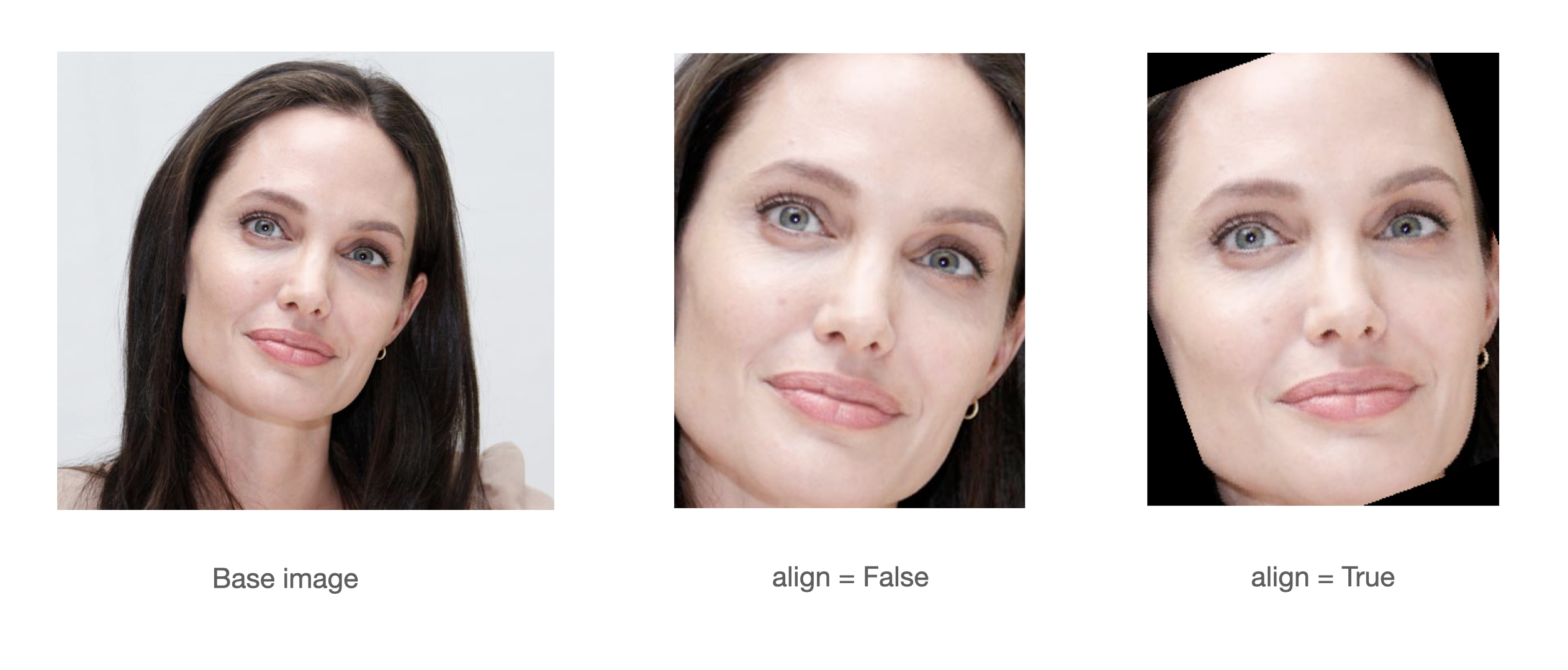
If you prefer to prioritize alignment before detection, you may opt to set the align_first parameter to True. By following this approach, you will eliminate the black pixel areas that arise as a result of alignment following detection. This functionality is applicable only when the provided image contains a single face.
Face Recognition - Demo
Notice that face recognition module of insightface project is ArcFace, and face detection module is RetinaFace. ArcFace and RetinaFace pair is wrapped in deepface library for Python. Consider to use deepface if you need an end-to-end face recognition pipeline.
#!pip install deepface
from deepface import DeepFace
obj = DeepFace.verify("img1.jpg", "img2.jpg"
          , model_name = 'ArcFace', detector_backend = 'retinaface')
print(obj["verified"])
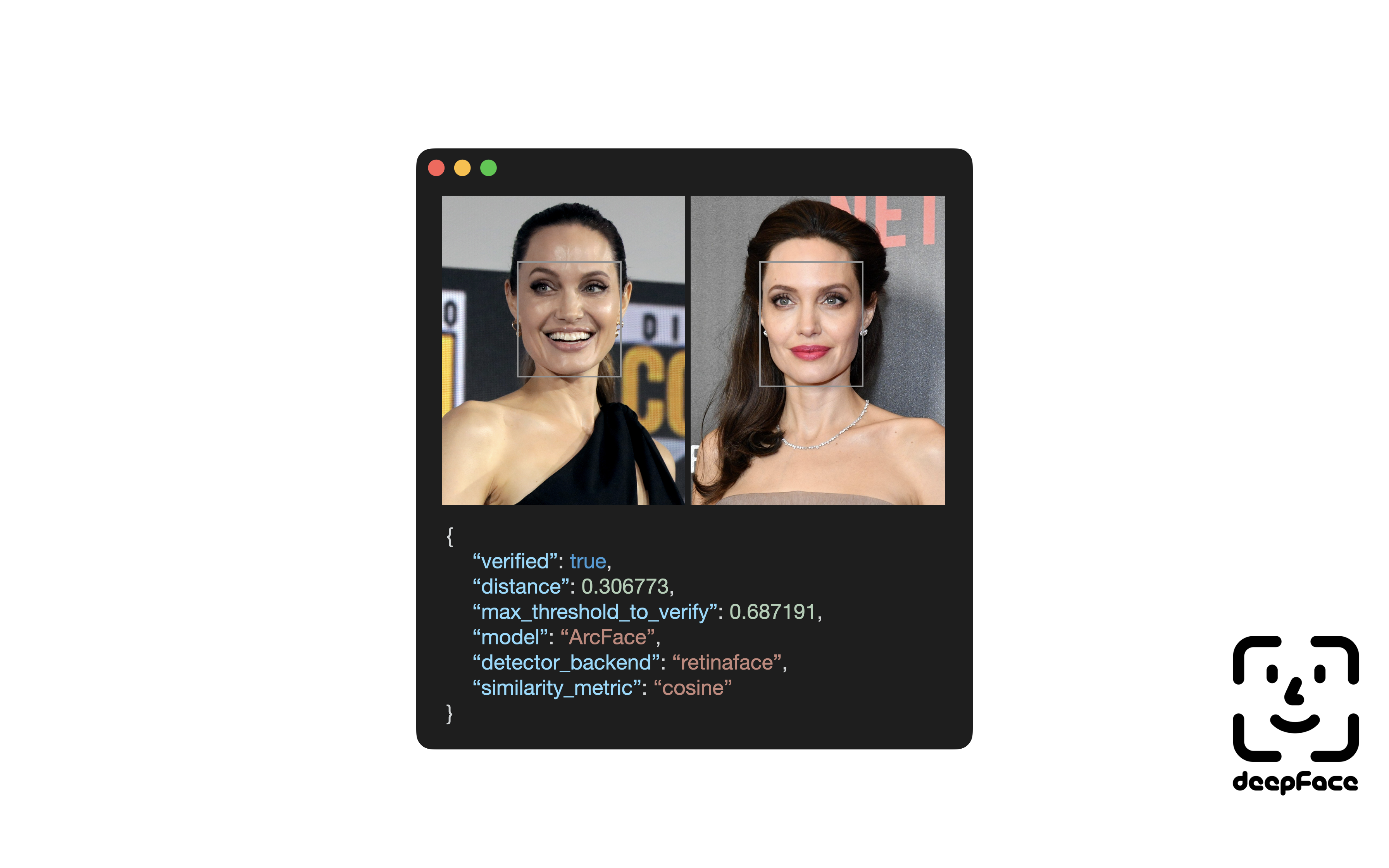
Notice that ArcFace got 99.40% accuracy on LFW data set whereas human beings just have 97.53% confidence.
Contribution 
Pull requests are more than welcome! You should run the unit tests and linting locally before creating a PR. Commands make test and make lint will help you to run it locally. Once a PR created, GitHub test workflow will be run automatically and unit test results will be available in GitHub actions before approval.
Support
There are many ways to support a project. Starring⭐️ the repo is just one 🙏
You can also support this work on Patreon

Acknowledgements
This work is mainly based on the insightface project and retinaface paper; and it is heavily inspired from the re-implementation of retinaface-tf2 by Stanislas Bertrand. Finally, Bertrand's implementation uses Fast R-CNN written by Ross Girshick in the background. All of those reference studies are licensed under MIT license.
Citation
If you are using RetinaFace in your research, please consider to cite its original research paper. Besides, if you are using this re-implementation of retinaface, please consider to cite the following research papers as well. Here are examples of BibTeX entries:
@inproceedings{serengil2020lightface,
  title        = {LightFace: A Hybrid Deep Face Recognition Framework},
  author       = {Serengil, Sefik Ilkin and Ozpinar, Alper},
  booktitle    = {2020 Innovations in Intelligent Systems and Applications Conference (ASYU)},
  pages        = {23-27},
  year         = {2020},
  doi          = {10.1109/ASYU50717.2020.9259802},
  url          = {https://doi.org/10.1109/ASYU50717.2020.9259802},
  organization = {IEEE}
}
@inproceedings{serengil2021lightface,
  title        = {HyperExtended LightFace: A Facial Attribute Analysis Framework},
  author       = {Serengil, Sefik Ilkin and Ozpinar, Alper},
  booktitle    = {2021 International Conference on Engineering and Emerging Technologies (ICEET)},
  pages        = {1-4},
  year         = {2021},
  doi          = {10.1109/ICEET53442.2021.9659697},
  url          = {https://doi.org/10.1109/ICEET53442.2021.9659697},
  organization = {IEEE}
}
Finally, if you use this RetinaFace re-implementation in your GitHub projects, please add retina-face dependency in the requirements.txt.
Licence
This project is licensed under the MIT License - see LICENSE for more details.
Release history Release notifications | RSS feed


Download files
Download the file for your platform. If you're not sure which to choose, learn more about installing packages.
Source Distribution
Built Distribution
Filter files by name, interpreter, ABI, and platform.
If you're not sure about the file name format, learn more about wheel file names.
Copy a direct link to the current filters
File details
Details for the file retina-face-0.0.15.tar.gz.
File metadata
- Download URL: retina-face-0.0.15.tar.gz
- Upload date:
- Size: 18.5 kB
- Tags: Source
- Uploaded using Trusted Publishing? No
- Uploaded via: twine/3.8.0 pkginfo/1.8.2 readme-renderer/32.0 requests/2.31.0 requests-toolbelt/0.10.1 urllib3/1.26.15 tqdm/4.50.2 importlib-metadata/6.8.0 keyring/23.5.0 rfc3986/2.0.0 colorama/0.4.4 CPython/3.8.5
File hashes
| Algorithm | Hash digest | |
|---|---|---|
| SHA256 |
89524b258642879cd60fc452ba2576abeb19dee10c05fcc1620f84dd60935840
|
|
| MD5 |
5a5a3c4677a5d0eb59e10a7e2989c371
|
|
| BLAKE2b-256 |
9442d14483ffa596b81c1f26db11cec37c66a46891c872b60bf2ebbf566b716d
|
File details
Details for the file retina_face-0.0.15-py3-none-any.whl.
File metadata
- Download URL: retina_face-0.0.15-py3-none-any.whl
- Upload date:
- Size: 24.3 kB
- Tags: Python 3
- Uploaded using Trusted Publishing? No
- Uploaded via: twine/3.8.0 pkginfo/1.8.2 readme-renderer/32.0 requests/2.31.0 requests-toolbelt/0.10.1 urllib3/1.26.15 tqdm/4.50.2 importlib-metadata/6.8.0 keyring/23.5.0 rfc3986/2.0.0 colorama/0.4.4 CPython/3.8.5
File hashes
| Algorithm | Hash digest | |
|---|---|---|
| SHA256 |
fef3036ae61fbeda84237e29876f17e241a5bf852065ef1a85748a3b7a90e0b3
|
|
| MD5 |
2c472a1b966160d82a6221963e57b345
|
|
| BLAKE2b-256 |
7736155fe445891fa32f003b2a7937e8ded07d34c5f8811732e1a24f5eb873ca
|






