
robotframework extension lib for test mongodb

Project description
robot-mongodb-library
robot framework extension for test connect mongodb
https://pypi.org/project/robot-mongodb-library/
How to Use
pip install robot-mongodb-library
Import into project file : example.robot
*** Settings ***
Library   RobotMongoDBLibrary.Insert
Library   RobotMongoDBLibrary.Update
Library   RobotMongoDBLibrary.Find
Library   RobotMongoDBLibrary.Delete


*** Variables ***
# CONNECT WITH PARAMS
# &{MONGODB_CONNECT_STRING}    host=127.0.0.1   port=27017   username=admin   password=password    database=robotdb     collection=customer

# CONNECT WITH CONNECTION STRING CLUSTER
&{MONGODB_CONNECT_STRING}=   connection=mongodb://admin:password@127.0.0.1:27017,127.0.0.2:27017,127.0.0.3:27017/robotdb?authSource=robotdb    database=robotdb   collection=customer


*** Test Cases ***
Test insert data into mongodb
    &{DATA}     Create Dictionary   _id=X100001      name=Tarathep      address=Thailand     phone=8888888888
    ${MSG}      InsertOne   ${MONGODB_CONNECT_STRING}    ${DATA}
    Should Be Equal    ${MSG}    INSERTED SUCCESS


Test find by fillter data from mongodb
    &{FILLTER}     Create Dictionary   name=Tarathep      address=Thailand
    ${RESULTS}     Find    ${MONGODB_CONNECT_STRING}    ${FILLTER}
    FOR    ${RESULT}    IN    @{RESULTS}
           Log To Console    ${RESULT["phone"]}
    END


Test update data phone into mongodb by ID
    &{NEWDATA}     Create Dictionary        phone=0649359xxx
    ${MSG}      Update   ${MONGODB_CONNECT_STRING}    X100001      ${NEWDATA}
    Should Be Equal    ${MSG}    UPDATED SUCCESS


Test find data by ID from mongodb
    ${RESULTS}     FindOneByID    ${MONGODB_CONNECT_STRING}    X100001
    Log To Console      ${RESULTS}


Test delete data by ID into mongodb
    ${MSG}     DeleteOneByID    ${MONGODB_CONNECT_STRING}    X100001
    Should Be Equal    ${MSG}    DELETED SUCCESS
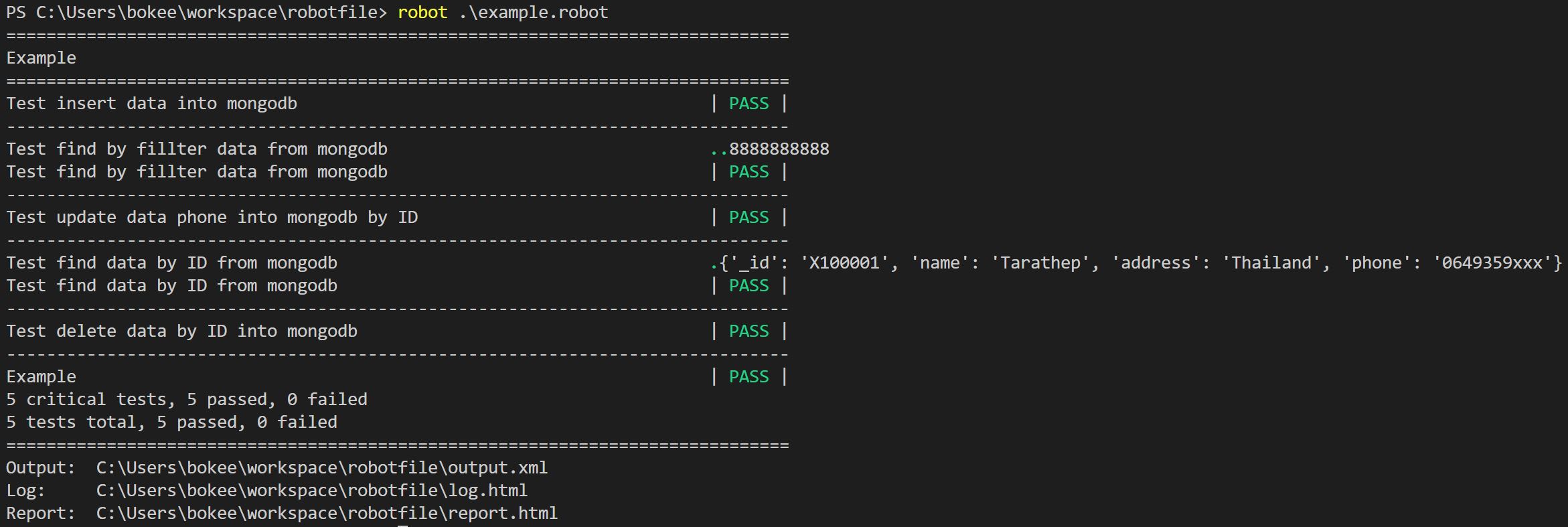
Example Result


Download files
Download the file for your platform. If you're not sure which to choose, learn more about installing packages.
Source Distribution
File details
Details for the file robot-mongodb-library-0.0.5.tar.gz.
File metadata
- Download URL: robot-mongodb-library-0.0.5.tar.gz
- Upload date:
- Size: 3.0 kB
- Tags: Source
- Uploaded using Trusted Publishing? No
- Uploaded via: twine/3.4.1 importlib_metadata/3.10.0 pkginfo/1.7.0 requests/2.25.1 requests-toolbelt/0.9.1 tqdm/4.60.0 CPython/3.9.2
File hashes
| Algorithm | Hash digest | |
|---|---|---|
| SHA256 |
18dad7335deacde39a0eea39c0389cbcac1ab32a34f3c5ef13ba5e537daf457c
|
|
| MD5 |
b0c5ca131ed561bd68000a17811527c4
|
|
| BLAKE2b-256 |
efe45a00d8c5cb3a9862e9981ed3b16c0200efe93ccd9a8e69f0ce4c254ec45e
|






