
An extremely fast Python linter, written in Rust.


Project description
Ruff




Discord | Docs | Playground
An extremely fast Python linter, written in Rust.
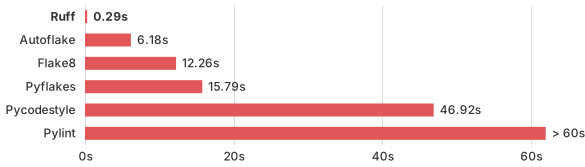
Linting the CPython codebase from scratch.
- ⚡️ 10-100x faster than existing linters
- 🐍 Installable via
pip - 🛠️
pyproject.tomlsupport - 🤝 Python 3.11 compatibility
- 📦 Built-in caching, to avoid re-analyzing unchanged files
- 🔧 Autofix support, for automatic error correction (e.g., automatically remove unused imports)
- 📏 Over 400 built-in rules (and growing)
- ⚖️ Near-parity with the built-in Flake8 rule set
- 🔌 Native re-implementations of dozens of Flake8 plugins, like flake8-bugbear
- ⌨️ First-party editor integrations for VS Code and more
- 🌎 Monorepo-friendly, with hierarchical and cascading configuration
Ruff aims to be orders of magnitude faster than alternative tools while integrating more functionality behind a single, common interface.
Ruff can be used to replace Flake8 (plus dozens of plugins), isort, pydocstyle, yesqa, eradicate, pyupgrade, and autoflake, all while executing tens or hundreds of times faster than any individual tool.
Ruff is extremely actively developed and used in major open-source projects like:
...and many more.
Read the launch blog post or the most recent project update.
Testimonials
Sebastián Ramírez, creator of FastAPI:
Ruff is so fast that sometimes I add an intentional bug in the code just to confirm it's actually running and checking the code.
Nick Schrock, founder of Elementl, co-creator of GraphQL:
Why is Ruff a gamechanger? Primarily because it is nearly 1000x faster. Literally. Not a typo. On our largest module (dagster itself, 250k LOC) pylint takes about 2.5 minutes, parallelized across 4 cores on my M1. Running ruff against our entire codebase takes .4 seconds.
Bryan Van de Ven, co-creator of Bokeh, original author of Conda:
Ruff is ~150-200x faster than flake8 on my machine, scanning the whole repo takes ~0.2s instead of ~20s. This is an enormous quality of life improvement for local dev. It's fast enough that I added it as an actual commit hook, which is terrific.
Timothy Crosley, creator of isort:
Just switched my first project to Ruff. Only one downside so far: it's so fast I couldn't believe it was working till I intentionally introduced some errors.
Tim Abbott, lead developer of Zulip:
This is just ridiculously fast...
ruffis amazing.
Table of Contents
For more, see the documentation.
- Installation and Usage
- Configuration
- Supported Rules
- Contributing
- Support
- Acknowledgements
- Who's Using Ruff?
- License
Installation and Usage
For more, see the documentation.
Installation
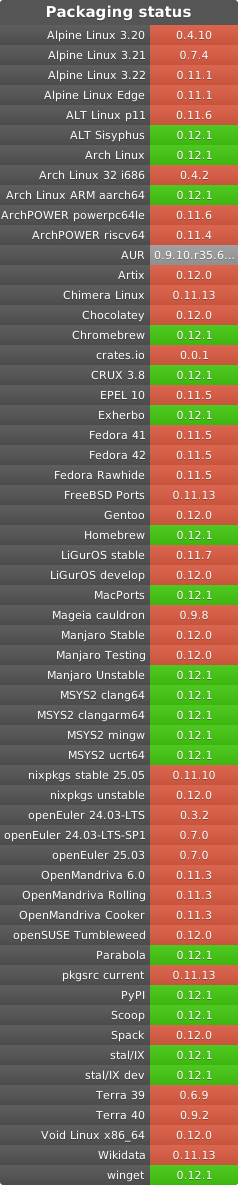
Ruff is available as ruff on PyPI:
pip install ruff
For macOS Homebrew and Linuxbrew users, Ruff is also available as ruff on Homebrew:
brew install ruff
For Conda users, Ruff is also available as ruff on conda-forge:
conda install -c conda-forge ruff
For Arch Linux users, Ruff is also available as ruff on the official repositories:
pacman -S ruff
For Alpine users, Ruff is also available as ruff on the testing repositories:
apk add ruff
Usage
To run Ruff, try any of the following:
ruff check .                        # Lint all files in the current directory (and any subdirectories)
ruff check path/to/code/            # Lint all files in `/path/to/code` (and any subdirectories)
ruff check path/to/code/*.py        # Lint all `.py` files in `/path/to/code`
ruff check path/to/code/to/file.py  # Lint `file.py`
You can run Ruff in --watch mode to automatically re-run on-change:
ruff check path/to/code/ --watch
Ruff also works with pre-commit:
- repo: https://github.com/charliermarsh/ruff-pre-commit
  # Ruff version.
  rev: 'v0.0.250'
  hooks:
    - id: ruff
Or, to enable autofix:
- repo: https://github.com/charliermarsh/ruff-pre-commit
  # Ruff version.
  rev: 'v0.0.250'
  hooks:
    - id: ruff
      args: [--fix, --exit-non-zero-on-fix]
Configuration
Ruff can be configured via a pyproject.toml file, a ruff.toml file, or through the command line.
For a complete enumeration of the available configuration options, see the documentation.
Configure via pyproject.toml
If left unspecified, the default configuration is equivalent to:
[tool.ruff]
# Enable Pyflakes `E` and `F` codes by default.
select = ["E", "F"]
ignore = []

# Allow autofix for all enabled rules (when `--fix`) is provided.
fixable = ["A", "B", "C", "D", "E", "F", "..."]
unfixable = []

# Exclude a variety of commonly ignored directories.
exclude = [
    ".bzr",
    ".direnv",
    ".eggs",
    ".git",
    ".hg",
    ".mypy_cache",
    ".nox",
    ".pants.d",
    ".pytype",
    ".ruff_cache",
    ".svn",
    ".tox",
    ".venv",
    "__pypackages__",
    "_build",
    "buck-out",
    "build",
    "dist",
    "node_modules",
    "venv",
]
per-file-ignores = {}

# Same as Black.
line-length = 88

# Allow unused variables when underscore-prefixed.
dummy-variable-rgx = "^(_+|(_+[a-zA-Z0-9_]*[a-zA-Z0-9]+?))$"

# Assume Python 3.10.
target-version = "py310"

[tool.ruff.mccabe]
# Unlike Flake8, default to a complexity level of 10.
max-complexity = 10
As an example, the following would configure Ruff to: (1) enforce flake8-bugbear rules, in addition
to the defaults; (2) avoid enforcing line-length violations (E501); (3) avoid attempting to fix
flake8-bugbear (B) violations; and (3) ignore import-at-top-of-file violations (E402) in
__init__.py files:
[tool.ruff]
# Enable flake8-bugbear (`B`) rules.
select = ["E", "F", "B"]

# Never enforce `E501` (line length violations).
ignore = ["E501"]

# Avoid trying to fix flake8-bugbear (`B`) violations.
unfixable = ["B"]

# Ignore `E402` (import violations) in all `__init__.py` files, and in `path/to/file.py`.
[tool.ruff.per-file-ignores]
"__init__.py" = ["E402"]
"path/to/file.py" = ["E402"]
Plugin configurations should be expressed as subsections, e.g.:
[tool.ruff]
# Add "Q" to the list of enabled codes.
select = ["E", "F", "Q"]

[tool.ruff.flake8-quotes]
docstring-quotes = "double"
Ruff mirrors Flake8's rule code system, in which each rule code consists of a one-to-three letter
prefix, followed by three digits (e.g., F401). The prefix indicates that "source" of the rule
(e.g., F for Pyflakes, E for pycodestyle, ANN for flake8-annotations). The set of enabled
rules is determined by the select and ignore options, which support both the full code (e.g.,
F401) and the prefix (e.g., F).
As a special-case, Ruff also supports the ALL code, which enables all rules. Note that some of the
pydocstyle rules conflict (e.g., D203 and D211) as they represent alternative docstring
formats. Enabling ALL without further configuration may result in suboptimal behavior, especially
for the pydocstyle plugin.
If you're wondering how to configure Ruff, here are some recommended guidelines:
- Prefer
selectandignoreoverextend-selectandextend-ignore, to make your rule set explicit. - Use
ALLwith discretion. EnablingALLwill implicitly enable new rules whenever you upgrade. - Start with a small set of rules (
select = ["E", "F"]) and add a category at-a-time. For example, you might consider expanding toselect = ["E", "F", "B"]to enable the popular flake8-bugbear extension. - By default, Ruff's autofix is aggressive. If you find that it's too aggressive for your liking, consider turning off autofix for specific rules or categories (see: FAQ).
Configure via ruff.toml
As an alternative to pyproject.toml, Ruff will also respect a ruff.toml file, which implements
an equivalent schema (though the [tool.ruff] hierarchy can be omitted). For example, the
pyproject.toml described above would be represented via the following ruff.toml:
# Enable flake8-bugbear (`B`) rules.
select = ["E", "F", "B"]

# Never enforce `E501` (line length violations).
ignore = ["E501"]

# Avoid trying to fix flake8-bugbear (`B`) violations.
unfixable = ["B"]

# Ignore `E402` (import violations) in all `__init__.py` files, and in `path/to/file.py`.
[per-file-ignores]
"__init__.py" = ["E402"]
"path/to/file.py" = ["E402"]
For a full list of configurable options, see the list of all options.
Command-line interface
Some configuration settings can be provided via the command-line, such as those related to rule enablement and disablement, file discovery, logging level, and more:
ruff check path/to/code/ --select F401 --select F403 --quiet
See ruff help for more on Ruff's top-level commands:
Ruff: An extremely fast Python linter.

Usage: ruff [OPTIONS] <COMMAND>

Commands:
  check   Run Ruff on the given files or directories (default)
  rule    Explain a rule
  config  List or describe the available configuration options
  linter  List all supported upstream linters
  clean   Clear any caches in the current directory and any subdirectories
  help    Print this message or the help of the given subcommand(s)

Options:
  -h, --help     Print help
  -V, --version  Print version

Log levels:
  -v, --verbose  Enable verbose logging
  -q, --quiet    Print lint violations, but nothing else
  -s, --silent   Disable all logging (but still exit with status code "1" upon detecting lint violations)

For help with a specific command, see: `ruff help <command>`.
Or ruff help check for more on the linting command:
Run Ruff on the given files or directories (default)

Usage: ruff check [OPTIONS] [FILES]...

Arguments:
  [FILES]...  List of files or directories to check

Options:
      --fix
          Attempt to automatically fix lint violations
      --show-source
          Show violations with source code
      --show-fixes
          Show an enumeration of all autofixed lint violations
      --diff
          Avoid writing any fixed files back; instead, output a diff for each changed file to stdout
  -w, --watch
          Run in watch mode by re-running whenever files change
      --fix-only
          Fix any fixable lint violations, but don't report on leftover violations. Implies `--fix`
      --format <FORMAT>
          Output serialization format for violations [env: RUFF_FORMAT=] [possible values: text, json, junit, grouped, github, gitlab, pylint]
      --target-version <TARGET_VERSION>
          The minimum Python version that should be supported
      --config <CONFIG>
          Path to the `pyproject.toml` or `ruff.toml` file to use for configuration
      --statistics
          Show counts for every rule with at least one violation
      --add-noqa
          Enable automatic additions of `noqa` directives to failing lines
      --show-files
          See the files Ruff will be run against with the current settings
      --show-settings
          See the settings Ruff will use to lint a given Python file
  -h, --help
          Print help

Rule selection:
      --select <RULE_CODE>
          Comma-separated list of rule codes to enable (or ALL, to enable all rules)
      --ignore <RULE_CODE>
          Comma-separated list of rule codes to disable
      --extend-select <RULE_CODE>
          Like --select, but adds additional rule codes on top of the selected ones
      --per-file-ignores <PER_FILE_IGNORES>
          List of mappings from file pattern to code to exclude
      --fixable <RULE_CODE>
          List of rule codes to treat as eligible for autofix. Only applicable when autofix itself is enabled (e.g., via `--fix`)
      --unfixable <RULE_CODE>
          List of rule codes to treat as ineligible for autofix. Only applicable when autofix itself is enabled (e.g., via `--fix`)

File selection:
      --exclude <FILE_PATTERN>         List of paths, used to omit files and/or directories from analysis
      --extend-exclude <FILE_PATTERN>  Like --exclude, but adds additional files and directories on top of those already excluded
      --respect-gitignore              Respect file exclusions via `.gitignore` and other standard ignore files
      --force-exclude                  Enforce exclusions, even for paths passed to Ruff directly on the command-line

Miscellaneous:
  -n, --no-cache
          Disable cache reads
      --isolated
          Ignore all configuration files
      --cache-dir <CACHE_DIR>
          Path to the cache directory [env: RUFF_CACHE_DIR=]
      --stdin-filename <STDIN_FILENAME>
          The name of the file when passing it through stdin
  -e, --exit-zero
          Exit with status code "0", even upon detecting lint violations
      --exit-non-zero-on-fix
          Exit with a non-zero status code if any files were modified via autofix, even if no lint violations remain

Log levels:
  -v, --verbose  Enable verbose logging
  -q, --quiet    Print lint violations, but nothing else
  -s, --silent   Disable all logging (but still exit with status code "1" upon detecting lint violations)
pyproject.toml discovery
Similar to ESLint,
Ruff supports hierarchical configuration, such that the "closest" pyproject.toml file in the
directory hierarchy is used for every individual file, with all paths in the pyproject.toml file
(e.g., exclude globs, src paths) being resolved relative to the directory containing the
pyproject.toml file.
There are a few exceptions to these rules:
- In locating the "closest"
pyproject.tomlfile for a given path, Ruff ignores anypyproject.tomlfiles that lack a[tool.ruff]section. - If a configuration file is passed directly via
--config, those settings are used for across files. Any relative paths in that configuration file (likeexcludeglobs orsrcpaths) are resolved relative to the current working directory. - If no
pyproject.tomlfile is found in the filesystem hierarchy, Ruff will fall back to using a default configuration. If a user-specific configuration file exists at${config_dir}/ruff/pyproject.toml, that file will be used instead of the default configuration, with${config_dir}being determined via thedirscrate, and all relative paths being again resolved relative to the current working directory. - Any
pyproject.toml-supported settings that are provided on the command-line (e.g., via--select) will override the settings in every resolved configuration file.
Unlike ESLint,
Ruff does not merge settings across configuration files; instead, the "closest" configuration file
is used, and any parent configuration files are ignored. In lieu of this implicit cascade, Ruff
supports an extend field, which allows you to inherit the settings from another
pyproject.toml file, like so:
# Extend the `pyproject.toml` file in the parent directory.
extend = "../pyproject.toml"
# But use a different line length.
line-length = 100
All of the above rules apply equivalently to ruff.toml files. If Ruff detects both a ruff.toml
and pyproject.toml file, it will defer to the ruff.toml.
Python file discovery
When passed a path on the command-line, Ruff will automatically discover all Python files in that
path, taking into account the exclude and
extend-exclude settings in each directory's
pyproject.toml file.
By default, Ruff will also skip any files that are omitted via .ignore, .gitignore,
.git/info/exclude, and global gitignore files (see: respect-gitignore).
Files that are passed to ruff directly are always linted, regardless of the above criteria.
For example, ruff check /path/to/excluded/file.py will always lint file.py.
Rule resolution
The set of enabled rules is controlled via the select
and ignore settings, along with the
extend-select and
extend-ignore modifiers.
To resolve the enabled rule set, Ruff may need to reconcile select and ignore from a variety
of sources, including the current pyproject.toml, any inherited pyproject.toml files, and the
CLI (e.g., --select).
In those scenarios, Ruff uses the "highest-priority" select as the basis for the rule set, and
then applies any extend-select, ignore, and extend-ignore adjustments. CLI options are given
higher priority than pyproject.toml options, and the current pyproject.toml file is given higher
priority than any inherited pyproject.toml files.
For example, given the following pyproject.toml file:
[tool.ruff]
select = ["E", "F"]
ignore = ["F401"]
Running ruff check --select F401 would result in Ruff enforcing F401, and no other rules.
Running ruff check --extend-select B would result in Ruff enforcing the E, F, and B rules, with
the exception of F401.
Suppressing errors
To omit a lint rule entirely, add it to the "ignore" list via ignore
or extend-ignore, either on the command-line
or in your pyproject.toml file.
To ignore a violation inline, Ruff uses a noqa system similar to Flake8.
To ignore an individual violation, add # noqa: {code} to the end of the line, like so:
# Ignore F841.
x = 1  # noqa: F841

# Ignore E741 and F841.
i = 1  # noqa: E741, F841

# Ignore _all_ violations.
x = 1  # noqa
Note that, for multi-line strings, the noqa directive should come at the end of the string, and
will apply to the entire string, like so:
"""Lorem ipsum dolor sit amet.

Lorem ipsum dolor sit amet, consectetur adipiscing elit, sed do eiusmod tempor.
"""  # noqa: E501
To ignore all violations across an entire file, add # ruff: noqa to any line in the file, like so:
# ruff: noqa
To ignore a specific rule across an entire file, add # ruff: noqa: {code} to any line in the file,
like so:
# ruff: noqa: F841
Or see the per-file-ignores configuration
setting, which enables the same functionality via a pyproject.toml file.
Note that Ruff will also respect Flake8's # flake8: noqa directive, and will treat it as
equivalent to # ruff: noqa.
Automatic error suppression
Ruff supports several workflows to aid in noqa management.
First, Ruff provides a special rule code, RUF100, to enforce that your noqa directives are
"valid", in that the violations they say they ignore are actually being triggered on that line (and
thus suppressed). You can run ruff check /path/to/file.py --extend-select RUF100 to flag unused noqa
directives.
Second, Ruff can automatically remove unused noqa directives via its autofix functionality.
You can run ruff check /path/to/file.py --extend-select RUF100 --fix to automatically remove unused
noqa directives.
Third, Ruff can automatically add noqa directives to all failing lines. This is useful when
migrating a new codebase to Ruff. You can run ruff check /path/to/file.py --add-noqa to automatically
add noqa directives to all failing lines, with the appropriate rule codes.
Action comments
Ruff respects isort's action comments
(# isort: skip_file, # isort: on, # isort: off, # isort: skip, and # isort: split), which
enable selectively enabling and disabling import sorting for blocks of code and other inline
configuration.
See the isort documentation
for more.
Exit codes
By default, Ruff exits with the following status codes:
0if no violations were found, or if all present violations were fixed automatically.1if violations were found.2if Ruff terminates abnormally due to invalid configuration, invalid CLI options, or an internal error.
This convention mirrors that of tools like ESLint, Prettier, and RuboCop.
Ruff supports two command-line flags that alter its exit code behavior:
--exit-zerowill cause Ruff to exit with a status code of0even if violations were found. Note that Ruff will still exit with a status code of2if it terminates abnormally.--exit-non-zero-on-fixwill cause Ruff to exit with a status code of1if violations were found, even if all such violations were fixed automatically. Note that the use of--exit-non-zero-on-fixcan result in a non-zero exit code even if no violations remain after autofixing.
Autocompletion
Ruff supports autocompletion for most shells. A shell-specific completion script can be generated
by ruff generate-shell-completion <SHELL>, where <SHELL> is one of bash, elvish, fig, fish,
powershell, or zsh.
The exact steps required to enable autocompletion will vary by shell. For example instructions, see the Poetry or ripgrep documentation.
As an example: to enable autocompletion for Zsh, run
ruff generate-shell-completion zsh > ~/.zfunc/_ruff. Then add the following line to your
~/.zshrc file, if they're not already present:
fpath+=~/.zfunc
autoload -Uz compinit && compinit
Supported Rules
Ruff supports over 400 lint rules, many of which are inspired by popular tools like Flake8, isort, pyupgrade, and others. Regardless of the rule's origin, Ruff re-implements every rule in Rust as a first-party feature.
By default, Ruff enables Flake8's E and F rules. Ruff supports all rules from the F category,
and a subset of the E category, omitting those
stylistic rules made obsolete by the use of an autoformatter, like Black.
For a complete enumeration, see the list of rules in the Ruff documentation.
Contributing
Contributions are welcome and highly appreciated. To get started, check out the contributing guidelines. You can also join us on Discord.
Support
Having trouble? Check out the existing issues on GitHub, or feel free to open a new one.
You can also ask for help on Discord.
Acknowledgements
Ruff's linter draws on both the APIs and implementation details of many other tools in the Python ecosystem, especially Flake8, Pyflakes, pycodestyle, pydocstyle, pyupgrade, and isort.
In some cases, Ruff includes a "direct" Rust port of the corresponding tool. We're grateful to the maintainers of these tools for their work, and for all the value they've provided to the Python community.
Ruff's autoformatter is built on a fork of Rome's rome_formatter,
and again draws on both the APIs and implementation details of Rome,
Prettier, and Black.
Ruff is also influenced by a number of tools outside the Python ecosystem, like Clippy and ESLint.
Ruff is the beneficiary of a large number of contributors.
Ruff is released under the MIT license.
Who's Using Ruff?
Ruff is used in a number of major open-source projects, including:
- pandas
- FastAPI
- Transformers (Hugging Face)
- Diffusers (Hugging Face)
- Apache Airflow
- SciPy
- Zulip
- Bokeh
- Pydantic
- Dagster
- Dagger
- Sphinx
- Hatch
- PDM
- Jupyter
- Great Expectations
- ONNX
- Polars
- Ibis
- Synapse (Matrix)
- SnowCLI (Snowflake)
- Dispatch (Netflix)
- Saleor
- Pynecone
- OpenBB
- Home Assistant
- Pylint
- Cryptography (PyCA)
- cibuildwheel (PyPA)
- build (PyPA)
- Babel
- featuretools
- meson-python
- ZenML
License
MIT
Release history Release notifications | RSS feed


Download files
Download the file for your platform. If you're not sure which to choose, learn more about installing packages.
Source Distribution
Built Distributions
Filter files by name, interpreter, ABI, and platform.
If you're not sure about the file name format, learn more about wheel file names.
Copy a direct link to the current filters
File details
Details for the file ruff-0.0.250.tar.gz.
File metadata
- Download URL: ruff-0.0.250.tar.gz
- Upload date:
- Size: 734.3 kB
- Tags: Source
- Uploaded using Trusted Publishing? No
- Uploaded via: twine/4.0.2 CPython/3.10.6
File hashes
| Algorithm | Hash digest | |
|---|---|---|
| SHA256 |
7d56d8ae7664519757fd0b971b5594b900e5d68e875f1a95264a4aac73881be4
|
|
| MD5 |
90750e64ac82e4512488ee00be04e58c
|
|
| BLAKE2b-256 |
16fa6282dcb993f44d46faf20982aea10d2cc0c3edadcc49a46a135784ca78a5
|
File details
Details for the file ruff-0.0.250-py3-none-win_arm64.whl.
File metadata
- Download URL: ruff-0.0.250-py3-none-win_arm64.whl
- Upload date:
- Size: 3.3 MB
- Tags: Python 3, Windows ARM64
- Uploaded using Trusted Publishing? No
- Uploaded via: twine/4.0.2 CPython/3.10.6
File hashes
| Algorithm | Hash digest | |
|---|---|---|
| SHA256 |
c023b6550136354fcde2770d9eb59b579335bb24f31a2954c609025a95e5a044
|
|
| MD5 |
6eab077706a6140c437793ca2d10a211
|
|
| BLAKE2b-256 |
c3c345cfe8f278e96316cb96729943f4a0691b7824a522d1c4ab886aeaea3454
|
File details
Details for the file ruff-0.0.250-py3-none-win_amd64.whl.
File metadata
- Download URL: ruff-0.0.250-py3-none-win_amd64.whl
- Upload date:
- Size: 3.5 MB
- Tags: Python 3, Windows x86-64
- Uploaded using Trusted Publishing? No
- Uploaded via: twine/4.0.2 CPython/3.10.6
File hashes
| Algorithm | Hash digest | |
|---|---|---|
| SHA256 |
777fe459fdfdf152c7ff49e1631b3f0aee5581939e7115e72ced9c1172e2348a
|
|
| MD5 |
4160710f8e87abdde3a4c204f4fd5c11
|
|
| BLAKE2b-256 |
cee53d66ec88dbbd1efc1d5002e4c68598f5fcdb86d2721eef3dfcdd931e1239
|
File details
Details for the file ruff-0.0.250-py3-none-win32.whl.
File metadata
- Download URL: ruff-0.0.250-py3-none-win32.whl
- Upload date:
- Size: 3.4 MB
- Tags: Python 3, Windows x86
- Uploaded using Trusted Publishing? No
- Uploaded via: twine/4.0.2 CPython/3.10.6
File hashes
| Algorithm | Hash digest | |
|---|---|---|
| SHA256 |
7d3624416b11abd57e085b2b3e14fd6bd2bff0e5d591c07040fb3a98dbe4ce72
|
|
| MD5 |
a1a8fc04fb0a97ceaf686eee13fdaaea
|
|
| BLAKE2b-256 |
7ea927c59087ad89c840ec4e4e434a1baaefc94cdd262bc78d309bd20f2f725f
|
File details
Details for the file ruff-0.0.250-py3-none-musllinux_1_2_x86_64.whl.
File metadata
- Download URL: ruff-0.0.250-py3-none-musllinux_1_2_x86_64.whl
- Upload date:
- Size: 4.1 MB
- Tags: Python 3, musllinux: musl 1.2+ x86-64
- Uploaded using Trusted Publishing? No
- Uploaded via: twine/4.0.2 CPython/3.10.6
File hashes
| Algorithm | Hash digest | |
|---|---|---|
| SHA256 |
156425914a86244483b6937ae0d608568c74d6aa98e008491a561929dab7091d
|
|
| MD5 |
09d58971a6dafbdea3ccf6878b45751c
|
|
| BLAKE2b-256 |
4d45f5faa7424e6e380b0d83f32222ba507b62595c2cf7ce45590a0f4dfd2ae0
|
File details
Details for the file ruff-0.0.250-py3-none-musllinux_1_2_i686.whl.
File metadata
- Download URL: ruff-0.0.250-py3-none-musllinux_1_2_i686.whl
- Upload date:
- Size: 3.7 MB
- Tags: Python 3, musllinux: musl 1.2+ i686
- Uploaded using Trusted Publishing? No
- Uploaded via: twine/4.0.2 CPython/3.10.6
File hashes
| Algorithm | Hash digest | |
|---|---|---|
| SHA256 |
a47207e727432400eb1f913f77819d242c5d966e9a0670b773a0581aa1e94c9a
|
|
| MD5 |
4e12892200e30ccaa937d08ee40dbc6b
|
|
| BLAKE2b-256 |
3cd1d00d12a090e0099d344cbe8c53a2e0e822b1169d61a61205f38878bed97c
|
File details
Details for the file ruff-0.0.250-py3-none-musllinux_1_2_armv7l.whl.
File metadata
- Download URL: ruff-0.0.250-py3-none-musllinux_1_2_armv7l.whl
- Upload date:
- Size: 3.5 MB
- Tags: Python 3, musllinux: musl 1.2+ ARMv7l
- Uploaded using Trusted Publishing? No
- Uploaded via: twine/4.0.2 CPython/3.10.6
File hashes
| Algorithm | Hash digest | |
|---|---|---|
| SHA256 |
c0fd2748253b793fbb0e508606f1b6c3bf80f87eb4dfab1d488a9b25098fbea3
|
|
| MD5 |
6f841f5c5a335e484ca50ee60d808e8f
|
|
| BLAKE2b-256 |
a9550953074f95b8e998055a3a96df1f9964a065a602e80e9735b5dfa9b669ab
|
File details
Details for the file ruff-0.0.250-py3-none-musllinux_1_2_aarch64.whl.
File metadata
- Download URL: ruff-0.0.250-py3-none-musllinux_1_2_aarch64.whl
- Upload date:
- Size: 3.7 MB
- Tags: Python 3, musllinux: musl 1.2+ ARM64
- Uploaded using Trusted Publishing? No
- Uploaded via: twine/4.0.2 CPython/3.10.6
File hashes
| Algorithm | Hash digest | |
|---|---|---|
| SHA256 |
a258c1950ad210347538423f372288f09a8243924f6d855cecdc12eec23d989b
|
|
| MD5 |
e5393b2cc72be9ed76b4bb104e65857a
|
|
| BLAKE2b-256 |
5cd7e6dd1d9c7ac8b2da2a773d99f191c87a07da37f08552335eb5749d91e724
|
File details
Details for the file ruff-0.0.250-py3-none-manylinux_2_17_x86_64.manylinux2014_x86_64.whl.
File metadata
- Download URL: ruff-0.0.250-py3-none-manylinux_2_17_x86_64.manylinux2014_x86_64.whl
- Upload date:
- Size: 4.0 MB
- Tags: Python 3, manylinux: glibc 2.17+ x86-64
- Uploaded using Trusted Publishing? No
- Uploaded via: twine/4.0.2 CPython/3.10.6
File hashes
| Algorithm | Hash digest | |
|---|---|---|
| SHA256 |
b76679030f7c0066fa0377c852ee9a978cd3287b6c05680e209844e9a92f12b7
|
|
| MD5 |
d4ace2cde3c4540f5ae1e488650edafa
|
|
| BLAKE2b-256 |
a31eef5ba8666c9132537c1ced7700789d5576de8b8e7f845b2a662f294f6e0f
|
File details
Details for the file ruff-0.0.250-py3-none-manylinux_2_17_s390x.manylinux2014_s390x.whl.
File metadata
- Download URL: ruff-0.0.250-py3-none-manylinux_2_17_s390x.manylinux2014_s390x.whl
- Upload date:
- Size: 4.8 MB
- Tags: Python 3, manylinux: glibc 2.17+ s390x
- Uploaded using Trusted Publishing? No
- Uploaded via: twine/4.0.2 CPython/3.10.6
File hashes
| Algorithm | Hash digest | |
|---|---|---|
| SHA256 |
cd7e26ab0bb9a75c40b3a6a1afd75acf279ee81b0812fbfca6e952ea6e96950a
|
|
| MD5 |
a500e02903364d6d4e3692b11c00785f
|
|
| BLAKE2b-256 |
d61afac31ca923353ca3ea4e0ed9710cebd7bf6d8562c6d0c31f94296dccf8d6
|
File details
Details for the file ruff-0.0.250-py3-none-manylinux_2_17_ppc64le.manylinux2014_ppc64le.whl.
File metadata
- Download URL: ruff-0.0.250-py3-none-manylinux_2_17_ppc64le.manylinux2014_ppc64le.whl
- Upload date:
- Size: 4.4 MB
- Tags: Python 3, manylinux: glibc 2.17+ ppc64le
- Uploaded using Trusted Publishing? No
- Uploaded via: twine/4.0.2 CPython/3.10.6
File hashes
| Algorithm | Hash digest | |
|---|---|---|
| SHA256 |
9cb6d218c85ea3dd7c6a2dbafd1054f4075ee384efd4e9ae879e337053819ce8
|
|
| MD5 |
ec6aabc7cb733a965bc26004a60aa61e
|
|
| BLAKE2b-256 |
206187523309981edea33a348d2c6fbf433cdd7ae5bc3b690f3b653f1bb8574e
|
File details
Details for the file ruff-0.0.250-py3-none-manylinux_2_17_ppc64.manylinux2014_ppc64.whl.
File metadata
- Download URL: ruff-0.0.250-py3-none-manylinux_2_17_ppc64.manylinux2014_ppc64.whl
- Upload date:
- Size: 4.5 MB
- Tags: Python 3, manylinux: glibc 2.17+ ppc64
- Uploaded using Trusted Publishing? No
- Uploaded via: twine/4.0.2 CPython/3.10.6
File hashes
| Algorithm | Hash digest | |
|---|---|---|
| SHA256 |
d4802ac353f8b7fbbdeb3636bf240ef9168d6befa65403f7f162a59b5c62378a
|
|
| MD5 |
629b03067f36cb5312dabb6fdd289d86
|
|
| BLAKE2b-256 |
520ba2c8fe7bb60d2d99b41e7531a3413d4dd12c3db475aa7648826b5decb1bb
|
File details
Details for the file ruff-0.0.250-py3-none-manylinux_2_17_i686.manylinux2014_i686.whl.
File metadata
- Download URL: ruff-0.0.250-py3-none-manylinux_2_17_i686.manylinux2014_i686.whl
- Upload date:
- Size: 3.9 MB
- Tags: Python 3, manylinux: glibc 2.17+ i686
- Uploaded using Trusted Publishing? No
- Uploaded via: twine/4.0.2 CPython/3.10.6
File hashes
| Algorithm | Hash digest | |
|---|---|---|
| SHA256 |
b08b4b3e37f7909a0c580178f07016dbfb1307384bb80ddb6308d27b264d7a3f
|
|
| MD5 |
082a2a05bc1ef18e6dcf9285b0a52ea0
|
|
| BLAKE2b-256 |
00884b432e7deab4c21016ab2521c3011f2e6b377785a53da32733f43c120b85
|
File details
Details for the file ruff-0.0.250-py3-none-manylinux_2_17_armv7l.manylinux2014_armv7l.whl.
File metadata
- Download URL: ruff-0.0.250-py3-none-manylinux_2_17_armv7l.manylinux2014_armv7l.whl
- Upload date:
- Size: 3.5 MB
- Tags: Python 3, manylinux: glibc 2.17+ ARMv7l
- Uploaded using Trusted Publishing? No
- Uploaded via: twine/4.0.2 CPython/3.10.6
File hashes
| Algorithm | Hash digest | |
|---|---|---|
| SHA256 |
601bc0c6462777826bc5cd5fd271897b2cc874bfc6ba22d88dffc6fffee931de
|
|
| MD5 |
269b9da08c8e184c91e6b429d9416bfb
|
|
| BLAKE2b-256 |
505fea014266efffa44eb2aa331e1510595348b3f0a4c257e7f072f6b584ce8e
|
File details
Details for the file ruff-0.0.250-py3-none-manylinux_2_17_aarch64.manylinux2014_aarch64.whl.
File metadata
- Download URL: ruff-0.0.250-py3-none-manylinux_2_17_aarch64.manylinux2014_aarch64.whl
- Upload date:
- Size: 3.7 MB
- Tags: Python 3, manylinux: glibc 2.17+ ARM64
- Uploaded using Trusted Publishing? No
- Uploaded via: twine/4.0.2 CPython/3.10.6
File hashes
| Algorithm | Hash digest | |
|---|---|---|
| SHA256 |
039213a38229354c27f96225e540defc728fbbc4dee4514a9f95f954528028c0
|
|
| MD5 |
9243351e3335bc91fe70e4bd9012cdd0
|
|
| BLAKE2b-256 |
7c1195242fa213d5538c64a55b8f74d3f0ec5a3b35497283a40705dd7e9803db
|
File details
Details for the file ruff-0.0.250-py3-none-macosx_10_9_x86_64.macosx_11_0_arm64.macosx_10_9_universal2.whl.
File metadata
- Download URL: ruff-0.0.250-py3-none-macosx_10_9_x86_64.macosx_11_0_arm64.macosx_10_9_universal2.whl
- Upload date:
- Size: 7.5 MB
- Tags: Python 3, macOS 10.9+ universal2 (ARM64, x86-64), macOS 10.9+ x86-64, macOS 11.0+ ARM64
- Uploaded using Trusted Publishing? No
- Uploaded via: twine/4.0.2 CPython/3.10.6
File hashes
| Algorithm | Hash digest | |
|---|---|---|
| SHA256 |
4514628a0a95de6168a97f47029db81787518b4c6f2ed0fd68d77b5874ad9710
|
|
| MD5 |
a34c59cd10d915df3ce2d1aceedf65b5
|
|
| BLAKE2b-256 |
f59d8043d818515c4c75aeabf0f01c480ed334201e0894f70c24227228d4483e
|
File details
Details for the file ruff-0.0.250-py3-none-macosx_10_7_x86_64.whl.
File metadata
- Download URL: ruff-0.0.250-py3-none-macosx_10_7_x86_64.whl
- Upload date:
- Size: 4.0 MB
- Tags: Python 3, macOS 10.7+ x86-64
- Uploaded using Trusted Publishing? No
- Uploaded via: twine/4.0.2 CPython/3.10.6
File hashes
| Algorithm | Hash digest | |
|---|---|---|
| SHA256 |
6ada810621b0007246337463649a3c12bcd027cee356e3a83d91a56a7dfeb30d
|
|
| MD5 |
af29509300a0acd2990de469ca46758c
|
|
| BLAKE2b-256 |
8a6f233dc06f0c14b508fbfbfff8e863245085a2a8686ffe966d53b724d209c5
|






