
A simple visualiser for SCML worlds and tournaments

Project description
scml-vis




A simple visualiser for SCML worlds and tournaments.
You can watch a demo on YouTube
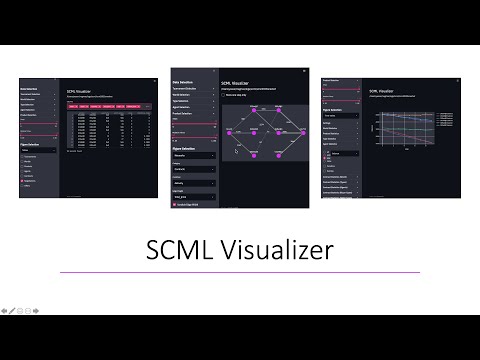
Screenshots


Main Features
- Displays any world/tournament run using the SCML package
- Allows filtering using worlds, agent types, and agent instances
- Shows world statistics, agent type and instance statistics and contract statistics as functions of simulation step/time
Requirements
- scml-vis requires Python 3.8 or above.
- scml-vis can visualize worlds created by scml 0.4.2 or later (simulations created using older versions of scml can be visualized in most cases but are not officially supported).
Installation
With pip:
python3 -m pip install scml-vis
With pipx:
python3 -m pip install --user pipx

pipx install scml-vis
Usage
The visualizer can be run using any of the following commands:
scmlv
scmlvis
scml-vis
Hereafter we will use the shorter version.
-
To visualize any of the recently run worlds and tournaments just run:
scmlv show
This will open your browser and allow you to choose a world or a tournament to display.
- If this is the first time you visualize logs in this folder, you will be asked
to compile visualization data
- If visualization data is available (or your pressed the
compile visualization databutton), you can now start visualizing the logs
- If this is the first time you visualize logs in this folder, you will be asked
to compile visualization data
-
To visualize the logs in a specific folder, you can directly pass the folder as in:
scmlv show -f path-to-your-folder
-
It is also possible to just compile visualization data without running the visualizer using:
scmlv compile path-to-your-folder
-
The visualizer creates a database that it uses to create all the figures you see. You can directly explore this database using:
scmlv explore path-to-your-folder
This will open a datasette page allowing you to explore this database
This dataset will contain 8 tables describing everything that was logged in the world or tournament.
Please consult datasette documentation for all the ways you can interact with this dataset.


Available visualizations
To visualize your logs, you need to follow three steps:
- Filter the dataset using the
Data Selectionsection of the sidebar. - Choose the family of figures you would like to show from the
Figure Selectiondropdown in the sidebar. Currently we provideTime-series,Tablesandothersthat are always available as well asNetworksthat are only available when you visualize a single world or filter the tournament to focus on a single world. - Choose the specific graph you want to see from the family selected in the previous step.
You can watch a demo of this process here
TODO List (Good Ideas for PRs)
Show negotiation logs (i.e. negotiation results)Display all contracts (i.e. in a table) based on selection criteriaZoom on negotiation details (i.e. exchanged offers)Add dynamic figures using plotly/altairAdd networkx like graphs of contracts / negotiations / offersAllow starting the app without specifying a folder.- Add saving and loading of the visualizer's state (i.e. what is visible).
- Add new figure types that do not have time/step in the x-axis.
- Correcting the placement of weights on edges in network views.
- Adding a graph showing negotiation history in the ufun-space of negotiators (will require a change in the scml package).
- Resolving the strange behavior of CI bands in plotly in some cases.
Release history Release notifications | RSS feed


Download files
Download the file for your platform. If you're not sure which to choose, learn more about installing packages.
Source Distribution
Built Distribution
Filter files by name, interpreter, ABI, and platform.
If you're not sure about the file name format, learn more about wheel file names.
Copy a direct link to the current filters
File details
Details for the file scml-vis-0.2.7.tar.gz.
File metadata
- Download URL: scml-vis-0.2.7.tar.gz
- Upload date:
- Size: 52.9 kB
- Tags: Source
- Uploaded using Trusted Publishing? No
- Uploaded via: poetry/1.1.5 CPython/3.9.2 Darwin/20.5.0
File hashes
| Algorithm | Hash digest | |
|---|---|---|
| SHA256 |
59fd90f6d2c58891bc8128b1dea6553911fbc45d21b31bacd82621c7d0a07d09
|
|
| MD5 |
649349eb708df16bbfff76861d85b356
|
|
| BLAKE2b-256 |
6ba74f74fc4e0ba9df6a490567c208857a2ba670a640b5ae0b65fe71f94528db
|
File details
Details for the file scml_vis-0.2.7-py3-none-any.whl.
File metadata
- Download URL: scml_vis-0.2.7-py3-none-any.whl
- Upload date:
- Size: 52.8 kB
- Tags: Python 3
- Uploaded using Trusted Publishing? No
- Uploaded via: poetry/1.1.5 CPython/3.9.2 Darwin/20.5.0
File hashes
| Algorithm | Hash digest | |
|---|---|---|
| SHA256 |
acf16b3adac1c1156c82b3571b399878dddc5708d3057504996fbc260c535805
|
|
| MD5 |
333b2cd3e11397194cf218d36b04fd81
|
|
| BLAKE2b-256 |
b4a24403e6ba6c3a25fffe21aaaaeca2832ca6dd487d5fbc3e7e858d44f1bbf7
|






