
Sematic AI RAG System

Project description

Semantic AI Lib



An open-source framework for Retrieval-Augmented System (RAG) uses semantic search to retrieve the expected results and generate human-readable conversational responses with the help of LLM (Large Language Model).
Semantic AI Library Documentation Docs here
Requirements
Python 3.10+ asyncio
Installation
# Using pip
$ python -m pip install semantic-ai

# Manual install
$ python -m pip install .
Set the environment variable
Set the credentials in .env file. Only give the credential for an one connector, an one indexer and an one llm model config. other fields put as empty
# Default
FILE_DOWNLOAD_DIR_PATH= # default directory name 'download_file_dir'
EXTRACTED_DIR_PATH= # default directory name 'extracted_dir'

# Connector (SharePoint, S3, GCP Bucket, GDrive, Confluence etc.,)
CONNECTOR_TYPE="connector_name" # sharepoint
SHAREPOINT__CLIENT_ID="client_id"
SHAREPOINT__CLIENT_SECRET="client_secret"
SHAREPOINT__TENANT_ID="tenant_id"
SHAREPOINT__HOST_NAME='<tenant_name>.sharepoint.com'
SHAREPOINT__SCOPE='https://graph.microsoft.com/.default'
SHAREPOINT__SITE_ID="site_id"
SHAREPOINT__DRIVE_ID="drive_id"
SHAREPOINT__FOLDER_URL="folder_url" # /My_folder/child_folder/

# Indexer
INDEXER_TYPE="vector_db_name" # elasticsearch, qdrant
ELASTICSEARCH__URL="elasticsearch_url" # give valid url
ELASTICSEARCH__USER="elasticsearch_user" # give valid user
ELASTICSEARCH__PASSWORD="elasticsearch_password" # give valid password
ELASTICSEARCH__INDEX_NAME="index_name"
ELASTICSEARCH__SSL_VERIFY="ssl_verify" # True or False

# Qdrant
QDRANT__URL="<qdrant_url>"
QDRANT__INDEX_NAME="<index_name>"
QDRANT__API_KEY="<apikey>"

# LLM
LLM__MODEL="<llm_model>" # llama, openai
LLM__MODEL_NAME_OR_PATH="" # model name
OPENAI_API_KEY="<openai_api_key>" # if using openai
Method 1: To load the .env file. Env file should have the credentials
%load_ext dotenv
%dotenv
%dotenv relative/or/absolute/path/to/.env

(or)

dotenv -f .env run -- python
Method 2:
from semantic_ai.config import Settings
settings = Settings()
1. Import the module
import asyncio
import semantic_ai
2. To download the files from a given source, extract the content from the downloaded files and index the extracted data in the given vector db.
await semantic_ai.download()
await semantic_ai.extract()
await semantic_ai.index()
After completion of download, extract and index, we can generate the answer from indexed vector db. That code given below.
3. To generate the answer from indexed vector db using retrieval LLM model.
search_obj = await semantic_ai.search()
query = ""
search = await search_obj.generate(query)
Suppose the job is running for a long time, we can watch the number of files processed, the number of files failed, and that filename stored in the text file that is processed and failed in the 'EXTRACTED_DIR_PATH/meta' directory.
Example
To connect the source and get the connection object. We can see that in the examples folder. Example: SharePoint connector
from semantic_ai.connectors import Sharepoint

CLIENT_ID = '<client_id>'  # sharepoint client id
CLIENT_SECRET = '<client_secret>'  # sharepoint client seceret
TENANT_ID = '<tenant_id>'  # sharepoint tenant id
SCOPE = 'https://graph.microsoft.com/.default'  # scope
HOST_NAME = "<tenant_name>.sharepoint.com"  # for example 'contoso.sharepoint.com'

# Sharepoint object creation
connection = Sharepoint(client_id=CLIENT_ID,
                        client_secret=CLIENT_SECRET,
                        tenant_id=TENANT_ID,
                        host_name=HOST_NAME,
                        scope=SCOPE)
Run in the server
$ semantic_ai serve -f .env

INFO:     Loading environment from '.env'
INFO:     Started server process [43973]
INFO:     Waiting for application startup.
INFO:     Application startup complete.
INFO:     Uvicorn running on http://127.0.0.1:8000 (Press CTRL+C to quit)
Open your browser at http://127.0.0.1:8000/semantic-ai
Interactive API docs
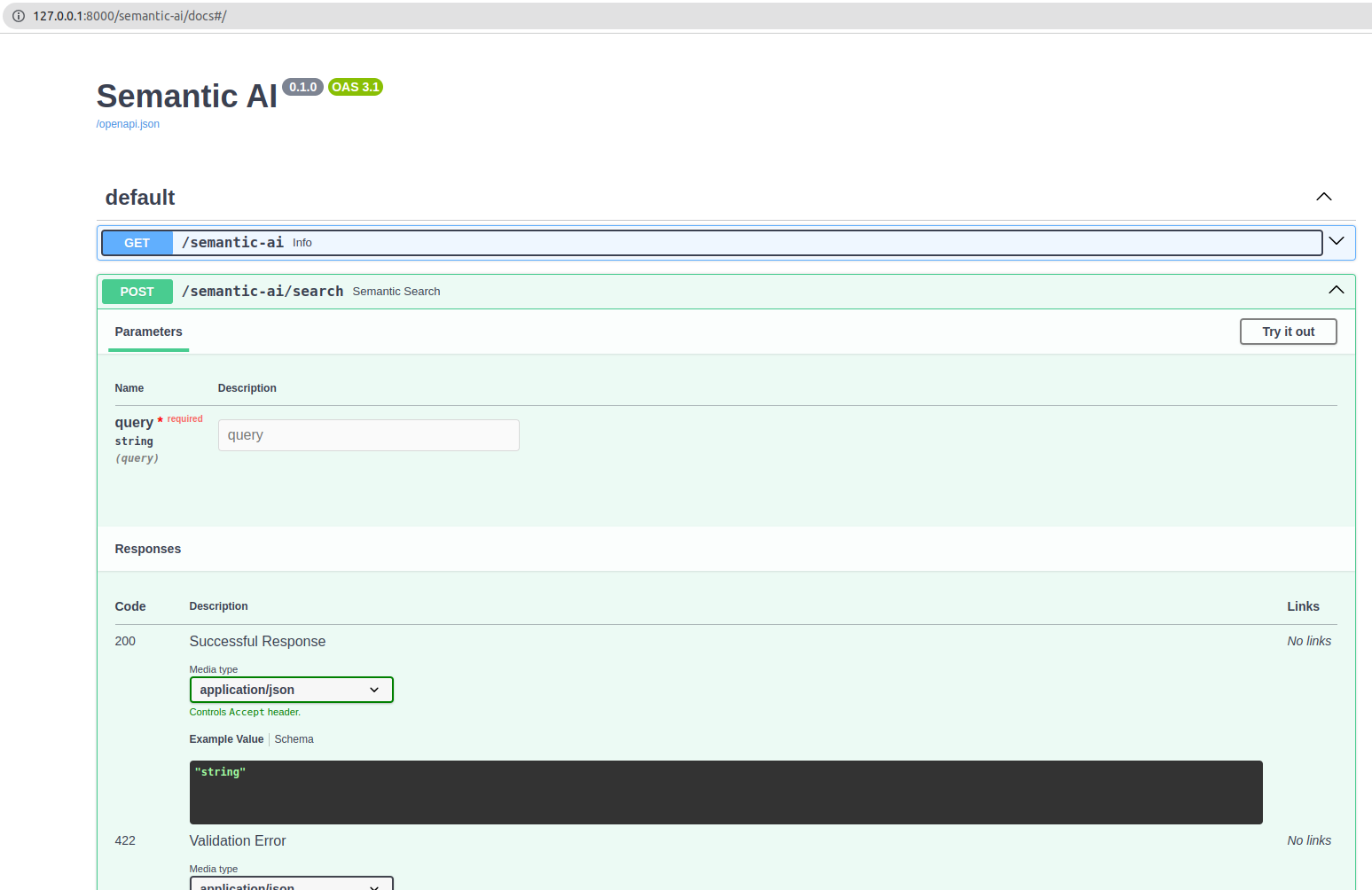
Now go to http://127.0.0.1:8000/docs.
You will see the automatic interactive API documentation (provided by Swagger UI):
Release history Release notifications | RSS feed


Download files
Download the file for your platform. If you're not sure which to choose, learn more about installing packages.
Source Distribution
Built Distribution
Filter files by name, interpreter, ABI, and platform.
If you're not sure about the file name format, learn more about wheel file names.
Copy a direct link to the current filters
File details
Details for the file semantic_ai-0.0.4.tar.gz.
File metadata
- Download URL: semantic_ai-0.0.4.tar.gz
- Upload date:
- Size: 24.7 kB
- Tags: Source
- Uploaded using Trusted Publishing? No
- Uploaded via: twine/4.0.2 CPython/3.9.18
File hashes
| Algorithm | Hash digest | |
|---|---|---|
| SHA256 |
84c393495d9302c46d8c9a3041915e5aedd5fe1ea66c372fb8835dea5c1fa3a8
|
|
| MD5 |
155728f7ca9468e5b203cd648b691e6d
|
|
| BLAKE2b-256 |
976c9b5c3da0c0ff0b6d42235c149a45d5bf92ffc8686ab7f9b7d948de60cfd8
|
File details
Details for the file semantic_ai-0.0.4-py3-none-any.whl.
File metadata
- Download URL: semantic_ai-0.0.4-py3-none-any.whl
- Upload date:
- Size: 30.8 kB
- Tags: Python 3
- Uploaded using Trusted Publishing? No
- Uploaded via: twine/4.0.2 CPython/3.9.18
File hashes
| Algorithm | Hash digest | |
|---|---|---|
| SHA256 |
d2c9b24c867d1d4ba612a8a0c38b9351e8d379de1b19adee0c8132aa719781ce
|
|
| MD5 |
c7e0081e31b06b84958e7442b7ecf957
|
|
| BLAKE2b-256 |
e4d931af43c156aa633277082b4dc4088cb651517aa167033ece69e17a693296
|






