
Network configuration parser that translates show command outputs into structured data


Project description
Show Configuration Parser (shconfparser)







🚀 Version 3.0 - Modern Python library (3.8+) with uv support! See docs/ for guides.
Introduction
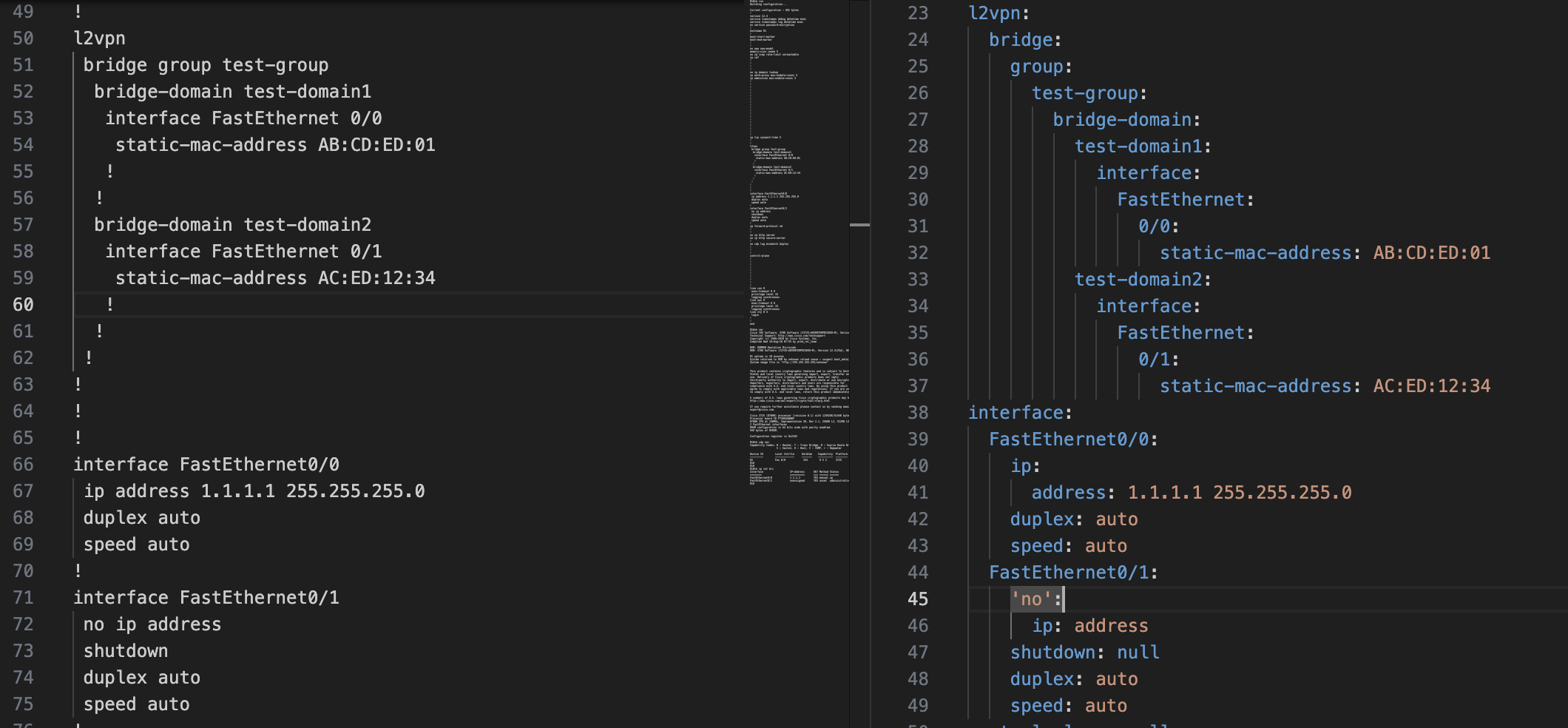
Show configuration parser (shconfparser) is a Python library for parsing network device configurations. This library examines the config and breaks it into a set of parent and clild relationships.
shconfparser is a vendor independent library where you can parse the following formats:
- Tree structure
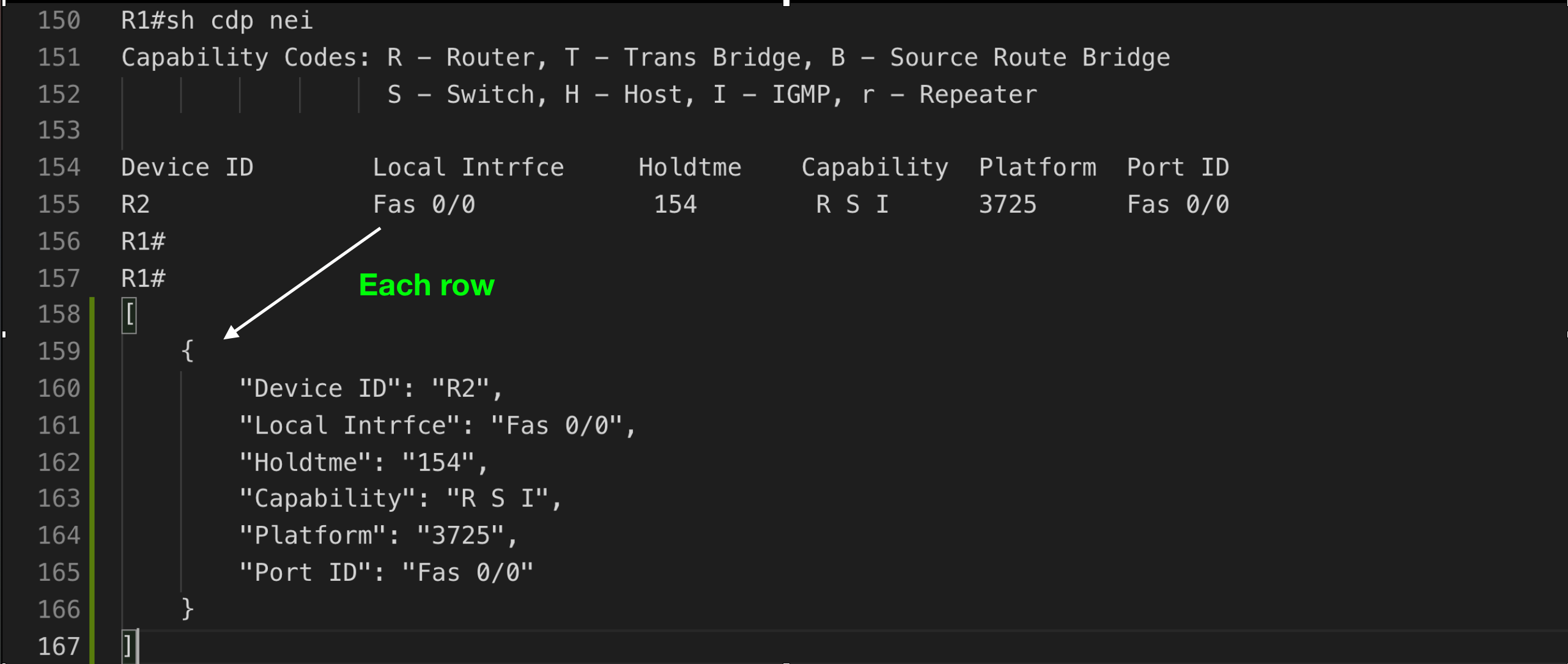
i.e. show running - Table structure
i.e. show ip interface - Data
i.e. show version
Modern Format (JSON/YAML) - Hierarchical Structure
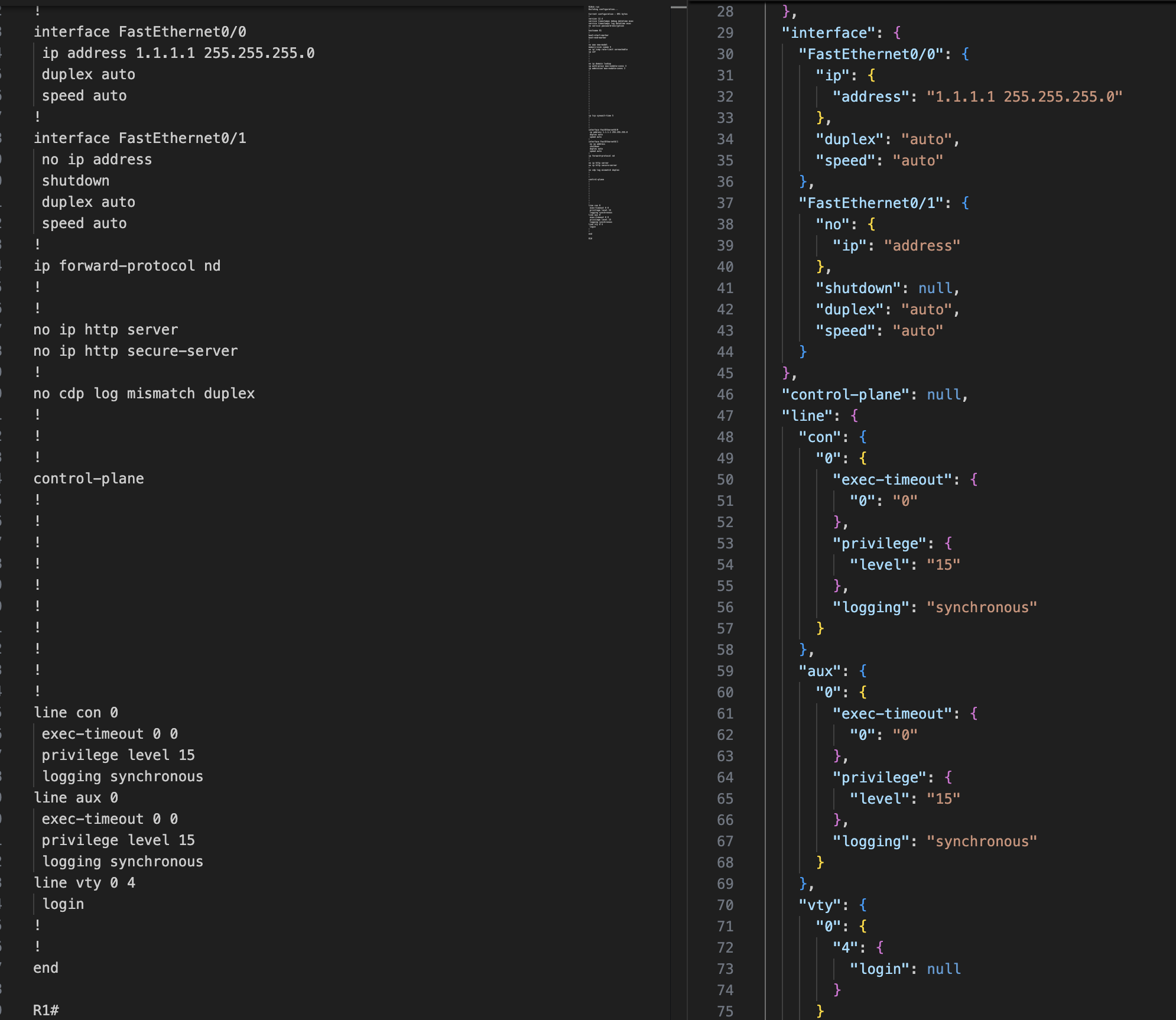
Legacy Format - OrderedDict with Full Keys

Table Structure
Key Features
✨ Zero Dependencies - Uses only Python standard library
⚡ Fast - Modern tooling with uv package manager support
🔒 Type Safe - Full type hints and py.typed marker
🎯 Vendor Independent - Works with any network device configuration
📊 Multiple Formats - Parse trees, tables, and unstructured data
📄 Format Flexibility - Output as JSON or YAML structures
🔍 XPath Queries - NSO-style queries with context tracking (NEW!)
🧪 Well Tested - 80%+ code coverage, tested on Python 3.8-3.13
Quick Start
Installation
pip install shconfparser
Faster with uv:
curl -LsSf https://astral.sh/uv/install.sh | sh
uv pip install shconfparser
Basic Usage
Modern format (recommended - hierarchical structure with XPath):
from shconfparser.parser import Parser

# Use modern format for cleaner output and XPath support
p = Parser(output_format='json')  # or 'yaml'
data = p.read('running_config.txt')

# Parse directly (no split needed for single show running command)
tree = p.parse_tree(data)
print(p.dump(tree, indent=2))

# Query with XPath
result = p.xpath('/hostname')
print(result.data)  # 'R1'
Alternative: Legacy format (backward compatible)
p = Parser()  # Defaults to 'legacy' format
# or explicitly: Parser(output_format='legacy')
data = p.read('running_config.txt')
tree = p.parse_tree(data)
print(p.dump(tree, indent=4))
# Returns OrderedDict with full command strings as keys
# Example: {'interface FastEthernet0/0': {...}}
Multiple show commands in one file:
from shconfparser.parser import Parser

p = Parser(output_format='json')  # Modern format recommended
data = p.read('multiple_commands.txt')  # Contains multiple show outputs
data = p.split(data)  # Split into separate commands
data.keys()
# odict_keys(['running', 'version', 'cdp_neighbors', 'ip_interface_brief'])

# Now parse each command separately
data['running'] = p.parse_tree(data['running'])

headers = ['Device ID', 'Local Intrfce', 'Holdtme', 'Capability', 'Platform', 'Port ID']
data['cdp_neighbors'] = p.parse_table(data['cdp_neighbors'], header_names=headers)

print(p.dump(data['running'], indent=2))
Alternative: Access internal properties
p = Parser()
p.read('multiple_commands.txt')
p.split(p.r.data)

# Access split data from internal property
data = p.s.shcmd_dict
data['running'] = p.parse_tree(data['running'])
print(p.dump(data['running'], indent=4))
Usage Examples
Check Library Version
import shconfparser
print(shconfparser.__version__)  # '3.0.0'
Parse Tree Structure (show running-config)
from shconfparser.parser import Parser

p = Parser()

# Single command file - parse directly
data = p.read('running_config.txt')
tree = p.parse_tree(data)  # No split() needed

# Access nested configuration
print(p.dump(tree['interface FastEthernet0/0'], indent=2))
# {
#   "ip address 1.1.1.1 255.255.255.0": null,
#   "duplex auto": null,
#   "speed auto": null
# }
Parse Table Structure (show cdp neighbors)
# Single command file
p = Parser()
data = p.read('cdp_neighbors.txt')

# Parse table directly (no split needed)
headers = ['Device ID', 'Local Intrfce', 'Holdtme', 'Capability', 'Platform', 'Port ID']
cdp_data = p.parse_table(data, header_names=headers)

# Access as list of dictionaries
for neighbor in cdp_data:
    print(f"{neighbor['Device ID']} on {neighbor['Local Intrfce']}")
# Output: R2 on Fas 0/0
Parse Unstructured Data (show version)
# Single command file
p = Parser()
data = p.read('show_version.txt')

# Parse show version output directly
version_data = p.parse_data(data)  # No split() needed

# Search for specific information
import re
for line in version_data.keys():
    if re.search(r'IOS.*Version', line):
        print(line)
# Output: Cisco IOS Software, 3700 Software (C3725-ADVENTERPRISEK9-M), Version 12.4(25d)...
Search in Tree
# Search for all interfaces
pattern = r'interface\s+\w+.*'
matches = p.search.search_all_in_tree(pattern, tree)

for key, value in matches.items():
    print(value)
# interface FastEthernet0/0
# interface FastEthernet0/1
Search in Table
# Find specific device in CDP table
pattern = r'R\d+'
match = p.search.search_in_table(pattern, cdp_data, 'Device ID')
print(match)
# {'Device ID': 'R2', 'Local Intrfce': 'Fas 0/0', ...}
Output Format Selection
Parse configurations in legacy (OrderedDict) or modern (dict) hierarchical structures:
from shconfparser.parser import Parser

# Legacy format (backward compatible - OrderedDict with full keys)
p = Parser()  # Defaults to 'legacy'
# or explicitly: Parser(output_format='legacy')
data = p.read('running_config.txt')
tree = p.parse_tree(data)  # Returns OrderedDict
print(type(tree))  # <class 'collections.OrderedDict'>
# Example: {'interface FastEthernet0/0': {'ip address 1.1.1.1': ''}}

# Modern formats: JSON or YAML (hierarchical dict structure)
p = Parser(output_format='json')  # Hierarchical dict
# or: Parser(output_format='yaml')  # Same structure, different name
data = p.read('running_config.txt')
tree = p.parse_tree(data)  # Returns dict
print(type(tree))  # <class 'dict'>
# Example: {'interface': {'FastEthernet0/0': {'ip': {'address': '1.1.1.1'}}}}

# Override format per call
p = Parser()  # Legacy by default
tree_legacy = p.parse_tree(data)  # OrderedDict
tree_json = p.parse_tree(data, format='json')  # dict
Format Comparison:
# Legacy format - preserves exact CLI structure (OrderedDict)
{
    "interface FastEthernet0/0": {
        "ip address 1.1.1.1 255.255.255.0": "",
        "duplex auto": ""
    }
}

# Modern formats (json/yaml) - hierarchical and programmatic (dict)
{
    "interface": {
        "FastEthernet0/0": {
            "ip": {
                "address": "1.1.1.1 255.255.255.0"
            },
            "duplex": "auto"
        }
    }
}
Benefits of modern formats (json/yaml):
- Cleaner hierarchy for nested configurations
- Better for programmatic access
- XPath query support
- Easier to convert to actual JSON/YAML files
- Natural structure for complex configs
XPath Queries (New in 3.0!)
Query YAML-formatted configurations using NSO-style XPath with optional context tracking:
from shconfparser.parser import Parser

# XPath requires YAML format
p = Parser(output_format='yaml')
data = p.read('running_config.txt')
tree = p.parse_tree(data)

# Simple queries
result = p.xpath('/hostname')
print(result.data)  # 'R1'

# Wildcards - find all interface duplex settings
result = p.xpath('/interface/*/duplex')
print(result.matches)  # ['auto', 'auto']
print(result.count)    # 2

# Predicates with slashes (network interface names)
result = p.xpath('/interface[FastEthernet0/0]/duplex')
print(result.data)  # 'auto'

# Recursive search - find anywhere in tree
result = p.xpath('//duplex')
print(result.matches)  # ['auto', 'auto']

# Predicate wildcards
result = p.xpath('/interface[FastEthernet*]/ip/address')
print(result.data)  # '1.1.1.1 255.255.255.0'
Context Options - Solve the "which interface?" problem:
# Problem: Can't identify source with wildcards
result = p.xpath('/interface/*/duplex')
print(result.matches)  # ['auto', 'auto'] - Which interface?

# Solution 1: context='none' (default - just values)
result = p.xpath('/interface/*/duplex', context='none')
print(result.matches)  # ['auto', 'auto']

# Solution 2: context='partial' (from wildcard match point)
result = p.xpath('/interface/*/duplex', context='partial')
print(result.matches)
# [{'FastEthernet0/0': {'duplex': 'auto'}},
#  {'FastEthernet0/1': {'duplex': 'auto'}}]

# Solution 3: context='full' (complete tree hierarchy)
result = p.xpath('/interface/*/duplex', context='full')
print(result.matches)
# [{'interface': {'FastEthernet0/0': {'duplex': 'auto'}}},
#  {'interface': {'FastEthernet0/1': {'duplex': 'auto'}}}]

# Path tracking (always available)
result = p.xpath('/interface/*/speed')
print(result.paths)
# [['interface', 'FastEthernet0/0', 'speed'],
#  ['interface', 'FastEthernet0/1', 'speed']]
XPath Features:
- ✅ Absolute paths:
/interface/FastEthernet0/0/duplex - ✅ Recursive search:
//duplex(find anywhere) - ✅ Wildcards:
/interface/*/duplex - ✅ Predicates:
/interface[FastEthernet0/0] - ✅ Predicate wildcards:
/interface[FastEthernet*] - ✅ Context tracking: See which match came from where
- ✅ Path tracking:
result.pathsshows path components
XPathResult Structure:
result = p.xpath('//duplex')
print(result.success)   # True
print(result.data)      # First match: 'auto'
print(result.matches)   # All matches: ['auto', 'auto']
print(result.count)     # Number of matches: 2
print(result.query)     # Original query: '//duplex'
print(result.paths)     # Path to each match
print(result.error)     # Error message if failed

# Boolean check
if result:
    print(f"Found {result.count} matches")
Note: XPath queries only work with output_format='yaml'. JSON format (OrderedDict) preserves exact CLI structure and should use traditional dict navigation.
Alternative: Using Individual Components
For advanced users who need granular control
from shconfparser import Reader, ShowSplit, TreeParser, TableParser

# For multiple show commands
reader = Reader('multiple_commands.txt')
splitter = ShowSplit()
data = splitter.split(reader.data)  # Split only if multiple commands

# Use specific parsers
tree_parser = TreeParser()
table_parser = TableParser()

running = tree_parser.parse(data['running'])
cdp = table_parser.parse(data['cdp_neighbors'], header_names=headers)
💡 Remember: Use split() only when your file contains multiple show commands. For single command files, parse directly.
📖 For more examples, see docs/ folder.
Documentation
📚 Complete documentation: docs/README.md
For Users
| Guide | Description |
|---|---|
| Usage Examples | Detailed parsing examples (tree, table, data) |
| API Reference | Complete API documentation |
| Migration Guide | Upgrade from v2.x to v3.0 |
| Python Compatibility | Python version support |
For Contributors
| Guide | Description |
|---|---|
| Quick Start | 5-minute contributor setup |
| Contributing Guide | How to contribute |
| Architecture | System design and structure |
| Business Standards | Quality and compliance standards |
Support
Getting Help
- 📖 Documentation: docs/README.md
- 🐛 Bug Reports: GitHub Issues
- 💬 Questions: Stack Overflow (tag:
shconfparser) - 📧 Email: kirankotari@live.com
Frequently Asked Questions
Q: What Python versions are supported?
A: Python 3.8-3.13 are fully tested and supported.
Q: Does this work with my network vendor?
A: Yes! shconfparser is vendor-independent and works with any hierarchical configuration format.
Q: Are there any dependencies?
A: No runtime dependencies - uses only Python standard library.
Q: How do I migrate from v2.x?
A: The API is backward compatible. Just run pip install --upgrade shconfparser. See Migration Guide for details.
Community
- 🌟 Star us on GitHub
- 🤝 Contribute: See CONTRIBUTING.md
- 📊 CI/CD: Automated testing on Python 3.8-3.13 across Ubuntu, macOS, Windows
License
MIT License © 2016-2025 Kiran Kumar Kotari
Special thanks to all contributors
Release history Release notifications | RSS feed


Download files
Download the file for your platform. If you're not sure which to choose, learn more about installing packages.
Source Distribution
Built Distribution
Filter files by name, interpreter, ABI, and platform.
If you're not sure about the file name format, learn more about wheel file names.
Copy a direct link to the current filters
File details
Details for the file shconfparser-3.1.1.tar.gz.
File metadata
- Download URL: shconfparser-3.1.1.tar.gz
- Upload date:
- Size: 1.8 MB
- Tags: Source
- Uploaded using Trusted Publishing? No
- Uploaded via: uv/0.9.21 {"installer":{"name":"uv","version":"0.9.21","subcommand":["publish"]},"python":null,"implementation":{"name":null,"version":null},"distro":{"name":"Ubuntu","version":"24.04","id":"noble","libc":null},"system":{"name":null,"release":null},"cpu":null,"openssl_version":null,"setuptools_version":null,"rustc_version":null,"ci":true}
File hashes
| Algorithm | Hash digest | |
|---|---|---|
| SHA256 |
87d0cf33e25ac0f6176715c780adf382cfc981048b07d8eb003d104f880a5c77
|
|
| MD5 |
2fd22a4b2f527323d7c479dbbb5c0029
|
|
| BLAKE2b-256 |
672a09ddba3808d1000a654257ea1bfb7db516fe720ad947062b324df292e33b
|
File details
Details for the file shconfparser-3.1.1-py3-none-any.whl.
File metadata
- Download URL: shconfparser-3.1.1-py3-none-any.whl
- Upload date:
- Size: 27.9 kB
- Tags: Python 3
- Uploaded using Trusted Publishing? No
- Uploaded via: uv/0.9.21 {"installer":{"name":"uv","version":"0.9.21","subcommand":["publish"]},"python":null,"implementation":{"name":null,"version":null},"distro":{"name":"Ubuntu","version":"24.04","id":"noble","libc":null},"system":{"name":null,"release":null},"cpu":null,"openssl_version":null,"setuptools_version":null,"rustc_version":null,"ci":true}
File hashes
| Algorithm | Hash digest | |
|---|---|---|
| SHA256 |
9a4da79eed0b1872008317be97706b45f25efb58fc3b076a9d1b17546b7c6271
|
|
| MD5 |
e3d5cf58287b8d537ffdbecc9c71279d
|
|
| BLAKE2b-256 |
b864b3ba60408b790afd6ca409579ea2994af3586c879bfaef97995bf576aa7c
|






