
No project description provided

Project description
A Pure Python, React-style Framework for Scaling Your Jupyter and Web Apps

Come chat with us on Discord to ask questions or share your thoughts or creations!

Introducing Solara
While there are many Python web frameworks out there, most are designed for small data apps or use paradigms unproven for larger scale. Code organization, reusability, and state tend to suffer as apps grow in complexity, resulting in either spaghetti code or offloading to a React application.
Solara addresses this gap. Using a React-like API, we don't need to worry about scalability. React has already proven its ability to support the world's largest web apps.
Solara uses a pure Python implementation of React (Reacton), creating ipywidget-based applications. These apps work both inside the Jupyter Notebook and as standalone web apps with frameworks like FastAPI. This paradigm enables component-based code and incredibly simple state management.
By building on top of ipywidgets, we automatically leverage an existing ecosystem of widgets and run on many platforms, including JupyterLab, Jupyter Notebook, Voilà, Google Colab, DataBricks, JetBrains Datalore, and more.
We care about developer experience. Solara will give your hot code reloading and type hints for faster development.
Installation
Run:
pip install solara
Or follow the Installation instructions for more detailed instructions.
First script
Put the following Python snippet in a file (we suggest sol.py), or put it in a Jupyter notebook cell:
import solara

# Declare reactive variables at the top level. Components using these variables
# will be re-executed when their values change.
sentence = solara.reactive("Solara makes our team more productive.")
word_limit = solara.reactive(10)


@solara.component
def Page():
    # Calculate word_count within the component to ensure re-execution when reactive variables change.
    word_count = len(sentence.value.split())

    solara.SliderInt("Word limit", value=word_limit, min=2, max=20)
    solara.InputText(label="Your sentence", value=sentence, continuous_update=True)

    # Display messages based on the current word count and word limit.
    if word_count >= int(word_limit.value):
        solara.Error(f"With {word_count} words, you passed the word limit of {word_limit.value}.")
    elif word_count >= int(0.8 * word_limit.value):
        solara.Warning(f"With {word_count} words, you are close to the word limit of {word_limit.value}.")
    else:
        solara.Success("Great short writing!")


# The following line is required only when running the code in a Jupyter notebook:
Page()
Run from the command line in the same directory where you put your file (sol.py):
$ solara run sol.py
Solara server is starting at http://localhost:8765
Or copy-paste this to a Jupyter notebook cell and execute it (the Page() expression at the end
will cause it to automatically render the component in the notebook).
See this snippet run live at https://solara.dev/documentation/getting_started
Demo
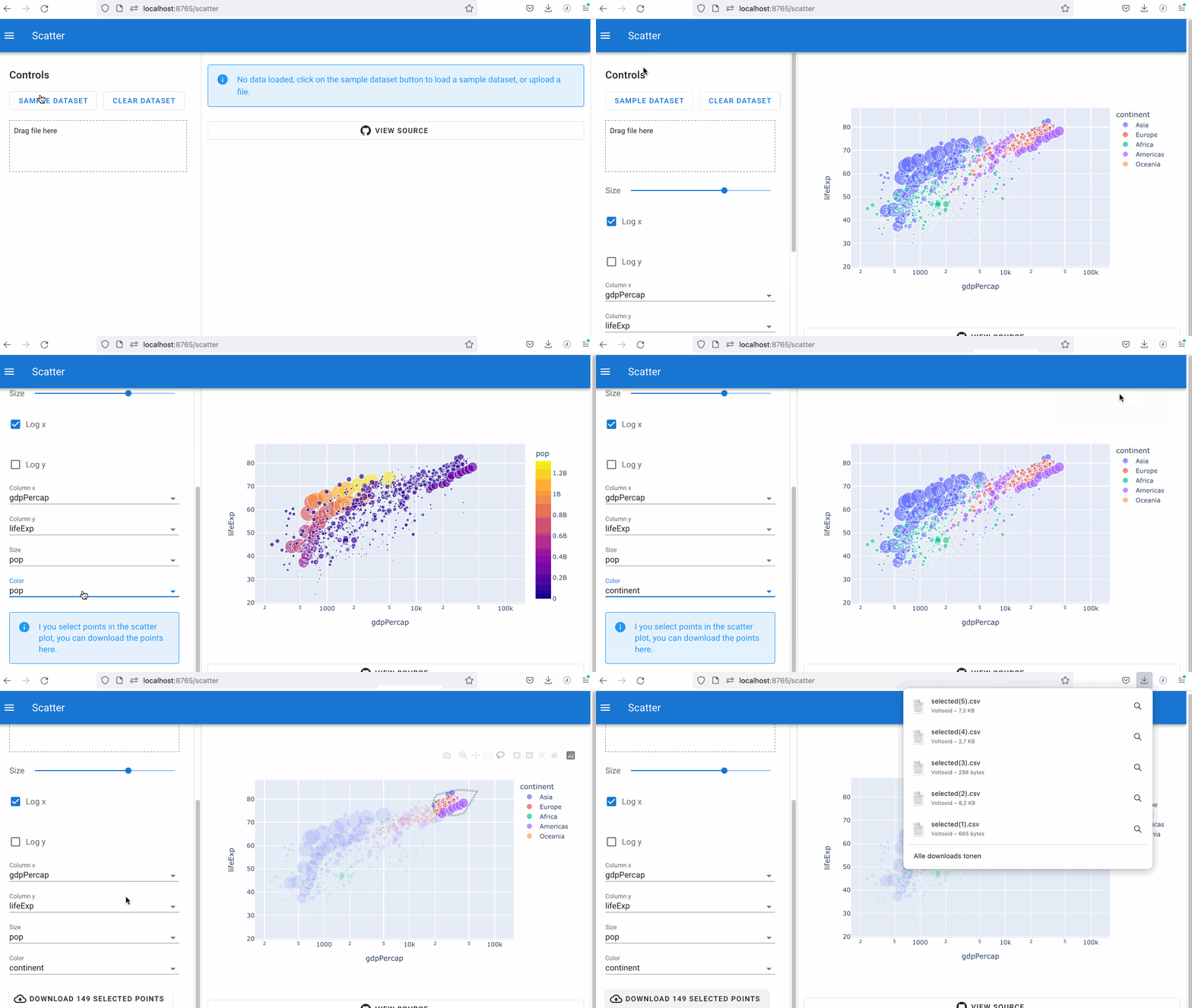
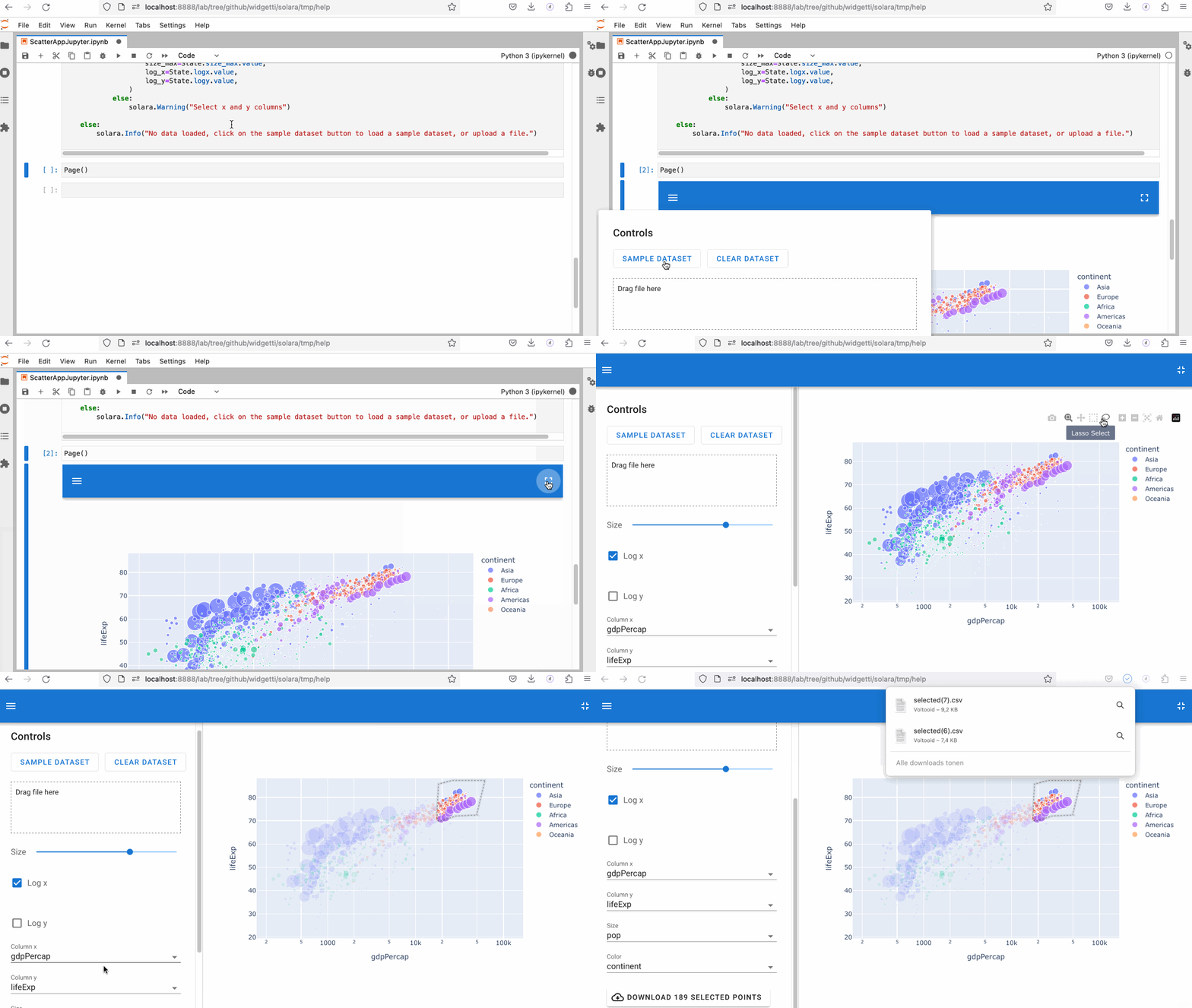
The following demo app can be used to explore a dataset (build in or upload yourself) using a scatter plot. The plot can be interacted with to filter the dataset, and the filtered dataset can be downloaded.
Running in solara-server
The solara server is build on top of Starlette/FastAPI and runs standalone. Ideal for production use.
Running in Jupyter
By building on top of ipywidgets, we automatically leverage an existing ecosystem of widgets and run on many platforms, including JupyterLab, Jupyter Notebook, Voilà, Google Colab, DataBricks, JetBrains Datalore, and more. This means our app can also run in Jupyter:
Resources
Visit our main website or jump directly to the introduction


Note that the solara.dev website is created using Solara
Release history Release notifications | RSS feed


Download files
Download the file for your platform. If you're not sure which to choose, learn more about installing packages.
Source Distribution
Built Distribution
Filter files by name, interpreter, ABI, and platform.
If you're not sure about the file name format, learn more about wheel file names.
Copy a direct link to the current filters
File details
Details for the file solara_ui-1.57.3.tar.gz.
File metadata
- Download URL: solara_ui-1.57.3.tar.gz
- Upload date:
- Size: 1.3 MB
- Tags: Source
- Uploaded using Trusted Publishing? No
- Uploaded via: Hatch/1.16.4 cpython/3.10.19 HTTPX/0.28.1
File hashes
| Algorithm | Hash digest | |
|---|---|---|
| SHA256 |
8e93315547451480cf4a37b785cbf1a0e44fd2ef5b417883b5f0a47cce1c08ac
|
|
| MD5 |
55aa7cab1529e1c949ec02fd4ad7a67f
|
|
| BLAKE2b-256 |
8c39e2df25da93a18da77bf6c8afbfa7042657b8bafcf6cd06134d06b17c41aa
|
File details
Details for the file solara_ui-1.57.3-py3-none-any.whl.
File metadata
- Download URL: solara_ui-1.57.3-py3-none-any.whl
- Upload date:
- Size: 1.3 MB
- Tags: Python 3
- Uploaded using Trusted Publishing? No
- Uploaded via: Hatch/1.16.4 cpython/3.10.19 HTTPX/0.28.1
File hashes
| Algorithm | Hash digest | |
|---|---|---|
| SHA256 |
1721b16674c9ebbff5817761392f22480a8ac158c89f87be20fdca8139e91a46
|
|
| MD5 |
aff03c3b8fff3e31a32f346a4765e3bf
|
|
| BLAKE2b-256 |
e1bf4156a69a2939ad172d3aecb8adbc0f2b69307b86312a5fdcd6d3c26c453a
|






