
An experimental version of Streamlit Multi-Page Apps

Project description
Streamlit-Pages







Author: @blackary
Code: https://github.com/blackary/st_pages
Installation
pip install st-pages
See it in action
Basic example: https://st-pages.streamlit.app/
Example with sections: https://st-pages-sections.streamlit.app/
Why st-pages?
Summary: st-pages allows you to set the page names, order, and icons (and optionally group the pages into sections) in a multipage Streamlit app from your code without having to rename the files.
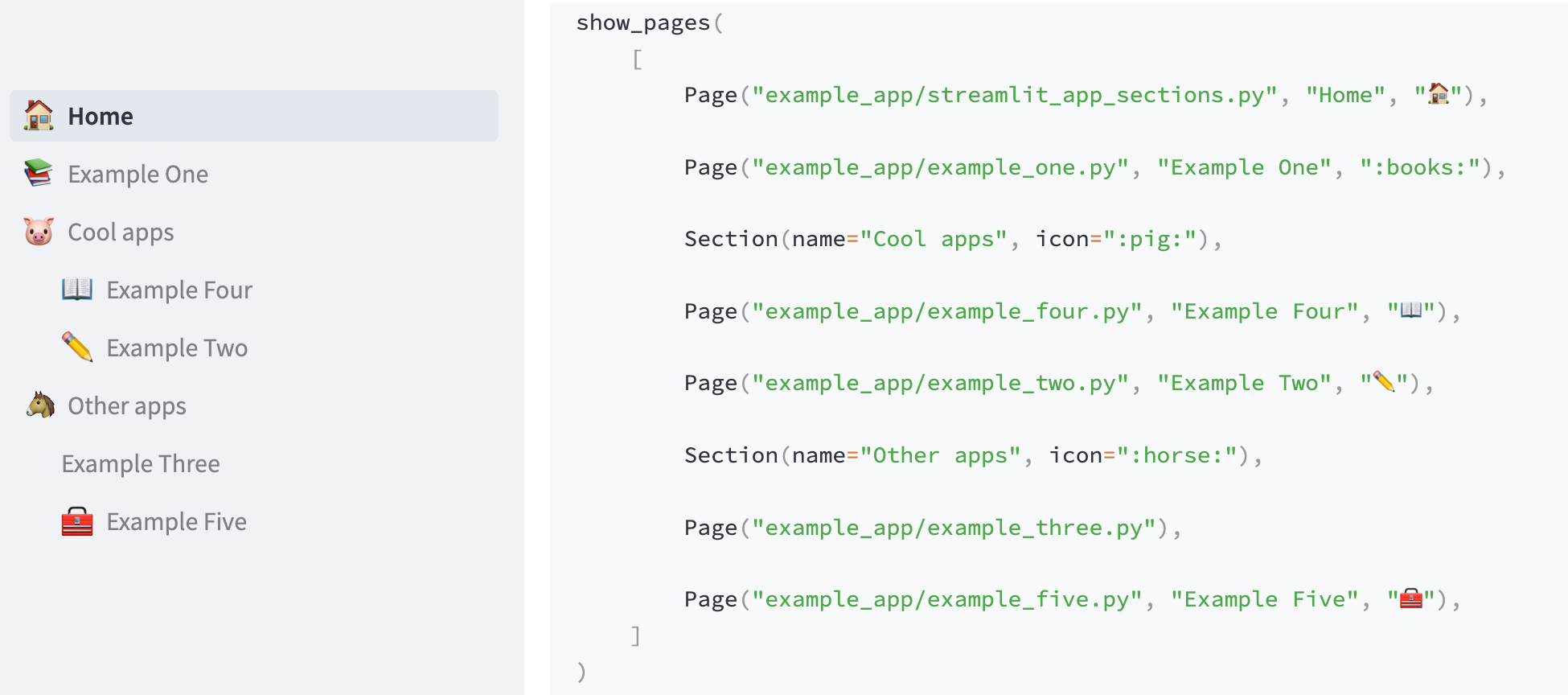
Streamlit has native support for multi-page apps where page filenames are the source of truth for page settings. But, it's a bit annoying to have to change the filename to change the names in the sidebar or reorder the pages in your app. Even more, I really dislike having to put emojis in filenames.
This is an experimental package to try out how page-management might work if you could name the pages whatever you wanted, and could manage which pages are visible, and how they appear in the sidebar, via a setup function.
This enables you to set page name, icon and order independently of file name/path, while still retaining the same sidebar & url behavior of current streamlit multi-page apps.
How to use
Method one: declare pages inside your streamlit code
from st_pages import Page, show_pages, add_page_title

# Optional -- adds the title and icon to the current page
add_page_title()

# Specify what pages should be shown in the sidebar, and what their titles and icons
# should be
show_pages(
    [
        Page("streamlit_app.py", "Home", "🏠"),
        Page("other_pages/page2.py", "Page 2", ":books:"),
    ]
)
If you want to organize your pages into sections with indention showing which pages belong to which section, you can do the following:
from st_pages import Page, Section, show_pages, add_page_title

add_page_title() # By default this also adds indentation

# Specify what pages should be shown in the sidebar, and what their titles and icons
# should be
show_pages(
    [
        Page("streamlit_app.py", "Home", "🏠"),
        Page("other_pages/page2.py", "Page 2", ":books:"),
        Section("My section", icon="🎈️"),
        # Pages after a section will be indented
        Page("Another page", icon="💪"),
    ]
)
Method two: declare pages inside of a config file
Contents of .streamlit/pages.toml
[[pages]]
path = "streamlit_app.py"
name = "Home"
icon = "🏠"

[[pages]]
path = "other_pages/page2.py"
name = "Page 2"
icon = ":books:"
Example with sections:
[[pages]]
path = "streamlit_app.py"
name = "Home"
icon = "🏠"

[[pages]]
path = "other_pages/page2.py"
name = "Page 2"
icon = ":books:"

[[pages]]
name = "My second"
icon = "🎈️"
is_section = true

# Pages after an `is_section = true` will be indented
[[pages]]
name = "Another page"
icon = "💪"
Streamlit code:
from st_pages import show_pages_from_config, add_page_title

# Either this or add_indentation() MUST be called on each page in your
# app to add indendation in the sidebar
add_page_title()

show_pages_from_config()
Release history Release notifications | RSS feed


Download files
Download the file for your platform. If you're not sure which to choose, learn more about installing packages.
Source Distribution
Built Distribution
Filter files by name, interpreter, ABI, and platform.
If you're not sure about the file name format, learn more about wheel file names.
Copy a direct link to the current filters
File details
Details for the file st_pages-0.3.2.tar.gz.
File metadata
- Download URL: st_pages-0.3.2.tar.gz
- Upload date:
- Size: 6.6 kB
- Tags: Source
- Uploaded using Trusted Publishing? No
- Uploaded via: poetry/1.3.2 CPython/3.10.2 Linux/5.15.0-1033-azure
File hashes
| Algorithm | Hash digest | |
|---|---|---|
| SHA256 |
4707a3ede6203e5523c7f70d1fdc70167b4f36b53ccc075d89b1fe142cad9ce6
|
|
| MD5 |
14da7360a33485e36d82189e8c289b84
|
|
| BLAKE2b-256 |
cd7d975757e51e7f21c33425affe5b6c0c95cabe4a29c2a689e02fe29a99c33d
|
File details
Details for the file st_pages-0.3.2-py3-none-any.whl.
File metadata
- Download URL: st_pages-0.3.2-py3-none-any.whl
- Upload date:
- Size: 6.2 kB
- Tags: Python 3
- Uploaded using Trusted Publishing? No
- Uploaded via: poetry/1.3.2 CPython/3.10.2 Linux/5.15.0-1033-azure
File hashes
| Algorithm | Hash digest | |
|---|---|---|
| SHA256 |
bda9ee1c6115f711aec11eec22cf2ef8e50c7054390491ce0a559b676c85123a
|
|
| MD5 |
525f9e3c8e437f89c08f931251f3ad72
|
|
| BLAKE2b-256 |
2f4d74c5f1ca345e5e193d25bc64899790ace451a10f8d85c21da6468ec30b40
|






