
Yet another manga scraper and downloader

Project description
 tankobon
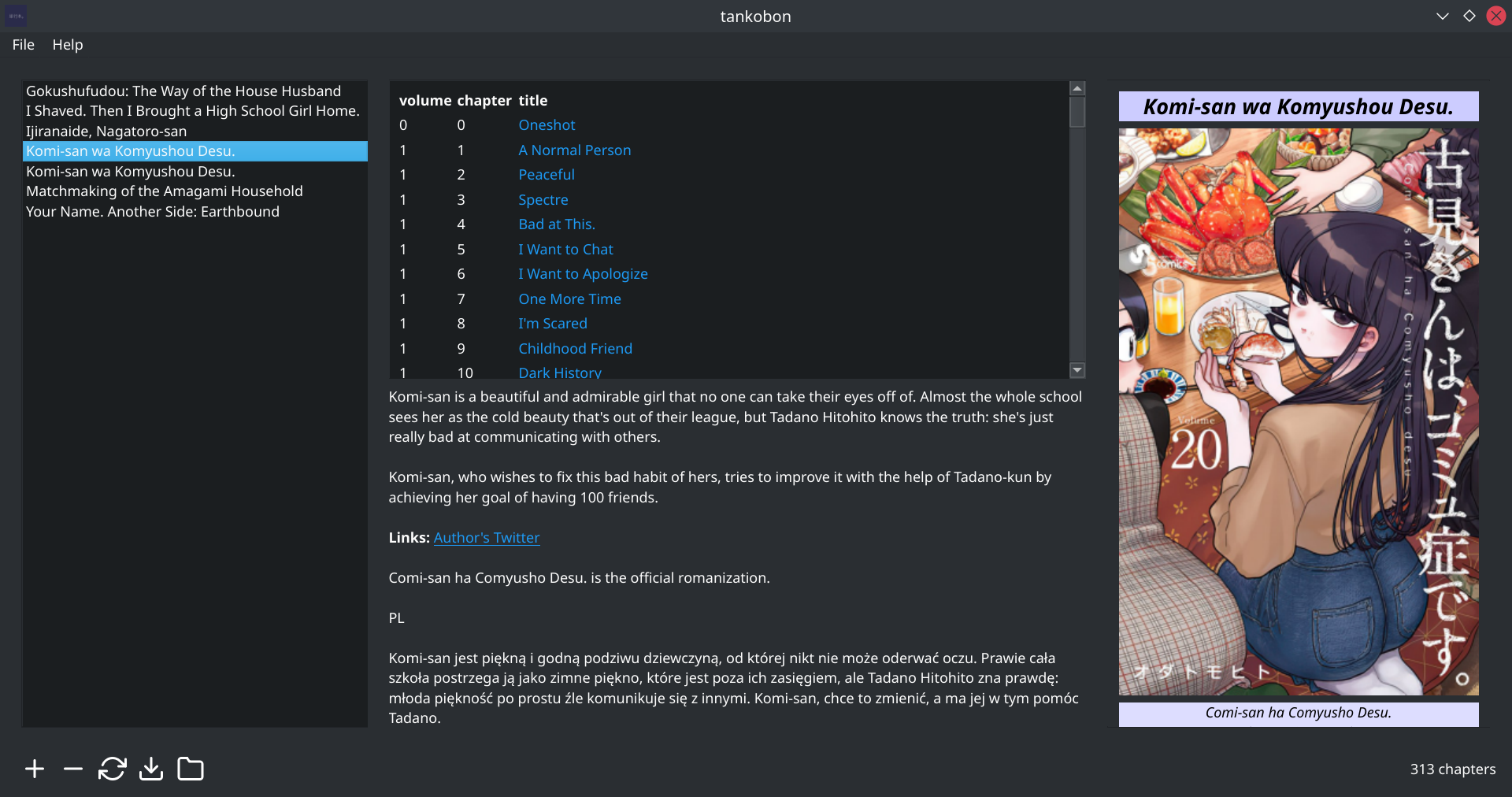







Pure-python manga downloader.
The following websites are currently supported:
mangakakalot.commangadex.org
API Docs / Changelog
Usage (CLI)
# Add a manga url to the cache (at ~/.local/share/tankobon)
$ tankobon add https://mangadex.org/title/a96676e5-8ae2-425e-b549-7f15dd34a6d8

# List all manga in the cache
$ tankobon list
supported websites: mangadex\.org/title/([a-fA-F0-9\-]+)
                    mangakakalot.com

540a94ad: Komi-san wa Komyushou Desu. (https://mangadex.org/title/a96676e5-8ae2-425e-b549-7f15dd34a6d8)

# download it to disk...
$ tankobon download 540a94ad

# ...and pack it into a nice pdf file for use with your favourite e-reader.
tankobon pdfify -o komi.pdf
Or maybe you might want to use the GUI instead:
tankobon gui
What it can do:
- Add/refresh/delete manga
- Show HTML-based previews of the manga cover, description, etc.
- Download manga
What it can't do:
- Show manga pages (pdf reader?)
Multilingual Support
tankobon now supports manga with multiple language translations (especially for Mangadex)!
Configuration (CLI)
First check the languages the manga supports:
$ tankobon info <shorthash> | grep languages -A10
...
languages: čeština, český jazyk (cs)
           English (en)
           Italiano (it)
           Русский (ru)
           Español (es)
           Português (pt)
           Bahasa Indonesia (id)
           język polski, polszczyzna (pl)
           Nederlands, Vlaams (nl)
           français, langue française (fr)
Next, set the language:
$ tankobon config lang <code>
where code is the two-letter ISO 639-1 id (i.e fr for français) beside the language's native name.
Configuration (GUI)
On the menu bar, click File -> Settings and change the language using the drop-down menu.
Once the settings are closed, the manga currently being displayed will be reloaded to show the selected language.
Todo
- tests and docs (docs done)
- create GUI to make downloading easier, like youtube-DLG
- Add user configuration to select another language
-
Searcherclass (to search for manga?) - i18n for selected language?
Install
pip install tankobon
Contributing
Just send in a PR with your feature changes/bug fixes. To set up development builds for tankobon, do the following:
$ git clone https://github.com/ongyx/tankobon && cd tankobon

# (create and enter a virtualenv if you want)
$ flit install -s  # Install tankobon as a symlink (any changes to source code will be reflected immediately)

# (make your code changes here...)

# make sure all tests pass
$ pytest
Credits
feather for the icons (all svgs) in the resources folder.
License
MIT.
Release history Release notifications | RSS feed


Download files
Download the file for your platform. If you're not sure which to choose, learn more about installing packages.
Source Distribution
Built Distribution
Filter files by name, interpreter, ABI, and platform.
If you're not sure about the file name format, learn more about wheel file names.
Copy a direct link to the current filters
File details
Details for the file tankobon-2022.1.18.tar.gz.
File metadata
- Download URL: tankobon-2022.1.18.tar.gz
- Upload date:
- Size: 915.7 kB
- Tags: Source
- Uploaded using Trusted Publishing? No
- Uploaded via: python-requests/2.26.0
File hashes
| Algorithm | Hash digest | |
|---|---|---|
| SHA256 |
530258789a027119b1c599c1716677c27c1485df159dd298df7bc415ae816876
|
|
| MD5 |
8bc3249d65c22a2f7e9a3c9c840f5c92
|
|
| BLAKE2b-256 |
f644dd8cfc4350869be247bb3d11c1bdaa0bbeac4cc4223b7b04728417520ea7
|
File details
Details for the file tankobon-2022.1.18-py3-none-any.whl.
File metadata
- Download URL: tankobon-2022.1.18-py3-none-any.whl
- Upload date:
- Size: 104.1 kB
- Tags: Python 3
- Uploaded using Trusted Publishing? No
- Uploaded via: python-requests/2.26.0
File hashes
| Algorithm | Hash digest | |
|---|---|---|
| SHA256 |
4d863917861c98b99a912cb358ba5876404fec177ca5006063f89b81f44b0a5e
|
|
| MD5 |
052cf7936f81039e6315508e3de51f16
|
|
| BLAKE2b-256 |
c498185f3c83a671d47d118177a919ceb0589764d8b5f3c5c46bc91187f7de61
|






