
Advanced benchmarking tool

Project description


An advanced benchmarking tool written in Python 3 that supports setting up an environment for benchmarking and the generation of visually appealing reports.
It runs on Linux systems and (rudimentarily) on macOS.
Why should you use temci?
temci allows you to easily measure the execution time (and other things) of programs and compare them against each other resulting in a pretty HTML5 based report. Furthermore it can set up the environment to ensure benchmarking results with a low variance. The latter feature can be used without using temci for benchmarking by using temci short shell.
Usage
The main commands of temci are temci exec and temci report.
Suppose you want to see whether grepping for the strings that consist of a and b in the current folder is slower than for strings that consist only of a.
First we have to install temci (using Nix, see below for more instructions):
nix-env -f https://github.com/parttimenerd/temci/archive/master.tar.gz -iAfter this, we can benchmark both commands with temci:
# benchmark both commands 20 times
temci short exec "grep '[ab]*' -R ." "grep 'a*' -R ." --runs 10

# append --watch to get report (in which you can move with the arrow keys and scroll)
# after every benchmark completed (use --watch_every to decrease interval)
temci short exec "grep '[ab]*' -R ." "grep 'a*' -R ." --runs 10 --watch

# if you want to improve the stability your benchmarks, run them with root privileges
# the benchmarked programs are run with your current privileges
temci short exec "grep '[ab]*' -R ." "grep 'a*' -R ." --runs 10 --sudo --preset usable
This results in a run_output.yaml file that should look like:
- attributes: {description: 'grep ''[ab]*'' -R .'}
  data:
    etime: [0.03, 0.02, 0.02, 0.03, 0.03, 0.03, 0.02, 0.03, 0.03, 0.02]
    … # other properties
- attributes: {description: grep 'a*' -R .}
  data:
    etime: [0.02, 0.03, 0.02, 0.03, 0.03, 0.02, 0.03, 0.03, 0.02, 0.02]
    … # other properties
- property_descriptions: {etime: elapsed real (wall clock) time, … }
For more information on the support measurement tools (like perf stat and rusage), the supported plugins for setting up the environment and more, see temci exec.
We can now create a report from these benchmarking results using temci report. We use the option --properties to include only the elapsed time in the report to keep the report simple:
> temci report run_output.yaml --properties etime
Report for single runs
grep '[ab]*' -R .    (   10 single benchmarks)
     etime mean =     2(6).(000)m, deviation = 18.84223%

grep 'a*' -R .       (   10 single benchmarks)
     etime mean =     2(5).(000)m, deviation = 20.00000%

Equal program blocks
     grep '[ab]*' -R .  ⟷  grep 'a*' -R .
         etime confidence =        67%, speed up =      3.85%
We see that there is no significant difference between the two commands.
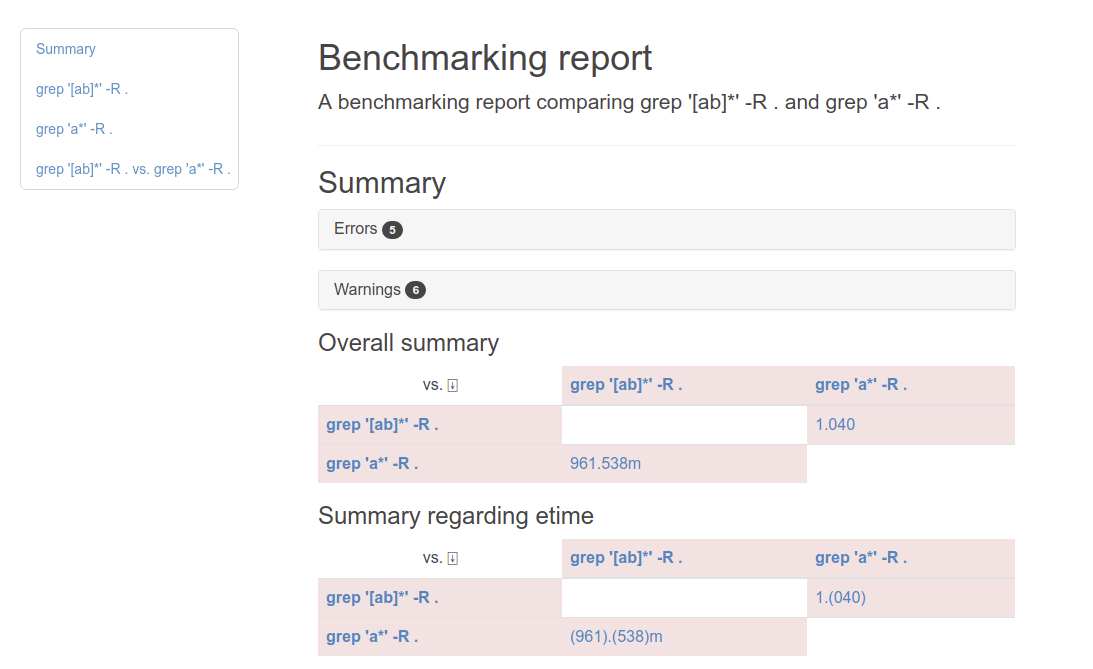
There are multiple reporters besides the default console reporter. Another reporter is the html2 reporter that produces an HTML report, use it by adding the --reporter html2 option:
Installation
The simplest way is to use the Nix package manager, after installing Nix, run:
nix-env -f https://github.com/parttimenerd/temci/archive/master.tar.gz -iUsing pip requiring at least Python 3.6:
sudo pip3 install temciFor more information see the Installation page.
Auto completion
Temci can generate auto completion files for bash and zsh. Add the following line to your .bashrc or .zshrc:
. `temci_completion $0`Using temci to set up a benchmarking environment
Use the temci short shell COMMAND to run a command (sh by default) in a shell that is inside the benchmarking environment. Most options of temci short exec are supported. For more information, see temci shell.
Why is temci called temci?
The problem in naming programs is that most good program names are already taken. A good program or project name has (in my opinion) the following properties:
it shouldn’t be used on the relevant platforms (in this case: github and pypi)
it should be short (no one wants to type long program names)
it should be pronounceable
it should have at least something to do with the program
temci is such a name. It’s lojban for time (i.e. the time duration between two moments or events).
Contributing
Bug reports and code contributions are highly appreciated.
For more information, see the Contributing page.
Release history Release notifications | RSS feed


Download files
Download the file for your platform. If you're not sure which to choose, learn more about installing packages.
Source Distribution
Built Distribution
Filter files by name, interpreter, ABI, and platform.
If you're not sure about the file name format, learn more about wheel file names.
Copy a direct link to the current filters
File details
Details for the file temci-0.8.3.tar.gz.
File metadata
- Download URL: temci-0.8.3.tar.gz
- Upload date:
- Size: 787.2 kB
- Tags: Source
- Uploaded using Trusted Publishing? No
- Uploaded via: twine/3.2.0 pkginfo/1.7.0 requests/2.25.1 setuptools/45.2.0 requests-toolbelt/0.9.1 tqdm/4.48.0 CPython/3.8.10
File hashes
| Algorithm | Hash digest | |
|---|---|---|
| SHA256 |
ec25d38c5ef54c085f00b4508e0017a305682e54e9fd45d6ea0a91c700e10ecd
|
|
| MD5 |
258ea4778bd275c0031742cc254cc2f7
|
|
| BLAKE2b-256 |
bb9405516c183e12ae487b2e1c8a7720df58045b5287db8562dd83bab9dc45e4
|
File details
Details for the file temci-0.8.3-py3-none-any.whl.
File metadata
- Download URL: temci-0.8.3-py3-none-any.whl
- Upload date:
- Size: 816.4 kB
- Tags: Python 3
- Uploaded using Trusted Publishing? No
- Uploaded via: twine/3.2.0 pkginfo/1.7.0 requests/2.25.1 setuptools/45.2.0 requests-toolbelt/0.9.1 tqdm/4.48.0 CPython/3.8.10
File hashes
| Algorithm | Hash digest | |
|---|---|---|
| SHA256 |
8b2db4fad170d9c9f590456f6f8ca8d348badf20671fc50bb22dde40f8bd4791
|
|
| MD5 |
9886c21ac9dae49011d2e71d3faf35f2
|
|
| BLAKE2b-256 |
f42d650d53854850c3353685bfd0b55994e4c4bb36f8efd82d4d924b72d6b164
|






