
Lightweight navigation wrapper for Tkinter

Project description
Tkinter-nav
Lightweight navigation wrapper for Tkinter.
Install
pip install tkinter-nav
Usage
Create Some Pages
import tkinter as tk
import tkinter_nav as tknav


class PageOne(tknav.Page):

    def __init__(self, parent):
        tknav.Page.__init__(self, parent, 'name_of_page')

        # Use as any Frame
        # Page extends tk.Frame
        tk.Button(self, ...).pack()

    def page_did_mount(self):
      ...

    def page_did_unmount(self):
      ...


class PageTwo(tknav.Page):
  ...


class PageThree(tknav.Page):
  ...
Create your App
...

class App(tknav.Wrapper):

  def __init__(self):
    pages = [PageOne, PageTwo]

    tknav.Wrapper.__init__(
        self,
        # Your pages
        pages=pages,
        # Set inital state, not required
        start_state={'foo': 'bar'}
    )

    # Use as any Tk instance
    # tknav.Wrapper extends tk.Tk
    self.geometry('200x200')
    self.title('My Nav App')

    # Show page
    self.show_page('page_one')


# Run
if __main__ == '__main__':
  App().mainloop()
Pages
Navigate Between Pages
- From the constructor
class PageOne(tknav.Page):

    def __init__(self, parent):
        ...

        tk.Button(
          command=lambda: self.navigate('page_two')
        ).pack()
- From a handler function
class PageOne(tknav.Page):
    ...

    def handleClick(self):
      self.navigate('page_two')
Mount and Unmount
- page_did_mount: When the page is shown
- page_did_unmount: When the page is hidden
Note: You do not have to use them. They will be defined with a pass statement.
class SomePage(tknav.Page):
    ...

    def page_did_mount(self):
      print('Page did mount')

    def page_did_unmount(self):
      print('Page did unmount')
Note: If you are familiar with React, they share the same role as ComponentDidMount and ComponentDidUnmount.
State
You can set a global state for your app which will enable you to share data between pages.
class App(tknav.Nav):

  def __init__(self):
    ...

    self.app_state = {'foo': 'bar'}

class PageOne(tknav.Page):
    ...

    def function(self):
      # get a value
      print(self.app_state['foo']) #bar

      # set a new value
      self.app_state['bar'] = 'foo'
When navigate() is called, the local state is merged with the global state.
class PageTwo(tknav.Page):
    ...

    def function(self):
      print(self.app_state['bar']) #foo
Note: If you are familiar with React, same principle.
Example
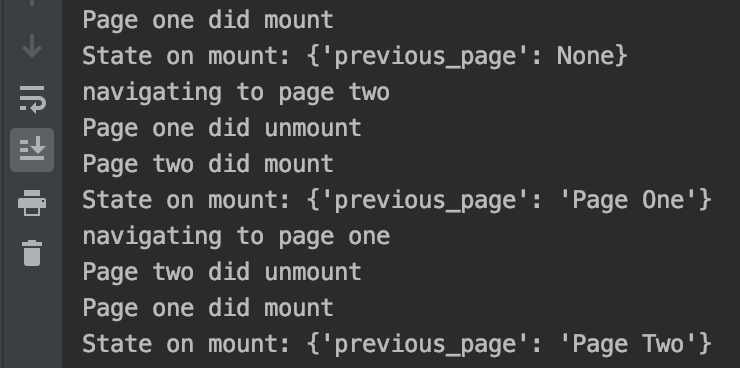
Is this example, we navigated from page_one to page_two to page_one again. The state is printed in page_did_mount() and changed in page_did_unmount().


Download files
Download the file for your platform. If you're not sure which to choose, learn more about installing packages.
Source Distribution
Built Distribution
Filter files by name, interpreter, ABI, and platform.
If you're not sure about the file name format, learn more about wheel file names.
Copy a direct link to the current filters






