
Trankit: A Light-Weight Transformer-based Toolkit for Multilingual Natural Language Processing

Project description
Trankit: A Light-Weight Transformer-based Python Toolkit for Multilingual Natural Language Processing




Our technical paper for Trankit won the Outstanding Demo Paper Award at EACL 2021. Please cite the paper if you use Trankit in your research.
@inproceedings{nguyen2021trankit,
      title={Trankit: A Light-Weight Transformer-based Toolkit for Multilingual Natural Language Processing},
      author={Nguyen, Minh Van and Lai, Viet Dac and Veyseh, Amir Pouran Ben and Nguyen, Thien Huu},
      booktitle="Proceedings of the 16th Conference of the European Chapter of the Association for Computational Linguistics: System Demonstrations",
      year={2021}
}
:boom: :boom: :boom: Trankit v1.0.0 is out:
-
90 new pretrained transformer-based pipelines for 56 languages. The new pipelines are trained with XLM-Roberta large, which further boosts the performance significantly over 90 treebanks of the Universal Dependencies v2.5 corpus. Check out the new performance here. This page shows you how to use the new pipelines.
-
Auto Mode for multilingual pipelines. In the Auto Mode, the language of the input will be automatically detected, enabling the multilingual pipelines to process the input without specifying its language. Check out how to turn on the Auto Mode here. Thank you loretoparisi for your suggestion on this.
-
Command-line interface is now available to use. This helps users who are not familiar with Python programming language use Trankit easily. Check out the tutorials on this page.
Trankit is a light-weight Transformer-based Python Toolkit for multilingual Natural Language Processing (NLP). It provides a trainable pipeline for fundamental NLP tasks over 100 languages, and 90 downloadable pretrained pipelines for 56 languages.
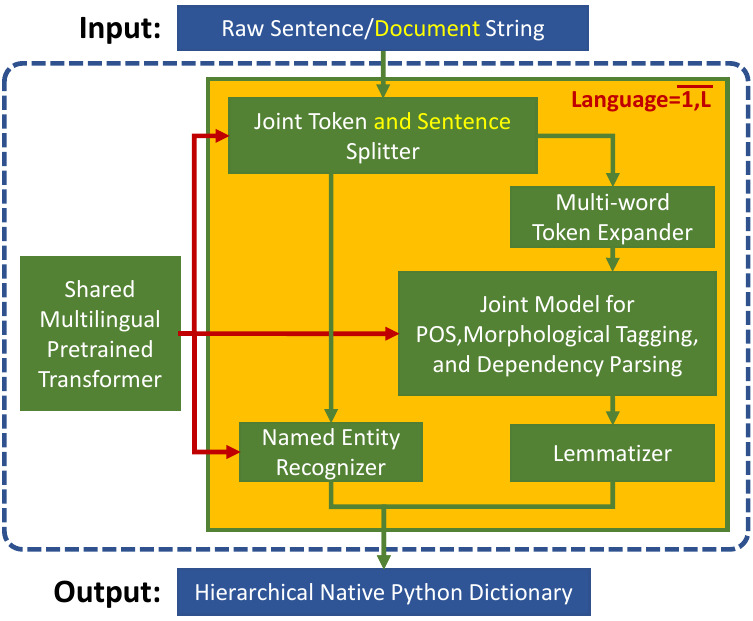
Trankit outperforms the current state-of-the-art multilingual toolkit Stanza (StanfordNLP) in many tasks over 90 Universal Dependencies v2.5 treebanks of 56 different languages while still being efficient in memory usage and speed, making it usable for general users.
In particular, for English, Trankit is significantly better than Stanza on sentence segmentation (+9.36%) and dependency parsing (+5.07% for UAS and +5.81% for LAS). For Arabic, our toolkit substantially improves sentence segmentation performance by 16.36% while Chinese observes 14.50% and 15.00% improvement of UAS and LAS for dependency parsing. Detailed comparison between Trankit, Stanza, and other popular NLP toolkits (i.e., spaCy, UDPipe) in other languages can be found here on our documentation page.
We also created a Demo Website for Trankit, which is hosted at: http://nlp.uoregon.edu/trankit
Installation
Trankit can be easily installed via one of the following methods:
Using pip
pip install trankit
The command would install Trankit and all dependent packages automatically.
From source
git clone https://github.com/nlp-uoregon/trankit.git
cd trankit
pip install -e .
This would first clone our github repo and install Trankit.
Fixing the compatibility issue of Trankit with Transformers
Previous versions of Trankit have encountered the compatibility issue when using recent versions of transformers. To fix this issue, please install the new version of Trankit as follows:
pip install trankit==1.1.0
If you encounter any other problem with the installation, please raise an issue here to let us know. Thanks.
Usage
Trankit can process inputs which are untokenized (raw) or pretokenized strings, at both sentence and document level. Currently, Trankit supports the following tasks:
- Sentence segmentation.
- Tokenization.
- Multi-word token expansion.
- Part-of-speech tagging.
- Morphological feature tagging.
- Dependency parsing.
- Named entity recognition.
Initialize a pretrained pipeline
The following code shows how to initialize a pretrained pipeline for English; it is instructed to run on GPU, automatically download pretrained models, and store them to the specified cache directory. Trankit will not download pretrained models if they already exist.
from trankit import Pipeline

# initialize a multilingual pipeline
p = Pipeline(lang='english', gpu=True, cache_dir='./cache')
Perform all tasks on the input
After initializing a pretrained pipeline, it can be used to process the input on all tasks as shown below. If the input is a sentence, the tag is_sent must be set to True.
from trankit import Pipeline

p = Pipeline(lang='english', gpu=True, cache_dir='./cache')

######## document-level processing ########
untokenized_doc = '''Hello! This is Trankit.'''
pretokenized_doc = [['Hello', '!'], ['This', 'is', 'Trankit', '.']]

# perform all tasks on the input
processed_doc1 = p(untokenized_doc)
processed_doc2 = p(pretokenized_doc)

######## sentence-level processing #######
untokenized_sent = '''This is Trankit.'''
pretokenized_sent = ['This', 'is', 'Trankit', '.']

# perform all tasks on the input
processed_sent1 = p(untokenized_sent, is_sent=True)
processed_sent2 = p(pretokenized_sent, is_sent=True)
Note that, although pretokenized inputs can always be processed, using pretokenized inputs for languages that require multi-word token expansion such as Arabic or French might not be the correct way. Please check out the column Requires MWT expansion? of this table to see if a particular language requires multi-word token expansion or not.
For more detailed examples, please check out our documentation page.
Multilingual usage
Starting from version v1.0.0, Trankit supports a handy Auto Mode in which users do not have to set a particular language active before processing the input. In the Auto Mode, Trankit will automatically detect the language of the input and use the corresponding language-specific models, thus avoiding switching back and forth between languages in a multilingual pipeline.
from trankit import Pipeline

p = Pipeline('auto')

# Tokenizing an English input
en_output = p.tokenize('''I figured I would put it out there anyways.''')

# POS, Morphological tagging and Dependency parsing a French input
fr_output = p.posdep('''On pourra toujours parler à propos d'Averroès de "décentrement du Sujet".''')

# NER tagging a Vietnamese input
vi_output = p.ner('''Cuộc tiêm thử nghiệm tiến hành tại Học viện Quân y, Hà Nội''')
In this example, the code name 'auto' is used to initialize a multilingual pipeline in the Auto Mode. For more information, please visit this page. Note that, besides the new Auto Mode, the manual mode can still be used as before.
Building a customized pipeline
Training customized pipelines is easy with Trankit via the class TPipeline. Below we show how we can train a token and sentence splitter on customized data.
from trankit import TPipeline

tp = TPipeline(training_config={
    'task': 'tokenize',
    'save_dir': './saved_model',
    'train_txt_fpath': './train.txt',
    'train_conllu_fpath': './train.conllu',
    'dev_txt_fpath': './dev.txt',
    'dev_conllu_fpath': './dev.conllu'
    }
)

trainer.train()
Detailed guidelines for training and loading a customized pipeline can be found here
Sharing your customized pipelines
In case you want to share your customized pipelines with other users. Please create an issue here and provide us the following information:
- Training data that you used to train your models, e.g., data license, data source, and some data statistics (i.e., sizes of training, development, and test data).
- Performance of your pipelines on your test data using the official evaluation script.
- A downloadable link to your trained model files (a Google drive link would be great). After we receive your request, we will check and test your pipelines. Once everything is done, we would make the pipelines accessible by other users via new language codes.
Acknowledgements
This project has been supported by the Office of the Director of National Intelligence (ODNI), Intelligence Advanced Research Projects Activity (IARPA), via IARPA Contract No. 2019-19051600006 under the Better Extraction from Text Towards Enhanced Retrieval (BETTER) Program.
We use XLM-Roberta and Adapters as our shared multilingual encoder for different tasks and languages. The AdapterHub is used to implement our plug-and-play mechanism with Adapters. To speed up the development process, the implementations for the MWT expander and the lemmatizer are adapted from Stanza. To implement the language detection module, we leverage the langid library.
Release history Release notifications | RSS feed


Download files
Download the file for your platform. If you're not sure which to choose, learn more about installing packages.
Source Distribution
Built Distribution
Filter files by name, interpreter, ABI, and platform.
If you're not sure about the file name format, learn more about wheel file names.
Copy a direct link to the current filters
File details
Details for the file trankit-1.1.1.tar.gz.
File metadata
- Download URL: trankit-1.1.1.tar.gz
- Upload date:
- Size: 602.0 kB
- Tags: Source
- Uploaded using Trusted Publishing? No
- Uploaded via: twine/3.2.0 pkginfo/1.5.0.1 requests/2.22.0 setuptools/41.4.0 requests-toolbelt/0.9.1 tqdm/4.36.1 CPython/3.7.4
File hashes
| Algorithm | Hash digest | |
|---|---|---|
| SHA256 |
1fc2b529e03c7c3b734a6ae70ca96dad6b734b2daa165569c11e05e6782e41be
|
|
| MD5 |
ed56f08d58ec8f7e21186e929cea33dc
|
|
| BLAKE2b-256 |
a4ff51af2a0473720dfdacd33f25a77c4a4617bbed321428e4ad03cad3cc6cf7
|
File details
Details for the file trankit-1.1.1-py3-none-any.whl.
File metadata
- Download URL: trankit-1.1.1-py3-none-any.whl
- Upload date:
- Size: 773.4 kB
- Tags: Python 3
- Uploaded using Trusted Publishing? No
- Uploaded via: twine/3.2.0 pkginfo/1.5.0.1 requests/2.22.0 setuptools/41.4.0 requests-toolbelt/0.9.1 tqdm/4.36.1 CPython/3.7.4
File hashes
| Algorithm | Hash digest | |
|---|---|---|
| SHA256 |
b29184c69ed1af15ac6033214d9d1468ee80bbe3cc7c8349b14f617efdfd78ee
|
|
| MD5 |
d2f5c4dc04d142e29ce48e3bc2d09d68
|
|
| BLAKE2b-256 |
2f844b60583342a7a6551418e4d88414bc509a19ec0f175e24a212c9acf2ca49
|






