
Tokenizer POS-tagger and Dependency-parser for Classical Chinese

Project description

UD-Kanbun
Tokenizer, POS-Tagger, and Dependency-Parser for Classical Chinese Texts (漢文/文言文), working on Universal Dependencies.
Basic usage
>>> import udkanbun
>>> lzh=udkanbun.load()
>>> s=lzh("不入虎穴不得虎子")
>>> print(s)
# text = 不入虎穴不得虎子
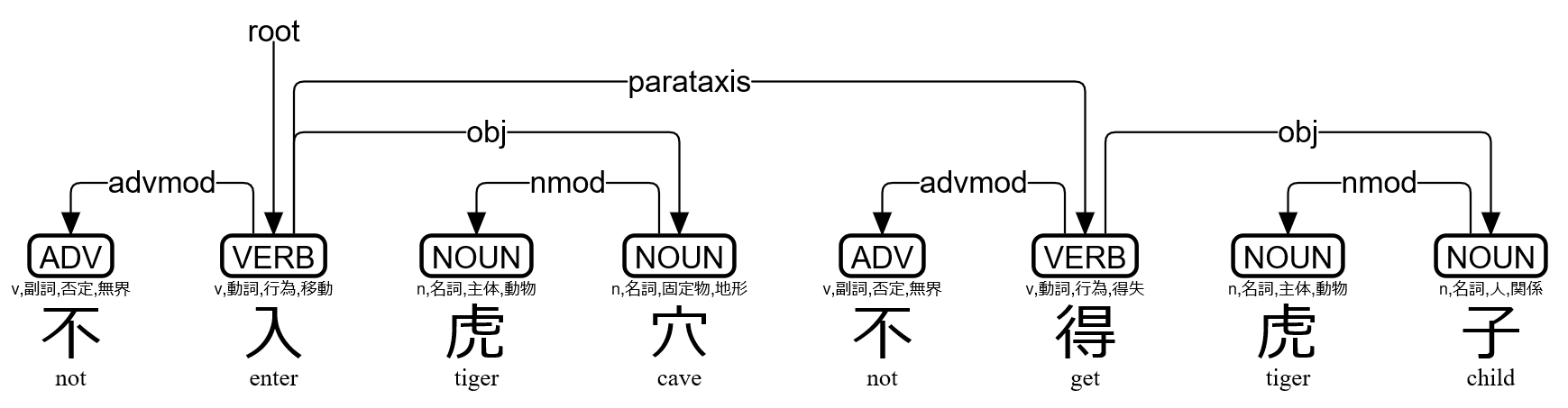
1	不	不	ADV	v,副詞,否定,無界	Polarity=Neg	2	advmod	_	Gloss=not|SpaceAfter=No
2	入	入	VERB	v,動詞,行為,移動	_	0	root	_	Gloss=enter|SpaceAfter=No
3	虎	虎	NOUN	n,名詞,主体,動物	_	4	nmod	_	Gloss=tiger|SpaceAfter=No
4	穴	穴	NOUN	n,名詞,固定物,地形	Case=Loc	2	obj	_	Gloss=cave|SpaceAfter=No
5	不	不	ADV	v,副詞,否定,無界	Polarity=Neg	6	advmod	_	Gloss=not|SpaceAfter=No
6	得	得	VERB	v,動詞,行為,得失	_	2	parataxis	_	Gloss=get|SpaceAfter=No
7	虎	虎	NOUN	n,名詞,主体,動物	_	8	nmod	_	Gloss=tiger|SpaceAfter=No
8	子	子	NOUN	n,名詞,人,関係	_	6	obj	_	Gloss=child|SpaceAfter=No

>>> t=s[1]
>>> print(t.id,t.form,t.lemma,t.upos,t.xpos,t.feats,t.head.id,t.deprel,t.deps,t.misc)
1 不 不 ADV v,副詞,否定,無界 Polarity=Neg 2 advmod _ Gloss=not|SpaceAfter=No

>>> print(s.kaeriten())
不㆑入㆓虎穴㆒不㆑得㆓虎子㆒

>>> print(s.to_tree())
不 <╗     advmod
入 ═╩═╦═╗ root
虎 <╗ ║ ║ nmod
穴 ═╝<╝ ║ obj
不 <╗   ║ advmod
得 ═╩═╗<╝ parataxis
虎 <╗ ║   nmod
子 ═╝<╝   obj

>>> f=open("trial.svg","w")
>>> f.write(s.to_svg())
>>> f.close()
udkanbun.load() has two options udkanbun.load(MeCab=True,Danku=False). By default, the UD-Kanbun pipeline uses MeCab for tokenizer and POS-tagger, then uses UDPipe for dependency-parser. With the option MeCab=False the pipeline uses UDPipe for all through the processing. With the options MeCab=False,Danku=True the pipeline tries to segment sentences automatically.
udkanbun.UDKanbunEntry.to_tree() has an option to_tree(BoxDrawingWidth=2) for old terminals, whose Box Drawing characters are "fullwidth". to_tree(kaeriten=True,Japanese=True) is convenient for Japanese users.
You can simply use udkanbun on the command line:
echo 不入虎穴不得虎子 | udkanbun
Usage via spaCy
If you have already installed spaCy 2.1.0 or later, you can use UD-Kanbun via spaCy Language pipeline.
>>> import udkanbun.spacy
>>> lzh=udkanbun.spacy.load()
>>> d=lzh("不入虎穴不得虎子")
>>> print(type(d))
<class 'spacy.tokens.doc.Doc'>
>>> print(udkanbun.spacy.to_conllu(d))
# text = 不入虎穴不得虎子
1	不	不	ADV	v,副詞,否定,無界	_	2	advmod	_	Gloss=not|SpaceAfter=No
2	入	入	VERB	v,動詞,行為,移動	_	0	root	_	Gloss=enter|SpaceAfter=No
3	虎	虎	NOUN	n,名詞,主体,動物	_	4	nmod	_	Gloss=tiger|SpaceAfter=No
4	穴	穴	NOUN	n,名詞,固定物,地形	_	2	obj	_	Gloss=cave|SpaceAfter=No
5	不	不	ADV	v,副詞,否定,無界	_	6	advmod	_	Gloss=not|SpaceAfter=No
6	得	得	VERB	v,動詞,行為,得失	_	2	parataxis	_	Gloss=get|SpaceAfter=No
7	虎	虎	NOUN	n,名詞,主体,動物	_	8	nmod	_	Gloss=tiger|SpaceAfter=No
8	子	子	NOUN	n,名詞,人,関係	_	6	obj	_	Gloss=child|SpaceAfter=No

>>> t=d[0]
>>> print(t.i+1,t.orth_,t.lemma_,t.pos_,t.tag_,t.head.i+1,t.dep_,t.whitespace_,t.norm_)
1 不 不 ADV v,副詞,否定,無界 2 advmod  not
Installation for Linux
Tar-ball is available for Linux, and is installed by default when you use pip:
pip install udkanbun
Installation for Cygwin
Make sure to get gcc-g++ python37-pip python37-devel packages, and then:
pip3.7 install udkanbun
Use python3.7 command in Cygwin instead of python.
Installation for Jupyter Notebook (Google Colaboratory)
!pip install udkanbun
Try notebook for Google Colaboratory.
Author
Koichi Yasuoka (安岡孝一)
References
- Koichi Yasuoka: Universal Dependencies Treebank of the Four Books in Classical Chinese, DADH2019: 10th International Conference of Digital Archives and Digital Humanities (December 2019), pp.20-28.
- 安岡孝一: 四書を学んだMeCab+UDPipeはセンター試験の漢文を読めるのか, 東洋学へのコンピュータ利用, 第30回研究セミナー (2019年3月8日), pp.3-110.
- 安岡孝一: 漢文の依存文法解析と返り点の関係について, 日本漢字学会第1回研究大会予稿集 (2018年12月1日), pp.33-48.
Release history Release notifications | RSS feed


Download files
Download the file for your platform. If you're not sure which to choose, learn more about installing packages.
Source Distribution
File details
Details for the file udkanbun-2.0.9.tar.gz.
File metadata
- Download URL: udkanbun-2.0.9.tar.gz
- Upload date:
- Size: 10.5 MB
- Tags: Source
- Uploaded using Trusted Publishing? No
- Uploaded via: twine/1.13.0 pkginfo/1.5.0.1 requests/2.21.0 setuptools/41.0.0 requests-toolbelt/0.8.0 tqdm/4.44.0 CPython/3.7.6
File hashes
| Algorithm | Hash digest | |
|---|---|---|
| SHA256 |
5a420b230e227e028e8d48bd09af438beaf1232e86b1b3506faaa04cc74b4b32
|
|
| MD5 |
7e94f76e40331de485daf6d753c6dba2
|
|
| BLAKE2b-256 |
295410407fe86701114b1388c923131627a7f77cb368fed4e0d7b4eec289f013
|






