
CLI program to filter word choices to aid solving Wordle game problems

Project description
WORDLE-AID


wordle-aid is a Linux command line program to filter word choices to aid solving Wordle problems. You run this program specifying your previous guesses and results, and then the program outputs a list of candidate words in English frequency usage order to your terminal. Wordle-aid uses the pyspellchecker package for its source of English dictionary words and frequencies.
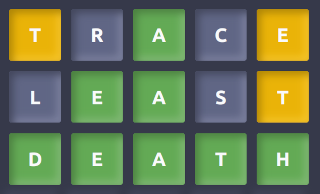
The following example Wordle (#21) solution illustrates how to use it.
-
Choose any starting word as normal. You can even use
wordle-aidto help with this, e.g.# print all 5 letter words, in reverse frequency order to screen: $ wordle-aid ..... # Or, print all 5 letter words with at least 3 vowels: $ wordle-aid -v3 ..... # Or, print all 5 letter words with at least 3 vowels and all unique letters: $ wordle-aid -v3 -u ..... -
We choose our favorite starting word TRACE as the first guess, which gives the result shown on the first line of the image above. Based on this result, run:
$ wordle-aid TracE ..a..
neath 55
keats 57
yeats 148
beaut 168
exalt 352
leant 380
heath 467
meaty 726
meats 1028
feats 1189
heats 1539
yeast 1587
leapt 1884
feast 12436
seats 18355
dealt 19971
beast 22995
beats 31332
meant 212776
death 285290
least 456376
The output above is the list of possible candidate words, given the command line word arguments you have specified.
Note: Specify the 1st guess word you used and set each yellow (i.e. correct but incorrect position) letter to upper-case, and other letters to lower-case. Specify all green (i.e. correct and in position) letters you have found so far in the right (wildcard) field in their correct position.
-
Choose a word from the suggestion list output from above command. We choose to enter the highest frequency candidate LEAST from the list, which gives the result shown on the second line in the image above. Then run:
$ wordle-aid TracE leasT .ea.. neath 55 heath 467 meaty 726 death 285290 -
Choose a word from the suggestion list output from the above command. We choose to enter the highest frequency result DEATH, which gives us the final correct answer.
In summary, specify ..... (all wildcards) as your starting result and
insert characters to it as your find them, i.e. all green letters from
each guess. Note that the number of wildcard characters determines the
Wordle game word size (e.g. wordle-aid bundle ...... for a 6 letter
game). Specify your previous word guesses earlier on the command line.
They don't actually have to be in the order that you guessed them
although likely you will be re-editing from your command history so they
will be. Yellow letter guesses (i.e. letter valid but in incorrect
place) are entered as upper case, and dark/grey letter guesses (i.e.
letter not present anywhere) are entered as lower case. Green letters
(i.e. letter valid and in correct place) can be lower or upper case in
the earlier word arguments, but must be specified in the final
wildcard word (as either lower or upper case) .
Example Minimal Solver
Wordle-aid also includes an example solver, invoked by the -s/--solve
option to solve in the mininum number of steps assuming the most
frequent candidate word is chosen each step. E.g to see an example
solution for the above word DEATH:
$ wordle-aid -s death
1 about [AbouT .....]
2 thank [THank ..a..]
3 death [death death] SOLVED
You can also specify 1 or more starting words, e.g if we start with the same word TRACE as we chose for the opening example above then we get the same sequence of word candidates as the example (because wordle-aid selects the highest frequency candidate each step as we manually did in the example).
$ wordle-aid -s trace death
1 trace [TracE ..a..]
2 least [leasT .ea..]
3 death [death death] SOLVED
Or, use a different second word for the example:
$ wordle-aid -s trace stamp death
1 trace [TracE ..a..]
2 stamp [sTamp ..a..]
3 death [death death] SOLVED
But default, unless you have specified a word for a step, wordle-aid
selects the highest frequency word candidate each solver iteration. To
introduce some randomness, you can instead tell wordle-aid to randomly
choose a candidate from within the top N candidates by including the
-r/--random option, e.g:
$ wordle-aid -s -r20 death
1 right [rigHT .....]
2 hates [HATEs .....]
3 teach [Teach .ea.h]
4 neath [neath .eath]
5 death [death death] SOLVED
Or from the top N percentage of candidates:
$ wordle-aid -s -r20% death
1 bonus [bonus .....]
2 cigar [cigAr .....]
3 taped [TApED .....]
4 death [death death] SOLVED
Simple Python API
This program takes command line options and arguments and then writes to standard output. If you instead want to run it programmatically from another calling python program (e.g. for a simulation/test) then you can import and run it as a module. The main code is wrapped within a function signature:
def run(args: Union[List[str], str], fp: TextIO = sys.stdout, *,
        read_start_options: bool = False) -> None
So you provide a list of option/argument strings (or a single command line string) and pass in a string buffer which the program will write to instead of standard output. E.g, as a simple example:
#!/usr/bin/python3
import io
import wordle_aid

buf = io.StringIO()
wordle_aid.run('-v4 .....', buf)
topword = buf.getvalue().splitlines()[-1]

# Output top frequency 5 letter word which has 4 vowels:
print(topword.split()[0])
A real example is this script to automatically solve a list of words and calculate the average number of guesses.
Installation or Upgrade
Wordle-aid runs on pure Python and requires the pyspellchecker 3rd party package.
Arch users can install wordle-aid from the AUR.
Python 3.7 or later is required. Note wordle-aid is on
PyPI so just ensure that
pipx is installed then type the
following:
$ pipx install wordle-aid
To upgrade:
$ pipx upgrade wordle-aid
Command Line Options
Type wordle-aid -h to view the usage summary:
usage: wordle-aid [-h] [-l LANGUAGE] [-v VOWELS] [-u] [-w WORDS_FILE]
                     [-e EXCLUDE_WORDS_FILE] [-s] [-r RANDOM] [-c] [-V]
                     [words ...]

CLI program to filter word choices to aid solving Wordle game problems.

positional arguments:
  words                 list of attempted words. Upper case letter is right
                        letter but wrong place. Lower case letter is wrong
                        letter anywhere. Last word is wildcards for current
                        matches.

options:
  -h, --help            show this help message and exit
  -l LANGUAGE, --language LANGUAGE
                        pyspellchecker language dictionary to use,
                        default="en"
  -v VOWELS, --vowels VOWELS
                        exclude words with less than this number of unique
                        vowels
  -u, --unique          exclude words with non-unique letters
  -w WORDS_FILE, --words-file WORDS_FILE
                        filter dictionary to words in given text file. Use
                        multiple times to specify multiple files.
  -e EXCLUDE_WORDS_FILE, --exclude-words-file EXCLUDE_WORDS_FILE
                        exclude words in given text file. Use multiple times
                        to specify multiple files.
  -s, --solve           solve to final given word, starting with earlier given
                        words (if any)
  -r RANDOM, --random RANDOM
                        choose word for solver at each step randomly from
                        given number (or %) of top candidates, default=1
  -c, --no-colors       don't show colors in solver output
  -V, --version         show wordle-aid version

Note you can set default starting options in "$HOME/.config/wordle-aid-
flags.conf".
License
Copyright (C) 2022 Mark Blakeney. This program is distributed under the terms of the GNU General Public License. This program is free software: you can redistribute it and/or modify it under the terms of the GNU General Public License as published by the Free Software Foundation, either version 3 of the License, or any later version. This program is distributed in the hope that it will be useful, but WITHOUT ANY WARRANTY; without even the implied warranty of MERCHANTABILITY or FITNESS FOR A PARTICULAR PURPOSE. See the GNU General Public License at https://en.wikipedia.org/wiki/GNU_General_Public_License for more details.
Release history Release notifications | RSS feed


Download files
Download the file for your platform. If you're not sure which to choose, learn more about installing packages.
Source Distribution
Built Distribution
Filter files by name, interpreter, ABI, and platform.
If you're not sure about the file name format, learn more about wheel file names.
Copy a direct link to the current filters
File details
Details for the file wordle_aid-2.9.tar.gz.
File metadata
- Download URL: wordle_aid-2.9.tar.gz
- Upload date:
- Size: 45.8 kB
- Tags: Source
- Uploaded using Trusted Publishing? No
- Uploaded via: uv/0.9.1
File hashes
| Algorithm | Hash digest | |
|---|---|---|
| SHA256 |
50e9603f238a8b99980f2efc4699187750259309ab604af1ff5a305e5ae3b673
|
|
| MD5 |
50f61da51fed8bd1aa1de70bf6d44a7b
|
|
| BLAKE2b-256 |
4c2c3c58acd8443d74eb36840dc6fa97df566bd599be699774a036c2d9f48cb1
|
File details
Details for the file wordle_aid-2.9-py3-none-any.whl.
File metadata
- Download URL: wordle_aid-2.9-py3-none-any.whl
- Upload date:
- Size: 9.0 kB
- Tags: Python 3
- Uploaded using Trusted Publishing? No
- Uploaded via: uv/0.9.1
File hashes
| Algorithm | Hash digest | |
|---|---|---|
| SHA256 |
9580c86827702bdf72aa1aed946e6c874a4e0375537499993e3f784e26ca1d76
|
|
| MD5 |
fb902f3fca60b8861f45677c3e477138
|
|
| BLAKE2b-256 |
86507c87a1519d7786c7d69e0d08d0ca5cd45c9ac629c6cf1727765e90496ae4
|






