
Powerline for Xonsh shell

Project description
Xontrib Powerline 2
xontrib-powerline fork by santagada/xontrib-powerline.
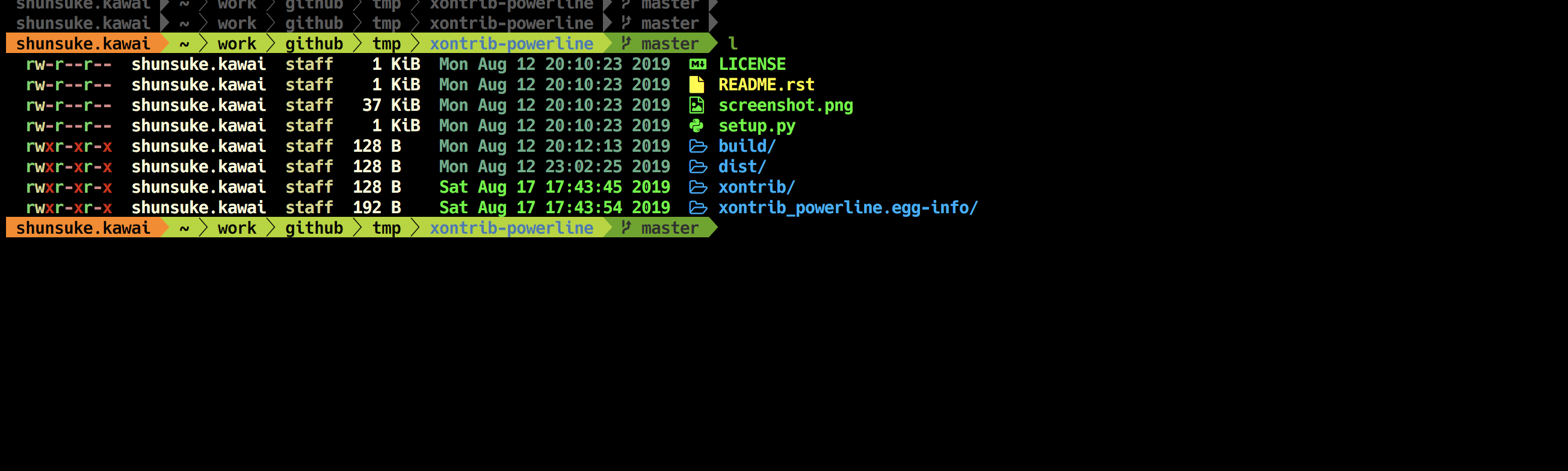
Install
pip install xontrib-powerline2
And them load it on your .xonshrc
xontrib load powerline2
Configuration
There are two variables that can be set, $PL_PROMPT for main prompt, $PL_PROMPT for the right prompt and $PL_TOOLBAR for the bottom toolbar.
They contain a list of sections that can be used separated by >. The value ! means not to use that prompt.
Examples:
$PL_PROMPT='cwd>branch'
$PL_RPROMPT = '!'  # for no toolbar
$PL_TOOLBAR = 'who>virtualenv>branch>cwd>full_proc'
xontrib load powerline2
Bulid prompt
If you want to override the settings after xontrib load, so commit changes to your prompt execute pl_build_prompt command.
Check config
To see all available sections type pl_available_sections command.
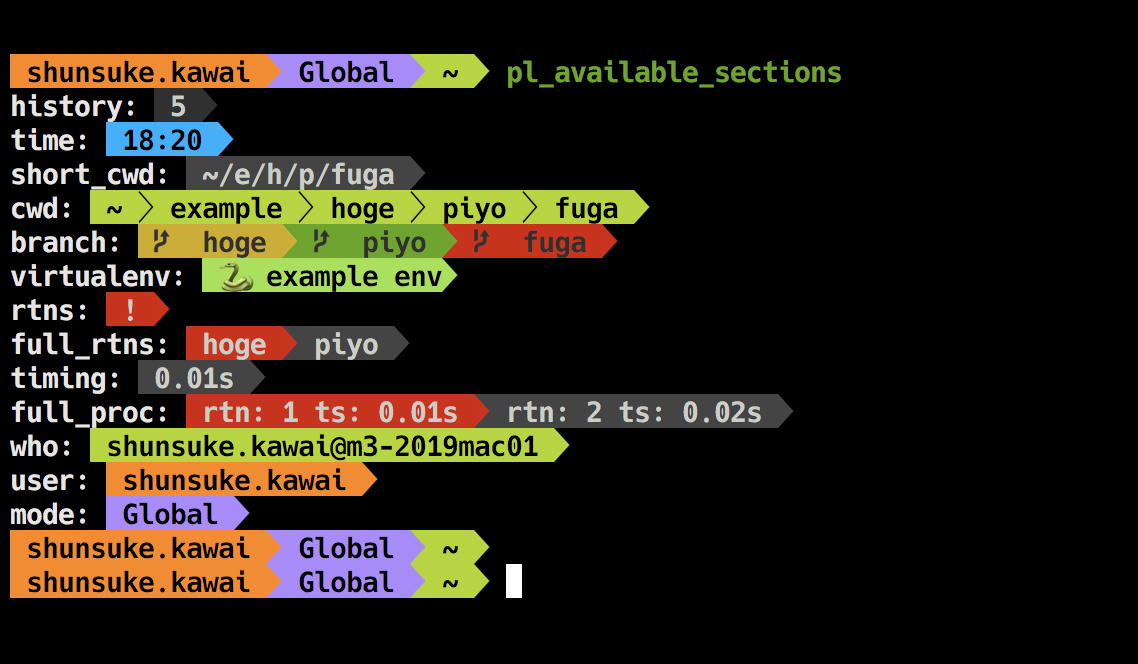
Default sections
| section | description |
|---|---|
| who | {user}@{hostname} |
| virtualenv | {env_name} |
| branch | {curr_branch} |
| cwd | $pwd using $pl_colors['cwd', 'git_root', 'git_sub_dir'] and $pl_parts |
| short_cwd | {short_cwd} |
| full_proc | run time of the previous command from history |
| timing | diff from previous command's executed time |
| time | strftime(' %h:%m ') |
| history | len(__xonsh__.history) |
| rtns | '!' if __xonsh__.history.rtns else none |
| full_rtns | rtns[-1] if __xonsh__.history.rtns else none |
If you want to know about {} sections, please look xonsh document.
Custom sections
We can add customize origin section by $PL_EXTRA_SEC.
# func return [format string, text color, background color]
$PL_EXTRA_SEC = {"user": lambda: [' I'm {user} ', 'BLACK', '#fd971f']}
$PL_PROMPT='user>cwd>branch'
$PL_TOOLBAR='!'
$PL_RPROMPT='!'
xontrib load powerline2

Section's color
We can change section color by $PL_COLORS.
$PL_COLORS is dict. Basically, the value is (text_color, background_color).
| key | default value | description |
|---|---|---|
| who | ("BLACK", "#a6e22e") | - |
| venv | ("BLACK", "INTENSE_GREEN") | - |
| branch | ("#333") | background color from $PROMPT_FIELDS['branch_bg_color'] |
| cwd | ("WHITE", "#444") | - |
| git_root | ("BLACK", "#00adee") | used by cwd |
| git_sub_dir | ("WHITE", "#00adee") | used by cwd |
| short_cwd | ("WHITE", "#444") | - |
| full_proc | ("WHITE", "RED", "#444") | There are two types of background depending on the situation |
| timing | ("WHITE", "#444") | - |
| time | ("BLACK", "#00adee") | - |
| history | ("WHITE", "#333333") | - |
| rtns | ("WHITE", "RED") | - |
| full_rtns | ("WHITE", "RED", "#444") | There are two types of background depending on the situation |
Multi line prompt
We can use multi line prompt by \n.
$PL_PROMPT='\nuser>mode>\ncwd'
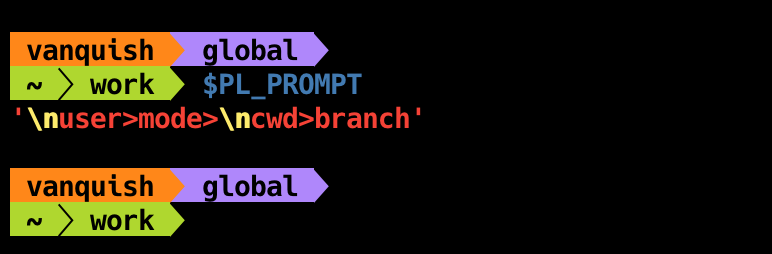
Separate mode
We can change the way of separation mode by $PL_SEP_MODE.
| mode | separate char |
|---|---|
| powerline | , , , |
| round | , , , |
| down | , , , |
| up | , , , |
| flame | , , , |
| squares | , , , |
| ruiny | , , , |
| lego | , |
For example
# set $PL_SEP_MODE or using pl_set_mode alias
$PL_SEP_MODE='round'
pl_set_mode round

If you want to use original separeter, you can use $PL_ORG_SEP, $PL_ORG_SEP_THIN, $PL_ORG_RSEP.
$PL_ORG_SEP = '■'
$PL_ORG_SEP_THIN = '□'
$PL_ORG_RSEP = '■'
xontrib load powerline2

Credits
laerus/cookiecutter-xontrib: https://github.com/laerus/cookiecutter-xontribsantagada/xontrib-powerline: https://github.com/santagada/xontrib-powerline
Similer Projects
jnoortheen/xontrib-powerline3: https://github.com/jnoortheen/xontrib-powerline3- That is also compatible with
ASYNC_PROMPT!
- That is also compatible with


Download files
Download the file for your platform. If you're not sure which to choose, learn more about installing packages.
Source Distribution
Built Distribution
Filter files by name, interpreter, ABI, and platform.
If you're not sure about the file name format, learn more about wheel file names.
Copy a direct link to the current filters
File details
Details for the file xontrib-powerline2-1.5.0.tar.gz.
File metadata
- Download URL: xontrib-powerline2-1.5.0.tar.gz
- Upload date:
- Size: 6.1 kB
- Tags: Source
- Uploaded using Trusted Publishing? No
- Uploaded via: twine/3.2.0 pkginfo/1.5.0.1 requests/2.24.0 setuptools/50.3.2 requests-toolbelt/0.9.1 tqdm/4.46.1 CPython/3.7.3
File hashes
| Algorithm | Hash digest | |
|---|---|---|
| SHA256 |
eaec5acd8ab0107d2564fd5719812f953b6e8fabbed796a2813de7ae4daa9b54
|
|
| MD5 |
55281e0ac9f59c78bad5c81597430ddf
|
|
| BLAKE2b-256 |
f9a4bbf9e3e5724e6c1d17b23bddc84b143e0871e4005273fb7c9254309445f2
|
File details
Details for the file xontrib_powerline2-1.5.0-py3-none-any.whl.
File metadata
- Download URL: xontrib_powerline2-1.5.0-py3-none-any.whl
- Upload date:
- Size: 7.0 kB
- Tags: Python 3
- Uploaded using Trusted Publishing? No
- Uploaded via: twine/3.2.0 pkginfo/1.5.0.1 requests/2.24.0 setuptools/50.3.2 requests-toolbelt/0.9.1 tqdm/4.46.1 CPython/3.7.3
File hashes
| Algorithm | Hash digest | |
|---|---|---|
| SHA256 |
fd3f957404423003ec1d950154679409bc4f9a4974b7105ecc8dd232bd85bf64
|
|
| MD5 |
b8f9e63803c3b2c6103825f24f2608d6
|
|
| BLAKE2b-256 |
a0f3793f950b40350943071f2b005b59a68dab7aa6fd4f0b2a73358d7737836b
|






