
Attribution of Neural Networks using PyTorch

Project description
Zennit
Zennit (Zennit explains neural networks in torch) is a high-level framework in Python using PyTorch for explaining/exploring neural networks. Its design philosophy is intended to provide high customizability and integration as a standardized solution for applying LRP-based attribution methods in research.
Zennit is currently under development and has not yet reached a stable state. Interfaces may change suddenly and without warning, so please be careful when attempting to use Zennit in its current state.
If you find Zennit useful for your research, please consider citing our related paper:
@article{anders2021software,
      author  = {Anders, Christopher J. and
                 Neumann, David and
                 Samek, Wojciech and
                 Müller, Klaus-Robert and
                 Lapuschkin, Sebastian},
      title   = {Software for Dataset-wide XAI: From Local Explanations to Global Insights with {Zennit}, {CoRelAy}, and {ViRelAy}},
      journal = {CoRR},
      volume  = {abs/2106.13200},
      year    = {2021},
}
Install
To install directly from PyPI using pip, use:
$ pip install zennit
Alternatively, install from a manually cloned repository to try out the examples:
$ git clone https://github.com/chr5tphr/zennit.git
$ pip install ./zennit
Usage
An example can be found in share/example/feed_forward.py.
Currently, only feed-forward type models are supported.
At its heart, Zennit registers hooks at PyTorch's Module level, to modify the backward pass to produce LRP
attributions (instead of the usual gradient).
All rules are implemented as hooks (zennit/rules.py) and most use the LRP-specific BasicHook (zennit/core.py).
Composites are a way of choosing the right hook for the right layer.
In addition to the abstract NameMapComposite, which assigns hooks to layers by name, and LayerMapComposite,
which assigns hooks to layers based on their Type, there exist explicit Composites, which currently are
- EpsilonGammaBox (ZBox in input, epsilon in dense, Gamma 0.25 in convolutions)
- EpsilonPlus (PresetA in iNNvestigate)
- EpsilonPlusFlat (PresetAFlat in iNNvestigate)
- EpsilonAlpha2Beta1 (PresetB in iNNvestigate)
- EpsilonAlpha2Beta1Flat (PresetBFlat in iNNvestigate).
They may be used by directly importing from zennit.composites, or by using
their snake-case name as key for zennit.composites.COMPOSITES. Additionally,
there are Canonizers, which modify models such that LRP may be applied, if
needed. Currently, there are MergeBatchNorm, AttributeCanonizer and
CompositeCanonizer. There are two versions of the abstract MergeBatchNorm,
SequentialMergeBatchNorm, which automatically detects BatchNorm layers
followed by linear layers in sequential networks, and NamedMergeBatchNorm,
which expects a list of tuples to assign one or more linear layers to one batch
norm layer. AttributeCanonizer temporarily overwrites attributes of
applicable modules, e.g. for ResNet50, the forward function (attribute) of the
Bottleneck modules is overwritten to handle the residual connection.
Example
This example requires bash, cURL and (magic-)file.
Create a virtual environment, install Zennit and download the example scripts:
$ mkdir zennit-example
$ cd zennit-example
$ python -m venv .venv
$ .venv/bin/pip install zennit
$ curl -o feed_forward.py \
    'https://raw.githubusercontent.com/chr5tphr/zennit/master/share/example/feed_forward.py'
$ curl -o download-lighthouses.sh \
    'https://raw.githubusercontent.com/chr5tphr/zennit/master/share/scripts/download-lighthouses.sh'
Prepare the data needed for the example :
$ mkdir params data results
$ bash download-lighthouses.sh --output data/lighthouses
$ curl -o params/vgg16-397923af.pth 'https://download.pytorch.org/models/vgg16-397923af.pth'
This creates the needed directories and downloads the pre-trained vgg16 parameters and 8 images of light houses from wikimedia commons into the required label-directory structure for the imagenet dataset in Pytorch.
The feed_forward.py example may then be run using:
$ .venv/bin/python feed_forward.py \
    data/lighthouses \
    'results/vgg16_epsilon_gamma_box_{sample:02d}.png' \
    --inputs 'results/vgg16_input_{sample:02d}.png' \
    --parameters params/vgg16-397923af.pth \
    --model vgg16 \
    --composite epsilon_gamma_box \
    --relevance-norm symmetric \
    --cmap coldnhot
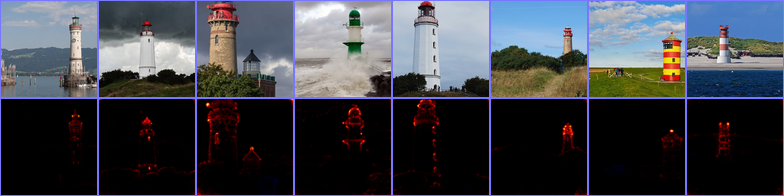
which computes the lrp heatmaps according to the epsilon_gamma_box rule and stores them in results, along with the respective input images.
Other possible composites that can be passed to --composites are, e.g., epsilon_plus, epsilon_alpha2_beta1_flat, guided_backprop, excitation_backprop.
The resulting heatmaps may look like the following:
Alternatively, heatmaps for SmoothGrad with absolute relevances may be computed by omitting --composite and supplying --attributor:
$ .venv/bin/python feed_forward.py \
    data/lighthouses \
    'results/vgg16_smoothgrad_{sample:02d}.png' \
    --inputs 'results/vgg16_input_{sample:02d}.png' \
    --parameters params/vgg16-397923af.pth \
    --model vgg16 \
    --attributor smoothgrad \
    --relevance-norm absolute \
    --cmap hot
For Integrated Gradients, --attributor integrads may be provided.
Heatmaps for Occlusion Analysis with unaligned relevances may be computed by executing:
$ .venv/bin/python feed_forward.py \
    data/lighthouses \
    'results/vgg16_occlusion_{sample:02d}.png' \
    --inputs 'results/vgg16_input_{sample:02d}.png' \
    --parameters params/vgg16-397923af.pth \
    --model vgg16 \
    --attributor occlusion \
    --relevance-norm unaligned \
    --cmap hot
The following is a slightly modified exerpt of share/example/feed_forward.py:
...
    # the maximal input shape, needed for the ZBox rule
    shape = (batch_size, 3, 224, 224)

    composite_kwargs = {
        'low': norm_fn(torch.zeros(*shape, device=device)),  # the highest and ...
        'high': norm_fn(torch.ones(*shape, device=device)),  # the lowest pixel value for ZBox
        'canonizers': [VGG16Canonizer()]  # the torchvision specific vgg16 canonizer
    }

    # create a composite specified by a name; the COMPOSITES dict includes all preset composites
    # provided by zennit.
    composite = COMPOSITES['epsilon_gamma_box'](**composite_kwargs)

    # disable requires_grad for all parameters, we do not need their modified gradients
    for param in model.parameters():
        param.requires_grad = False

    # create the composite context outside the main loop, such that the canonizers and hooks do not
    # need to be registered and removed for each step.
    with composite.context(model) as modified_model:
        for data, target in loader:
            # we use data without the normalization applied for visualization, and with the
            # normalization applied as the model input
            data_norm = norm_fn(data.to(device))
            data_norm.requires_grad_()

            # one-hot encoding of the target labels of size (len(target), 1000)
            output_relevance = torch.eye(n_outputs, device=device)[target]

            out = modified_model(data_norm)
            # a simple backward pass will accumulate the relevance in data_norm.grad
            torch.autograd.backward((out,), (output_relevance,))
...
Contributing
Code Style
We use PEP8 with a line-width of 120 characters. For docstrings we use numpydoc.
We use flake8 for quick style checks and pylint for thorough style checks.
Testing
Tests are written using pytest and executed in a separate environment using tox.
A full style check and all tests can be run by simply calling tox in the repository root.
Release history Release notifications | RSS feed


Download files
Download the file for your platform. If you're not sure which to choose, learn more about installing packages.
Source Distribution
Built Distribution
Filter files by name, interpreter, ABI, and platform.
If you're not sure about the file name format, learn more about wheel file names.
Copy a direct link to the current filters
File details
Details for the file zennit-0.3.2.tar.gz.
File metadata
- Download URL: zennit-0.3.2.tar.gz
- Upload date:
- Size: 605.9 kB
- Tags: Source
- Uploaded using Trusted Publishing? No
- Uploaded via: twine/3.4.1 importlib_metadata/4.5.0 pkginfo/1.7.0 requests/2.25.1 requests-toolbelt/0.9.1 tqdm/4.61.1 CPython/3.9.5
File hashes
| Algorithm | Hash digest | |
|---|---|---|
| SHA256 |
860d43c3b9a565ddc3a60cf714d1a40c7a3d01c791079a7ef454c66eebb0aa2c
|
|
| MD5 |
f04af02501104418d2983cc7ad30ff4b
|
|
| BLAKE2b-256 |
5e21f3b1a8b51d4d0847354c263c1ac8e5d54029e65549f7bf263c490b7b6859
|
File details
Details for the file zennit-0.3.2-py3-none-any.whl.
File metadata
- Download URL: zennit-0.3.2-py3-none-any.whl
- Upload date:
- Size: 44.1 kB
- Tags: Python 3
- Uploaded using Trusted Publishing? No
- Uploaded via: twine/3.4.1 importlib_metadata/4.5.0 pkginfo/1.7.0 requests/2.25.1 requests-toolbelt/0.9.1 tqdm/4.61.1 CPython/3.9.5
File hashes
| Algorithm | Hash digest | |
|---|---|---|
| SHA256 |
92f985222993d75b39bd68046bbf70e2771b364552f6a5656a8aa7a4a7b926ff
|
|
| MD5 |
2fcb7bdfd736b85dfa1a8c1a063e744e
|
|
| BLAKE2b-256 |
e452caebd93e68b65ea4a23b567ff9971c5100cff43bb6e5e43d0fca58a7777d
|






