
Verify JWT issued by Azure Active Directory B2C in Python.

Project description
azure-ad-verify-token
Verify JWT issued by Azure Active Directory B2C in Python 🐍.


Validation steps this library makes:

1. Accepts an Azure AD B2C JWT.
2. Extracts `kid` from unverified headers.
3. Finds `kid` within Azure JWKS.
4. Obtains RSA key from JWK.
5. Calls `jwt.decode` with nessary parameters, which inturn validates:

    - Signature
    - Expiration
    - Audience
    - Issuer
    - Key
    - Algorithm
License

This work is licensed under a Creative Commons Attribution-NonCommercial-NoDerivatives 4.0 International License.
For commercial use licenses contact us.
Installation
pip install azure-ad-verify-token
Usage
First you'll need to get your azure_ad_app_id, azure_ad_issuer and azure_ad_jwks_uri. See below steps to obtain these.
-
For app id. Login to Azure Portal, navigation to Azure AD B2C, Click on the Applications section and your app id should be listed.
-
For Issuer and JWKS URI:
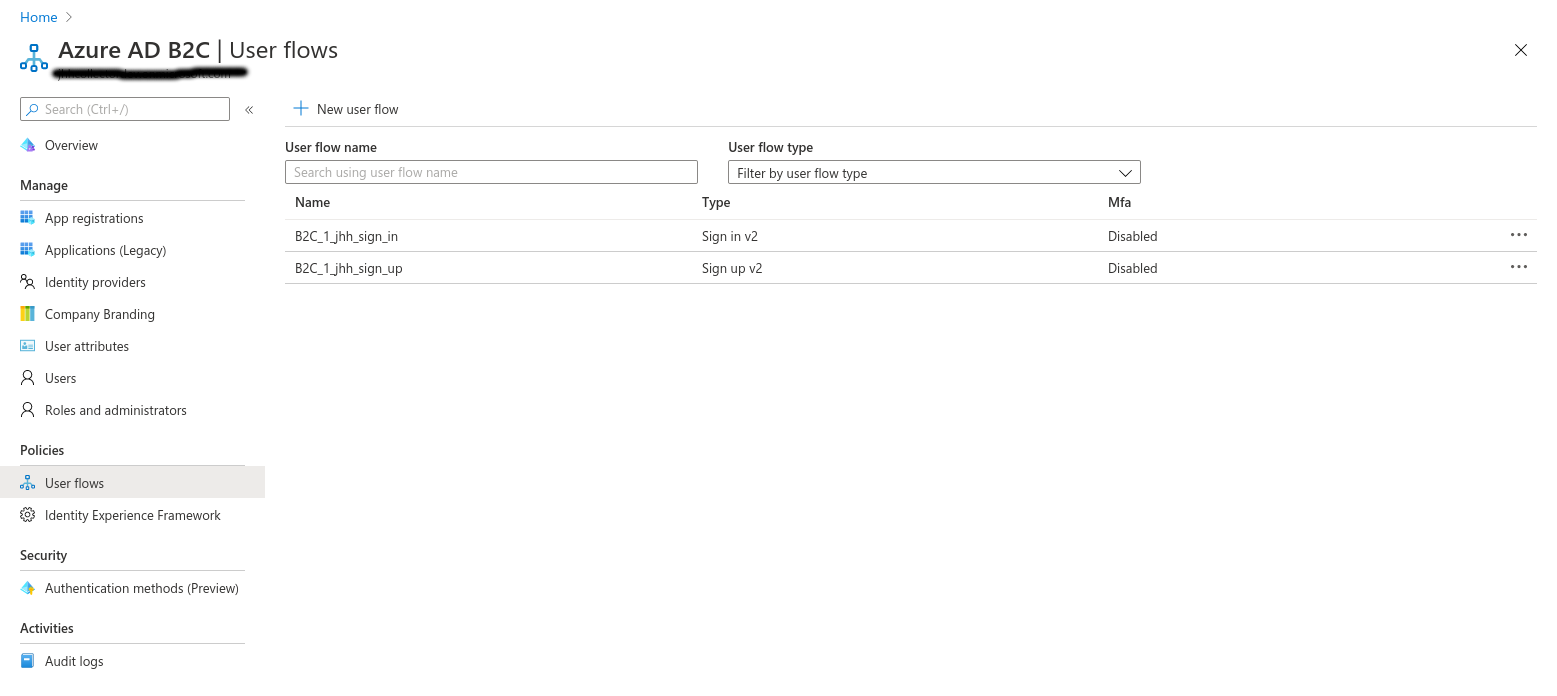
Under the "User Flows", note down the name of yours, this will be needed shortly.
Next, under Azure AD B2C, within the Applications section.
Click on "Endpoints".
Copy the endpoint with the label "OpenID Connect configuration endpoint (v2)"
It will look something like:
https://exampletenant.b2clogin.com/exampletenant.onmicrosoft.com/<policy-name>/v2.0/.well-known/openid-configuration
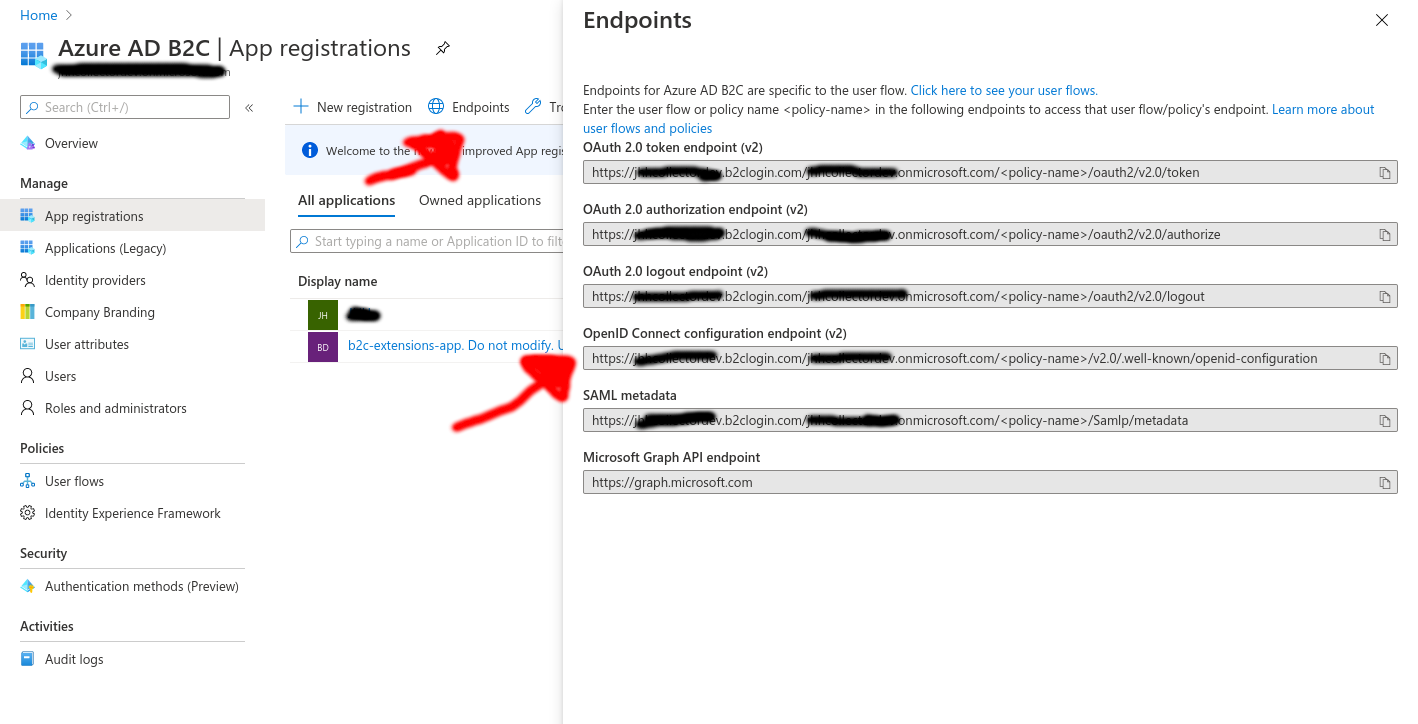
Now replace <policy-name> with the name of your User Flow from earlier
https://exampletenant.b2clogin.com/exampletenant.onmicrosoft.com/B2C_1_app_sign_in/v2.0/.well-known/openid-configuration
Now visit that URL in your web browser.
You should get a JSON response, note down the values for the keys 'issuer' and 'jwks_uri'.
Now you have those values you can proceed to verify a Azure generated JWT Token.
from azure_ad_verify_token import verify_jwt

azure_ad_app_id = 'b74cd13f-8f79-4c98-b748-7789ecb1111d5'
azure_ad_issuer = 'https://exampletenant.b2clogin.com/0867afa-24e7-40e9-9d27-74bb598zzzzc/v2.0/'
azure_ad_jwks_uri = 'https://exampletenant.b2clogin.com/exampletenant.onmicrosoft.com/B2C_1_app_sign_in/discovery/v2.0/keys'
payload = verify_jwt(
    token='<AZURE_JWT_TO_VERIFY_HERE>',
    valid_audiences=[azure_ad_app_id],
    issuer=azure_ad_issuer,
    jwks_uri=azure_ad_jwks_uri,
    verify=True,
)

print(payload)
{'aud': 'b74cd13f-8f79-4c98-b748-7789ecb1111d5',
 'auth_time': 1591800638,
 'emails': ['bob@example.com'],
 'exp': 1591804238,
 'family_name': 'Exp Admin',
 'given_name': 'Richard',
 'iat': 1591800638,
 'iss': 'https://exampletenant.b2clogin.com/90867afa-24e7-40e9-9d27-74bb598zzzzc/v2.0/',
 'nbf': 1591800638,
 'sub': 'e07bbc53-b812-4572-9edc-4b5d4ac88447',
 'tfp': 'B2C_1_app_sign_in',
 'ver': '1.0'}
If something goes wrong, one of the below exceptions will be raised:
# If the token is found to be invalid.
azure_ad_verify_token.InvalidAuthorizationToken

# Base exception, raised if the checks which call the Azure server recieve an unhappy response.
azure_ad_verify_token.AzureVerifyTokenError
Release History
0.2.0 (2021-10-19)
- Adds optional arg
verifytoverify_jwtfunction.
0.1.3 (2021-03-11)
- Allow wider versions of cryptography dep.
0.1.2 (2020-06-30)
- Corrects required dependency version range.
0.1.1 (2020-06-29)
- Documentation updates.
0.1.0 (2020-06-29)
- Initial release.


Download files
Download the file for your platform. If you're not sure which to choose, learn more about installing packages.
Source Distribution
Built Distribution
Filter files by name, interpreter, ABI, and platform.
If you're not sure about the file name format, learn more about wheel file names.
Copy a direct link to the current filters
File details
Details for the file azure-ad-verify-token-0.2.0.tar.gz.
File metadata
- Download URL: azure-ad-verify-token-0.2.0.tar.gz
- Upload date:
- Size: 12.8 kB
- Tags: Source
- Uploaded using Trusted Publishing? No
- Uploaded via: twine/3.4.2 importlib_metadata/4.8.1 pkginfo/1.7.1 requests/2.25.1 requests-toolbelt/0.9.1 tqdm/4.62.3 CPython/3.8.0
File hashes
| Algorithm | Hash digest | |
|---|---|---|
| SHA256 |
beebecd4db0dfe539afd07978562019d624cbfecac05e96136e74f55f151e0a9
|
|
| MD5 |
3e35423d1d579ab69f53481f4fed9eba
|
|
| BLAKE2b-256 |
5d4528fab73d0e2d2dc6131f3689aa7db1f53e528cc3e4d6163ac7de17775ba3
|
File details
Details for the file azure_ad_verify_token-0.2.0-py2.py3-none-any.whl.
File metadata
- Download URL: azure_ad_verify_token-0.2.0-py2.py3-none-any.whl
- Upload date:
- Size: 10.3 kB
- Tags: Python 2, Python 3
- Uploaded using Trusted Publishing? No
- Uploaded via: twine/3.4.2 importlib_metadata/4.8.1 pkginfo/1.7.1 requests/2.25.1 requests-toolbelt/0.9.1 tqdm/4.62.3 CPython/3.8.0
File hashes
| Algorithm | Hash digest | |
|---|---|---|
| SHA256 |
a1e2279b81f4d706fcc27ca8131f0ca7a24560561a461c8030e58f5047cc3820
|
|
| MD5 |
08bf0408bcfb5f707b675987879159c0
|
|
| BLAKE2b-256 |
8e2cefd99184692ed424974b9fbbed50873f921b797bc6dc02c2933dbfb7b9b7
|






