
Infrastructure as code static analysis


Project description
Checkov





Table of contents
Description
Checkov is a static code analysis tool for infrastructure-as-code. It scans cloud infrastructure provisioned using Terraform or cloudformation and detects security and compliance misconfigurations.
Checkov is written in Python and provides a simple method to write and manage policies. It follows the CIS Foundations benchmarks where applicable.
Features
- 100+ built-in policies cover security and compliance best practices for AWS, Azure & Google Cloud.
- Scans Terraform and AWS CloudFormation configurations.
- Scans for AWS credentials in EC2 Userdata, Lambda environment variables and Terrafrom providers
- Policies support evaluation of variables to their optional default value.
- Supports in-line suppression of accepted risks or false-positives to reduce recurring scan failures.
- Output currently available as CLI, JSON or JUnit XML.
Screenshots
Scan results in CLI

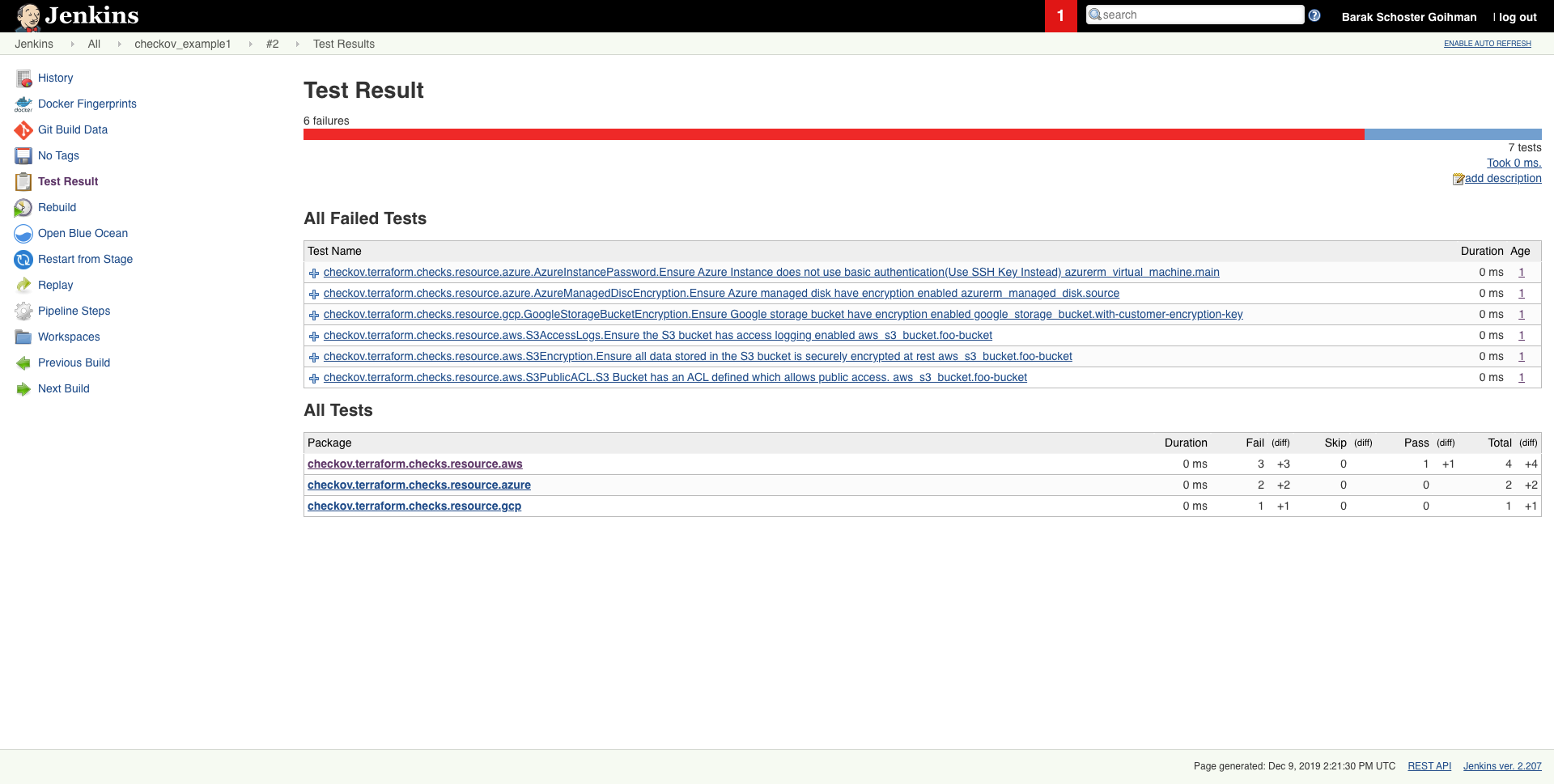
Scheduled scan result in Jenkins
Getting started
Installation
pip install checkov
or using homebrew (MacOS only)
brew tap bridgecrewio/checkov https://github.com/bridgecrewio/checkov
brew update
brew install checkov
Configure an input folder
checkov -d /user/path/to/iac/code
Or a specific file
checkov -f /user/tf/example.tf
or
checkov -f /user/cloudformation/example.yml
Scan result sample (CLI)
Passed Checks: 1, Failed Checks: 1, Suppressed Checks: 0
Check: "Ensure all data stored in the S3 bucket is securely encrypted at rest"
/main.tf:
	 Passed for resource: aws_s3_bucket.template_bucket
Check: "Ensure all data stored in the S3 bucket is securely encrypted at rest"
/../regionStack/main.tf:
	 Failed for resource: aws_s3_bucket.sls_deployment_bucket_name
Start using Checkov by reading the Getting Started page.
Using Docker
docker pull bridgecrew/checkov
docker run -t -v /user/tf:/tf bridgecrew/checkov -d /tf
Suppressing/Ignoring a check
Like any static-analysis tool it is limited by its analysis scope. For example, if a resource is managed manually, or using subsequent configuration management tooling, a suppression can be inserted as a simple code annotation.
Suppression comment format
To skip a check on a given Terraform definition block, apply the following comment pattern inside it's scope:
checkov:skip=<check_id>:<suppression_comment>
<check_id>is one of the available check scanners<suppression_comment>is an optional suppression reason to be included in the output
Example
The following comment skip the CKV_AWS_20 check on the resource identified by foo-bucket, where the scan checks if an AWS S3 bucket is private.
In the example, the bucket is configured with a public read access; Adding the suppress comment would skip the appropriate check instead of the check to fail.
resource "aws_s3_bucket" "foo-bucket" {
  region        = var.region
    #checkov:skip=CKV_AWS_20:The bucket is a public static content host
  bucket        = local.bucket_name
  force_destroy = true
  acl           = "public-read"
}
The output would now contain a SKIPPED check result entry:
...
...
Check: "S3 Bucket has an ACL defined which allows public access."
	SKIPPED for resource: aws_s3_bucket.foo-bucket
	Suppress comment: The bucket is a public static content host
	File: /example_skip_acl.tf:1-25

...
Alternatives
For Terraform compliance scanners check out tfsec, Terrascan and Terraform AWS Secure Baseline.
For CloudFormation scanning check out cfripper and cfn_nag.
Contributing
Contribution is welcomed!
Start by reviewing the contribution guidelines. After that, take a look at a good first issue.
Looking to contribute new checks? Learn how to write a new check (AKA policy) here
Support
Bridgecrew builds and maintains Checkov to make policy-as-code simple and accessible.
Start with our Documentation for quick tutorials and examples.
If you need direct support you can contact us at info@bridgecrew.io
Release history Release notifications | RSS feed


Download files
Download the file for your platform. If you're not sure which to choose, learn more about installing packages.
Source Distribution
Built Distribution
Filter files by name, interpreter, ABI, and platform.
If you're not sure about the file name format, learn more about wheel file names.
Copy a direct link to the current filters
File details
Details for the file checkov-1.0.240.tar.gz.
File metadata
- Download URL: checkov-1.0.240.tar.gz
- Upload date:
- Size: 45.3 kB
- Tags: Source
- Uploaded using Trusted Publishing? No
- Uploaded via: twine/3.1.1 pkginfo/1.5.0.1 requests/2.23.0 setuptools/46.1.3 requests-toolbelt/0.9.1 tqdm/4.45.0 CPython/3.7.7
File hashes
| Algorithm | Hash digest | |
|---|---|---|
| SHA256 |
70a1157a36a9d3923acb7c3d1760d456ee749424ef7b9c904b398ca316098308
|
|
| MD5 |
1502fa15a90d418766ce8484ccb9d6ee
|
|
| BLAKE2b-256 |
adb5d3da66a9f031409d849b0b7e9d69f1c3d097d4f5e26d0af2a31464f30c37
|
File details
Details for the file checkov-1.0.240-py3-none-any.whl.
File metadata
- Download URL: checkov-1.0.240-py3-none-any.whl
- Upload date:
- Size: 116.7 kB
- Tags: Python 3
- Uploaded using Trusted Publishing? No
- Uploaded via: twine/3.1.1 pkginfo/1.5.0.1 requests/2.23.0 setuptools/46.1.3 requests-toolbelt/0.9.1 tqdm/4.45.0 CPython/3.7.7
File hashes
| Algorithm | Hash digest | |
|---|---|---|
| SHA256 |
30cd64fa429e095aa6e908a874e7dab4318cd21f71ea4fd8b1329deb05f40688
|
|
| MD5 |
c1fc44fe47e7c6ddfa4255c0314d43ce
|
|
| BLAKE2b-256 |
260d703788e43fd835fca30a96ba59ef0172d169fd60b98959ff8c673ebbd925
|






