
Infrastructure as code static analysis


Project description
Checkov



Table of contents
Description
Checkov is a static code analysis tool for infrastructure-as-code. It scans cloud infrastructure provisioned using Terraform and detects security and compliance misconfigurations.
Checkov is written in Python and provides a simple method to write and manage policies. It follows the CIS Foundations benchmarks where applicable.
Features
- 40+ built-in policies cover security and compliance best practices for AWS, Azure & Google Cloud.
- Policies support variable scanning by building a dynamic code dependency graph.
- Supports in-line suppression of accepted risks or false-positives to reduce recurring scan failures.
- Output currently available as CLI, JSON or JUnit XML.
Screenshots
Scan results in CLI
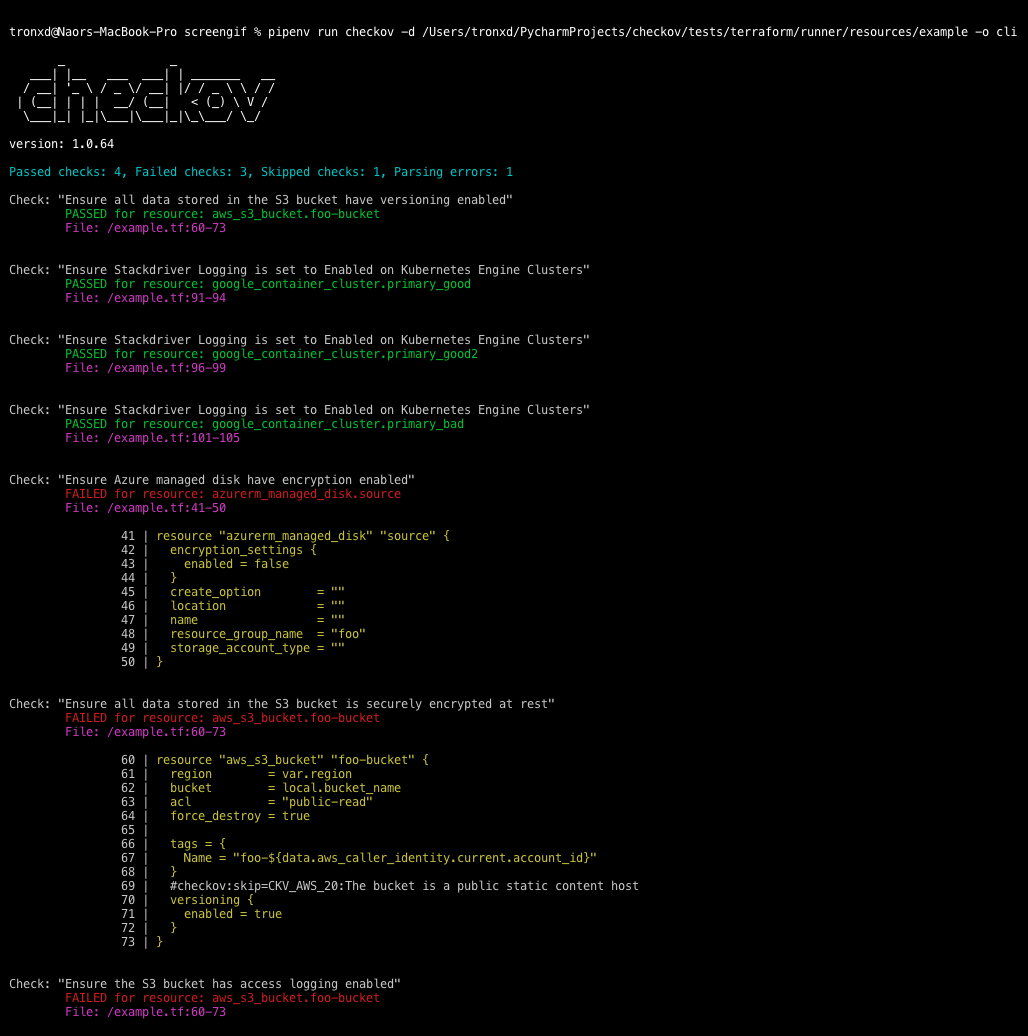
Scheduled scan result in Jenkins

Getting Started
Install
pip install checkov
Configure an input folder
checkov -d /user/tf
Scan result sample (CLI)
Passed Checks: 1, Failed Checks: 1, Suppressed Checks: 0

Check: "Ensure all data stored in the S3 bucket is securely encrypted at rest"
/main.tf:
	 Passed for resource: aws_s3_bucket.template_bucket

Check: "Ensure all data stored in the S3 bucket is securely encrypted at rest"
/../regionStack/main.tf:
	 Failed for resource: aws_s3_bucket.sls_deployment_bucket_name
Export scan to JSON
checkov -d /user/tf -o json
Sample output
{
    "results": {
        "passed_checks": [
            {
                "check_id": "BC_AWS_S3_14",
                "check_name": "Ensure all data stored in the S3 bucket is securely encrypted at rest",
                "check_result": "SUCCESS",
                "code_block": "",
                "file_path": "/main.tf",
                "file_line_range": "",
                "resource": "aws_s3_bucket.template_bucket"
            },
            {
                "check_id": "BC_AWS_S3_13",
                "check_name": "Ensure the S3 bucket has access logging enabled",
                "check_result": "SUCCESS",
                "code_block": "",
                "file_path": "/main.tf",
                "file_line_range": "",
                "resource": "aws_s3_bucket.template_bucket"
            }
                  ],
        "suppressed_checks": [],
        "parsing_errors": []
    },
    "summary": {
        "passed": 2,
        "failed": 0,
        "suppressed": 0,
        "parsing_errors": 0
    }
}
Sample policy
Each Checkov policy is defined by resources it scans and expected values for related resource blocks.
For example, a policy that ensures all data is stored in S3 is versioned, scans the versioning configuration for all aws_s3_bucket supported resources. The ```scan_resource_confis a method that defines the scan's expectyed behavior, i.e.versioning_block['enabled']``
from checkov.terraform.models.enums import CheckResult, CheckCategories
from checkov.terraform.checks.resource.base_check import BaseResourceCheck
class S3Versioning(BaseResourceCheck):
    def __init__(self):
        name = "Ensure all data stored in the S3 bucket is versioned"
        id = "S3_11"
        supported_resources = ['aws_s3_bucket']
        categories = [CheckCategories.BACKUP_AND_RECOVERY]
        super().__init__(name=name, id=id, categories=categories, supported_resources=supported_resources)
    def scan_resource_conf(self, conf):
        if 'versioning' in conf.keys():
            versioning_block = conf['versioning'][0]
            if versioning_block['enabled'][0]:
                return CheckResult.SUCCESS
        return CheckResult.FAILURE
scanner = S3Versioning()
Alternatives
For Terraform compliance scanners check out tfsec, Terrascan and Terraform AWS Secure Baseline.
For CloudFormaiton scanning check out cfripper and cfn_nag.
Support
Bridgecrew builds and maintains Checkov to make policy-as-code simple and accessible.
Start with our Documentation for a quick tutorial and examples.
If you need support contact us at support@bridgecrew.io or open a ticket.
Release history Release notifications | RSS feed


Download files
Download the file for your platform. If you're not sure which to choose, learn more about installing packages.
Source Distribution
Built Distribution
Filter files by name, interpreter, ABI, and platform.
If you're not sure about the file name format, learn more about wheel file names.
Copy a direct link to the current filters
File details
Details for the file checkov-1.0.54.tar.gz.
File metadata
- Download URL: checkov-1.0.54.tar.gz
- Upload date:
- Size: 16.9 kB
- Tags: Source
- Uploaded using Trusted Publishing? No
- Uploaded via: twine/3.1.1 pkginfo/1.5.0.1 requests/2.22.0 setuptools/41.6.0 requests-toolbelt/0.9.1 tqdm/4.40.2 CPython/3.7.5
File hashes
| Algorithm | Hash digest | |
|---|---|---|
| SHA256 |
95e0e57817667975de43741a95d7fd5b26e54bb153c5795f657e7dcf6a0dc192
|
|
| MD5 |
4c0d7bde894a35e289c86b868d0d7faf
|
|
| BLAKE2b-256 |
d3bf2be4baf94b3e19f70fe136c95e5d839ee737376a27c3a4829304fe97c812
|
File details
Details for the file checkov-1.0.54-py3-none-any.whl.
File metadata
- Download URL: checkov-1.0.54-py3-none-any.whl
- Upload date:
- Size: 45.8 kB
- Tags: Python 3
- Uploaded using Trusted Publishing? No
- Uploaded via: twine/3.1.1 pkginfo/1.5.0.1 requests/2.22.0 setuptools/41.6.0 requests-toolbelt/0.9.1 tqdm/4.40.2 CPython/3.7.5
File hashes
| Algorithm | Hash digest | |
|---|---|---|
| SHA256 |
0f7be45d0ec2d7ec678bbc596191529867ffa7f769995fbb02696b0411584b10
|
|
| MD5 |
410959fa046939fb8215687f43cec471
|
|
| BLAKE2b-256 |
4ab02197ef78a9755215d3d1cb33f54c9a49e10747bc54d02cfc274cf7516ad0
|






