
A Gtk+ time tracking application


Project description
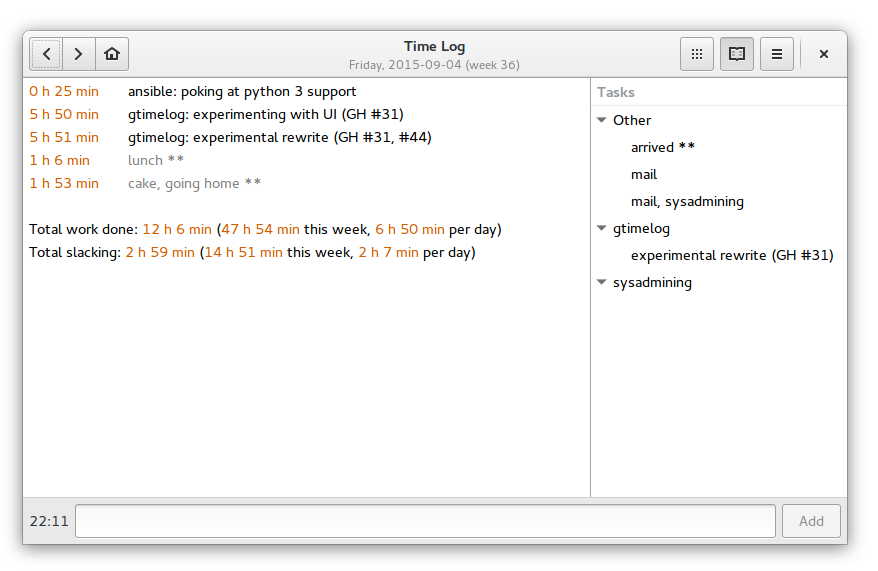
GTimeLog is a simple app for keeping track of time.



Installing
GTimeLog is packaged for Debian and Ubuntu:
sudo apt-get install gtimelog
For Ubuntu, a newer version can usually be found in the PPA:
You can fetch the latest released version from PyPI
$ pip install gtimelog
$ gtimelog
You can run it from a source checkout without an explicit installation step:
$ git clone https://github.com/gtimelog/gtimelog
$ cd gtimelog
$ ./gtimelog
System requirements:
Python (2.7 or 3.3+)
PyGObject
gobject-introspection type libraries for GTK+, Pango
Documentation
This is work in progress:
docs/index.rst contains an overview
docs/formats.rst describes the file formats
Resources
Website: http://mg.pov.lt/gtimelog
Mailing list: gtimelog@googlegroups.com (archive at http://groups.google.com/group/gtimelog)
IRC: #gtimelog on irc.freenode.net
Source code: https://github.com/gtimelog/gtimelog
Report bugs at https://github.com/gtimelog/gtimelog/issues
There’s an old bugtracker at https://bugs.launchpad.net/gtimelog
I sometimes also browse distribution bugs:
Credits
GTimeLog was mainly written by Marius Gedminas <marius@gedmin.as>.
Barry Warsaw <barry@python.org> stepped in as a co-maintainer when Marius burned out. Then Barry got busy and Marius recovered.
Many excellent contributors are listed in CONTRIBUTORS.rst
Changelog
0.10.1 (2016-09-22)
Fix error on Python 3 when using task_list_url (GH: #92).
Fix some PyGIWarnings about unspecified versions on startup.
0.10.0 (2015-09-29)
Use Tango colors in the main text buffer (GH: #13).
Allow tagging entries (GH: #19)
The syntax is category: text -- tag1 tag2
Per-tag summaries show up in reports
Use GtkApplication instead of own DBus server for enforcing single-instance.
Drop –replace, –ignore-dbus command-line options because of this.
Require glib and gio to be version 2.40 or newer for sane GtkApplication-based command line parsing (check with pkg-config --modversion glib-2.0 gio-2.0).
Remove obsolete code:
Drop support for Python 2.6 (PyGObject dropped support for it long ago).
Drop PyGtk/Gtk+ 2 support code (it didn’t work since 0.9.1 anyway).
Drop EggTrayIcon support (it was for Gtk+ 2 only anyway).
Drop the –prefer-pygtk command-line option.
Disable tray icon by default for new users (existing gtimelogrc files will be untouched).
Improve tray icon selection logic for best contrast (GH: #29).
0.9.3 (2015-09-29)
Adding new entries didn’t update total weekly numbers (GH: #28).
Older versions
See the full changelog.
Release history Release notifications | RSS feed


Download files
Download the file for your platform. If you're not sure which to choose, learn more about installing packages.
Source Distribution
Built Distributions
Filter files by name, interpreter, ABI, and platform.
If you're not sure about the file name format, learn more about wheel file names.
Copy a direct link to the current filters
File details
Details for the file gtimelog-0.10.1.tar.gz.
File metadata
- Download URL: gtimelog-0.10.1.tar.gz
- Upload date:
- Size: 259.2 kB
- Tags: Source
- Uploaded using Trusted Publishing? No
File hashes
| Algorithm | Hash digest | |
|---|---|---|
| SHA256 |
39fdbc9ee19df4e591f8b50ec9be7417d80696ecea85ee3b00943c3c6e712d68
|
|
| MD5 |
53a9edacc36683e91f257724340cfd19
|
|
| BLAKE2b-256 |
8924404fc5e99968f01569cc754c11ccd458777b22d4483dec032ab6882ac885
|
File details
Details for the file gtimelog-0.10.1-py3-none-any.whl.
File metadata
- Download URL: gtimelog-0.10.1-py3-none-any.whl
- Upload date:
- Size: 184.5 kB
- Tags: Python 3
- Uploaded using Trusted Publishing? No
File hashes
| Algorithm | Hash digest | |
|---|---|---|
| SHA256 |
bf9434fa72cb1efa756536a60d40c1432bf5adb6d7724551e6955587da2b4b58
|
|
| MD5 |
c3268bc597cfb5ae8cacfc5b4281a807
|
|
| BLAKE2b-256 |
013eb69b7c9f65a549b3aa24e5235b2d53c84028d807b2cc5a1ebf6cb6bcf0eb
|
File details
Details for the file gtimelog-0.10.1-py2-none-any.whl.
File metadata
- Download URL: gtimelog-0.10.1-py2-none-any.whl
- Upload date:
- Size: 184.5 kB
- Tags: Python 2
- Uploaded using Trusted Publishing? No
File hashes
| Algorithm | Hash digest | |
|---|---|---|
| SHA256 |
c313bb367185b31e610a0b5c78e6064b10447f6f264271969567d5daa5feba30
|
|
| MD5 |
21926beb54e6f1a02ddfab21a1d18730
|
|
| BLAKE2b-256 |
66e5a007fe03b6d7ac3abaf8fe2ec315154a466d5ad8e2596e6db6d35f960de1
|






