
A Gtk+ time tracking application


Project description
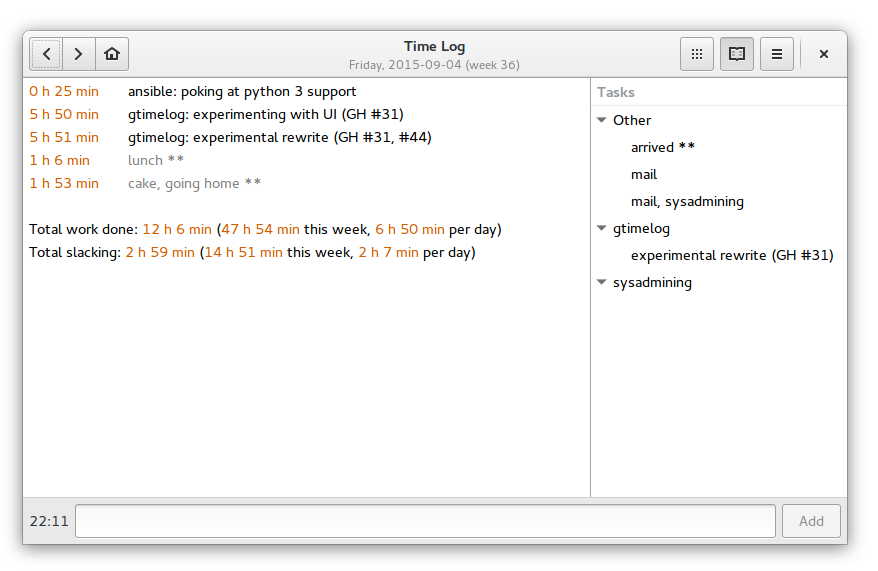
GTimeLog is a simple app for keeping track of time.



Installing
GTimeLog is packaged for Debian and Ubuntu:
sudo apt-get install gtimelog
For Ubuntu, a newer version can usually be found in the PPA:
You can fetch the latest released version from PyPI
$ pip install gtimelog
$ gtimelog
You can run it from a source checkout without an explicit installation step:
$ git clone https://github.com/gtimelog/gtimelog
$ cd gtimelog
$ make
$ ./gtimelog
System requirements:
Python (2.7 or 3.3+)
PyGObject
gobject-introspection type libraries for GTK+, Pango
GTK+ 3.10 or newer (3.14 or newer for best results)
Documentation
This is work in progress:
docs/index.rst contains an overview
docs/formats.rst describes the file formats
Resources
Website: https://gtimelog.org
Mailing list: gtimelog@googlegroups.com (archive at https://groups.google.com/group/gtimelog)
IRC: #gtimelog on irc.freenode.net
Source code: https://github.com/gtimelog/gtimelog
Report bugs at https://github.com/gtimelog/gtimelog/issues
There’s an old bugtracker at https://bugs.launchpad.net/gtimelog
I sometimes also browse distribution bugs:
Credits
GTimeLog was mainly written by Marius Gedminas <marius@gedmin.as>.
Barry Warsaw <barry@python.org> stepped in as a co-maintainer when Marius burned out. Then Barry got busy and Marius recovered.
Many excellent contributors are listed in CONTRIBUTORS.rst
Changelog
0.11.3 (2019-04-23)
Use a better workaround for window.present() not working on Wayland.
Fix a rare AssertionError on quit.
Fix problem with “Edit log” and “Edit tasks” menu entries on Windows (GH: #133).
Do not include *** entries in slacking total (GH: #138).
Show average time per day spent on filtered tasks (GH: #146).
Drop Python 3.4 support.
0.11.2 (2018-11-03)
Window menu now includes items previously shown only in the app menu: Preferences, About (GH: #126).
Keyboard shortcuts window (press Ctrl+Shift+?).
Dropped the help page (there was only one and it was only listing keyboard shortucts, and it was also incomplete and had no translations).
Bugfix: if timelog.txt was a symlink, changes to the symlink target would not get noticed automatically (GH: #128).
0.11.1 (2018-07-18)
The undocmented remote task list over HTTP(S) feature is now able to ask for basic HTTP authentication credentials and store them in gnome-keyring (GH: #109).
Bugfix: entries with just a category and no task that did not have a trailing space after the ‘:’ were considered to be uncategorized (GH: #117).
Add Python 3.7 support.
Drop Python 3.3 support.
Older versions
See the full changelog.
Release history Release notifications | RSS feed


Download files
Download the file for your platform. If you're not sure which to choose, learn more about installing packages.
Source Distribution
Built Distribution
Filter files by name, interpreter, ABI, and platform.
If you're not sure about the file name format, learn more about wheel file names.
Copy a direct link to the current filters
File details
Details for the file gtimelog-0.11.3.tar.gz.
File metadata
- Download URL: gtimelog-0.11.3.tar.gz
- Upload date:
- Size: 290.7 kB
- Tags: Source
- Uploaded using Trusted Publishing? No
- Uploaded via: twine/1.13.0 pkginfo/1.5.0.1 requests/2.21.0 setuptools/41.0.0 requests-toolbelt/0.9.1 tqdm/4.31.1 CPython/3.7.3
File hashes
| Algorithm | Hash digest | |
|---|---|---|
| SHA256 |
a5a65b7b929aa3b16ecb4213b56f6573a925613bbce3db1969ca26f31d6b8ab2
|
|
| MD5 |
6dc703e47ff4c67fb5b947b4baf43437
|
|
| BLAKE2b-256 |
763153ea1e01c57ddf2cc8387d946ee5f545ad9de6f1cd45b2988ccbaa4d5a00
|
File details
Details for the file gtimelog-0.11.3-py2.py3-none-any.whl.
File metadata
- Download URL: gtimelog-0.11.3-py2.py3-none-any.whl
- Upload date:
- Size: 226.3 kB
- Tags: Python 2, Python 3
- Uploaded using Trusted Publishing? No
- Uploaded via: twine/1.13.0 pkginfo/1.5.0.1 requests/2.21.0 setuptools/41.0.0 requests-toolbelt/0.9.1 tqdm/4.31.1 CPython/3.7.3
File hashes
| Algorithm | Hash digest | |
|---|---|---|
| SHA256 |
52c738d1660f50e656a134af16ba0f0f6c6e07c3158018aedc8f3a5f41a487fd
|
|
| MD5 |
480ca69ba9220d52eea3c29534ca461d
|
|
| BLAKE2b-256 |
d8387a18e3d389fd055b24b781adc437b11c8c84d2b442dd982b2ee57f10372b
|






