
A query language for language models.

Project description

LMQL
A query language for programming (large) language models.
Documentation »
Explore Examples
·
Playground IDE
·
Report Bug


LMQL is a query language for large language models (LLMs). It facilitates LLM interaction by combining the benefits of natural language prompting with the expressiveness of Python. With only a few lines of LMQL code, users can express advanced, multi-part and tool-augmented LM queries, which then are optimized by the LMQL runtime to run efficiently as part of the LM decoding loop.
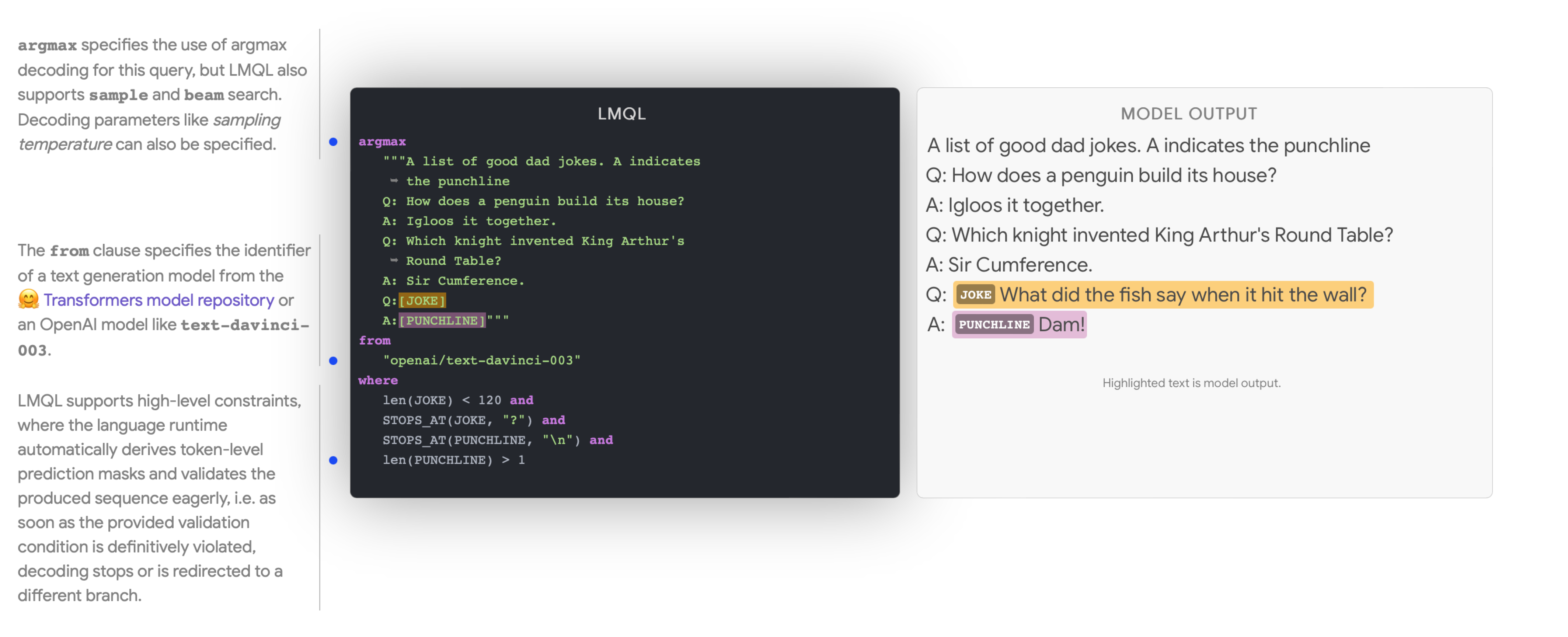
Example of a simple LMQL program.
Getting Started
To install the latest version of LMQL run the following command with Python >=3.10 installed.
pip install lmql
Local GPU Support: If you want to run models on a local GPU, make sure to install LMQL in an environment with a GPU-enabled installation of PyTorch >= 1.11 (cf. https://pytorch.org/get-started/locally/).
Running LMQL Programs
After installation, you can launch the LMQL playground IDE with the following command:
lmql playground
Using the LMQL playground requires an installation of Node.js. If you are in a conda-managed environment you can install node.js via
conda install nodejs=14.20 -c conda-forge. Otherwise, please see the official Node.js website https://nodejs.org/en/download/ for instructions how to install it on your system.
This launches a browser-based playground IDE, including a showcase of many exemplary LMQL programs. If the IDE does not launch automatically, go to http://localhost:3000.
Alternatively, lmql run can be used to execute local .lmql files. Note that when using local HuggingFace Transformers models in the Playground IDE or via lmql run, you have to first launch an instance of the LMQL Inference API for the corresponding model via the command lmql serve-model.
Configuring OpenAI API Credentials
If you want to use OpenAI models, you have to configure your API credentials. To do so, create a file api.env in the active working directory, with the following contents.
openai-org: <org identifier>
openai-secret: <api secret>
For system-wide configuration, you can also create an api.env file at $HOME/.lmql/api.env or at the project root of your LMQL distribution (e.g. src/ in a development copy).
Setting Up a Development Environment
To setup a conda environment for local LMQL development with GPU support, run the following commands:
# prepare conda environment
conda env create -f scripts/conda/requirements.yml -n lmql
conda activate lmql

# registers the `lmql` command in the current shell
source scripts/activate-dev.sh
Operating System: The GPU-enabled version of LMQL was tested to work on Ubuntu 22.04 with CUDA 12.0 and Windows 10 via WSL2 and CUDA 11.7. The no-GPU version (see below) was tested to work on Ubuntu 22.04 and macOS 13.2 Ventura or Windows 10 via WSL2.
Development without GPU
This section outlines how to setup an LMQL development environment without local GPU support. Note that LMQL without local GPU support only supports the use of API-integrated models like openai/text-davinci-003. Please see the OpenAI API documentation (https://platform.openai.com/docs/models/gpt-3-5) to learn more about the set of available models.
To setup a conda environment for LMQL with no GPU support, run the following commands:
# prepare conda environment
conda env create -f scripts/conda/requirements-no-gpu.yml -n lmql-no-gpu
conda activate lmql-no-gpu

# registers the `lmql` command in the current shell
source scripts/activate-dev.sh
Release history Release notifications | RSS feed


Download files
Download the file for your platform. If you're not sure which to choose, learn more about installing packages.
Source Distribution
Built Distribution
Filter files by name, interpreter, ABI, and platform.
If you're not sure about the file name format, learn more about wheel file names.
Copy a direct link to the current filters
File details
Details for the file lmql-0.0.6.4.tar.gz.
File metadata
- Download URL: lmql-0.0.6.4.tar.gz
- Upload date:
- Size: 737.1 kB
- Tags: Source
- Uploaded using Trusted Publishing? No
- Uploaded via: twine/4.0.2 CPython/3.10.11
File hashes
| Algorithm | Hash digest | |
|---|---|---|
| SHA256 |
967378ac98cd357e49ae86954bd225c7ebf0acf5d0dc140f2844af0e34bca36e
|
|
| MD5 |
2238712cd6572558c38055d31b8c07e1
|
|
| BLAKE2b-256 |
e63cbcc368420c403ba944a0d6a28bf1b1a8db3671dd79dd1efb47d6eb74b5fc
|
File details
Details for the file lmql-0.0.6.4-py3-none-any.whl.
File metadata
- Download URL: lmql-0.0.6.4-py3-none-any.whl
- Upload date:
- Size: 637.7 kB
- Tags: Python 3
- Uploaded using Trusted Publishing? No
- Uploaded via: twine/4.0.2 CPython/3.10.11
File hashes
| Algorithm | Hash digest | |
|---|---|---|
| SHA256 |
62ee2722f474c631e2f211360f5b9646cf7544d8a8d6b353bfe535dcb10e0485
|
|
| MD5 |
62376ef54e0738b5d9bdf83fa4716c3e
|
|
| BLAKE2b-256 |
f5f87d23a47cf868dd5b24255acd78c03b3bdf78e569167821a7464b9988314c
|






