
Extremely fast and smart HTML + JS + CSS minifier

Project description
minify-html








A Rust HTML minifier meticulously optimised for speed and effectiveness, with bindings for other languages.
- Advanced minification strategy beats other minifiers while being much faster.
- Uses SIMD searching, direct tries, and lookup tables.
- Handles invalid HTML, with extensive testing and fuzzing.
- Uses minify-js for super fast JS minification.
View the changelog to see the latest updates.
Performance
Comparison with html-minifier and minimize, run on the top web pages. See the breakdown here.
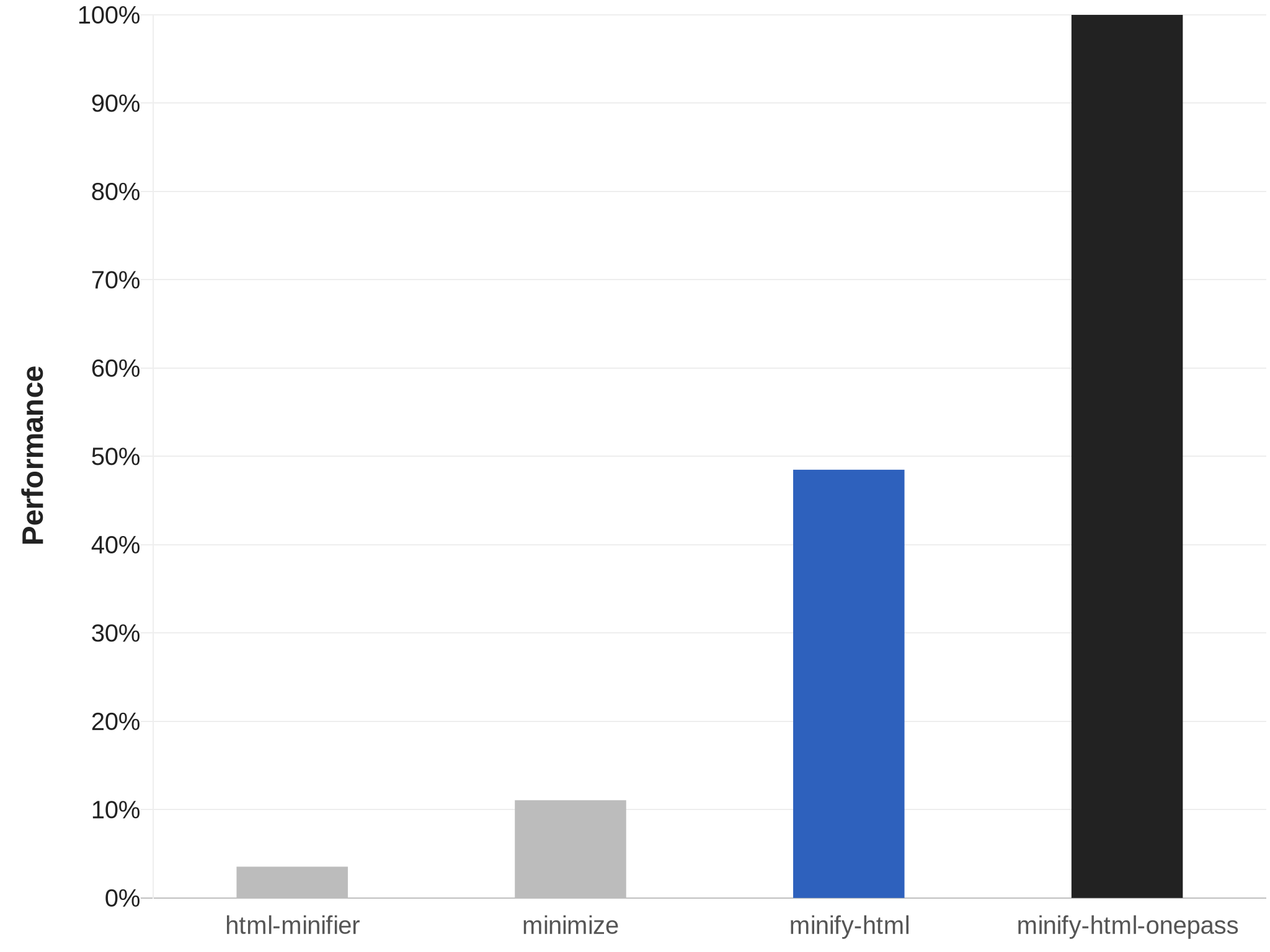
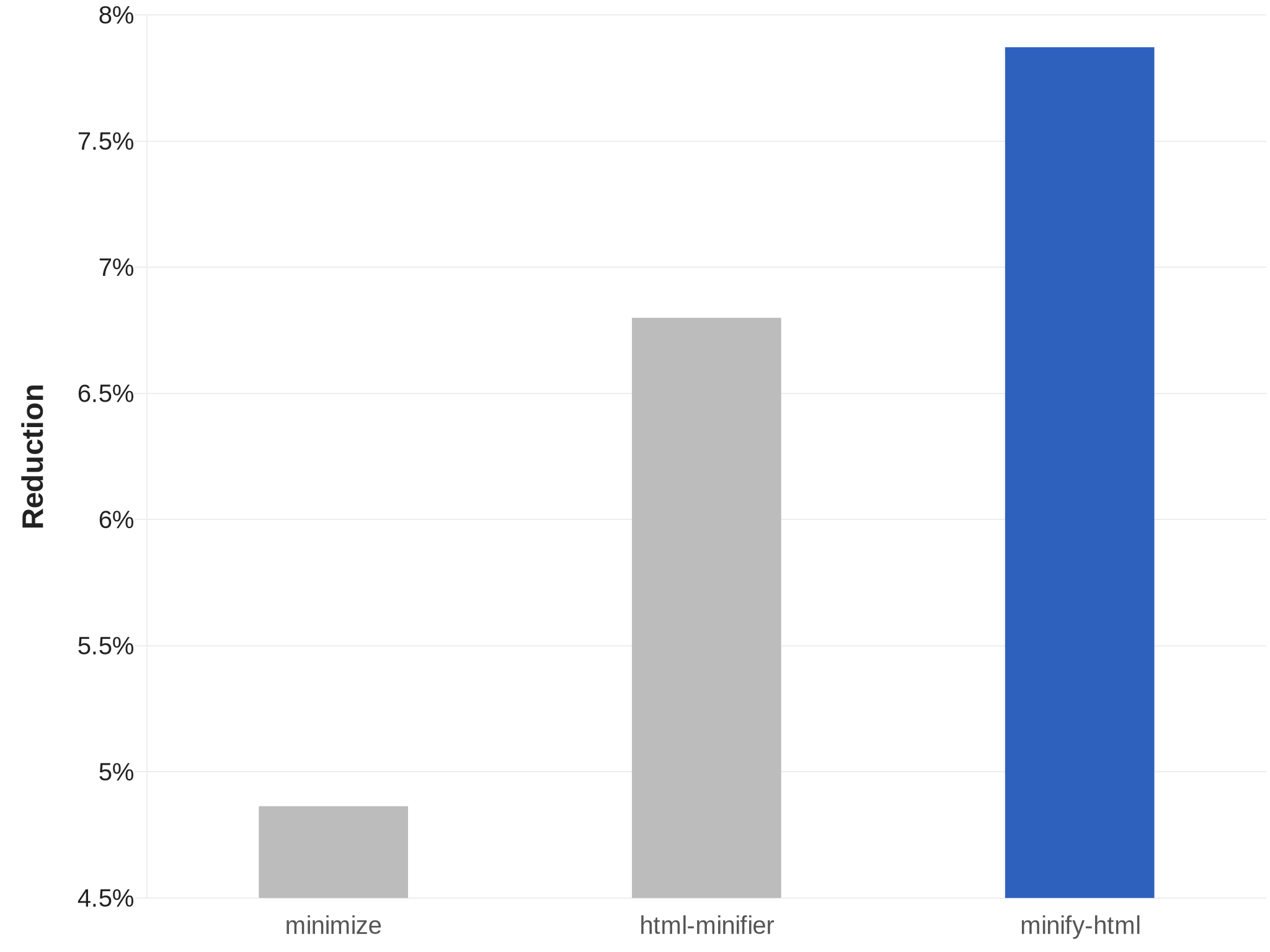
The onepass variant is even more optimised for speed. See its README for more details.
Compatibility and usage
CLI
Precompiled binaries are available for Linux, macOS, and Windows.
Get
Linux x64 | Linux ARM64 | macOS x64 | Windows x64
Use
Use the --help argument for more details.
minify-html --output /path/to/output.min.html --keep-closing-tags --minify-css /path/to/src.html
To quickly parallel process a batch of files in place:
minify-html --keep-closing-tags --minify-css /path/to/**/*.html
Deno
- Package: https://wilsonl.in/minify-html/deno/0.10.2/index.js
- Binding: WASM
- Platforms: All
Use
import init, {minify} from "https://wilsonl.in/minify-html/deno/0.10.2/index.js";

const encoder = new TextEncoder();
const decoder = new TextDecoder();

await init();

const minified = decoder.decode(minify(encoder.encode("<p>  Hello, world!  </p>"), { keep_spaces_between_attributes: true, keep_comments: true }));
All Cfg fields are available as snake_case properties on the object provided as the second argument; if any are not set, they default to false.
Node.js
- Package: @minify-html/node
- Binding: Neon
- Platforms: Linux (ARM64 and x64), macOS (x64), Windows (x64); Node.js 8.6.0 and higher
Get
Using npm:
npm i @minify-html/node
Using Yarn:
yarn add @minify-html/node
Use
TypeScript definitions are available.
import { Buffer } from "node:buffer";
import * as minifyHtml from "@minify-html/node";
// Or `const minifyHtml = require("@minify-html/node")` if not using TS/ESM.

const minified = minifyHtml.minify(Buffer.from("<p>  Hello, world!  </p>"), { keep_spaces_between_attributes: true, keep_comments: true });
All Cfg fields are available as snake_case properties on the object provided as the second argument; if any are not set, they default to false.
Java
- Package: in.wilsonl.minifyhtml
- Binding: JNI
- Platforms: Linux, macOS, Windows; Java 7 and higher
Get
Add as a Maven dependency:
<dependency>
  <groupId>in.wilsonl.minifyhtml</groupId>
  <artifactId>minify-html</artifactId>
  <version>0.10.2</version>
</dependency>
Use
import in.wilsonl.minifyhtml.Configuration;
import in.wilsonl.minifyhtml.MinifyHtml;

Configuration cfg = new Configuration.Builder()
    .setKeepHtmlAndHeadOpeningTags(true)
    .setMinifyCss(true)
    .build();

String minified = MinifyHtml.minify("<p>  Hello, world!  </p>", cfg);
All Cfg fields are available as camelCase setter methods on the Builder; if any are not set, they default to false.
Python
- Package: minify-html
- Binding: PyO3
- Platforms: Linux (ARM64 and x64), macOS (x64), Windows (x64); Python 3.8 to 3.10
Get
Add the PyPI project as a dependency and install it using pip or pipenv.
Use
import minify_html

minified = minify_html.minify("<p>  Hello, world!  </p>", minify_js=True, remove_processing_instructions=True)
All Cfg fields are available as Python keyword arguments; if any are omitted, they default to False.
Ruby
- Package: minify_html
- Binding: Rutie
- Platforms: Linux, macOS; Ruby 2.5 and higher
Get
Add the library as a dependency to Gemfile or *.gemspec.
Use
require 'minify_html'

print MinifyHtml.minify("<p>  Hello, world!  </p>", { :keep_spaces_between_attributes => true, :minify_js => true })
All Cfg fields are available; if any are omitted, they default to false.
WASM
- Package: @minify-html/wasm
- Binding: WASM
- Platforms: All
A bundler may be required to use the WebAssembly module, see this for more details.
Use
import init, {minify} from "@minify-html/wasm";

const encoder = new TextEncoder();
const decoder = new TextDecoder();

await init();

const minified = decoder.decode(minify(encoder.encode("<p>  Hello, world!  </p>"), { keep_spaces_between_attributes: true, keep_comments: true }));
All Cfg fields are available as snake_case properties on the object provided as the second argument; if any are not set, they default to false.
Minification
Note that some of the minification done can result in HTML that will not pass validation, but remain interpreted and rendered correctly by the browser; essentially, the laxness of the browser is taken advantage of for better minification. To prevent this, refer to these configuration options:
do_not_minify_doctypeensure_spec_compliant_unquoted_attribute_valueskeep_spaces_between_attributes
Whitespace
minify-html has advanced context-aware whitespace minification that does things such as:
- Leave whitespace untouched in
preandcode, which are whitespace sensitive. - Trim and collapse whitespace in content tags, as whitespace is collapsed anyway when rendered.
- Remove whitespace in layout tags, which allows the use of inline layouts while keeping formatted code.
Methods
There are three whitespace minification methods. When processing text content, minify-html chooses which ones to use depending on the containing element.
Collapse whitespace
Applies to: any element except whitespace sensitive elements.
Reduce a sequence of whitespace characters in text nodes to a single space (U+0020).
| Before | After |
|---|---|
<p>↵
··The·quick·brown·fox↵
··jumps·over·the·lazy↵
··dog.↵
</p>
|
<p>·The·quick·brown·fox·jumps·over·the·lazy·dog.·</p>
|
Destroy whole whitespace
Applies to: any element except whitespace sensitive, content, content-first, and formatting elements.
Remove any text nodes between tags that only consist of whitespace characters.
| Before | After |
|---|---|
<ul>↵
··<li>A</li>↵
··<li>B</li>↵
··<li>C</li>↵
</ul>
|
<ul>↵
··<li>A</li><li>B</li><li>C</li>↵
</ul>
|
Trim whitespace
Applies to: any element except whitespace sensitive and formatting elements.
Remove any leading/trailing whitespace from any leading/trailing text nodes of a tag.
| Before | After |
|---|---|
<p>↵
··Hey,·I·<em>just</em>·found↵
··out·about·this·<strong>cool</strong>·website!↵
··<sup>[1]</sup>↵
</p>
|
<p>Hey,·I·<em>just</em>·found↵
··out·about·this·<strong>cool</strong>·website!↵
··<sup>[1]</sup></p>
|
Element types
minify-html assumes HTML and SVG elements are used in specific ways, based on standards and best practices. By making these assumptions, it can apply optimal whitespace minification strategies. If these assumptions do not hold, consider adjusting the HTML source or turning off whitespace minification.
| Group | Elements | Expected children |
|---|---|---|
| Formatting | a, strong, and others |
Formatting elements, text. |
| Content | h1, p, and others |
Formatting elements, text. |
| Layout | div, ul, and others |
Layout elements, content elements. |
| Content-first | label, li, and others |
Like content but could be layout with only one child. |
Formatting elements
Whitespace is collapsed.
Formatting elements are usually inline elements that wrap around part of some text in a content element, so its whitespace isn't trimmed as they're probably part of the content.
Content elements
Whitespace is trimmed and collapsed.
Content elements usually represent a contiguous and complete unit of content such as a paragraph. As such, whitespace is significant but sequences of them are most likely due to formatting.
Before
<p>↵
··Hey,·I·<em>just</em>·found↵
··out·about·this·<strong>cool</strong>·website!↵
··<sup>[1]</sup>↵
</p>
After
<p>Hey,·I·<em>just</em>·found·out·about·this·<strong>cool</strong>·website!·<sup>[1]</sup></p>
Layout elements
Whitespace is trimmed and collapsed. Whole whitespace is removed.
These elements should only contain other elements and no text. This makes it possible to remove whole whitespace, which is useful when using display: inline-block so that whitespace between elements (e.g. indentation) does not alter layout and styling.
Before
<ul>↵
··<li>A</li>↵
··<li>B</li>↵
··<li>C</li>↵
</ul>
After
<ul><li>A</li><li>B</li><li>C</li></ul>
Content-first elements
Whitespace is trimmed and collapsed.
These elements are usually like content elements but are occasionally used like a layout element with one child. Whole whitespace is not removed as it might contain content, but this is OK for using as layout as there is only one child and whitespace is trimmed.
Before
<li>↵
··<article>↵
····<section></section>↵
····<section></section>↵
··</article>↵
</li>
After
<li><article><section></section><section></section></article></li>
Tags
Optional opening and closing tags are removed.
Attributes
Any entities in attribute values are decoded, and then the shortest representation of the value is calculated and used:
- Double quoted, with any
"encoded. - Single quoted, with any
'encoded. - Unquoted, with
"/'first character (if applicable), any>, and any whitespace encoded.
Attributes have their whitespace (after any decoding) trimmed and collapsed when possible.
Boolean attribute values are removed. Some other attributes are completely removed if their value is empty or the default value after any processing.
type attributes on script tags with a value equaling a JavaScript MIME type are removed.
If an attribute value is empty after any processing, everything but the name is completely removed (i.e. no =), as an empty attribute is implicitly the same as an attribute with an empty string value.
Spaces are removed between attributes when possible.
Entities
Entities are decoded if they're valid and shorter or equal in length when decoded. UTF-8 sequences that have a shorter entity representation are encoded.
Numeric entities that do not refer to a valid Unicode Scalar Value are replaced with the replacement character.
Encoding is avoided when possible; for example, < are only encoded in content if they are followed by a valid tag name character.
If necessary, the shortest entity representation is chosen.
Comments
Comments are removed.
Ignored
Bangs, processing instructions, and empty elements are not removed as it is assumed there is a special reason for their declaration.
Parsing
minify-html can process any HTML, handling all possible syntax (including invalid ones) gracefully like browsers. See Parsing.md for more details.
Issues and contributions
Pull requests and any contributions welcome!
If minify-html did something unexpected, misunderstood some syntax, or incorrectly kept/removed some code, raise an issue with some relevant code that can be used to reproduce and investigate the issue.
Release history Release notifications | RSS feed


Download files
Download the file for your platform. If you're not sure which to choose, learn more about installing packages.
Source Distributions
Built Distributions
Filter files by name, interpreter, ABI, and platform.
If you're not sure about the file name format, learn more about wheel file names.
Copy a direct link to the current filters
File details
Details for the file minify_html-0.10.2-cp310-none-win_amd64.whl.
File metadata
- Download URL: minify_html-0.10.2-cp310-none-win_amd64.whl
- Upload date:
- Size: 547.6 kB
- Tags: CPython 3.10, Windows x86-64
- Uploaded using Trusted Publishing? No
- Uploaded via: twine/4.0.1 CPython/3.10.7
File hashes
| Algorithm | Hash digest | |
|---|---|---|
| SHA256 |
4cd5660d4099d16b006d20259aa003cecd559b7fa77d3cba06699362bbcc2110
|
|
| MD5 |
4a98b1fd8efef324b525d88553fc2264
|
|
| BLAKE2b-256 |
277f3b87ebc40be6231f1717113b5ad22f2d4820ecde4db1224ad7dd2db81afb
|
File details
Details for the file minify_html-0.10.2-cp310-cp310-manylinux_2_28_aarch64.whl.
File metadata
- Download URL: minify_html-0.10.2-cp310-cp310-manylinux_2_28_aarch64.whl
- Upload date:
- Size: 630.6 kB
- Tags: CPython 3.10, manylinux: glibc 2.28+ ARM64
- Uploaded using Trusted Publishing? No
- Uploaded via: twine/4.0.1 CPython/3.10.5
File hashes
| Algorithm | Hash digest | |
|---|---|---|
| SHA256 |
06b18e634d5d2ed849460bc6166db70ac96191575153970bb497308c9c9f40cd
|
|
| MD5 |
b34019a1c67473c808ab2f2a6a0533fb
|
|
| BLAKE2b-256 |
b55cb3bff1a195a1aacdf560e09328003c4087821e74fcaa9482e47aa0885580
|
File details
Details for the file minify_html-0.10.2-cp310-cp310-manylinux_2_27_x86_64.whl.
File metadata
- Download URL: minify_html-0.10.2-cp310-cp310-manylinux_2_27_x86_64.whl
- Upload date:
- Size: 698.2 kB
- Tags: CPython 3.10, manylinux: glibc 2.27+ x86-64
- Uploaded using Trusted Publishing? No
- Uploaded via: twine/4.0.1 CPython/3.10.7
File hashes
| Algorithm | Hash digest | |
|---|---|---|
| SHA256 |
8664d674551eb565e1d61053dc18a250515adac7b1d481c00b1d010afb6d3825
|
|
| MD5 |
b2b0259dcbf50e9cb9b9c2480814d49b
|
|
| BLAKE2b-256 |
adf7280ec0b48a808e284d85337c1ff5f98d3edbb8c5df85f5f6c95c29c43eae
|
File details
Details for the file minify_html-0.10.2-cp310-cp310-macosx_10_7_x86_64.whl.
File metadata
- Download URL: minify_html-0.10.2-cp310-cp310-macosx_10_7_x86_64.whl
- Upload date:
- Size: 587.4 kB
- Tags: CPython 3.10, macOS 10.7+ x86-64
- Uploaded using Trusted Publishing? No
- Uploaded via: twine/4.0.1 CPython/3.10.7
File hashes
| Algorithm | Hash digest | |
|---|---|---|
| SHA256 |
c23627a4421567b5202d04d5f51fc91f22db2d53e4de44840302263a9d7860bc
|
|
| MD5 |
c6a22d541511be9db1a2e39baa72b598
|
|
| BLAKE2b-256 |
048fa81f64673bd9eabc6edc54e568de0ca0a8dcc13862676100cf0d69497734
|
File details
Details for the file minify_html-0.10.2-cp39-none-win_amd64.whl.
File metadata
- Download URL: minify_html-0.10.2-cp39-none-win_amd64.whl
- Upload date:
- Size: 547.6 kB
- Tags: CPython 3.9, Windows x86-64
- Uploaded using Trusted Publishing? No
- Uploaded via: twine/4.0.1 CPython/3.9.13
File hashes
| Algorithm | Hash digest | |
|---|---|---|
| SHA256 |
99142c9ccbbaee068fb724d049f4706ba256556971a7d2161b01149d00cf9770
|
|
| MD5 |
2dcdb859ded492fabf48706a5dd41961
|
|
| BLAKE2b-256 |
aae17cd3135f085355ffb393f99da2d081af0d4be3a9f5c8df7d71eecb67664a
|
File details
Details for the file minify_html-0.10.2-cp39-cp39-manylinux_2_28_aarch64.whl.
File metadata
- Download URL: minify_html-0.10.2-cp39-cp39-manylinux_2_28_aarch64.whl
- Upload date:
- Size: 630.6 kB
- Tags: CPython 3.9, manylinux: glibc 2.28+ ARM64
- Uploaded using Trusted Publishing? No
- Uploaded via: twine/4.0.1 CPython/3.9.13
File hashes
| Algorithm | Hash digest | |
|---|---|---|
| SHA256 |
bd53087a8f9c1792ba6c9080f43b5a80a5d934861821a52f14cd63d332a3e8ca
|
|
| MD5 |
0b2e80c89c5c918bad3b98c617a77fc5
|
|
| BLAKE2b-256 |
efa06449b2e5b847df079bd817b0e8b415b07a0af7c86537b52dc2ab46928661
|
File details
Details for the file minify_html-0.10.2-cp39-cp39-manylinux_2_27_x86_64.whl.
File metadata
- Download URL: minify_html-0.10.2-cp39-cp39-manylinux_2_27_x86_64.whl
- Upload date:
- Size: 698.2 kB
- Tags: CPython 3.9, manylinux: glibc 2.27+ x86-64
- Uploaded using Trusted Publishing? No
- Uploaded via: twine/4.0.1 CPython/3.9.14
File hashes
| Algorithm | Hash digest | |
|---|---|---|
| SHA256 |
343c473898f1a94fdec365d8a0d5d139f25bb00cb7c8b48eeb92ed7d419b29bf
|
|
| MD5 |
0b38a1cb82ba86c439649495c50e7e07
|
|
| BLAKE2b-256 |
a06620237f160e6aa18c1dc0a8fbfe50dab8bedaf646bb4290b3405ff54f5a41
|
File details
Details for the file minify_html-0.10.2-cp39-cp39-macosx_10_7_x86_64.whl.
File metadata
- Download URL: minify_html-0.10.2-cp39-cp39-macosx_10_7_x86_64.whl
- Upload date:
- Size: 587.4 kB
- Tags: CPython 3.9, macOS 10.7+ x86-64
- Uploaded using Trusted Publishing? No
- Uploaded via: twine/4.0.1 CPython/3.9.14
File hashes
| Algorithm | Hash digest | |
|---|---|---|
| SHA256 |
02346dd60f5a7abbd8ac27f6b50f840fb731e4d13954a0dd82f3671515458f36
|
|
| MD5 |
b50089c97dc0435131e5ed1a172c8c73
|
|
| BLAKE2b-256 |
d24f1a6c7ca4025122740a94413ce61d2e2b01f785940d6257a11123e1124c81
|
File details
Details for the file minify_html-0.10.2-cp38-none-win_amd64.whl.
File metadata
- Download URL: minify_html-0.10.2-cp38-none-win_amd64.whl
- Upload date:
- Size: 547.7 kB
- Tags: CPython 3.8, Windows x86-64
- Uploaded using Trusted Publishing? No
- Uploaded via: twine/4.0.1 CPython/3.8.10
File hashes
| Algorithm | Hash digest | |
|---|---|---|
| SHA256 |
8d0982f5812ecb37562afbf7478aaa68e75bf79599084e0ae019ce8ceb32752a
|
|
| MD5 |
fe22515d0208d3fac4422f7437088560
|
|
| BLAKE2b-256 |
a4d4fca0fbbedf2d36a2fdb6b36e38b0a2498f437d439cad69c048ff1888bbf2
|
File details
Details for the file minify_html-0.10.2-cp38-cp38-manylinux_2_28_aarch64.whl.
File metadata
- Download URL: minify_html-0.10.2-cp38-cp38-manylinux_2_28_aarch64.whl
- Upload date:
- Size: 631.0 kB
- Tags: CPython 3.8, manylinux: glibc 2.28+ ARM64
- Uploaded using Trusted Publishing? No
- Uploaded via: twine/4.0.1 CPython/3.8.13
File hashes
| Algorithm | Hash digest | |
|---|---|---|
| SHA256 |
b67f3dc876af7f26eae750ca015ead4d8380f660659b6eaf5cd5874308710b52
|
|
| MD5 |
de786f375d63ca9a21380e7a230c4a8f
|
|
| BLAKE2b-256 |
1a0273ad5decf66596b066efdfbed81cdcf42f769869768756392a6a1d9672ec
|
File details
Details for the file minify_html-0.10.2-cp38-cp38-manylinux_2_27_x86_64.whl.
File metadata
- Download URL: minify_html-0.10.2-cp38-cp38-manylinux_2_27_x86_64.whl
- Upload date:
- Size: 698.8 kB
- Tags: CPython 3.8, manylinux: glibc 2.27+ x86-64
- Uploaded using Trusted Publishing? No
- Uploaded via: twine/4.0.1 CPython/3.8.14
File hashes
| Algorithm | Hash digest | |
|---|---|---|
| SHA256 |
619806ba1097f03d67b766bf37aab9652cba66a8d0049adc2cdc5c8a5f644e29
|
|
| MD5 |
a6c9d7b5ef6919f3089b1934eea1672b
|
|
| BLAKE2b-256 |
e69826fe4b80a65ae57c710d81fad0c6ff7b5e7790410c932e122eeecffd46c5
|
File details
Details for the file minify_html-0.10.2-cp38-cp38-macosx_10_7_x86_64.whl.
File metadata
- Download URL: minify_html-0.10.2-cp38-cp38-macosx_10_7_x86_64.whl
- Upload date:
- Size: 587.8 kB
- Tags: CPython 3.8, macOS 10.7+ x86-64
- Uploaded using Trusted Publishing? No
- Uploaded via: twine/4.0.1 CPython/3.8.14
File hashes
| Algorithm | Hash digest | |
|---|---|---|
| SHA256 |
e4854e68801522910ebf1a9038d46eb314a578116ffcd472ec6971086a6c5d47
|
|
| MD5 |
dc9feb5be0884ef9fa826d736fdf0fc2
|
|
| BLAKE2b-256 |
63ebe48020c9e7798a4e28e7106a276eb52b841a9438e3d19352d6c172b4d7e4
|






