
Efficient Multi-Modal Semantic Search Models by Unum

Project description
Unified Form
Multi-Modal Inference Library
For Semantic Search Applications





UForm is a Multi-Modal Modal Inference package, designed to encode Multi-Lingual Texts, Images, and, soon, Audio, Video, and Documents, into a shared vector space!
It comes with a set of homonymous pre-trained networks available on HuggingFace portal and extends the transfromers package to support Mid-fusion Models.
Three Kinds of Multi-Modal Encoding
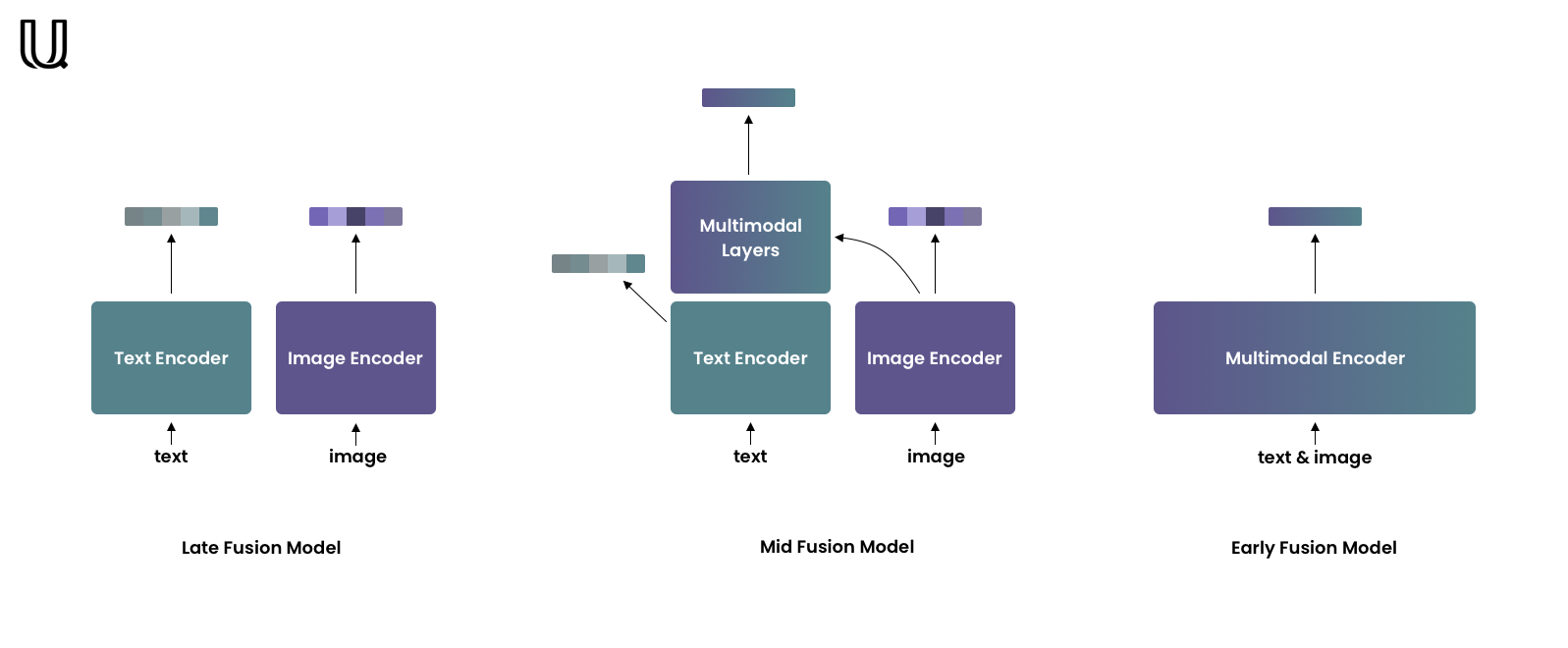
Late-fusion models encode each modality independently, but into one shared vector space. Due to independent encoding late-fusion models are good at capturing coarse-grained features but often neglect fine-grained ones. This type of models is well-suited for retrieval in large collections. The most famous example of such models is CLIP by OpenAI.
Early-fusion models encode both modalities jointly so they can take into account fine-grained features. Usually, these models are used for re-ranking relatively small retrieval results.
Mid-fusion models are the golden midpoint between the previous two types. Mid-fusion models consist of two parts – unimodal and multimodal. The unimodal part allows encoding each modality separately as late-fusion models do. The multimodal part takes unimodal features from the unimodal part as input and enhances them with a cross-attention mechanism.
This tiny package will help you deal with the last!
Installation
pip install uform
Usage
To load the model:
import uform

model = uform.get_model('unum-cloud/uform-vl-english')
model = uform.get_model('unum-cloud/uform-vl-multilingual')
You can also load your own Mid-fusion model. Just upload it on HuggingFace and pass model name to get_model.
To encode data:
from PIL import Image

text = 'a small red panda in a zoo'
image = Image.open('red_panda.jpg')

image_data = model.preprocess_image(image)
text_data = model.preprocess_text(text)

image_embedding = model.encode_image(image_data)
text_embedding = model.encode_text(text_data)
joint_embedding = model.encode_multimodal(image=image_data, text=text_data)
Retrieving features is also trivial:
image_features, image_embedding = model.encode_image(image_data, return_features=True)
text_features, text_embedding = model.encode_text(text_data, return_features=True)
These features can later be used to produce joint multimodal encodings faster, as the first layers of the transformer can be skipped:
joint_embedding = model.encode_multimodal(
    image_features=image_features,
    text_features=text_features,
    attention_mask=text_data['attention_mask']
)
Evaluation
There are two options to calculate semantic compatibility between an image and a text: Cosine Similarity and Matching Score.
Cosine Similarity
import torch.nn.functional as F

similarity = F.cosine_similarity(image_embedding, text_embedding)
The similarity will belong to the [-1, 1] range, 1 meaning the absolute match.
Pros:
- Computationally cheap.
- Only unimodal embeddings are required, unimodal encoding is faster than joint encoding.
- Suitable for retrieval in large collections.
Cons:
- Takes into account only coarse-grained features.
Matching Score
Unlike cosine similarity, unimodal embedding are not enough.
Joint embedding will be needed and the resulting score will belong to the [0, 1] range, 1 meaning the absolute match.
score = model.get_matching_scores(joint_embedding)
Pros:
- Joint embedding captures fine-grained features.
- Suitable for re-ranking - sorting retrieval result.
Cons:
- Resource-intensive.
- Not suitable for retrieval in large collections.
Models
Architecture
| Model | Language Tower | Image Tower | Multimodal Part | URL |
|---|---|---|---|---|
| English | BERT, 2 layers | ViT-B/16 | 2 layers | weights.pt |
| Multilingual | BERT, 8 layers | ViT-B/16 | 4 layers | weights.pt |
The Multilingual model supports 11 languages, after being trained on a balanced dataset. For pre-training we used translated captions made with NLLB.
| Code | Language | # | Code | Language | # | Code | Language |
|---|---|---|---|---|---|---|---|
| eng_Latn | English | # | fra_Latn | French | # | kor_Hang | Korean |
| deu_Latn | German | # | ita_Latn | Italian | # | pol_Latn | Polish |
| ita_Latn | Spanish | # | jpn_Jpan | Japanese | # | rus_Cyrl | Russian |
| tur_Latn | Turkish | # | zho_Hans | Chinese (Simplified) | # |
Performance
On RTX 3090, the following performance is expected from uform on text encoding.
| Model | Multilingual | Sequences per Second | Speedup |
|---|---|---|---|
bert-base-uncased |
No | 1'612 | |
distilbert-base-uncased |
No | 3'174 | x 1.96 |
MiniLM-L12 |
Yes | 3'604 | x 2.24 |
MiniLM-L6 |
No | 6'107 | x 3.79 |
uform |
Yes | 6'809 | x 4.22 |
Release history Release notifications | RSS feed


Download files
Download the file for your platform. If you're not sure which to choose, learn more about installing packages.
Source Distribution
Built Distribution
Filter files by name, interpreter, ABI, and platform.
If you're not sure about the file name format, learn more about wheel file names.
Copy a direct link to the current filters
File details
Details for the file uform-0.1.1.tar.gz.
File metadata
- Download URL: uform-0.1.1.tar.gz
- Upload date:
- Size: 10.8 kB
- Tags: Source
- Uploaded using Trusted Publishing? No
- Uploaded via: twine/4.0.2 CPython/3.9.16
File hashes
| Algorithm | Hash digest | |
|---|---|---|
| SHA256 |
6c155a2c9a74071ce91b18e1e50bfea3c7bcaeaeaa69b5c535f03bbdcb5b8d43
|
|
| MD5 |
04f6924ed7f4389ddd4e919e7d1423b6
|
|
| BLAKE2b-256 |
3139d16e74ed6ca9c76fd41b975513b968287dfcb2431a3efbd76c9740d7f6c8
|
File details
Details for the file uform-0.1.1-py3-none-any.whl.
File metadata
- Download URL: uform-0.1.1-py3-none-any.whl
- Upload date:
- Size: 11.0 kB
- Tags: Python 3
- Uploaded using Trusted Publishing? No
- Uploaded via: twine/4.0.2 CPython/3.9.16
File hashes
| Algorithm | Hash digest | |
|---|---|---|
| SHA256 |
d7ddb2dcf51947d21dc5ebc0e79b4db7d9157a21557ef8b9eee4e495eb117e9b
|
|
| MD5 |
a3a2fef4c2eadedbb72f245759ad420d
|
|
| BLAKE2b-256 |
a8a888a675af844c0933e53c70c18f7d24f557c199b14f7088e47e2fdbe37aff
|






