
A powerful and easy to use build tool for C++.

Project description









Aim
Aim is a command line tool for building C++ projects.
Project goals:
- Simplify building C++ projects
- Clear, easy to understand mechanism for supporting different build targets*
- Rapid dependency resolution and builds provided by ninja
- Easy to use - builds are managed using a
tomlfile
* A build target is some combination of things that affects the output binary. See Methodology for more information.
See ShapeAttack, for a demo of how Aim can be used in a real world example.
Known Limitations
- Windows support is still in development.
Why another build tool?
Aim is an attempt to make building C++ projects as simple as possible. It is very easy to add libraries and other executables to a project. Other build tools seem overly complex and require users to learn new sytaxes.
With Aim:
- adding build targets is simple and explicit
- all builds occur in their own directory by default
- builds are fast and reliable executed by the
ninjabuild system.
All you have to do is write the target.toml file. It is very easy.
Methodology
Aim treats any build variation as its own unique build target. A build target is some combination of things that affects the output binary. This could be variations of:
- operating system (Windows, OSX, Gnu Linux)
- compiler (MSVC, GCC, Clang)
- build type (Release, Debug, Sanitized)
- and maybe more.
Each build target has its own name, which is just some unique identifier that may comprise of the 'parts' that make up the build. For example, the build target linux-clang++-release indicates that this is a release build, using the clang++ compiler for the linux operating system.
Support for a build target is added by writing a target.toml file in a build directory. Each target.toml file must be written out in full for each target that you need to support. There is no way for target files to share information or to depend on another. While this leads to duplication between target files, it makes them very explicit and makes debugging builds much easier.
A target file can contain a number of builds. Each build could be a part of the project that builds as static or dyanamic library or as an executable. A build in the target.toml file will look roughly like:
[[builds]]
    name = "exe"                        # the unique name for this build.
    buildRule = "exe"                   # the type of build, in this case an executable. But can also be staticlib or dynamiclib.
    requires = ["lib_adder"]            # the name of a build also built by Aim. Must be library.
    outputName = "the_calculator"       # the output name, which is either the executable name or the library name.
    srcDirs = ["src"]                   # the src directories to build the executable library from.
    includePaths = ["include"]          # additional include paths to use during the build.
There are additional options depending on the buildRule. For a complete list of options see schema.py.
When a build is executed, all artifacts are placed in the target's build directory. This keeps your source directory clean and free of clutter.
Getting Started
Prerequisites
Aim requires the following dependencies:
Installation
Aim is a python project and is installed using pip.
pip install --user aim-build
Using
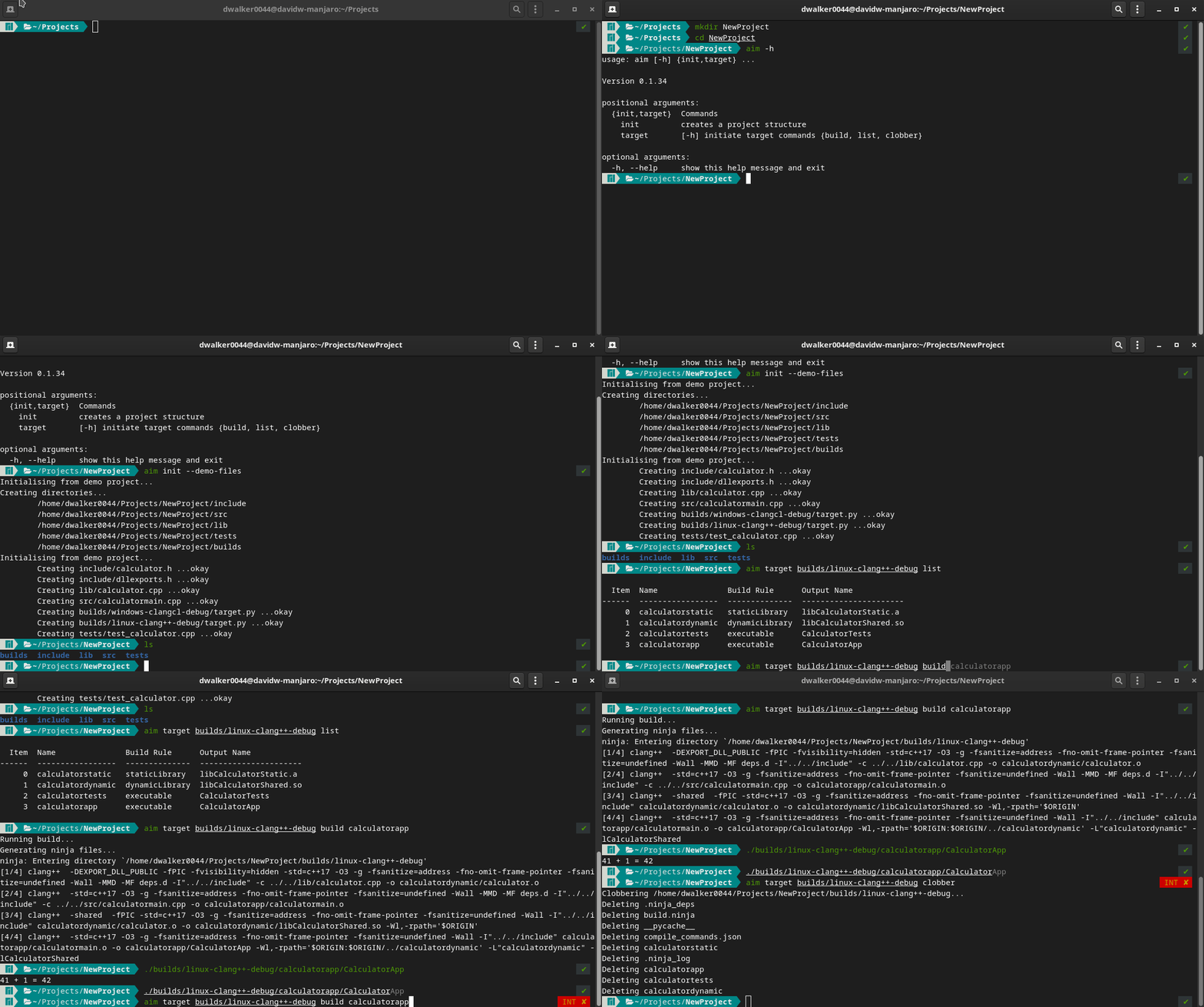
Note, aim init has an optional flag --demo. This adds some simple source files to the project for demonstration purposes.
There are 3 main commands:
list- Displays the builds for the targetinit- Creates a project structurebuild- Executes a build
For more information run:
aim <command> --help
Developing Aim
Aim is a Python project and uses the poetry dependency manager. See poetry installation for instructions.
Once you have cloned the project, the virtual environment and dependencies can be installed simply by executing:
poetry install
Dev Install
Unfortunately, unlike setuptools, there is no means to do a 'dev install' using poetry. A dev install causes a command line script to use the current development code which is useful so a project does not need to be reinstalled after every modification.
In order to use Aim on the command line, is it recommended to create an alias. The alias needs to:
- adds Aim to
PYTHONPATHto resolve import/module paths - execute the main Aim script using virtualenv's python
For bash this looks like:
alias aim="PYTHONPATH=$PWD/src $(poetry env info -p)/bin/python $PWD/src/aim_build/main.py"
For fish shell this looks like:
alias aim="PYTHONPATH=$PWD/src "(poetry env info -p)"/bin/python $PWD/src/aim_build/main.py"
Other remarks
The target file can be extended with other builds. For example to add unit tests. Begin by partitioning any code that
needs to be tested into a library. Then create another build for the test. Since unit tests are really an executable,
set buildRule="exe" and add the library to the requires list. Remember to update the build for the primary
executable as well if you have one.
The unit tests can now be built and run like any other executable.
Future improvements / known limitations
- The
ccfield isn't actually used at the moment. All build steps are performed by the cxx compiler.
Release history Release notifications | RSS feed


Download files
Download the file for your platform. If you're not sure which to choose, learn more about installing packages.
Source Distribution
Built Distribution
Filter files by name, interpreter, ABI, and platform.
If you're not sure about the file name format, learn more about wheel file names.
Copy a direct link to the current filters
File details
Details for the file aim-build-0.1.24.tar.gz.
File metadata
- Download URL: aim-build-0.1.24.tar.gz
- Upload date:
- Size: 26.5 kB
- Tags: Source
- Uploaded using Trusted Publishing? No
- Uploaded via: poetry/1.1.4 CPython/3.9.1 Linux/5.10.15-1-MANJARO
File hashes
| Algorithm | Hash digest | |
|---|---|---|
| SHA256 |
e4f5808d04be3bbd83b7d93e5c1ffc590b008d0e98b601c52d4e4012f9415df0
|
|
| MD5 |
84a2679ac9ddac5920c78595e27dd216
|
|
| BLAKE2b-256 |
7a9b049f94a2537e87cd31c5e8dc0a9b25745c51a250c187a3d871e3ec8b7239
|
File details
Details for the file aim_build-0.1.24-py3-none-any.whl.
File metadata
- Download URL: aim_build-0.1.24-py3-none-any.whl
- Upload date:
- Size: 32.8 kB
- Tags: Python 3
- Uploaded using Trusted Publishing? No
- Uploaded via: poetry/1.1.4 CPython/3.9.1 Linux/5.10.15-1-MANJARO
File hashes
| Algorithm | Hash digest | |
|---|---|---|
| SHA256 |
4c7400fe87f0c1ea2226f56f92dd7337d2d9af84b1af567a08382daae43956cd
|
|
| MD5 |
17f921b554af5fcde353267f4f381c19
|
|
| BLAKE2b-256 |
86fc13aae9274b3ce81f2374b931ca5410802ba17ec34fb2ed25452cd06a057f
|






