
A powerful and easy to use build tool for C++.

Project description









Aim
A command line tool for building C++ projects.
Introduction
Aim is an attempt to make building C++ projects from source as simple as possible while encouraging a modular approach to software development.
Aim only requires a target.toml file which is used to specify the builds of your project. Each build specifies a
component of your project, like a static library, dynamic library, or an executable.
Getting Started
Prerequisites
Aim requires the following dependencies:
Installation
Aim is a python project and is installed using pip.
pip install --user aim-build
Using
There are 3 main commands:
init- initialises a directory with an empty project structurelist --target=path/to/target_toml_dir- displays the builds for the targetbuild --target=path/to/target_toml_dir <build name>- executes a build
For more information run:
aim <command> --help
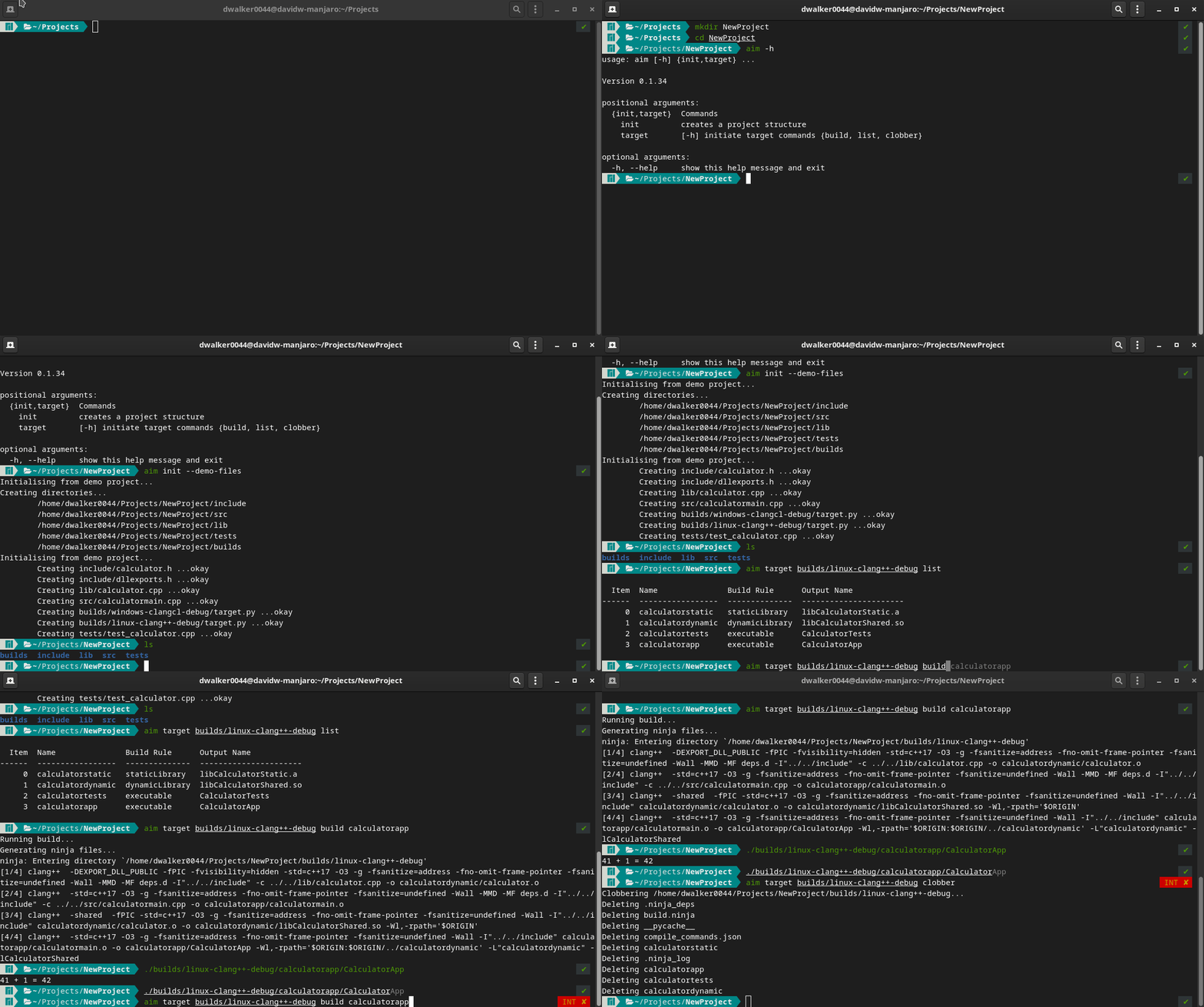
The easiest way to get started is to use:
aim init --demo-files
aim init can be used to generate an empty
project structure and the --demo-files flags will copy a small test application into the current directory for
demonstration purposes.
You can then list the available builds of a target by specifying:
aim list --target=builds/linux-clang++-debug
And to build:
aim build --target=builds/linux-clang++-debug <build name>
Target files
A target.toml file describes a project and its build components.
Begin by specifying projectRoot which is the path from the target file to your source files. All relative paths
will be relative to this directory.
The compiler frontend informs Aim how to construct compiler arguments (Note, only the gcc frontend is currently supported, but msvc will be added soon). Next specify the compiler, archiver, flags and
any defines.
projectRoot = "../.."

compilerFrontend="gcc"
compiler = "clang++"
ar = "ar"

flags = [
    "-std=c++17",
    "-O3",
    "-g",
    "-Wall",
]

# defines = [...] # Defines do not need the -D prefix.
Next specify your builds. For each build you must specify the name and buildRule. Valid build rules are staticLib,
dynamicLib, exe, headerOnly or libraryReference. A build typically looks like:
[[builds]]
    name = "calculatorApp"
    buildRule = "exe"
    requires = ["calculatorDynamic"] # A list of dependencies for this build.
    outputName = "CalculatorApp"     # The output name. Aim will manage any prefixes or suffixes required.
    srcDirs = ["src"]                # A list of source directories.
    includePaths = ["include"]       # A list of include paths.
    # The libraryPaths and libraries fields can be used to specify additional
    # libraries and paths to the build. This allows for linking against third
    # party libraries.
    #libraryPaths = []
    #libraries = []
Other notes:
-
The
requiresfield is important as it is how you specify the dependencies for a build. For example, if you create a static library named "myAwesomeLibrary", this can be used in other builds simply by specifyingrequires=["myAwesomeLibrary"]. -
A
headerOnlybuild does not have anoutputNameorsrcDirsas it is not built. TheheaderOnlyrule is not essential and is mostly for convenience. If you have a header only library, repeating the include paths across several builds can be become repetitive. Instead, create aheaderOnlybuild to capture the include paths and use it in other builds by adding the rule to the buildsrequiresfield. -
A
libraryReferencedoes not havesrcDirsas it is not built. Like theheaderOnlyrule it is mostly for convience to reduce duplication. The primary use case is for capturing theincludePaths,libraryPathsandlibrariesof a third party library that you need to use in a build. AlibraryReferencecan then be used by other builds by adding it to a buildsrequiresfield. -
The fields
compiler,flagsanddefinesare normally written at the top of the target file before the builds section. By default, all builds will use these fields i.e. they are global, but they can also be overridden by specifying them again in a build. Note that when these fields are specified specifically for a build, they completely replace the global definition; anyflagsordefinesthat you specify must be written out in full as they will not share any values with the global definition.
Supporting Multiple Targets
Aim treats any build variation as its own unique build target with its own unique target.toml.
A build target is some combination of things that affects the output binary such as:
- operating system (Windows, OSX, Gnu Linux)
- compiler (MSVC, GCC, Clang)
- build type (Release, Debug, Sanitized)
- etc.
Each build target and corresponding target.toml file must have its own directory ideally named using a unique
identifier that comprises the 'parts' that make up the build. For example, builds/linux-clang++-release/target.toml indicates that the target file describes a project that is a release build, uses the clang++ compiler and is for the linux operating system.
Note: each target.toml file must be written out in full for each target that you need to support. There is no way for
target files to share information or to depend on another. While this leads to duplication between target files, it
makes them very explicit and makes debugging builds much easier.
Developing Aim
Aim is a Python project and uses the poetry dependency manager. See poetry installation for instructions.
Once you have cloned the project, the virtual environment and dependencies can be installed simply by executing:
poetry install
Dev Install
Unfortunately, unlike setuptools, there is no means to do a 'dev install' using poetry. A dev install uses the
active source files under development, so the application can be tested without being installed each time.
In order to use Aim on the command line, is it recommended creating an alias. The alias needs to:
- adds Aim to
PYTHONPATHto resolve import/module paths - execute the main Aim script using virtualenv's python
Aim provides a dev-env.bash and dev-env.fish for setting an alias to mimic a 'dev' install. These files must be
sourced.
Known Limitations
- Windows support is still in development but is coming soon.
Release history Release notifications | RSS feed


Download files
Download the file for your platform. If you're not sure which to choose, learn more about installing packages.
Source Distribution
Built Distribution
Filter files by name, interpreter, ABI, and platform.
If you're not sure about the file name format, learn more about wheel file names.
Copy a direct link to the current filters
File details
Details for the file aim-build-0.1.28.tar.gz.
File metadata
- Download URL: aim-build-0.1.28.tar.gz
- Upload date:
- Size: 28.5 kB
- Tags: Source
- Uploaded using Trusted Publishing? No
- Uploaded via: poetry/1.1.4 CPython/3.9.1 Linux/5.10.18-1-MANJARO
File hashes
| Algorithm | Hash digest | |
|---|---|---|
| SHA256 |
4fdd689260d48dde287d6f3bb97fc4eb3409d1797c5d87f809481fe7e4e91929
|
|
| MD5 |
b3e7e9f1a2ccf0a2475c1136a559af83
|
|
| BLAKE2b-256 |
6465ba17b7e389b20a6c3ab1775fcb129d6f6316687f9362ea9e376e0838fac1
|
File details
Details for the file aim_build-0.1.28-py3-none-any.whl.
File metadata
- Download URL: aim_build-0.1.28-py3-none-any.whl
- Upload date:
- Size: 34.1 kB
- Tags: Python 3
- Uploaded using Trusted Publishing? No
- Uploaded via: poetry/1.1.4 CPython/3.9.1 Linux/5.10.18-1-MANJARO
File hashes
| Algorithm | Hash digest | |
|---|---|---|
| SHA256 |
c3f17f53f26aca73826c005ab760b6e6e5aade39d32170d4227dcc9d428b210b
|
|
| MD5 |
f17a6c807c7397849e71433f8eef0134
|
|
| BLAKE2b-256 |
608e53bf51bd86fa27c17f596ee54e017edb5c1a87e865e829558bfb5c96ed3d
|






